
Android五大布局详解——RelativeLayout(相对布局)
RelativeLayout
接着上一篇,本篇我将介绍RelativeLayout(相对布局)的一些知识点。
RelativeLayout
这是一个非常常用的布局,相比于上节所学到的LinearLayout布局,它更加的随意,可以通过相对定位的方式让控件出现在布局的任何位置。新建UILayoutTestTwo工程,修改activity_main.xml中的代码:
<?xml version="1.0" encoding="utf-8"?>

<RelativeLayout xmlns:android="http://schemas.android.com/apk/res/android"

    android:layout_width="match_parent"

    android:layout_height="match_parent">

    <Button

        android:id="@+id/button_one"

        android:layout_width="wrap_content"

        android:layout_height="wrap_content"

        android:layout_alignParentLeft="true"

        android:layout_alignParentTop="true"

        android:text="button 1"/>

    <Button

        android:id="@+id/button_two"

        android:layout_width="wrap_content"

        android:layout_height="wrap_content"

        android:layout_alignParentRight="true"

        android:layout_alignParentTop="true"

        android:text="button 2"/>

    <Button

        android:id="@+id/button_three"

        android:layout_width="wrap_content"

        android:layout_height="wrap_content"

        android:layout_centerInParent="true"

        android:text="button 3"/>

    <Button

        android:id="@+id/button_four"

        android:layout_width="wrap_content"

        android:layout_height="wrap_content"

        android:layout_alignParentLeft="true"

        android:layout_alignParentBottom="true"

        android:text="button 4"/>

    <Button

        android:id="@+id/button_five"

        android:layout_width="wrap_content"

        android:layout_height="wrap_content"

        android:layout_alignParentRight="true"

        android:layout_alignParentBottom="true"

        android:text="button 5"/>

</RelativeLayout>
运行程序,效果如下图:
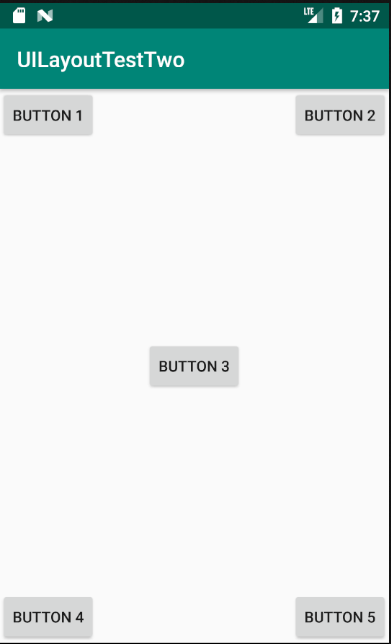
以上代码不做过多解释。上面的控件定位是依靠父布局的,其实RelativeLayout中还可以依靠控件进行定位。修改activity_main.xml中的代码:
<?xml version="1.0" encoding="utf-8"?>

<RelativeLayout xmlns:android="http://schemas.android.com/apk/res/android"

    android:layout_width="match_parent"

    android:layout_height="match_parent">

    <Button

        android:id="@+id/button_three"

        android:layout_width="wrap_content"

        android:layout_height="wrap_content"

        android:layout_centerInParent="true"

        android:text="button 3"/>

    <Button

        android:id="@+id/button_one"

        android:layout_width="wrap_content"

        android:layout_height="wrap_content"

        android:layout_above="@+id/button_three"

        android:layout_toLeftOf="@+id/button_three"

        android:text="button 1"/>

    <Button

        android:id="@+id/button_two"

        android:layout_width="wrap_content"

        android:layout_height="wrap_content"

        android:layout_above="@+id/button_three"

        android:layout_toRightOf="@+id/button_three"

        android:text="button 2"/>

    <Button

        android:id="@+id/button_four"

        android:layout_width="wrap_content"

        android:layout_height="wrap_content"

        android:layout_below="@+id/button_three"

        android:layout_toLeftOf="@+id/button_three"

        android:text="button 4"/>

    <Button

        android:id="@+id/button_five"

        android:layout_width="wrap_content"

        android:layout_height="wrap_content"

        android:layout_below="@+id/button_three"

        android:layout_toRightOf="@+id/button_three"

        android:text="button 5"/>

</RelativeLayout>
运行程序,效果如图所示:

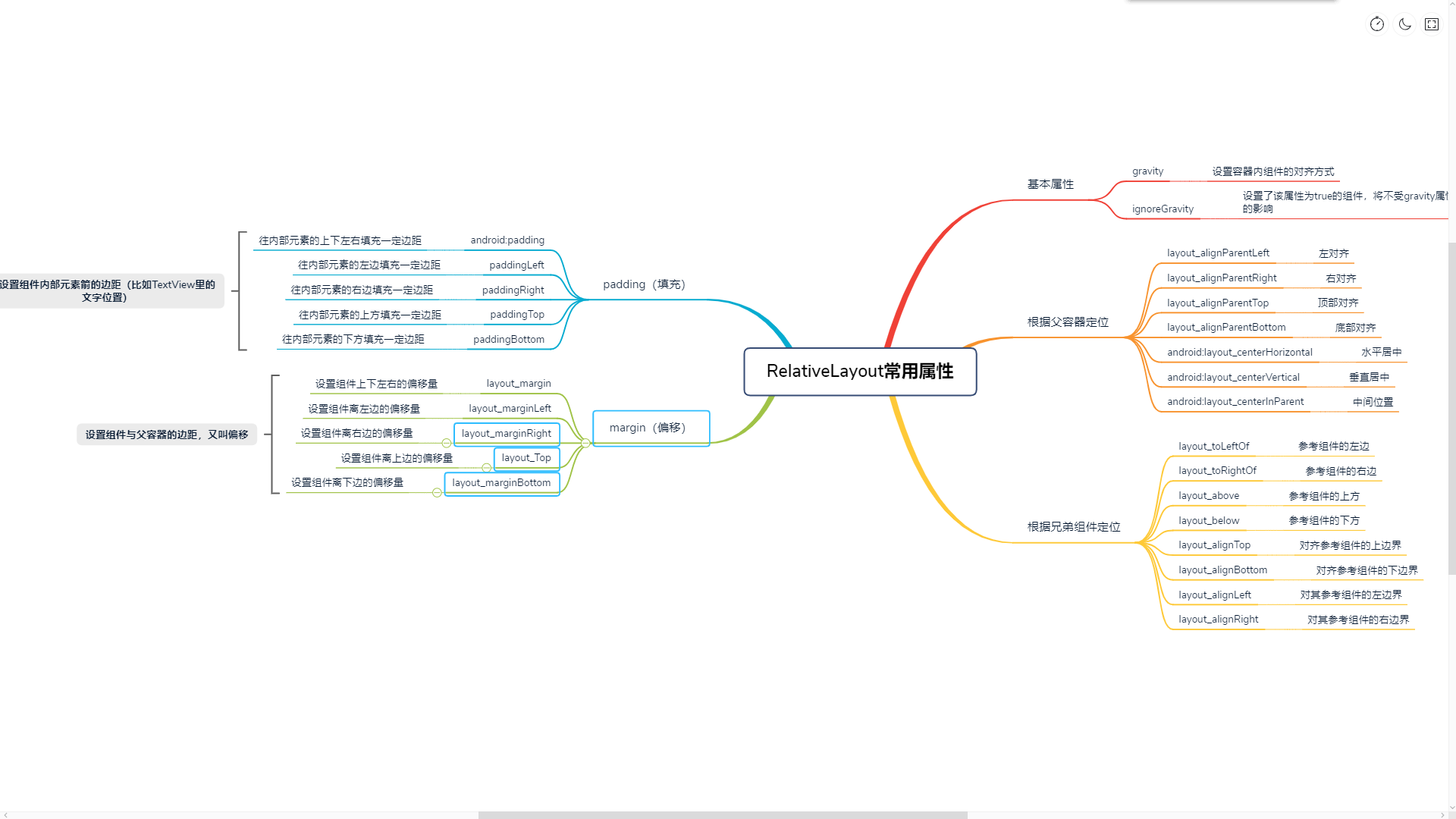
RelativeLayout的属性除了上面提到的,还有很多其他的,以后的学习中遇到了,可以多积累。下面是一些属性的简要说明:
Android五大布局详解——RelativeLayout(相对布局)的更多相关文章
- Android 布局详解 -三表格布局(TableLayout)以及重要属性
TableLayout跟TableRow 是一组搭配应用的布局,TableLayout置底,TableRow在TableLayout的上方,而Button.TextView等控件就 ...
- Html5移动端页面自适应布局详解(阿里rem布局)
在移动设备上进行网页的重构或开发,首先得搞明白的就是移动设备上的viewport,通读网上的各种对于viewport的解释之后 大概viewport可以理解为三种 1.layout viewport ...
- Android 布局详解
Android 布局详解 1.重用布局 当一个布局文件被多处使用时,最好<include>标签来重用布局. 例如:workspace_screen.xml的布局文件,在另一个布局文件中被重 ...
- Grid 网格布局详解
Grid网格布局详解: Grid布局与Flex布局有着一定的相似性,Grid布局是将容器划分成行和列,产生单元格,可以看做是二维布局. 基本概念: 采用网格布局的区域,称为"容器" ...
- Android开发重点难点1:RelativeLayout(相对布局)详解
前言 啦啦啦~博主又推出了一个新的系列啦~ 之前的Android开发系列主要以完成实验的过程为主,经常会综合许多知识来写,所以难免会有知识点的交杂,给人一种混乱的感觉. 所以博主推出“重点难点”系列, ...
- Android 布局学习之——Layout(布局)详解二(常见布局和布局参数)
[Android布局学习系列] 1.Android 布局学习之——Layout(布局)详解一 2.Android 布局学习之——Layout(布局)详解二(常见布局和布局参数) 3.And ...
- Android布局详解之一:FrameLayout
原创文章,如有转载,请注明出处:http://blog.csdn.net/yihui823/article/details/6702273 FrameLayout是最简单的布局了.所有放在布局里的 ...
- 【翻译】Anatomy of a Program in Memory—剖析内存中的一个程序(进程的虚拟存储器映像布局详解)
[翻译]Anatomy of a Program in Memory—剖析内存中的一个程序(进程的虚拟存储器映像布局详解) . . .
- DevExpress控件GridControl中的布局详解 【转】
DevExpress控件GridControl中的布局详解 [转] 2012-10-24 13:27:28| 分类: devexpress | 标签:devexpress |举报|字号 订阅 ...
随机推荐
- luogu P2515 [HAOI2010]软件安装 |Tarjan+树上背包
题目描述 现在我们的手头有N个软件,对于一个软件i,它要占用Wi的磁盘空间,它的价值为Vi.我们希望从中选择一些软件安装到一台磁盘容量为MM计算机上,使得这些软件的价值尽可能大(即Vi的和最大). 但 ...
- Object.defineProperty和Object.freeze、Object.seal
目录 一 Object.defineProperty 1.1 用法 1.2 数据描述 1.2.1 value 1.2.2 writable 1.2.3 enumerable 1.2.4 configu ...
- Java语法进阶14-网络编程
网络编程 软件结构 C/S结构 :全称为Client/Server结构,是指客户端和服务器结构. B/S结构 :全称为Browser/Server结构,是指浏览器和服务器结构. 网络通信协议 网络通信 ...
- usb fx2 cy68013 Cyapi使用心得
Cyapi使用心得(1)--USB连接 用Cyapi也有一阵了,这个确实比EZusb的api好用,简单说下Cyapi的使用心得,在编程中应该注意的一些问题,毕竟,说起来,那个CYapi的说明文档讲的实 ...
- RequireJS 打包工具
r.js是RequireJS的一个附产品,支持在 NodeJS环境下运行AMD程序,并且其包含了一个名为RequireJS Optimizer的工具,可以为项目完成合并脚本等优化操作 RequireJ ...
- tomcat安装与环境变量配置
1.安装tomcat 2.找到tomcat安装路径的bin文件夹 → 打开 startup.bat 3.打开浏览器输入网址 http://localhost:8080 4.配置CATALINA_BAS ...
- C#中关于值类型和引用类型的区别
小声哔哔 一直以来对于值类型与引用类型之间的区别都不是特别清晰,直到踩了坑.... 正好最新闲暇,便想着梳理梳理这一两年来遇到的奇葩问题和解决方案,顺便就把它给拎出来记一下,免得以后再摔跤 值类型与引 ...
- docker进阶之路-基础篇 | 一:环境搭建
转载请注明作者及出处: 作者:银河架构师 原文链接:https://www.cnblogs.com/luas/p/12061747.html 一.准备工作 查看内核 Docker 要求 CentOS ...
- 面试还搞不懂redis,快看看这40道面试题(含答案和思维导图)
Redis 面试题 1.什么是 Redis?. 2.Redis 的数据类型? 3.使用 Redis 有哪些好处? 4.Redis 相比 Memcached 有哪些优势? 5.Memcache 与 Re ...
- Spring boot采坑记--- 在启动时RequstMappingHandlerMapping无法找到部分contorller类文件的解决方案
最近有一个心得需求,需要在一个现有的springboot项目中增加一些新的功能,于是就在controller文件包下面创建新的包和类文件,但是后端开发完之后,本地测试发现前端访问报404错误,第一反应 ...