
CentOS7 Install Shipyard
# 采集木jj
原文:http://www.cnblogs.com/caoguo/p/5735189.html
# CentOS7 Install Shipyard
# yum install docker
# systemctl restart docker
# docker login -u user-p password -e sample.aliyun.com registry.aliyuncs.com
# 上面docker加速一大段实际就下面这一句
# vi /etc/sysconfig/docker
# ADD_REGISTRY='--add-registry xxx.mirror.aliyuncs.com'
$ docker pull alpine
$ docker pull library/shipyard
$ docker pull library/rethinkdb
$ docker pull microbox/etcd
$ docker pull shipyard/docker-proxy
$ docker pull swarm
$ docker pull shipyard/shipyard
$ curl -s https://shipyard-project.com/deploy | bash -s
Deploying Shipyard
-> Starting Database
-> Starting Discovery
-> Starting Cert Volume
-> Starting Proxy
-> Starting Swarm Manager
-> Starting Swarm Agent
-> Starting Controller
Shipyard available at http://192.168.190.147:8080
Username: admin Password: shipyard
# 如果想将安装重新来一遍
# for i in `docker ps |sed '1d'| awk '{print $NF}'`;do docker rm -f $i; done
# 停止运行镜像
# docker stop shipyard-proxy shipyard-certs shipyard-discovery shipyard-rethinkdb shipyard-swarm-agent shipyard-swarm-manager shipyard-controller
# 启动运行的镜像
# docker start shipyard-proxy shipyard-certs shipyard-discovery shipyard-rethinkdb shipyard-swarm-agent shipyard-swarm-manager shipyard-controller
# 查看运行的docker进程
# docker ps
# 查看下载的镜像
# docker images
# 增加节点
[root@localhost ~]# curl -sSL https://shipyard-project.com/deploy | ACTION=node DISCOVERY=etcd://192.168.190.147:4001 bash -s
Adding Node
-> Starting Cert Volume
-> Starting Proxy
-> Starting Swarm Manager
-> Starting Swarm Agent
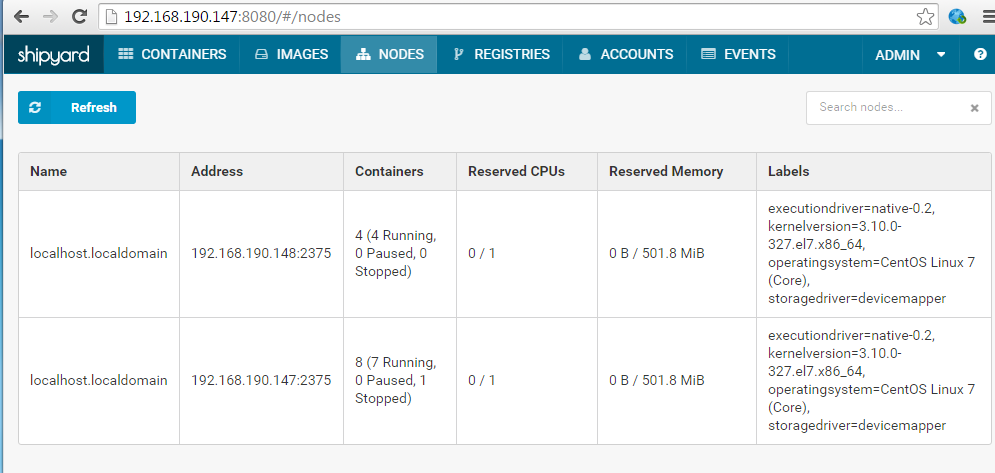
Node added to Swarm: 192.168.190.148
防爬虫原文链接:http://www.cnblogs.com/caoguo/p/5735189.html


CentOS7 Install Shipyard的更多相关文章
- Centos7 install Openstack - (第四节)添加计算服务(Nova)
Centos7 install Openstack - (第四节)添加计算服务(Nova) 我的blog地址:http://www.cnblogs.com/caoguo 该文根据openstack官方 ...
- Centos7 install Openstack - (第三节)添加镜像服务(Glance)
Centos7 install Openstack - (第三节)添加镜像服务(Glance) 我的blog地址:http://www.cnblogs.com/caoguo 该文根据openstack ...
- centos7 install vim8
centos7 install vim8 Git and dependency Git: https://github.com/vim/vim # yum install -y perl-devel ...
- CentOS7 Install Consul
Centos7 Install Consul 原文链接:http://www.cnblogs.com/caoguo/p/5959962.html 1) 环境 2) 安装 # yum install - ...
- CentOS7 install vsftpd
#mkdir -p /var/ftp/xcl/ #yum install -y vsftpd#useradd -g ftp -M -d /var/ftp/xcl -s /sbin/nologin xc ...
- centos7 install nginx+fastdfs
说明:centos7单机部署 nginx fastdfs ## 创建一下目录作为存储数据图片的路径 可以自己定义 mkdir -pv /data/application/{storage,tracke ...
- CentOS7 Install Docker(转)
https://linux.cn/article-4340-1.html CentOS 7 中 Docker 的安装 Docker 软件包已经包括在默认的 CentOS-Extras 软件源里.因此想 ...
- Centos7 install Openstack Juno (RDO) (转载)
原文地址:http://www.hdume.com/centos-7-0%E5%AE%89%E8%A3%85openstack/ 1.安装系统,Centos7镜像采用CentOS-7.0-1406-x ...
- centos7 install mysql5.7.27
1.yum 安装 wget yum install wget 2.下载MySQL 的yum repo wget https://repo.mysql.com//mysql57-community-re ...
随机推荐
- Spring简单实现数据源的动态切换
Spring简单实现数据源的动态切换: 1. 创建一个数据源切换类: 2. 继承AbstractRoutingDataSource,创建多数据源路由类,并注入到spring的配置文件中: 3. AOP ...
- js实现加密(?!)
<script src="yourUrl/md5.min.js"></script> 或者: <script src="http://cdn ...
- Count on an IEnumerable<dynamic>
http://stackoverflow.com/questions/7733305/count-on-an-ienumerabledynamic int count = Enumerable.Cou ...
- YTU 2844: 改错题A-看电影
2844: 改错题A-看电影 时间限制: 1 Sec 内存限制: 128 MB 提交: 69 解决: 47 题目描述 注:本题只需要提交标记为修改部分之间的代码,请按照C++方式提交. 小平家长为 ...
- 【CJOJ】Contest4 - A+B Series
Position:http://oj.changjun.com.cn/contest.php?cid=4 A经典题目 // <A.cpp> - Sun Oct 9 15:28:01 201 ...
- POJ - 1470 Closest Common Ancestors(离线Tarjan算法)
1.输出测试用例中是最近公共祖先的节点,以及这个节点作为最近公共祖先的次数. 2.最近公共祖先,离线Tarjan算法 3. /* POJ 1470 给出一颗有向树,Q个查询 输出查询结果中每个点出现次 ...
- 云-腾讯云:视频解决方案-un
ylbtech-云-腾讯云:视频解决方案 一站式视频解决方案,包含直播.点播.互动直播.云通信等产品:发布网络覆盖全球.海量转码设备.数十年深厚音视频技术积淀. 1.返回顶部 2.返回顶部 3 ...
- eclipse集成lombok注解不起作用
安装步骤: 步骤一:lombok的下载地址为:https://projectlombok.org/download,jar包很小.这里也把依赖写出来: <dependency> <g ...
- bzoj 4824: [Cqoi2017]老C的键盘【树形dp】
参考:https://www.cnblogs.com/FallDream/p/bzoj4824.html 画一画就会发现关系形成了一棵二叉树(其实看到n-1就能想到 然后dp,设f[i][j]为点i在 ...
- Java标准输入流system.in报错: java.util.NoSuchElementException解决方法
我的程序大概是这样的: main()主函数里面,调用两个自定义的方法,这里我们称之为方法a和方法b: 主函数main()里有一个:Scanner scanner = new Scanner(Syste ...