
WPF与缓动(一) N次缓动
WPF与缓动(一) N次缓动
周银辉
如果我们希望制作的动画效果像现实生活中的运动一样平滑, 比如汽车的启动与停止总有一个加速或减速的过程, 那么我们有必要研究一下"缓动"
缓入: 速度逐渐增加的过程,比如汽车的启动
如果我们用曲线上的点的斜率表示速度,那么在数学上它对应了下面这样的曲线: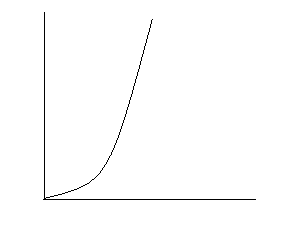
缓出:速度逐渐减小的过程,比如汽车的停止
在数学上它对应了下面的曲线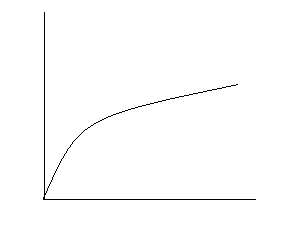
就加速运动而言, 根据以下位置与加速度等公式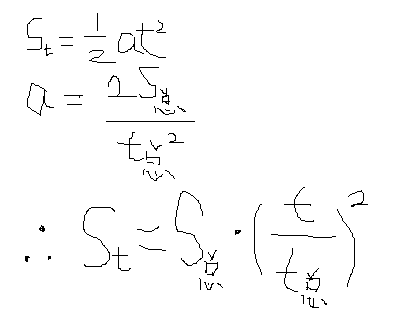
我们可以得到,任意时刻的速度等于总的路程乘以当前时间与总时间的比值的平方, 而总的路程实际将相当与WPF中Animation的To与From的差值, 当前时间与总时间的比值实际上相当与WPF中animationClock.CurrentProgress.Value值.
除此之外,我们发现,曲线的指数越大,点的斜率变化越快,那么加速度也就越大.
有了这些知识,我们可以很好的模拟加速运动了
参考以下代码
 using System;using System.Collections.Generic;using System.Text;using System.Windows.Media.Animation;using System.Windows;namespace EaseMoveDemo

 {
{ public class EaseMoveAnimation : DoubleAnimationBase
 { public static readonly DependencyProperty FromProperty = DependencyProperty.Register( "From", typeof(double?), typeof(EaseMoveAnimation), new PropertyMetadata(null)); public static readonly DependencyProperty ToProperty = DependencyProperty.Register( "To", typeof(double?), typeof(EaseMoveAnimation), new PropertyMetadata(null)); public static readonly DependencyProperty PowerProperty = DependencyProperty.Register( "Power", typeof(double?), typeof(EaseMoveAnimation), new PropertyMetadata(null)); public double? From { get { return (double?)this.GetValue(EaseMoveAnimation.FromProperty);
 } set { this.SetValue(EaseMoveAnimation.FromProperty, value); } } public double? To { get { return (double?)this.GetValue(EaseMoveAnimation.ToProperty); } set { this.SetValue(EaseMoveAnimation.ToProperty, value); } } /**//// <summary> /// 幂指数,值越大,曲线上点的斜率越大,加速度越大,设置为5时效果较好 /// </summary> public double? Power { get { return (double?)this.GetValue(EaseMoveAnimation.PowerProperty); } set { this.SetValue(EaseMoveAnimation.PowerProperty, value); } } protected override double GetCurrentValueCore(double defaultOriginValue, double defaultDestinationValue, AnimationClock animationClock) { double from = (this.From==null?defaultDestinationValue:(double)this.From); double to = (this.To==null?defaultOriginValue:(double)this.To); double delta = to - from; double power = this.Power == null ? 2 : (double)this.Power; //加速 return delta * Math.Pow(animationClock.CurrentProgress.Value, power) + from; //return delta * Math.Pow(animationClock.CurrentProgress.Value, 1/power) + from; //先加速后减速 //if (animationClock.CurrentProgress.Value < 0.5) //{ // return delta / 2 * Math.Pow(animationClock.CurrentProgress.Value * 2, power) + from; //} //return delta / 2 * Math.Pow((animationClock.CurrentProgress.Value - 0.5) * 2, 1/power) + delta / 2 + from; } protected override System.Windows.Freezable CreateInstanceCore() { return new EaseMoveAnimation(); } }
 }
}WPF与缓动(一) N次缓动的更多相关文章
- WPF中的动画——(四)缓动函数
缓动函数可以通过一系列公式模拟一些物理效果,如实地弹跳或其行为如同在弹簧上一样.它们一般应用在From/To/By动画上,可以使得其动画更加平滑. var widthAnimation = new D ...
- 有趣 GIF 动图集 - 仿佛每张小动图都诉说了一个小笑话或者小故事
点这里 来自法国南特(Nantes)的 Guillaume Kurkdjian 目前还是个学生.Kurkdjian 擅长创作一些平面动态图像,这些有趣的小动图仿佛每张都诉说了一个小笑话或者小故事,像个 ...
- 动漫绘画软件优动漫PAINT最近所用文件
在使用优动漫PAINT的时候有时候会遇到这样的问题,近期编辑的文件找不见了,或者想要接着之前的文件进行编辑,如何快速找到这些文件呢?其实在最近所用文件中一目了,本文我们一起来看看. 如果您想接着上次未 ...
- 认识优动漫PAINT,优动漫PAINT基本功能有哪些?
优动漫PAINT是一款搭载了绘制漫画.插画所需所有功能的软件.拥有笔感自然真实.表现形式多样的画笔工具,及高效.完美.便捷的上色工具等. 本文将通过由优动漫PAINT描绘的作品为例,简单介绍该软件的功 ...
- WPF与缓动(二) 正弦与余弦缓动
原文:WPF与缓动(二) 正弦与余弦缓动 WPF与缓动(二) 正弦与余弦缓动 ...
- 【WPF学习】第五十一章 动画缓动
线性动画的一个缺点是,它通常让人觉得很机械且不能够自然.相比而言,高级的用户界面具有模拟真实世界系统的动画效果.例如,可能使用具有触觉的下压按钮,当单击时按钮快速弹回,但是当没有进行操作时它们会慢慢地 ...
- Windows Phone开发(42):缓动动画
原文:Windows Phone开发(42):缓动动画 前面在讨论关键帧动画的时候,我有意把几个带缓动动画的关键帧动画忽略掉,如EasingColorKeyFrame.EasingDoubleKeyF ...
- thwen 缓动框架
描述 目前提供一个方法 ele 元素对象 obj 操作 duration 时间 effect 缓动选择 thwenMove(option) 框架支持以下缓动策略 -指数衰减的正弦曲线缓动 -圆形曲线的 ...
- 网站建设中前端常用的jQuery+easing缓动的动画
网站建设中前端人员利用jQuery实现动画再简单不过了,只是要实现更酷的效果还需要插件来帮忙,easing就是一款帮助jQuery实现缓动动画的插件,经过试用,效果很不错! 下载该插件:jquery. ...
随机推荐
- python3报错
这个错误是我在从Excel中导入数据,,x,y 和z(z代表了强度) 然后通过xyz画出一个二维的灰度图片所出现的错误 原因是因为用mcml生成的数据如: TypeError: cannot per ...
- html5的float属性超详解(display,position, float)(文本流)
html5的float属性超详解(display,position, float)(文本流) 一.总结 1.文本流: 2.float和绝对定位都不占文本流的位置 3.普通流是默认定位方式,就是依次按照 ...
- 【codeforces 742A】Arpa’s hard exam and Mehrdad’s naive cheat
time limit per test1 second memory limit per test256 megabytes inputstandard input outputstandard ou ...
- [GraphQL] Use GraphQLList with GraphQLObject Types
When working with collections of things in GraphQL, we'll always reach out for the GraphQLListType. ...
- Windows Phone 8.1 控件
如果你已经开始了 Windows Phone 8.1 的学习,就会发现许多在 8.0 下的控件在 8.1 中都发生了变化,以下就谈谈几个 8.1 下的新控件以及与 8.0 控件的改变. 1. Text ...
- href="javascript:;" href="javascript:void(0);" href="#"区别
一.href="javascript:;" 这种用法不正确,这么用的话会出现浏览器访问"javascript:;"这个地址的现象: 二.href="j ...
- PHP移动互联网开发笔记(8)——MySQL数据库基础回顾[2]
一.数据表 为了确保数据的完整性和一致性,在创建表时指定字段名称,字段类型和字段属性外,还需要使用约束(constraint),索引(index),主键(primary key)和外键(foregin ...
- 一大波Java来袭(四)String类、StringBuilder类、StringBuffer类对照
本文主要介绍String类.StringBuffer类.StringBuilder类的差别 : 一.概述 (一)String 字符串常量.可是它具有不可变性,就是一旦创建,对它进行的不论什么改动操作 ...
- c++ try catch 问题(没有throw就会被删除,加上/EHa这样就不会被删除)
以前都是用try{} catch(…){}来捕获C++中一些意想不到的异常, 今天看了Winhack的帖子才知道,这种方法在VC中其实是靠不住的.例如下面的代码: 以前都是用try{} catch(… ...
- Watchdog机制概述
1. Watchdog初始 Watchdog的中文的“看门狗”,有保护的意思.最早引入Watchdog是在单片机系统中,由于单片机的工作环境容易受到外界磁场的干扰,导致程序“跑飞”,造成整个系统无法正 ...