
spring boot-html和templates
静态页面
spring boot项目只有src目录,没有webapp目录,会将静态访问(html/图片等)映射到其自动配置的静态目录,如下
/static
/public
/resources
/META-INF/resources
比如,在resources建立一个static目录和index.htm静态文件,访问地址 http://localhost:8080/index.html
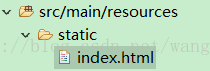
如果要从后台跳转到静态index.html,代码如下。
- @Controller
- public class HtmlController {
- @GetMapping("/html")
- public String html() {
- return "/index.html";
- }
@Controller

public class HtmlController {

	@GetMapping("/html")

	public String html() {

		return "/index.html";

	}
动态页面
动态页面需要先请求服务器,访问后台应用程序,然后再转向到页面,比如访问JSP。spring boot建议不要使用JSP,默认使用Thymeleaf来做动态页面。
在pom.xml 中添加Thymeleaf组件
- <dependency>
- <groupId>org.springframework.boot</groupId>
- <artifactId>spring-boot-starter-thymeleaf</artifactId>
- </dependency>
		<dependency>

			<groupId>org.springframework.boot</groupId>

			<artifactId>spring-boot-starter-thymeleaf</artifactId>

		</dependency>
TemplatesController.java
- package hello;
- import javax.servlet.http.HttpServletRequest;
- import org.springframework.stereotype.*;
- import org.springframework.web.bind.annotation.*;
- @Controller
- public class TemplatesController {
- @GetMapping("/templates")
- String test(HttpServletRequest request) {
- //逻辑处理
- request.setAttribute("key", "hello world");
- return "/index";
- }
- }
package hello; import javax.servlet.http.HttpServletRequest; import org.springframework.stereotype.;
import org.springframework.web.bind.annotation.; @Controller
public class TemplatesController {@GetMapping("/templates")
String test(HttpServletRequest request) {
//逻辑处理
request.setAttribute("key", "hello world");
return "/index";
}
}
@RestController:上一篇中用于将返回值转换成json
@Controller:现在要返回的是一个页面,所以不能再用@RestController,而用普通的@Controller/
request.setAttribute("key", "hello world"):这是最基本的语法,向页面转参数 key和value。
return "/index": 跳转到 templates/index.html动态页面,templates目录为spring boot默认配置的动态页面路径。
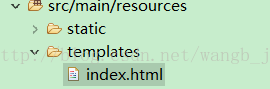
index.html 将后台传递的key参数打印出来
- <!DOCTYPE html>
- <html>
- <span th:text="${key}"></span>
- </html>
<!DOCTYPE html>

<html>

<span th:text="${key}"></span>

</html>
访问http://localhost:8080/templates
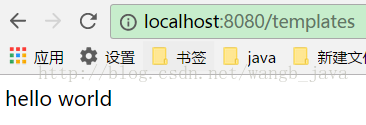
这只是一个最基本的传参,templates标签和JSP标签一样,也可以实现条件判断,循环等各种功能。不过我在上一篇讲过,建议用静态html+rest替代动态页面,所以关于templates在此不做详细介绍
动态和静态区别
静态页面的return默认是跳转到/static/index.html,当在pom.xml中引入了thymeleaf组件,动态跳转会覆盖默认的静态跳转,默认就会跳转到/templates/index.html,注意看两者return代码也有区别,动态没有html后缀。
重定向
如果在使用动态页面时还想跳转到/static/index.html,可以使用重定向return "redirect:/index.html"。
- @GetMapping("/html")
- public String html() {
- return "redirect:/index.html";
- }
	@GetMapping("/html")

	public String html() {

		return "redirect:/index.html";

	}
spring boot-html和templates的更多相关文章
- Spring boot 直接访问templates中html文件
application.properties 在浏览器中输入http://localhost:8080/index.html 会报一个 因为Spring boot 无法直接访问templates下的文 ...
- spring boot(4)-html和templates
静态页面 spring boot项目只有src目录,没有webapp目录,会将静态访问(html/图片等)映射到其自动配置的静态目录,如下 /static /public /resources ...
- 玩转spring boot——结合redis
一.准备工作 下载redis的windows版zip包:https://github.com/MSOpenTech/redis/releases 运行redis-server.exe程序 出现黑色窗口 ...
- 玩转spring boot——AOP与表单验证
AOP在大多数的情况下的应用场景是:日志和验证.至于AOP的理论知识我就不做赘述.而AOP的通知类型有好几种,今天的例子我只选一个有代表意义的“环绕通知”来演示. 一.AOP入门 修改“pom.xml ...
- 玩转spring boot——结合JPA入门
参考官方例子:https://spring.io/guides/gs/accessing-data-jpa/ 接着上篇内容 一.小试牛刀 创建maven项目后,修改pom.xml文件 <proj ...
- 玩转spring boot——结合JPA事务
接着上篇 一.准备工作 修改pom.xml文件 <project xmlns="http://maven.apache.org/POM/4.0.0" xmlns:xsi=&q ...
- 玩转spring boot——结合AngularJs和JDBC
参考官方例子:http://spring.io/guides/gs/relational-data-access/ 一.项目准备 在建立mysql数据库后新建表“t_order” ; -- ----- ...
- 玩转spring boot——MVC应用
如何快速搭建一个MCV程序? 参照spring官方例子:https://spring.io/guides/gs/serving-web-content/ 一.spring mvc结合thymeleaf ...
- 第一个Spring Boot Web程序
需要的环境和工具: 1.Eclipse2.Java环境(JDK 1.7或以上版本)3.Maven 3.0+(Eclipse已经内置了) 写个Hello Spring: 1.新建一个Maven项目,项目 ...
- Spring boot配置文件 application.properties
http://www.tuicool.com/articles/veUjQba 本文记录Spring Boot application.propertis配置文件的相关通用属性 # ========= ...
随机推荐
- php面试相关
22.描述一下大流量高并发量网站的解决方案 答: 1.确认服务器硬件是否足够支持当前的流量. 2.使用memcache缓存技术,将动态数据缓存到内存中,动态网页直接调用这些文件,而不必在访问数据库. ...
- Dapper学习总结
看了<Dapper从入门到精通>后的总结 (1)Dapper 是直接扩展 IDBConnection,而且是单独一个文件,可以直接嵌入到项目中使用. (2)通过手写sql语句,调用exec ...
- Web前端 优化方案
1.减少Http请求 在一个页面中图片,CSS,JS可能N个,如果每个资源都去请求一次服务器的话,那么服务器就会为每个资源开一个线程来完成,这样的话对服务器的压力就很大了.所以解决的方法就是合并资源 ...
- c++作业:求N的阶乘。
N的阶乘就是n.(n-1)! 5的阶乘是什么?5*4*3*2*1 #include <iostream> using namespace std; int jiecheng(int num ...
- 使用js将div高度设置为100%
在开发的工程中使用到了一些开源的bootstrap模板进行开发,在遇到一些需要替换的内容部分部分时,经常出现高度设置100%无法生效的问题,这里来用js强行设置一下. 思路:js监听窗口的缩放 ...
- 【转】vxworks的default boot line说明
boot程序的主要功能是引导vxworks 内核,所以boot程序需要知道vxworks的内核存放在何处,通过什么手段去获取.在vxworks缺省的boot程序里有一条内建的default boot ...
- Python + Bottle + 谷歌搜索Api 实现简单搜索引擎
1.运行环境 python3 centos7 2.Bottle的使用 使用bottle主要是因为它仅用python自带的库即可实现对web的搭建. bottle源码分析 bottle使用教程 3.代码 ...
- Unity基础-Input接口
input 底层的设备输入接口,在开发中很少用到 Input.GetKey() // Update is called once per frame void Update () { if (Inpu ...
- php 常用函数集合(持续更新中...)
php 常用函数集合 在php的开发中,巧妙的运用php自带的一些函数,会起到事半功倍的效果,在此,主要记录一些常用的函数 1.time(),microtime()函数 time():获取当前时间戳 ...
- linux SVN安装及配置教程
1.环境centos6.4 2.安装svnyum -y install subversion 3.配置 建立版本库目录mkdir /www/svndata svnserve -d -r /www/sv ...