
2013 duilib入门简明教程 -- 简单控件介绍 (12)
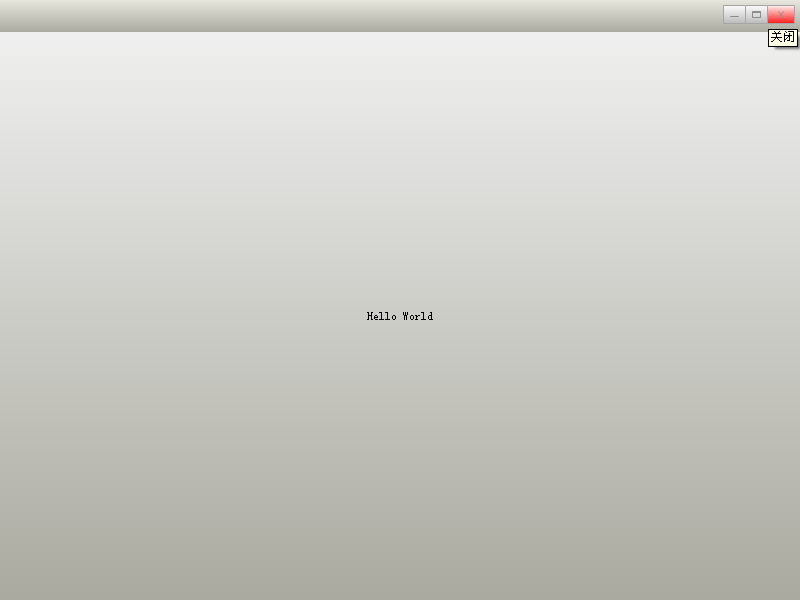
class CDuiFrameWnd : public WindowImplBase

{

public:

    virtual LPCTSTR    GetWindowClassName() const   {   return _T("DUIMainFrame");  }

    virtual CDuiString GetSkinFile()                {   return _T("duilib.xml");    }

    virtual CDuiString GetSkinFolder()              {   return _T("");  }

};

int APIENTRY _tWinMain(HINSTANCE hInstance, HINSTANCE hPrevInstance, LPTSTR lpCmdLine, int nCmdShow)

{

    CPaintManagerUI::SetInstance(hInstance);

    CDuiFrameWnd duiFrame;

    duiFrame.Create(NULL, _T("DUIWnd"), UI_WNDSTYLE_FRAME, WS_EX_WINDOWEDGE);

    duiFrame.CenterWindow();

    duiFrame.ShowModal();

    return ;

}
XML代码如下(由于前面的教程里都一一介绍了各种属性,所以以后的XML就不一一注释了):
<?xml version="1.0" encoding="UTF-8"?>

<Window size="800,600" mininfo="600,400" caption="0,0,0,32" sizebox="4,4,4,4">

  <VerticalLayout bkcolor="#FFF0F0F0" bkcolor2="#FFAAAAA0">

    <!-- 标题栏区 -->

    <HorizontalLayout height="32" bkcolor="#FFE6E6DC" bkcolor2="#FFAAAAA0">

      <VerticalLayout />

      <VerticalLayout width="77">

          <Button name="minbtn"   tooltip="最小化" float="true" pos="0,5,22,24"  width="23" normalimage=" file='SysBtn\MinNormal.bmp' " hotimage=" file='SysBtn\MinFocus.bmp' " pushedimage=" file='SysBtn\MinFocus.bmp' "/>

          <Button name="maxbtn"   tooltip="最大化" float="true" pos="22,5,44,24" width="23" normalimage=" file='SysBtn\MaxNormal.bmp' " hotimage=" file='SysBtn\MaxFocus.bmp' " pushedimage=" file='SysBtn\MaxFocus.bmp' " />

          <Button name="restorebtn" visible="false" tooltip="还原" float="true" pos="22,5,44,24" width="23" normalimage=" file='SysBtn\StoreNormal.bmp' " hotimage=" file='SysBtn\StoreFocus.bmp' " pushedimage=" file='SysBtn\StoreFocus.bmp' " />

          <Button name="closebtn" tooltip="关闭"   float="true" pos="44,5,74,24" width="28" normalimage=" file='SysBtn\CloseNormal.bmp' " hotimage=" file='SysBtn\CloseFocus.bmp' " pushedimage=" file='SysBtn\CloseFocus.bmp' "/>

        </VerticalLayout>

    </HorizontalLayout>

  </VerticalLayout>

</Window>
前面教程的Hello World就是一个大大的按钮,大家对按钮应该很熟悉了,下面我们来几个按钮样式吧:








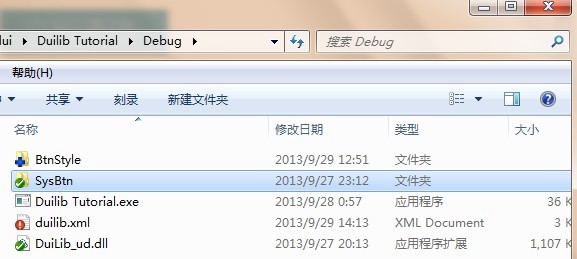
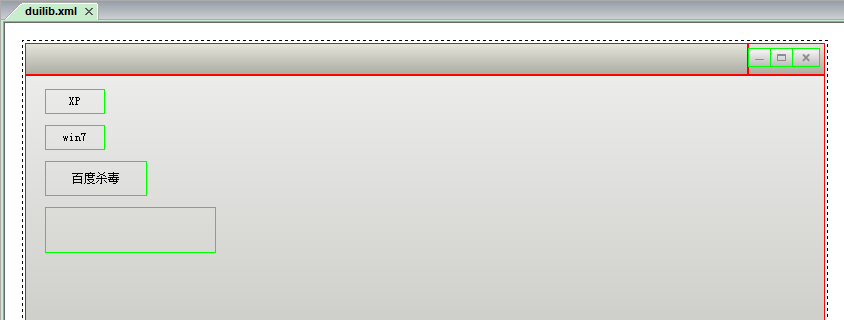
<?xml version="1.0" encoding="UTF-8"?>

<Window size="800,600" mininfo="600,400" caption="0,0,0,32" sizebox="4,4,4,4">

    <VerticalLayout bkcolor="#FFF0F0F0" bkcolor2="#FFAAAAA0">

        <!-- 标题栏区 -->

        <HorizontalLayout height="32" bkcolor="#FFE6E6DC" bkcolor2="#FFAAAAA0">

            <VerticalLayout />

            <VerticalLayout width="77">

                <Button name="minbtn"   tooltip="最小化" float="true" pos="0,5,22,24"  width="23" normalimage=" file='SysBtn\MinNormal.bmp' " hotimage=" file='SysBtn\MinFocus.bmp' " pushedimage=" file='SysBtn\MinFocus.bmp' "/>

                <Button name="maxbtn"   tooltip="最大化" float="true" pos="22,5,44,24" width="23" normalimage=" file='SysBtn\MaxNormal.bmp' " hotimage=" file='SysBtn\MaxFocus.bmp' " pushedimage=" file='SysBtn\MaxFocus.bmp' " />

                <Button name="restorebtn" visible="false" tooltip="还原" float="true" pos="22,5,44,24" width="23" normalimage=" file='SysBtn\StoreNormal.bmp' " hotimage=" file='SysBtn\StoreFocus.bmp' " pushedimage=" file='SysBtn\StoreFocus.bmp' " />

                <Button name="closebtn" tooltip="关闭"   float="true" pos="44,5,74,24" width="28" normalimage=" file='SysBtn\CloseNormal.bmp' " hotimage=" file='SysBtn\CloseFocus.bmp' " pushedimage=" file='SysBtn\CloseFocus.bmp' "/>

            </VerticalLayout>

        </HorizontalLayout>

        <!-- 客户区 -->

        <HorizontalLayout>

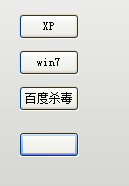
            <Button text="XP"       float="true" pos="20,14,0,0" width="60" height="25" normalimage=" file='BtnStyle\XP\button_nor.png' " hotimage=" file='BtnStyle\XP\button_over.png' " pushedimage=" file='BtnStyle\XP\button_down.png' " focusedimage=" file='BtnStyle\XP\button_focus.png' " />

            <Button text="win7"     float="true" pos="20,50,0,0" width="60" height="25" normalimage=" file='BtnStyle\win7\button_nor.png' " hotimage=" file='BtnStyle\win7\button_over.png' " pushedimage=" file='BtnStyle\win7\button_down.png' " focusedimage=" file='BtnStyle\win7\button_focus.png' " />

            <Button text="百度杀毒" float="true" pos="20,86,0,0" width="102" height="35" normalimage=" file='BtnStyle\BDKV\button_nor.png' " hotimage=" file='BtnStyle\BDKV\button_over.png' " pushedimage=" file='BtnStyle\BDKV\button_down.png' " />

            <Button                 float="true" pos="20,132,0,0" width="171" height="46" normalimage=" file='BtnStyle\BDKV2\button_nor.png' " hotimage=" file='BtnStyle\BDKV2\button_over.png' " pushedimage=" file='BtnStyle\BDKV2\button_down.png' " />

        </HorizontalLayout>

    </VerticalLayout>

</Window>
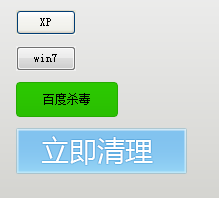
效果如下:
<Window size="800,600" mininfo="600,400" caption="0,0,0,32" sizebox="4,4,4,4">
<Default name="Button" value=" height="25" width="60" normalimage="file='BtnStyle\XP\button_nor.png'" hotimage="file='BtnStyle\XP\button_over.png'" pushedimage="file='BtnStyle\XP\button_down.png'" focusedimage="file='BtnStyle\XP\button_focus.png'" " />
<VerticalLayout bkcolor="#FFF0F0F0" bkcolor2="#FFAAAAA0">
<!-- 客户区 -->
<HorizontalLayout>
<Button text="XP" float="true" pos="20,14,0,0" height="25" />
<Button text="win7" float="true" pos="20,50,0,0" height="25" />
<Button text="百度杀毒" float="true" pos="20,86,0,0" height="25" />
<Button float="true" pos="20,132,0,0" height="25" />
</HorizontalLayout>
</VerticalLayout>
</Window>

2013 duilib入门简明教程 -- 简单控件介绍 (12)的更多相关文章
- 2013 duilib入门简明教程 -- 复杂控件介绍 (13)
首先将本节要介绍的控件全部拖到界面上,并调整好位置,如图: 然后将Name属性改成其他名字, 不能是[控件名+UI+数字]这种,因为这是DuiDesigner ...
- 2013 duilib入门简明教程 -- 总结 (20)
duilib的入门系列就到尾声了,再次提醒下,Alberl用的duilib版本是SVN上第个版本,时间是2013.08.15~ 这里给出Alberl最后汇总的一个工程,戳我下载,效 ...
- 2013 duilib入门简明教程 -- 自绘控件 (15)
在[2013 duilib入门简明教程 -- 复杂控件介绍 (13)]中虽然介绍了界面设计器上的所有控件,但是还有一些控件并没有被放到界面设计器上,还有一些常用控件duilib并没有提供(比如 ...
- 2013 duilib入门简明教程 -- 部分bug 2 (14)
上一个教程中提到了ActiveX的Bug,即如果主窗口直接用变量生成,则关闭窗口时会产生崩溃 如果用new的方式生成,则不会崩溃,所以给出一个临时的快速解决方案,即主窗口 ...
- 2013 duilib入门简明教程 -- 事件处理和消息响应 (17)
界面的显示方面就都讲完啦,下面来介绍下控件的响应. 前面的教程只讲了按钮和Tab的响应,即在Notify函数里处理.其实duilib还提供了另外一种响应的方法,即消息映射DUI_BEG ...
- 2013 duilib入门简明教程 -- FAQ (19)
虽然前面的教程几乎把所有的知识点都罗列了,但是有很多问题经常在群里出现,所以这里再次整理一下. 需要注意的是,在下面的问题中,除了加上XML属性外,主窗口必须继承自WindowImpl ...
- 2013 duilib入门简明教程 -- 第一个程序 Hello World(3)
小伙伴们有点迫不及待了么,来看一看Hello World吧: 新建一个空的win32项目,新建一个main.cpp文件,将以下代码复制进去: #include <windows.h> #i ...
- 2013 duilib入门简明教程 -- 部分bug (11)
一.WindowImplBase的bug 在第8个教程[2013 duilib入门简明教程 -- 完整的自绘标题栏(8)]中,可以发现窗口最大化之后有两个问题, 1.最大化按钮的样式 ...
- 2013 duilib入门简明教程 -- 界面布局(9)
上一个教程实现的标题栏代码中,并没有看到处理自适应窗口大小的代码,但是窗口大小变化后,按钮的位置会跟着变化,这是因为我们将按钮放到了HorizontalLayout.VerticalLayou ...
随机推荐
- jquery轮播图详解,40行代码即可简单解决。
我在两个月以前没有接触过html,css,jquery,javascript.今天我却在这里分享一篇技术贴,可能在技术大牛面前我的文章漏洞百出,也请斧正. 可以看出来,无论是div+css布局还是jq ...
- 【原】iOS学习之Masonry第三方约束
1.Masonry概述 目前最流行的Autolayout第三方框架 用优雅的代码方式编写Autolayout 省去了苹果官方恶心的Autolayout代码 大大提高了开发效率 框架地址:https:/ ...
- [BZOJ1562][ZJOI2007] 最大半连通子图
Description Input 第一行包含两个整数N,M,X.N,M分别表示图G的点数与边数,X的意义如上文所述.接下来M行,每行两个正整数a, b,表示一条有向边(a, b).图中的每个点将编号 ...
- Sublime Text3的安装
作为一名前端开发小白,使用Sublime两年多了,从当初的Sublime Text 2到如今的Sublime Text 3,非常喜欢这款轻量级编译器,它不像Dreamweaver那样动辄几百M,只有仅 ...
- 给li标签添加自定义属性
给li标签添加属性<ul> <li></li> <li></li> <li></li> <li>< ...
- java分享第十五天(log4j 格式详解)
log4j 格式详解 log4j.rootLogger=日志级别,appender1, appender2, -. 日志级别:ALL<DEBUG<INFO<WARN<ERRO ...
- phantomjs 双向认证,访问nginx,https
应用背景: phantomjs的一个爬虫,访问https站点,单向认证(只认证服务器身份)的都可以,双向认证(服务器和客户端都需要认证)必须上传本地证书: 开始用一个包含公钥私钥的PEM证书访问,怎么 ...
- 【PostgreSQL】PostgreSQL添加新服务器连接时,报错“Server doesn't listen ”,已解决。
PostgreSQL添加新的服务器连接时,报错:
- android之volley学习
Volley是android的平台通信库,一个新的网络通信框架.Volley 的特点:适合数据量小,通信频繁的网络操作. 获取Volley git 工具使用:git clone https://and ...
- 安装使用Oracle OSWbb/OSWbba工具
OSWbb是收集数据,OSWbba 是分析数据,在OSWbb4.0以后,OSWbba已经绑定在OSWbb内. 1.创建目录,上传/解压安装包 [oracle@std ~]$ mkdir oswbb [ ...