
ProgressBar+WebView实现自定义浏览器
当我们使用浏览器浏览网页时,总会看到下图页面的样子,上面是一个地址栏,地址栏下面显示加载进度,加载完成后进入页面内容,带颜色的进度条总是少不了的,那样子看起来也舒服,如何实现自定义手机浏览器功能呢?
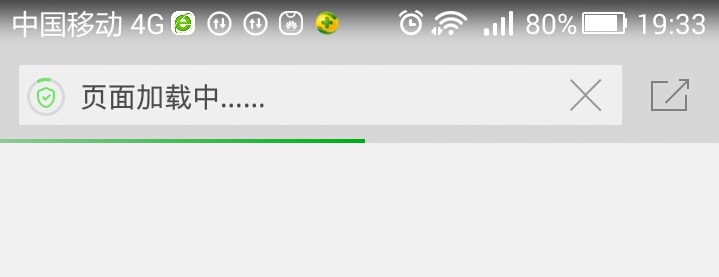
上面是360浏览器加载过程的截图,看起来也不算复杂,在做安卓开发中,经常要用到浏览器加载HTML的页面,于是想做一个demo,避免每次重复写的麻烦,效果图如下:


第一步:自定义WebView,命名ProgressWebView,在自定义ProgressWebView中添加进度条效果,代码如下:
|
1
2
3
4
5
6
7
8
9
10
11
12
13
14
15
16
|
public ProgressWebView(Context context, AttributeSet attrs) { super(context, attrs); progressbar = new ProgressBar(context, null, android.R.attr.progressBarStyleHorizontal); progressbar.setLayoutParams(new LayoutParams(LayoutParams.FILL_PARENT, 10, 0, 0)); Drawable drawable = context.getResources().getDrawable(R.drawable.progress_bar_states); progressbar.setProgressDrawable(drawable); addView(progressbar); // setWebViewClient(new WebViewClient(){}); setWebChromeClient(new WebChromeClient()); //是否支持缩放 getSettings().setSupportZoom(true); getSettings().setBuiltInZoomControls(true); } |
在这个构造方法里面,自定义进度条属性,设置为水平进度条,进度条的高度,同时定义进度条状态颜色,写在progress_bar_states.xml文件中,代码如下:
|
1
2
3
4
5
6
7
8
9
10
11
12
13
14
15
16
17
18
19
20
21
22
23
24
25
26
27
|
<layer-list xmlns:android="http://schemas.android.com/apk/res/android" > <item android:id="@android:id/background"> <shape> <corners android:radius="2dp" /> <gradient android:angle="270" android:centerColor="#E3E3E3" android:endColor="#E6E6E6" android:startColor="#C8C8C8" /> </shape> </item> <item android:id="@android:id/progress"> <clip> <shape> <corners android:radius="2dp" /> <gradient android:centerColor="#4AEA2F" android:endColor="#31CE15" android:startColor="#5FEC46" /> </shape> </clip> </item></layer-list> |
在这个xml文件中,可以按照自己喜好设置加载颜色,然后把进度条视图添加到WebView视图中,在使用ProgressWebView加载
HTML网页,可以像360浏览器一样显示加载进度。setWebChromeClient(new
WebChromeClient())用于加载请求的网页,支持进度条、js等效果,这里定义一个内部类WebChromeClient,代码如下:
|
1
2
3
4
5
6
7
8
9
10
11
12
13
14
|
public class WebChromeClient extends android.webkit.WebChromeClient { @Override public void onProgressChanged(WebView view, int newProgress) { if (newProgress == 100) { progressbar.setVisibility(GONE); } else { if (progressbar.getVisibility() == GONE) progressbar.setVisibility(VISIBLE); progressbar.setProgress(newProgress); } super.onProgressChanged(view, newProgress); } } |
这两个getSettings().setSupportZoom(true)和getSettings().setBuiltInZoomControls(true)设置是否支持缩放。
第二步:定义显示类,命名ProgressWebActivity.java,布局文件命名main_web.xml,代码如下:
|
1
2
3
4
5
6
7
8
9
10
11
12
13
14
15
16
17
18
|
<?xml version="1.0" encoding="utf-8"?><LinearLayout xmlns:android="http://schemas.android.com/apk/res/android" android:layout_width="fill_parent" android:layout_height="fill_parent" android:orientation="vertical" > <include android:id="@+id/head_views_main" layout="@layout/head_re" /> <com.sinolvc.zspg.view.ProgressWebView android:id="@+id/baseweb_webview" android:layout_width="fill_parent" android:layout_height="fill_parent" android:fadeScrollbars="true" android:scrollbarStyle="insideOverlay" /></LinearLayout> |
ProgressWebActivity.java代码:
|
1
2
3
4
5
6
7
8
9
10
11
12
13
14
15
16
17
18
19
20
21
22
23
24
25
26
27
28
29
30
31
32
33
34
35
36
37
38
39
40
41
42
43
44
45
46
47
|
public class ProgressWebActivity extends BaseActivity { protected ProgressWebView mWebView; @Override protected void onCreate(Bundle savedInstanceState) { super.onCreate(savedInstanceState); setContentView(R.layout.activity_baseweb); mWebView = (ProgressWebView) findViewById(R.id.baseweb_webview); mWebView.getSettings().setJavaScriptEnabled(true); initData(); initTitleView(getWindow().getDecorView(),R.string.load_news_detail_info,ProgressWebActivity .this); finishMySelf(); } private void finishMySelf(){ backll.setOnClickListener(new OnClickListener() { @Override public void onClick(View v) { ProgressWebActivity .this.finish(); } }); } protected void initData() { Intent intent = getIntent(); Bundle bundle = intent.getExtras(); String url = bundle.getString("url"); if(!TextUtils.isEmpty(url)&&!TextUtils.isEmpty(title)){ mWebView.loadUrl(url); } } @Override protected void onDestroy() { // TODO Auto-generated method stub super.onDestroy(); mWebView = null; }} |
initData方法获取上一个Activity传递过来的Intent数据,取出网页URL,判断连接是否为空,如果不为空,则使用自定义的ProgressWebView的loadUrl()方法加载,这个时候我们将会在APP端看到如下效果:

initTitleView用于设置浏览器顶部导航条,显示返回按钮和浏览新闻文字。
第三步:在需要使用自定义浏览器这个类ProgressWebActivity的地方,我们只需要设置Intent的数据,然后启动ProgressWebActivity加载之定义URL,实现带进度条加载指定页面的功能。
|
1
2
3
4
5
6
7
8
|
Bundle bundle = new Bundle(); bundle.putString("url", "http://www.teachcourse.cn"); bundle.putString("title", "做最好的源码分享网站"); Intent intent = new Intent(getContext(), ProgressWebActivity.class); intent.putExtras(bundle); startActivity(intent); |
到这里,我们使用ProgressBar+WebView自定义浏览器器的功能基本完成!
ProgressBar+WebView实现自定义浏览器的更多相关文章
- 拦截webview调用系统浏览器打开链接
给WebView设置自定义的WebViewClient即可 webview.setWebViewClient(new WebViewClient(){ @Override public boolean ...
- javascript自定义浏览器右键菜单
javascript自定义浏览器右键菜单 在书上看到document对象还有一个contextmenu事件,但是不知为什么w3school中找不到这个耶... 利用这个特性写了个浏览器的右键菜单, ...
- 不使用webview,用手机浏览器的android app
需求:wap站在手机上以App的形式打开,但不要嵌套WebView,只能以浏览器打开 package com.gzz.whyinzi; import android.net.Uri; import a ...
- 自定义浏览器滚动条的样式,打造属于你的滚动条风格——兼容IE和webkit(ff不支持)
前段时间,到网上找素材时,看到了一个很个性的滚动条式,打开Chrome的调试工具看了一下,发现不是用JavaScript来模拟实现的,觉得 有必要折腾一下.于是在各大浏览器中对比了一下,发现只用Chr ...
- 在IE中启动火狐——自定义浏览器链接协议
有时候需求就是这么奇葩,特别是在这个浏览器混战收尾的节骨眼上,有的客户正在将全单位的浏览器统一到Chrome.有的正在统一到Firefox.还有的正在统一到360上.于是就有了如题的需求,客户正在将浏 ...
- [android] WebView自定义浏览器
在布局文件中添加<EditText/>和<Button/>控件, 在布局文件中添加<WebView/>控件 在Activity中获取WebView对象 调用WebV ...
- 001 - 使用鸿蒙WebView创建简单浏览器 step 1
打开官网,找到WebView的文档(模拟器不支持) 鸿蒙webview的开发指南(原始链接,方便大家识别并点击):https://developer.harmonyos.com/cn/docs/doc ...
- JavaScript自定义浏览器滚动条兼容IE、 火狐和chrome
今天为大家分享一下我自己制作的浏览器滚动条,我们知道用css来自定义滚动条也是挺好的方式,css虽然能够改变chrome浏览器的滚动条样式可以自定义,css也能够改变IE浏览器滚动条的颜色.但是css ...
- Android ProgressBar分析及自定义ProgressBar
ProgressBar是在执行耗时操作时的一种人性化设计.分为两种形式:转圈的,能显示进度的. 而能取决于是什么样式的PregressBar,当然就是PregressBar的样式啦~ Widget.P ...
随机推荐
- 【Objective-C Runtime动态加载】---动态创建类Class
a.使用objc_allocateClassPair创建一个类Class const char * className = "Calculator"; Class kc ...
- Data Leakage 因果性
参考这篇: https://blog.csdn.net/jiandanjinxin/article/details/54633475 再论数据科学竞赛中的Data Leakage 存在和利用这种倒‘因 ...
- ubuntu下apache添加https支持
http是无状态,不安全的连接.而https是通过ssl加密的http连接,可靠性更强. 确保openssl安装完成,用openssl来产生和签署证书,可以自己签署,但是不安全,建议用证书机构颁发的证 ...
- docker入门小结(一)
入职需要学习docker,记录学习随笔.争取两天大致看完docker学习.博客也算是迁移到cnblogs. 学习的链接参考<docker从入门到实践>http://dockerpool.c ...
- 获取类路径中含有beans.xml的jar包名称
获取类路径中含有beans.xml的jar包名称 package com.stono; import java.io.File; import java.io.IOException; import ...
- android mvp高速开发框架介绍(继续dileber)
android mvp框架:dileber(https://github.com/dileber/dileber.git) 继续为大家介绍android mvp开源框架 dileber 官方交流qq群 ...
- same-tree——比较两个二叉树是否相同
Given two binary trees, write a function to check if they are equal or not. Two binary trees are con ...
- shell脚本学习笔记 (正則表達式)
正則表達式一般有三个部分组成,他们各自是:字符类,数量限定符,位置限定符. 规定一些特殊语法表示字符类.数 量限定符和位置关系,然后用这些特殊语法和普通字符一起表示一个模式,这就是正則表達式(Regu ...
- EasyUI这个框架用了好久了,总结一下遇到的问题和解决方法
1. jQuery EasyUI动态添加控件或者ajax加载页面后不能自动渲染问题的解决方法: 我们之所以在页面中,只要书写相应easyui的class,Easyui就能成功渲染页面,这是因为解析器在 ...
- Android日期对话框NumberPicker的使用方法教程
NumberPicker是Android3.0之后引入的一个控件.NumberPicker 是用于选择一组提前定义好数字的控件.比方时间hour的选择仅仅有0-23有效,则能够通过setMinValu ...