
DiyCode开源项目 BaseActivity 分析
1.首先将这个项目的BaseActivity源码拷贝过来。
/*

 * Copyright 2017 GcsSloop

 *

 * Licensed under the Apache License, Version 2.0 (the "License");

 * you may not use this file except in compliance with the License.

 * You may obtain a copy of the License at

 *

 *    http://www.apache.org/licenses/LICENSE-2.0

 *

 * Unless required by applicable law or agreed to in writing, software

 * distributed under the License is distributed on an "AS IS" BASIS,

 * WITHOUT WARRANTIES OR CONDITIONS OF ANY KIND, either express or implied.

 * See the License for the specific language governing permissions and

 * limitations under the License.

 *

 * Last modified 2017-03-11 22:24:54

 *

 * GitHub:  https://github.com/GcsSloop

 * Website: http://www.gcssloop.com

 * Weibo:   http://weibo.com/GcsSloop

 */

package com.gcssloop.diycode.base.app;

import android.annotation.TargetApi;

import android.content.Context;

import android.content.Intent;

import android.os.Build;

import android.os.Bundle;

import android.support.annotation.LayoutRes;

import android.support.v7.app.ActionBar;

import android.support.v7.app.AppCompatActivity;

import android.support.v7.widget.Toolbar;

import android.text.TextUtils;

import android.view.MenuItem;

import android.view.View;

import android.widget.Toast;

import com.gcssloop.diycode.R;

import com.gcssloop.diycode.hackpatch.IMMLeaks;

import com.gcssloop.diycode_sdk.api.Diycode;

import java.io.Serializable;

public abstract class BaseActivity extends AppCompatActivity {

    protected Diycode mDiycode;//项目本身的api提供的一个调用类

    protected ViewHolder mViewHolder;

    private Toast mToast;

    @TargetApi(Build.VERSION_CODES.KITKAT)

    @Override

    protected void onCreate(Bundle savedInstanceState) {

        super.onCreate(savedInstanceState);

        mDiycode = Diycode.getSingleInstance();

        mViewHolder = new ViewHolder(getLayoutInflater(), null, getLayoutId());

        setContentView(mViewHolder.getRootView());

        IMMLeaks.fixFocusedViewLeak(this.getApplication()); // 修复 InputMethodManager 引发的内存泄漏

        initActionBar(mViewHolder);

        initDatas();

        initViews(mViewHolder, mViewHolder.getRootView());

    }

    @LayoutRes

    protected abstract int getLayoutId();

    /**

     * 初始化数据,调用位置在 initViews 之前

     */

    protected void initDatas() {

    }

    /**

     * 初始化 View, 调用位置在 initDatas 之后

     */

    protected abstract void initViews(ViewHolder holder, View root);

    // 初始化 ActiobBar

    private void initActionBar(ViewHolder holder) {

        Toolbar toolbar = holder.get(R.id.toolbar);

        if (toolbar != null) {

            setSupportActionBar(toolbar);

        }

        ActionBar actionBar = getSupportActionBar();

        if (actionBar != null) {

            actionBar.setDisplayHomeAsUpEnabled(true);

        }

    }

    // 默认点击左上角是结束当前 Activity

    @Override

    public boolean onOptionsItemSelected(MenuItem item) {

        switch (item.getItemId()) {

            case android.R.id.home:

                finish();

                break;

        }

        return super.onOptionsItemSelected(item);

    }

    public ViewHolder getViewHolder() {

        return mViewHolder;

    }

    /**

     * 发出一个短Toast

     *

     * @param text 内容

     */

    public void toastShort(String text) {

        toast(text, Toast.LENGTH_SHORT);

    }

    /**

     * 发出一个长toast提醒

     *

     * @param text 内容

     */

    public void toastLong(String text) {

        toast(text, Toast.LENGTH_LONG);

    }

    private void toast(final String text, final int duration) {

        if (!TextUtils.isEmpty(text)) {

            runOnUiThread(new Runnable() {

                @Override

                public void run() {

                    if (mToast == null) {

                        mToast = Toast.makeText(getApplicationContext(), text, duration);

                    } else {

                        mToast.setText(text);

                        mToast.setDuration(duration);

                    }

                    mToast.show();

                }

            });

        }

    }

    protected void openActivity(Class<?> cls) {

        openActivity(this, cls);

    }

    public static void openActivity(Context context, Class<?> cls) {

        Intent intent = new Intent(context, cls);

        context.startActivity(intent);

    }

    /**

     * 打开 Activity 的同时传递一个数据

     */

    protected <V extends Serializable> void openActivity(Class<?> cls, String key, V value) {

        openActivity(this, cls, key, value);

    }

    /**

     * 打开 Activity 的同时传递一个数据

     */

    public <V extends Serializable> void openActivity(Context context, Class<?> cls, String key, V value) {

        Intent intent = new Intent(context, cls);

        intent.putExtra(key, value);

        context.startActivity(intent);

    }

}
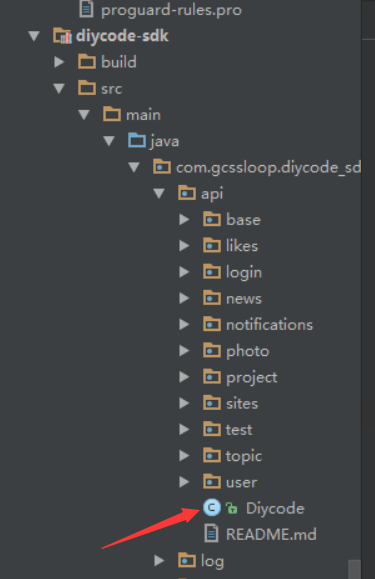
2.Diycode是项目本身的api提供的一个调用类。放在module中,名字为:diycode-sdk,应该就是为了方便开发客户端提供的一个API了,里面又是一大坨,单单这个类就有一千行,很多逻辑函数,不过现在先不研究。
3.ViewHolder是什么东西呢?
==>其实就是性能优化,这里是自己创建的一个类。放在和BaseActivity同一级下,所以说这个东西应该和BaseActivity一样,经常使用,以前也只是看到别人用,就自己用一下,不懂得其中真正的含义。
网上搜了一篇文章:listview加载性能优化ViewHolder
这个项目的ViewHolder源码是这样的:
/*

 * Copyright 2017 GcsSloop

 *

 * Licensed under the Apache License, Version 2.0 (the "License");

 * you may not use this file except in compliance with the License.

 * You may obtain a copy of the License at

 *

 *    http://www.apache.org/licenses/LICENSE-2.0

 *

 * Unless required by applicable law or agreed to in writing, software

 * distributed under the License is distributed on an "AS IS" BASIS,

 * WITHOUT WARRANTIES OR CONDITIONS OF ANY KIND, either express or implied.

 * See the License for the specific language governing permissions and

 * limitations under the License.

 *

 * Last modified 2017-03-11 22:24:54

 *

 * GitHub:  https://github.com/GcsSloop

 * Website: http://www.gcssloop.com

 * Weibo:   http://weibo.com/GcsSloop

 */

package com.gcssloop.diycode.base.app;

import android.content.Context;

import android.support.annotation.NonNull;

import android.util.SparseArray;

import android.view.LayoutInflater;

import android.view.View;

import android.view.ViewGroup;

import android.widget.ImageView;

import android.widget.TextView;

import com.bumptech.glide.Glide;

import com.bumptech.glide.load.engine.DiskCacheStrategy;

import com.gcssloop.diycode_sdk.log.Logger;

public class ViewHolder {

    private SparseArray<View> mViews;

    private View mRootView;

    public ViewHolder(LayoutInflater inflater, ViewGroup parent, int layoutId) {

        this.mViews = new SparseArray<View>();

        mRootView = inflater.inflate(layoutId, parent, false);

    }

    /**

     * 通过View的id来获取子View

     *

     * @param resId view的id

     * @param <T>   泛型

     * @return 子View

     */

    public <T extends View> T get(int resId) {

        View view = mViews.get(resId);

        //如果该View没有缓存过,则查找View并缓存

        if (view == null) {

            view = mRootView.findViewById(resId);

            mViews.put(resId, view);

        }

        if (view == null){

            Logger.e("View == null");

        }

        return (T) view;

    }

    /**

     * 获取布局View

     *

     * @return 布局View

     */

    public View getRootView() {

        return mRootView;

    }

    /**

     * 设置文本

     *

     * @param res_id view 的 id

     * @param text   文本内容

     * @return 是否成功

     */

    public boolean setText(CharSequence text, @NonNull int res_id) {

        try {

            TextView textView = get(res_id);

            textView.setText(text);

            return true;

        } catch (Exception e) {

            return false;

        }

    }

    public boolean setText(@NonNull int res_id, CharSequence text) {

        return setText(text, res_id);

    }

    public void loadImage(Context context, String url, int res_id) {

        ImageView imageView = get(res_id);

        String url2 = url;

        if (url.contains("diycode"))

            url2 = url.replace("large_avatar", "avatar");

        Glide.with(context).load(url2).diskCacheStrategy(DiskCacheStrategy.SOURCE).into(imageView);

    }

    /**

     * 设置监听器

     *

     * @param l   监听器

     * @param ids view 的 id

     */

    public void setOnClickListener(View.OnClickListener l, int... ids) {

        if (ids == null) {

            return;

        }

        for (int id : ids) {

            get(id).setOnClickListener(l);

        }

    }

}
下面分析一下:
(1)有一个私有成员变量。private SparseArray<View> mViews;
类似一个容器,可以装一些视图,并且这个类方便使用,性能也很棒。
(2)然后是ViewHolder构造函数,参数分别为LayoutInflater inflater,ViewGroup parent,Int layoutId.现在仔细了解一下这几个参数吧。
①LayoutInflater是什么东西呢?==>主要就是将xml转换成一个View对象,动态创建布局。
inflate方法有三个参数,分别是resource==>布局的资源id,root==>填充的根视图,attachToRoot==>是否将载入的视图绑定到根视图。
②View与ViewGroup有什么区别?==>View是所有UI组件的基类,而ViewGroup是容纳这些组件的容器,其本身也是从View派生出来的。
③LayoutId其实就是自己项目中R.id.***,就是inflate中的布局的资源的id。
(3)通过view的id来获取子View
 /**

     * 通过View的id来获取子View

     *

     * @param resId view的id

     * @param <T>   泛型

     * @return 子View

     */

    public <T extends View> T get(int resId) {

        View view = mViews.get(resId);

        //如果该View没有缓存过,则查找View并缓存

        if (view == null) {

            view = mRootView.findViewById(resId);

            mViews.put(resId, view);

        }

        if (view == null){

            Logger.e("View == null");

        }

        return (T) view;

    }
①<T extends View>是一个类型,如何理解这个泛型呢?==>限制了返回的T类,必须是View的子类。
②这里用到了一个Logger,日志类,直接拷贝一下,这个东西也是为了方便调试的。基本上每个项目都会用到的。
/*

 * Copyright 2017 GcsSloop

 *

 * Licensed under the Apache License, Version 2.0 (the "License");

 * you may not use this file except in compliance with the License.

 * You may obtain a copy of the License at

 *

 *    http://www.apache.org/licenses/LICENSE-2.0

 *

 * Unless required by applicable law or agreed to in writing, software

 * distributed under the License is distributed on an "AS IS" BASIS,

 * WITHOUT WARRANTIES OR CONDITIONS OF ANY KIND, either express or implied.

 * See the License for the specific language governing permissions and

 * limitations under the License.

 *

 * Last modified 2017-03-10 00:33:05

 *

 * GitHub:  https://github.com/GcsSloop

 * Website: http://www.gcssloop.com

 * Weibo:   http://weibo.com/GcsSloop

 */

package com.gcssloop.diycode_sdk.log;

import android.support.annotation.NonNull;

import android.util.Log;

public class Logger {

    private static String DEFAULT_TAG = "GCS-LOG";

    private static Config mConfig;

    private Logger() {

    }

    public static Config init() {

        mConfig = new Config(DEFAULT_TAG);

        return mConfig;

    }

    public static Config init(@NonNull String tag) {

        mConfig = new Config(tag);

        return mConfig;

    }

    public static void v(String message) {

        log(Config.LEVEL_VERBOSE, mConfig.getTag(), message);

    }

    public static void d(String message) {

        log(Config.LEVEL_DEBUG, mConfig.getTag(), message);

    }

    public static void i(String message) {

        log(Config.LEVEL_INFO, mConfig.getTag(), message);

    }

    public static void w(String message) {

        log(Config.LEVEL_WARN, mConfig.getTag(), message);

    }

    public static void e(String message) {

        log(Config.LEVEL_ERROR, mConfig.getTag(), message);

    }

    public static void v(String tag, String message) {

        log(Config.LEVEL_VERBOSE, tag, message);

    }

    public static void d(String tag, String message) {

        log(Config.LEVEL_DEBUG, tag, message);

    }

    public static void i(String tag, String message) {

        log(Config.LEVEL_INFO, tag, message);

    }

    public static void w(String tag, String message) {

        log(Config.LEVEL_WARN, tag, message);

    }

    public static void e(String tag, String message) {

        log(Config.LEVEL_ERROR, tag, message);

    }

    private static void log(int level, String tag, String message) {

        if (mConfig.getLevel() == Config.LEVEL_NONE) {

            return;

        }

        if (level < mConfig.getLevel()) {

            return;

        }

        switch (level) {

            case Config.LEVEL_VERBOSE:

                Log.v(tag, message);

                break;

            case Config.LEVEL_DEBUG:

                Log.d(tag, message);

                break;

            case Config.LEVEL_INFO:

                Log.i(tag, message);

                break;

            case Config.LEVEL_WARN:

                Log.w(tag, message);

                break;

            case Config.LEVEL_ERROR:

                Log.e(tag, message);

                break;

        }

    }

}
Logger类中有定义一个Config类,这是在diycode_sdk里面的,先看看定义吧。
/*

 * Copyright 2017 GcsSloop

 *

 * Licensed under the Apache License, Version 2.0 (the "License");

 * you may not use this file except in compliance with the License.

 * You may obtain a copy of the License at

 *

 *    http://www.apache.org/licenses/LICENSE-2.0

 *

 * Unless required by applicable law or agreed to in writing, software

 * distributed under the License is distributed on an "AS IS" BASIS,

 * WITHOUT WARRANTIES OR CONDITIONS OF ANY KIND, either express or implied.

 * See the License for the specific language governing permissions and

 * limitations under the License.

 *

 * Last modified 2017-03-10 00:33:05

 *

 * GitHub:  https://github.com/GcsSloop

 * Website: http://www.gcssloop.com

 * Weibo:   http://weibo.com/GcsSloop

 */

package com.gcssloop.diycode_sdk.log;

import android.support.annotation.NonNull;

public class Config {

    public static final int LEVEL_NONE = 0;

    public static final int LEVEL_FULL = 1;

    public static final int LEVEL_VERBOSE = 2;

    public static final int LEVEL_DEBUG = 3;

    public static final int LEVEL_INFO = 4;

    public static final int LEVEL_WARN = 5;

    public static final int LEVEL_ERROR = 6;

    public static final int LEVEL_ASSERT = 7;

    private String tag;

    private int level;

    public Config(String tag) {

        this.tag = tag;

        level = LEVEL_FULL;

    }

    public Config setLevel(@NonNull int level){

        this.level = level;

        return this;

    }

    public int getLevel() {

        return level;

    }

    public String getTag() {

        return tag;

    }

}
感觉像一个Bean类,很简单的一个类,定义了7个静态整型常量,1,2,3,4,5,6,7,应该是日志的等级,分为7个模式吧。
(4)有注意到有些变量前面有@NonNull注解,不知道什么意思。==>指明一个参数,字段或者方法的返回值不可以为NULL。
(5)然后在ViewHolder中提供了setText给TextView。方式很简单,就是先通过id得到这个TextView,然后setText即可。
(6)然后在ViewHolder中提供了一个loadImage方法。比较复杂,贴一下源代码。
public void loadImage(Context context, String url, int res_id) {

        ImageView imageView = get(res_id);

        String url2 = url;

        if (url.contains("diycode"))

            url2 = url.replace("large_avatar", "avatar");

        Glide.with(context).load(url2).diskCacheStrategy(DiskCacheStrategy.SOURCE).into(imageView);

    }
①首先也是通过id得到这个imageView。
②这里有一个Glide类。不知道这个图片加载库怎么用?
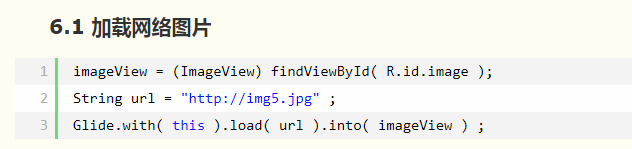
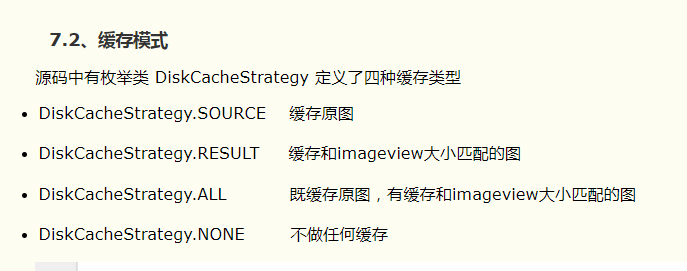
(7)最后设置了一个监听器。两个参数:View.OnClickListener l,int... ids ==>省略号是什么意思?==>类似一个数组吧(而且事先不知道长度呢!)
4.@TargetApi(Build.VERSION_CODES.KITKAT)在onCreate的前面声明,这东西起什么作用呢? ==>使用高编译版本的代码,为了通用性兼容运行此代码的低版本平台,要求程序员做出区分对待的加载。
5.在BaseActivity中的onCreate函数中,通过Diycode的SDK中获取单例类。这里了解一下什么是单例模式。==>保证一个类仅有一个实例,并提供一个访问它的全局访问点。
6.这里谈一下onCreate函数中的setContentView(view);
==>默认Activity中放入我们的xml或者Java控件是通过setContentView方法来操作的,当调用了setContentView所有的控件就得到了显示。
7.如何解决InputMethodManager造成的内存泄漏问题?

8.onCreate函数中有一个初始化ActionBar,就是初始化标题栏的意思。
ToolBar代替Actionbar在AppCompatActivity的使用
这里解释一下:
(1)actionBar.setDisplayHomeAsUpEnabled(true)==>给左上角图标的左边加上一个返回的图标。对应 ActionBar.DISPLAY_HOME_AS_UP。
(2)actionBar.setDisplayShowHomeEnabled(true) //使左上角图标是否显示,如果设成false,则没有程序图标,仅仅就个标题,否则,显示应用程序图标,对应id为android.R.id.home,对应ActionBar.DISPLAY_SHOW_HOME
(3)actionBar.setDisplayShowCustomEnabled(true) // 使自定义的普通View能在title栏显示,即actionBar.setCustomView能起作用,对应ActionBar.DISPLAY_SHOW_CUSTOM
(4)actionBar.setDisplayShowTitleEnabled(true) //对应ActionBar.DISPLAY_SHOW_TITLE。
(5)其中setHomeButtonEnabled和setDisplayShowHomeEnabled共同起作用,如果setHomeButtonEnabled设成false,即使setDisplayShowHomeEnabled设成true,图标也不能点击。
9.在BaseActivity中有一个toast函数,采用了一个runOnUiThread(new Runnable(){里面复写一个run方法即可})
代码参考一下了:
private void toast(final String text, final int duration) {

        if (!TextUtils.isEmpty(text)) {

            runOnUiThread(new Runnable() {

                @Override

                public void run() {

                    if (mToast == null) {

                        mToast = Toast.makeText(getApplicationContext(), text, duration);

                    } else {

                        mToast.setText(text);

                        mToast.setDuration(duration);

                    }

                    mToast.show();

                }

            });

        }

    }
不了解runOnUiThread?==>runOnUiThread更新主线程。
10.打开一个活动,在BaseActivity中,定义一个方法,点击某个东西,跳转到另外一个活动。
 protected void openActivity(Class<?> cls) {

        openActivity(this, cls);

    }

    public static void openActivity(Context context, Class<?> cls) {

        Intent intent = new Intent(context, cls);

        context.startActivity(intent);

    }
11.打开一个活动的同时传递一个数据
 /**

     * 打开 Activity 的同时传递一个数据

     */

    protected <V extends Serializable> void openActivity(Class<?> cls, String key, V value) {

        openActivity(this, cls, key, value);

    }

    /**

     * 打开 Activity 的同时传递一个数据

     */

    public <V extends Serializable> void openActivity(Context context, Class<?> cls, String key, V value) {

        Intent intent = new Intent(context, cls);

        intent.putExtra(key, value);

        context.startActivity(intent);

    }
总结一下:
1.这个BaseActivity应该指的是大部分通用的一个活动,左上角是一个返回的图标,右上角自定义的一个导航栏。
2.然后这个BaseActivity提供了一个toast支持,支持长toast或者短toast,而且是采用runOnUiThread更新主线程的方式。所以不会阻塞的。
3.这个BaseActivity中有自定义ViewHolder,加强了性能。里面可以有TextView,ImageView,还可以设置监听器给每一个view。
4.这个BaseActivity存放了一个关键的类,Diycode可以方便地调用API,获取后端数据的关键。
5.有一个抽象函数initViews(ViewHolder,View root),那么在继承这个BaseActivity中就可以执行了。
6.最后定义了2个重载函数,作用就是可以跳转到另外一个活动,传数据或者不传数据。
DiyCode开源项目 BaseActivity 分析的更多相关文章
- Diycode开源项目 BaseApplication分析+LeakCanary第三方+CrashHandler自定义异常处理
1.BaseApplication整个应用的开始 1.1.看一下代码 /* * Copyright 2017 GcsSloop * * Licensed under the Apache Licens ...
- Diycode开源项目 MainActivity分析
1.分析MainActivity整体结构 1.1.首先看一下这个界面的整体效果. 1.2.活动源代码如下 /* * Copyright 2017 GcsSloop * * Licensed under ...
- DiyCode开源项目 TopicActivity 分析
1.首先看看TopActivity效果. 2.TopicActivity是一个继承BaseActivity的.前面分析过BaseActivity了.主要有一个标题栏,有返回的图标. 3.贴一下T ...
- Diycode开源项目 ImageActivity分析
1.首先看一下效果 1.1做成了一个GIF 1.2.我用格式工厂有点问题,大小无法调到手机这样的大小,目前还没有解决方案. 1.3.网上有免费的MP4->GIF,参考一下这个网站吧. 1.4.讲 ...
- Diycode开源项目 TopicContentActivity分析
1.效果预览以及布局分析 1.1.实际效果预览 左侧话题列表的布局是通过TopicProvider来实现的,所以当初分析话题列表就没有看到布局. 这里的话题内容不是一个ListView,故要自己布局. ...
- Diycode开源项目 LoginActivity分析
1.首先看一下效果 1.1.预览一下真实页面 1.2.分析一下: 要求输入Email或者用户名,点击编辑框,弹出键盘,默认先进入输入Email或用户名编辑框. 点击密码后,密码字样网上浮动一段距离,E ...
- DiyCode开源项目 AboutActivity分析
1.首先看一下效果 这是手机上显示的效果: 1.1首先是一个标题栏,左侧一个左箭头,然后一个图标. 1.2然后下方是一个可以滑动的页面. 1.3分成了7个部分. 1.4DiyCode的图标. 1.5然 ...
- Diycode开源项目 UserActivity分析
1.效果预览 1.1.实际界面预览 1.2. 这是MainActivity中的代码 这里执行了跳转到自己的用户界面的功能. 1.3.点击头像或者用户名跳转到别人的页面 UserActivity的结构由 ...
- Diycode开源项目 SettingActivity分析
1.整体效果预览及布局分析 1.1.设置界面预览 1.2.主体对应关系 注意这里的线条用ImageView来实现 有一个TextView是检查更新,默认隐藏,具体出现时间还得之后确认. 最后一个Lin ...
随机推荐
- Java开发笔记(九十八)利用Callable启动线程
前面介绍了如何利用Runnable接口构建线程任务,该方式确实方便了线程代码的复用与共享,然而Runnable不像公共方法那样有返回值,也就无法将线程代码的处理结果传给外部,造成外部既不知晓该线程是否 ...
- ElasticSearch:华为云搜索CSS 之POC操作记录
2019/03/06 09:00 ES文档官方:https://support.huaweicloud.com/usermanual-es/es_01_0024.html 华为云区域:华北北京1 ES ...
- 从零开始的全栈工程师——js篇2.13(案例存放:三重数组渲染)
- a href="javascript:"与a href="#"
<a href="javascript:;"></a> <a href="#"></a> 这两种写法.这两种写法 ...
- WPF中的拖放1
实现了WPF的不同层级间的元素之间的拖放,例子虽小却很经典,引申一下也许可以实现类VS界面的浮动依靠面板. 拖放前: 拖放后: 代码如下: <Window x:Class="WpfAp ...
- 服务器 PyTorch 报错 重装 PyTorch
两个代码,pix2pix + CycleGan , wgan-gp 都是 pytorch 写的, 在服务器端运行,均存在下列问题,故判定是 pytorch 的安装问题. Traceback (mos ...
- 删除elasticsearch大于7天前的索引
curl -u 用户名:密码 -H'Content-Type:application/json' -d'{ "query": { "range": { &quo ...
- 工作中碰到的css问题解决方法
好久都没来这写东西了,都长草了.刚解决的两个小问题,先记下来 textarea横向没有滚动条加上 wrap="off"这个属性 英文单词不断行加上这个 word-break:bre ...
- sublime相关小技巧
1.快速建立一个新文件:Ctrl+n 2.修改多个相同符号:Ctrl+D 3.建立语言后缀的文件保存,例如我想创建PHP的语言脚本,先按Ctrl+Shift+p,打开Command Palette,输 ...
- windows xp professional 序列号(密钥)及百度网盘下载地址
HH7VV-6P3G9-82TWK-QKJJ3-MXR96 https://pan.baidu.com/share/link?uk=4247247642&shareid=500360