
Spring Boot : Swagger 2
每次修改完代码需要找原本的API时楼主的内心是痛苦的,因为一般情况下都找不到,需要重新写一份。如果使用Swagger的话,只要加几个注解就可以实时生成最新的在线API文档,而且不仅仅是文档,同时支持API接口的测试。下面呢,给大家分享一下Spring Boot 集成 Swagger 的步骤。
一、引入jar包
      <!-- Swagger2核心包-->

         <!-- https://mvnrepository.com/artifact/io.springfox/springfox-swagger2 -->

         <dependency>

             <groupId>io.springfox</groupId>

             <artifactId>springfox-swagger2</artifactId>

             <version>2.7.0</version>

         </dependency>

         <!-- Swagger2 UI包,前端展示API文档 -->

         <!-- https://mvnrepository.com/artifact/io.springfox/springfox-swagger-ui -->

         <dependency>

             <groupId>io.springfox</groupId>

             <artifactId>springfox-swagger-ui</artifactId>

             <version>2.7.0</version>

         </dependency>
二、配置SwaggerConfig
 package com.bjgoodwill.oip.major.config;

 import org.springframework.context.annotation.Bean;

 import org.springframework.context.annotation.Configuration;

 import springfox.documentation.builders.ApiInfoBuilder;

 import springfox.documentation.builders.PathSelectors;

 import springfox.documentation.builders.RequestHandlerSelectors;

 import springfox.documentation.service.ApiInfo;

 import springfox.documentation.spi.DocumentationType;

 import springfox.documentation.spring.web.plugins.Docket;

 import springfox.documentation.swagger2.annotations.EnableSwagger2;

 /**

  * @Description: swagger配置文件

  * @Date 2018/7/13 10:50

  * @Author HQueen

  */

 @Configuration

 @EnableSwagger2

 public class SwaggerConfig {

     @Bean

     public Docket api() {

         return new Docket(DocumentationType.SWAGGER_2)

                 .apiInfo(apiInfo())

                 .select()

                 .apis(RequestHandlerSelectors.basePackage("com.queeen.major"))

                 .paths(PathSelectors.any())

                 .build();

     }

     private ApiInfo apiInfo() {

         return new ApiInfoBuilder()

                 .title("API文档")

                 .build();

     }

 }
其中,@EnableSwagger2注解来启用Swagger2,apis()定义了扫描的包路径
三、编写接口
Spring Boot中包含了一些注解,对应于HTTP协议中的方法:
@GetMapping对应HTTP中的GET方法;
@PostMapping对应HTTP中的POST方法;
@PutMapping对应HTTP中的PUT方法;
@DeleteMapping对应HTTP中的DELETE方法;
@PatchMapping对应HTTP中的PATCH方法。
 package com.bjgoodwill.oip.major.system.controller;

 import org.springframework.beans.factory.annotation.Autowired;

 import org.springframework.stereotype.Controller;

 import org.springframework.ui.Model;

 import org.springframework.web.bind.annotation.GetMapping;

 import org.springframework.web.bind.annotation.PostMapping;

 import org.springframework.web.bind.annotation.RequestMapping;

 import org.springframework.web.bind.annotation.ResponseBody;

 import com.bjgoodwill.oip.core.enums.ExceptionEnum;

 import com.bjgoodwill.oip.core.exception.CoreException;

 import com.bjgoodwill.oip.core.util.StringUtils;

 import com.bjgoodwill.oip.major.system.model.UserModel;

 import com.bjgoodwill.oip.major.system.service.UserService;

 import com.bjgoodwill.oip.major.system.util.R;

 import io.swagger.annotations.Api;

 import io.swagger.annotations.ApiOperation;

 import io.swagger.annotations.ApiParam;

 /**

  * @Date 2018/7/13 10:50

  * @Author HQueen

  */

 @Controller

 @RequestMapping(value="/user")

 @Api(tags="用户信息")

 public class UserController {

     @Autowired

     UserService userService;

     /** 验证用户信息

      * @param account

      * @return

      */

     @ApiOperation(value="验证用户信息", notes="验证用户信息")

     @PostMapping(value="/verify")

     @ResponseBody

     public UserModel verifyUser(@ApiParam(name="account", value="用户名") String account){

         if (StringUtils.isEmpty(account)) {

             throw new CoreException(ExceptionEnum.REQUEST_NULL);

         }

         UserModel model = userService.findByAccount(account);

         return model;

     }

     /** 跳转至用户修护界面

      * @param id

      * @param model

      * @return

      */

     @ApiOperation(value="跳转至用户修护界面", notes="跳转至用户修护界面")

     @GetMapping(value="/pre/{id}")

     public String preUpdate(@ApiParam(name="id", value="用户ID") Long id, Model model) {

         UserModel userModel = userService.getByPrimaryKey(id);

         model.addAttribute("model", userModel);

         return "edit";

     }

     /** 修改用户基本信息

      * @param userModel

      * @return

      */

     @ApiOperation(value="修改用户基本信息", notes="修改用户基本信息")

     @PostMapping(value="/update")

     @ResponseBody

     public R update(@ApiParam(name="userModel", value="用户信息类") UserModel userModel) {

         if (userService.update(userModel) > 0) {

             return R.ok();

         }

         return R.error();

     }

 }
四、启动及测试
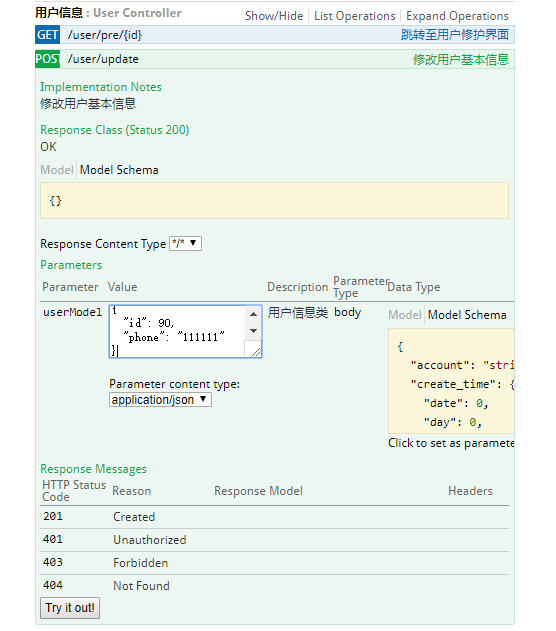
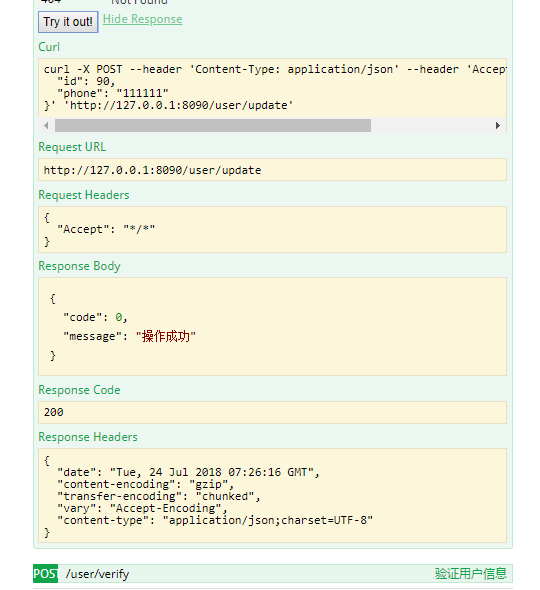
如上图所示,点击 Try it out! 就可以进行在线测试。
PS:
1. swagger和swagger 2的区别
在官方文档上是这么说明的:
What is the relationship between swagger-ui and springfox-swagger-ui?
- Swagger Spec is a specification.
- Swagger Api - an implementation of that specification that supports jax-rs, restlet, jersey etc.
- Springfox libraries in general - another implementation of the specification focused on the spring based ecosystem.
- Swagger.js and Swagger-ui - are client libraries in javascript that can consume swagger specification.
- springfox-swagger-ui - the one that you’re referring to, is just packaging swagger-ui in a convenient way so that spring services can serve it up.
总的来说就是:
1. Swagger 是一种规范。
2. springfox-swagger 是基于 Spring 生态系统的该规范的实现。
3. springfox-swagger-ui 是对 swagger-ui 的封装,使得其可以使用 Spring 的服务
2. 其他注解方式
在上述 demo 中,楼主使用@ApiParam注解对参数进行描述,下面呢,楼主提供第二种注解方式。
 package com.bjgoodwill.oip.major.system.controller;

 import org.springframework.beans.factory.annotation.Autowired;

 import org.springframework.stereotype.Controller;

 import org.springframework.ui.Model;

 import org.springframework.web.bind.annotation.GetMapping;

 import org.springframework.web.bind.annotation.PostMapping;

 import org.springframework.web.bind.annotation.RequestBody;

 import org.springframework.web.bind.annotation.RequestMapping;

 import org.springframework.web.bind.annotation.ResponseBody;

 import com.bjgoodwill.oip.core.enums.ExceptionEnum;

 import com.bjgoodwill.oip.core.exception.CoreException;

 import com.bjgoodwill.oip.core.util.StringUtils;

 import com.bjgoodwill.oip.major.system.model.UserModel;

 import com.bjgoodwill.oip.major.system.service.UserService;

 import com.bjgoodwill.oip.major.system.util.R;

 import io.swagger.annotations.Api;

 import io.swagger.annotations.ApiImplicitParam;

 import io.swagger.annotations.ApiImplicitParams;

 import io.swagger.annotations.ApiOperation;

 import io.swagger.annotations.ApiParam;

 /**

  * @Date 2018/7/13 10:50

  * @Author HQueen

  */

 @Controller

 @RequestMapping(value="/user")

 @Api(tags="用户信息")

 public class UserController {

     @Autowired

     UserService userService;

     /** 验证用户信息

      * @param account

      * @return

      */

     @ApiOperation(value="验证用户信息", notes="验证用户信息")

     @PostMapping(value="/verify")

     @ApiImplicitParams({

         @ApiImplicitParam(name="account", value="用户名", required=true, paramType="query", dataType="String")

     })

     @ResponseBody

     public UserModel verifyUser(String account){

         if (StringUtils.isEmpty(account)) {

             throw new CoreException(ExceptionEnum.REQUEST_NULL);

         }

         UserModel model = userService.findByAccount(account);

         return model;

     }

     /** 跳转至用户修护界面

      * @param id

      * @param model

      * @return

      */

     @ApiOperation(value="跳转至用户修护界面", notes="跳转至用户修护界面")

     @GetMapping(value="/pre/{id}")

     @ApiImplicitParams({

         @ApiImplicitParam(name="id", value="用户ID", required=true, paramType="path", dataType="Long")

     })

     public String preUpdate(Long id, Model model) {

         UserModel userModel = userService.getByPrimaryKey(id);

         model.addAttribute("model", userModel);

         return "edit";

     }

     /** 修改用户基本信息

      * @param userModel

      * @return

      */

     @ApiOperation(value="修改用户基本信息", notes="修改用户基本信息")

     @PostMapping(value="/update")

     @ResponseBody

     public R update(@RequestBody @ApiParam(name="userModel", value="用户信息类") UserModel userModel) {

         if (userService.update(userModel) > 0) {

             return R.ok();

         }

         return R.error();

     }

 }
Spring Boot : Swagger 2的更多相关文章
- spring boot + swagger + mysql + maven
1.首先编写 yaml 文件,创建项目所需的接口,在swagger.io官网上生成 spring boot项目: 2.由于生成的spring boot项目是公共类的所以还需要修改成所需的项目名称,主要 ...
- spring boot Swagger 集成
1. pom.xml <project xmlns="http://maven.apache.org/POM/4.0.0" xmlns:xsi="http://ww ...
- Spring Boot + Swagger
前言: 在互联网公司, 微服务的使用者一般分为两种, 客户端和其他后端项目(包括关联微服务),不管是那方对外提供文档 让别人理解接口 都是必不可少的.传统项目中一般使用wiki或者文档, 修改繁琐,调 ...
- Spring Boot --- Swagger基本使用
1. pom <!-- swagger2 --> <dependency> <groupId>io.springfox</groupId> <ar ...
- Spring Boot 集成Swagger
Spring Boot 集成Swagger - 小单的博客专栏 - CSDN博客https://blog.csdn.net/catoop/article/details/50668896 Spring ...
- Spring Boot项目简单上手+swagger配置+项目发布(可能是史上最详细的)
Spring Boot项目简单上手+swagger配置 1.项目实践 项目结构图 项目整体分为四部分:1.source code 2.sql-mapper 3.application.properti ...
- HTTP RESTful服务开发 spring boot+Maven +Swagger
这周配合第三方平台整合系统,需要提供HTTP REST服务和使用ActiveMQ推送消息,研究了下,做个笔记. 1.使用eclipse创建Spring Boot项目 创建Spring Boot项目( ...
- spring boot swagger-ui.html 404
很奇怪的问题,找了好久. 因为spring boot+swagger实现起来很简单.看下面三部曲: 1.pom添加两个swagger依赖. <!-- Swagger依赖包 --> < ...
- Spring boot中使用springfox来生成Swagger Specification小结
Rest接口对应Swagger Specification路径获取办法: 根据location的值获取api json描述文件 也许有同学会问,为什么搞的这么麻烦,api json描述文件不就是h ...
随机推荐
- Extjs知识点汇总
自定义渲染单元格内容 { name:"device.flag", header: '确认', dataIndex: 'flag', width:50, renderer: func ...
- xsp4 命令行配置运行(CLI工具)
xsp不必单独安装,它会在安装xamarin studio的时候出现在bin目录下,当然xsp是开源的地址:https://github.com/mono/xsp 常规使用方式如下: --root G ...
- FreeSql 新功能介绍:贪婪加载五种方法
前言 FreeSql 在经过6个月的开发和朋友们的工作实践,不断的改进创新,目前拥有1500个左右单元测试方法,且每个方法内又复盖不同的测试面. 今天介绍 FreeSql 各种贪婪加载的姿势,作下总结 ...
- c# 衍生类和基类的构造顺序
public class MyDeriveClass :MyBaseClass { public MyDeriveClass() :base() { } int derive_int = 1; } p ...
- 将图片至于jsp页面上(层)
<div style="position: relative"> <span style="position: relative; top: 1px; ...
- 笔记-迎难而上之Java基础进阶1
Collection集合 数组的长度是固定的,集合的长度是可变的 数组中存储的是同一类型的元素,可以存储基本数据类型值.集合存储的都是对象.而且对象的类型可以不一致. 集合框架 import java ...
- thinkphp5实现文章上一篇,下一篇
写在控制器 //列表是按照根据id降序排列的,所以上一篇 $prv=Db::table('qy_article')->where('at_id','>',$at_id)->where ...
- C++ | char* 在类中实践笔记
在C++中,当类中定义有char * 变量时,在传参,构造函数,复制构造函数如何创建及赋值,来一个简单的例子就明了: #include<iostream> #include<stri ...
- CentOS7.3下Zabbix3.5之邮件报警配置
一.邮件客户端以及脚本相关配置 1.安装sendmail,一般操作系统默认安装了安装 yum install sendmail 启动 service sendmail start 设置开机启动 chk ...
- 3Ds Max FTL:Virtual device creation failed.
1.在安装完成并激活3DsMax2017中文版后,启动提示:渲染错误消息:FTL: Virtual device creation failed.(中文译:虚拟设备的创建失败). 2.关闭渲染错误消息 ...