
Centos5.11 使用yum源
由于我是用的系统是Centos 5.11以停止更新很多年,故此yum也不能用,找了很多方法,最终yum能稳定的运行在Centos5.11上,下面开始一一讲解步骤:
1:首先更新yum源
地址:http://vault.centos.org/
网站是有各个版本镜像的,所以 通过lsb_release -a查询下,系统版本如图

下面是我的yum源完整版本,下面会说出具体针对系统版本进行修改yum源方法:
vim /etc/yum.repos.d/Centos-Base.repo
# CentOS-Base.repo

#

# The mirror system uses the connecting IP address of the client and the

# update status of each mirror to pick mirrors that are updated to and

# geographically close to the client.  You should use this for CentOS updates

# unless you are manually picking other mirrors.

#

# If the mirrorlist= does not work for you, as a fall back you can try the

# remarked out baseurl= line instead.

#

#

[base]

name=CentOS-$releasever - Base

baseurl=http://vault.centos.org/5.11/os/x86_64/

gpgcheck=

gpgkey=file:///etc/pki/rpm-gpg/RPM-GPG-KEY-CentOS-5

#released updates

[updates]

name=CentOS-$releasever - Updates

baseurl=http://vault.centos.org/5.11/os/x86_64/

gpgcheck=

gpgkey=file:///etc/pki/rpm-gpg/RPM-GPG-KEY-CentOS-5

#packages used/produced in the build but not released

[addons]

name=CentOS-$releasever - Addons

baseurl=http://vault.centos.org/5.11/os/x86_64/

gpgcheck=

gpgkey=file:///etc/pki/rpm-gpg/RPM-GPG-KEY-CentOS-5

#additional packages that may be useful

[extras]

name=CentOS-$releasever - Extras

baseurl=http://vault.centos.org/5.11/os/x86_64/

gpgcheck=

gpgkey=file:///etc/pki/rpm-gpg/RPM-GPG-KEY-CentOS-5

#additional packages that extend functionality of existing packages

[centosplus]

name=CentOS-$releasever - Plus

baseurl=http://vault.centos.org/5.11/os/x86_64/

gpgcheck=

enabled=

gpgkey=file:///etc/pki/rpm-gpg/RPM-GPG-KEY-CentOS-5

#contrib - packages by Centos Users

[contrib]

name=CentOS-$releasever - Contrib

baseurl=http://vault.centos.org/5.11/os/x86_64/

gpgcheck=

enabled=

gpgkey=file:///etc/pki/rpm-gpg/RPM-GPG-KEY-CentOS-5
注:如果你的版本是5.10(举例说明),打开此网站,http://vault.centos.org,根据上述地址http://vault.centos.org/5.11/os/x86_64/来进行修改,比如系统是5.10的话,是x86_64的,我们可以修改成http://vault.centos.org/5.10/os/x86_64/,修改完成后,浏览器打开输入地址,看看是不是可以显示出以下页面:
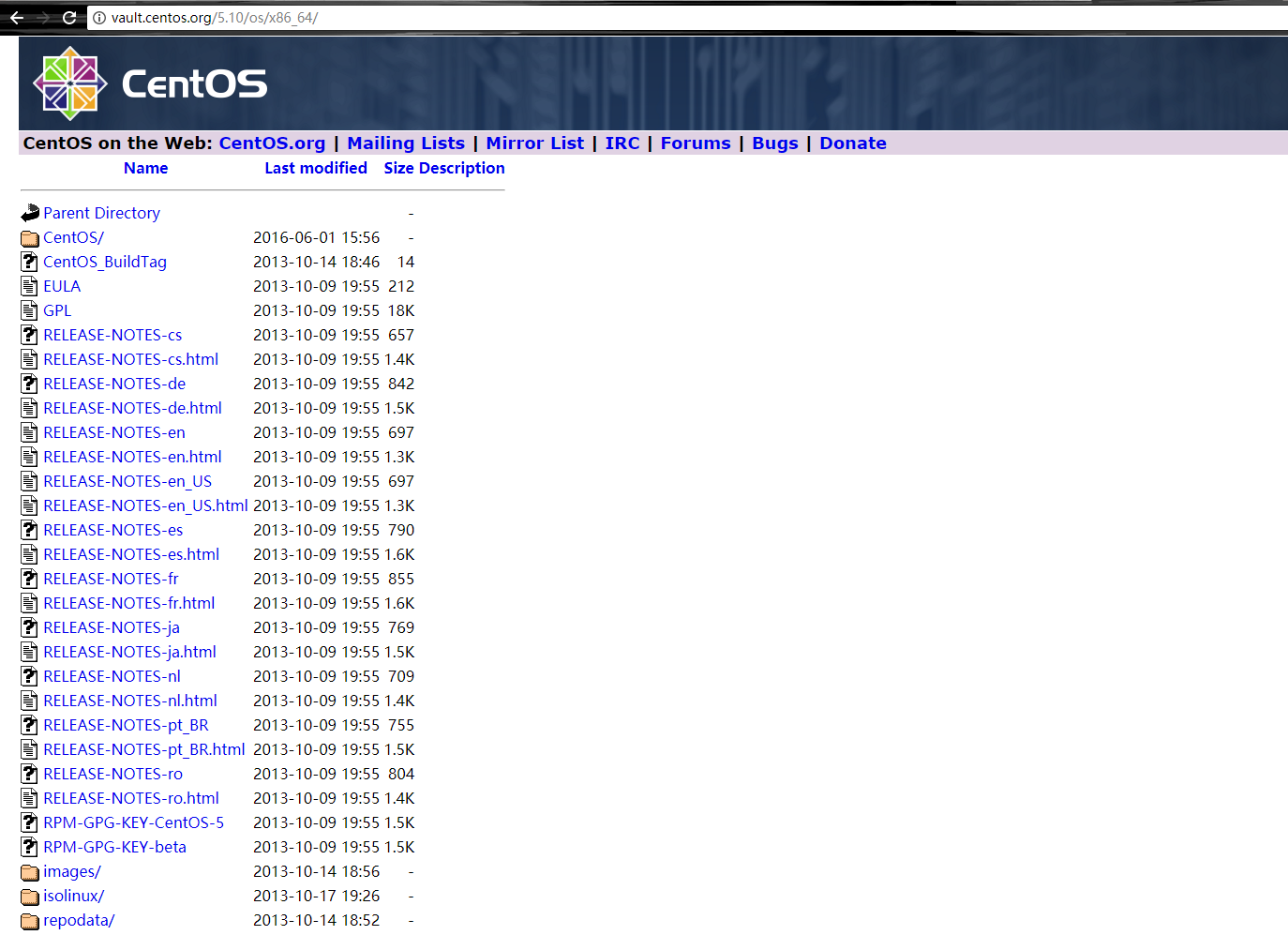
如果显示出上述页面,那根据我上面的5.11版本的Centos源把baseurl=http://vault.centos.org/5.11/os/x86_64/ 修改成 baseurl=http://vault.centos.org/5.10/os/x86_64/(是上述文件内容中,所有http://vault.centos.org/5.11/os/x86_64/地址),即可
修改完成后,保存,使用如下命令进行测试
yum clean all
yum makecache
测试成功后,可用yum进行安装、卸载软件
Centos5.11 使用yum源的更多相关文章
- centos6.4搭建基于ftp的yum源让本地局域网服务器使用
1. 挂载centos6.4 DVD镜像[root@centos64 ~]# mount /dev/cdrom /mnt 2. 安装vsftp软件,启动vsftpd服务,拷贝centos6.4 DVD ...
- 阿里云centos5升级yum源为6
升级后出现Errno -3] Error performing checksum 需要安装 python-hashlib Python 2.4 安装 hashlib 2012年11月13日 14:29 ...
- CentOS-5的yum源无法使用问题
CentOS-5的yum源无法使用问题 [root@37wan ~]# yum -y install gcc Loaded plugins: fastestmirror Determining fas ...
- CentOS修改各大yum源(centos5,centos6,centos7)
备份原配置文件 进入yum源配置目录: cd /etc/yum.repos.d 如果没有先安装wget: sudo yum install wget 修改yum源,就是修改CentOS-Base.re ...
- 建立自己的Yum源
转自http://kicklinux.com/setup-yum-repos-server/ 命令 reposync 可以直接同步yum源 如/etc/yum.repos.d/cloudera-cdh ...
- CentOS下建立本地YUM源并自动更新
1. 尽管有很多的免费镜像提供yum源服务,但是还是有必要建立自己的yum服务器,主要出于以下几点考虑: l 网络速度:访问互联网可能比较慢 l 节省带宽:如果有大量的服务器,架设自己的yum源可以有 ...
- redhat7 配置使用centos的yum源
新安装了redhat7.安装后,登录系统,使用yum update 更新系统.提示: This system is not registered to Red Hat Subscription Man ...
- 利用阿里云提供的镜像快速更换本地的yum源
打开网页:http://mirrors.aliyun.com/ 从“ 文件列表 ”找到自己的系统: Mirror Last update Help CPAN 2015-07-15 15:36:50 ...
- 配置yum源方法,以及失效时的处理
正常方法如下: step1: 备份原CentOS-Base.repo 文件 mv /etc/yum.repos.d/CentOS-Base.repo /etc/yum.repos.d/CentOS-B ...
随机推荐
- C++设计模式实现--策略(Strategy)模式
版权声明:本文为博主原创文章,未经博主同意不得转载. https://blog.csdn.net/L_Andy/article/details/30489331 一. 举例说明 曾经做了一个程序,程序 ...
- 解决Android Studio Fetching Android SDK component information失败问题【转】
本文转载自:http://blog.csdn.net/isesar/article/details/41908089 Android Studio 安装完成后,如果直接启动,Android Studi ...
- 小程序observer函数的应用
需求是这样的 就是构建月份的组件中,月份小于10月的时候 显示的数字都是一个位数,需要转换成两位数, 比如8月份是8 ,那就要转换为08 ,同理可得 其他低于十月份的月份也是要这样做: 打开组件的js ...
- 配置react+webpack+es6中的一些教训
1.要用es6,因为目前浏览器的支持情况,那么肯定需要插件将e6的代码转换成es5,我用的是babel-loader,事实证明使用6.x版本似乎是不行的,我换成5.3.2之后就成功了. 2.webpa ...
- linux命令学习笔记 : install 命令
install .作用 install命令的作用是安装或升级软件或备份数据,它的使用权限是所有用户. .格式 ()install [选项]... 来源 目的地 ()install [选项]... 来源 ...
- 并不对劲的loj3048:p5283:[十二省联考]异或粽子
题目大意 有\(n\)(\(n\leq5\times10^5\))个数\(a_1,a_2,...a_n\)(\(a_i\leq 2^{32}-1\)) 求区间异或和前\(k(k\leq2\times1 ...
- CTSC2012 熟悉的文章
传送门 首先很容易想到对于所有的模式串建出广义后缀自动机,之后对于我们每一个要检查的文本串,先在SAM上跑,计算出来每一个位置能匹配到的最远的位置是多少.(就是当前点减去匹配长度) 之后--考虑DP- ...
- codevs 1048石子归并
传送门 1048 石子归并 时间限制: 1 s 空间限制: 128000 KB 题目等级 : 黄金 Gold 题目描述 Description 有n堆石子排成一列,每堆石子有一个重量w[i], ...
- bzoj 3028 食物 —— 生成函数
题目:https://www.lydsy.com/JudgeOnline/problem.php?id=3028 式子很好推,详细可以看这篇博客:https://blog.csdn.net/wu_to ...
- HDU2844(多重部分和)
Coins Time Limit: 2000/1000 MS (Java/Others) Memory Limit: 32768/32768 K (Java/Others)Total Submi ...