
scrapy-splash抓取动态数据例子三
一、介绍
本例子用scrapy-splash抓取今日头条网站给定关键字抓取咨询信息。
给定关键字:打通;融合;电视
抓取信息内如下:
1、资讯标题
2、资讯链接
3、资讯时间
4、资讯来源
二、网站信息

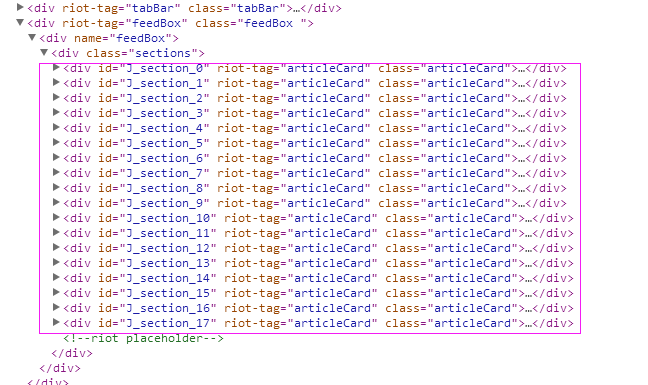


三、数据抓取
针对上面的网站信息,来进行抓取
1、首先抓取信息列表
抓取代码:sels = site.xpath('//div[@class="articleCard"]')
2、抓取标题
由于在抓取标题的时候,在列表页不太好抓取,所以就绕了一下直接每条资讯的链接页面来抓取标题
抓取代码:titles = sel.xpath('.//div[@class="doc-title"]/text()')
3、抓取链接
抓取代码:url = 'http://www.toutiao.com' + str(sel.xpath('.//a[@class="link title"]/@href')[0].extract())
4、抓取日期
抓取代码:dates = sel.xpath('.//span[@class="lbtn"]/text()')
5、抓取来源
抓取代码:source=str(sel.xpath('.//a[@class="lbtn source J_source"]/text()')[0].extract())
四、完整代码
1、toutiaoSpider
# -*- coding: utf-8 -*-

import scrapy

from scrapy import Request

from scrapy.spiders import Spider

from scrapy_splash import SplashRequest

from scrapy_splash import SplashMiddleware

from scrapy.http import Request, HtmlResponse

from scrapy.selector import Selector

from scrapy_splash import SplashRequest

from splash_test.items import SplashTestItem

import IniFile

import sys

import os

import re

import time

reload(sys)

sys.setdefaultencoding('utf-8')

# sys.stdout = open('output.txt', 'w')

class toutiaoSpider(Spider):

    name = 'toutiao'

    configfile = os.path.join(os.getcwd(), 'splash_test\spiders\setting.conf')

    cf = IniFile.ConfigFile(configfile)

    information_keywords = cf.GetValue("section", "information_keywords")

    information_wordlist = information_keywords.split(';')

    websearchurl = cf.GetValue("toutiao", "websearchurl")

    start_urls = []

    for word in information_wordlist:

        start_urls.append(websearchurl + word)

    # request需要封装成SplashRequest

    def start_requests(self):

        for url in self.start_urls:

            index = url.rfind('=')

            yield SplashRequest(url

                                , self.parse

                                , args={'wait': ''},

                                meta={'keyword': url[index + 1:]}

                                )

    def date_isValid(self, strDateText):

        '''

        判断日期时间字符串是否合法:如果给定时间大于当前时间是合法,或者说当前时间给定的范围内

        :param strDateText: 四种格式 '2小时前'; '2天前' ; '昨天' ;'2017.2.12 '

        :return: True:合法;False:不合法

        '''

        currentDate = time.strftime('%Y-%m-%d')

        if strDateText.find('分钟前') > 0 or strDateText.find('刚刚') > -1:

            return True, currentDate

        elif strDateText.find('小时前') > 0:

            datePattern = re.compile(r'\d{1,2}')

            ch = int(time.strftime('%H'))  # 当前小时数

            strDate = re.findall(datePattern, strDateText)

            if len(strDate) == 1:

                if int(strDate[0]) <= ch:  # 只有小于当前小时数,才认为是今天

                    return True, currentDate

        return False, ''

    def parse(self, response):

        site = Selector(response)

        # it_list = []

        keyword = response.meta['keyword']

        sels = site.xpath('//div[@class="articleCard"]')

        for sel in sels:

            dates = sel.xpath('.//span[@class="lbtn"]/text()')

            if len(dates) > 0:

                flag, date = self.date_isValid(dates[0].extract())

                if flag:

                    url = 'http://www.toutiao.com' + str(sel.xpath('.//a[@class="link title"]/@href')[0].extract())

                    source=str(sel.xpath('.//a[@class="lbtn source J_source"]/text()')[0].extract())

                    yield SplashRequest(url

                                        , self.parse_item

                                        , args={'wait': ''},

                                        meta={'date': date, 'url': url,

                                              'keyword': keyword, 'source': source}

                                        )

    def parse_item(self, response):

        site = Selector(response)

        it = SplashTestItem()

        titles = site.xpath('//h1[@class="article-title"]/text()')

        count = 0

        if len(titles) > 0:

            keyword = response.meta['keyword']

            strtiltle = str(titles[0].extract())

            if strtiltle.find(keyword) > -1:

                it['title'] = strtiltle

                it['url'] = response.meta['url']

                it['date'] = response.meta['date']

                it['keyword'] = keyword

                it['source'] = response.meta['source']

                return it
2、SplashTestItem
# -*- coding: utf-8 -*-

# Define here the models for your scraped items

#

# See documentation in:

# http://doc.scrapy.org/en/latest/topics/items.html

import scrapy

class SplashTestItem(scrapy.Item):

    #标题

    title = scrapy.Field()

    #日期

    date = scrapy.Field()

    #链接

    url = scrapy.Field()

    #关键字

    keyword  = scrapy.Field()

    #来源网站

    source =  scrapy.Field()
3、SplashTestPipeline
# -*- coding: utf-8 -*-

# Define your item pipelines here

#

# Don't forget to add your pipeline to the ITEM_PIPELINES setting

# See: http://doc.scrapy.org/en/latest/topics/item-pipeline.html

import codecs

import json

class SplashTestPipeline(object):

    def __init__(self):

        # self.file = open('data.json', 'wb')

        self.file = codecs.open(

            'spider.txt', 'w', encoding='utf-8')

        # self.file = codecs.open(

        #     'spider.json', 'w', encoding='utf-8')

    def process_item(self, item, spider):

        line = json.dumps(dict(item), ensure_ascii=False) + "\n"

        self.file.write(line)

        return item

    def spider_closed(self, spider):

        self.file.close()
4、setting.conf
iedriverserver = C:\Program Files\Internet Explorer\IEDriverServer.exe

meeting_keywords = 互联网电视;智能电视;数字;影音;家庭娱乐;节目;视听;版权;数据

information_keywords = 电视;数字电视;OTT;节目内容;盒子;智能推荐;个性化;视频;影音;跨屏;融合;打通;多平台

#information_keywords = 电视;OTT

invalid_day = 4

nexturllabel = 下一页

timesleep = 3

[toutiao]

websearchurl = http://www.toutiao.com/search/?keyword=
scrapy-splash抓取动态数据例子三的更多相关文章
- scrapy-splash抓取动态数据例子一
目前,为了加速页面的加载速度,页面的很多部分都是用JS生成的,而对于用scrapy爬虫来说就是一个很大的问题,因为scrapy没有JS engine,所以爬取的都是静态页面,对于JS生成的动态页面都无 ...
- scrapy-splash抓取动态数据例子八
一.介绍 本例子用scrapy-splash抓取界面网站给定关键字抓取咨询信息. 给定关键字:个性化:融合:电视 抓取信息内如下: 1.资讯标题 2.资讯链接 3.资讯时间 4.资讯来源 二.网站信息 ...
- scrapy-splash抓取动态数据例子七
一.介绍 本例子用scrapy-splash抓取36氪网站给定关键字抓取咨询信息. 给定关键字:个性化:融合:电视 抓取信息内如下: 1.资讯标题 2.资讯链接 3.资讯时间 4.资讯来源 二.网站信 ...
- scrapy-splash抓取动态数据例子六
一.介绍 本例子用scrapy-splash抓取中广互联网站给定关键字抓取咨询信息. 给定关键字:打通:融合:电视 抓取信息内如下: 1.资讯标题 2.资讯链接 3.资讯时间 4.资讯来源 二.网站信 ...
- scrapy-splash抓取动态数据例子五
一.介绍 本例子用scrapy-splash抓取智能电视网网站给定关键字抓取咨询信息. 给定关键字:打通:融合:电视 抓取信息内如下: 1.资讯标题 2.资讯链接 3.资讯时间 4.资讯来源 二.网站 ...
- scrapy-splash抓取动态数据例子四
一.介绍 本例子用scrapy-splash抓取微众圈网站给定关键字抓取咨询信息. 给定关键字:打通:融合:电视 抓取信息内如下: 1.资讯标题 2.资讯链接 3.资讯时间 4.资讯来源 二.网站信息 ...
- scrapy-splash抓取动态数据例子二
一.介绍 本例子用scrapy-splash抓取一点资讯网站给定关键字抓取咨询信息. 给定关键字:打通:融合:电视 抓取信息内如下: 1.资讯标题 2.资讯链接 3.资讯时间 4.资讯来源 二.网站信 ...
- scrapy-splash抓取动态数据例子十六
一.介绍 本例子用scrapy-splash爬取梅花网(http://www.meihua.info/a/list/today)的资讯信息,输入给定关键字抓取微信资讯信息. 给定关键字:数字:融合:电 ...
- scrapy-splash抓取动态数据例子十五
一.介绍 本例子用scrapy-splash爬取电视之家(http://www.tvhome.com/news/)网站的资讯信息,输入给定关键字抓取微信资讯信息. 给定关键字:数字:融合:电视 抓取信 ...
随机推荐
- [Android] 按钮单击事件的五种写法
在平时学习安卓的过程中,不论是看视频还是看博客,我发现每个人对代码的写法都有不同的偏好,比较明显的就是对控件响应事件的写法的不同.所以我想把这些写法总结一下,比较下各种写法的优劣,希望可以让自己可以灵 ...
- .NET 二进制序列化器,SOAP序列化器,XML序列化器
这里就不说JSON序列化了,只介绍三种:二进制序列化器,SOAP序列化器,XML序列化器 直接上代码: /// <summary> /// 二进制序列化器. /// 最节省流量,压缩程度最 ...
- Docker 常用命令收集
查看Docker版本 docker version 查看 Image docker images 打包 Image docker save -o ‘packageName.tar’ ‘imageNam ...
- CSS让文字在元素内绝对居中!!!【ie和谷歌】
<!DOCTYPE html> <html lang="en"> <head> <meta charset="UTF-8&quo ...
- Ubuntu 16.04 LTS安装Docker并使用加速器
参考优酷:http://v.youku.com/v_show/id_XMTkxOTYwODcxNg==.html?spm=a2h0k.8191407.0.0&from=s1.8-1-1.2 首 ...
- str 编码
你需要的是让编码用实际编码而不是 ascii 1 对需要 str->unicode 的代码,可以在前边写上 import sys reload(sys) sys.setdefault ...
- Python开发基础-Day18继承派生、组合、接口和抽象类
类的继承与派生 经典类和新式类 在python3中,所有类默认继承object,但凡是继承了object类的子类,以及该子类的子类,都称为新式类(在python3中所有的类都是新式类) 没有继承obj ...
- 安卓 内存 泄漏 工具 LeakCanary 使用
韩梦飞沙 yue31313 韩亚飞 han_meng_fei_sha 313134555@qq.com LeakCanary是Square开源了一个内存泄露自动探测神器 .这是项目的github仓库地 ...
- BZOJ 2789 letters(树状数组)
[题目链接] http://www.lydsy.com/JudgeOnline/problem.php?id=2789 [题目大意] 给出两个字符串,通过A字符串相邻之间字符的交换得到B字符串, 求最 ...
- 【计算几何】【圆反演】计蒜客17314 2017 ACM-ICPC 亚洲区(南宁赛区)网络赛 G. Finding the Radius for an Inserted Circle
题意:给你三个半径相同的圆,它们切在一起,然后让你往缝里一个一个地塞圆,问你塞到第k个的半径是多少. 就把上面那两个圆的切点当成反演中心,然后会反演成这个样子,两个平行直线和一个圆. 然后就是往那个圆 ...