
9.2 翻译系列:数据注解特性之---Column【EF 6 Code First系列】
EF 6 Code-First系列文章目录:
- 1 翻译系列:什么是Code First(EF 6 Code First 系列)
- 2.翻译系列:为EF Code-First设置开发环境(EF 6 Code-First系列)
- 3.翻译系列:EF Code-First 示例(EF 6 Code-First系列)
- 4.翻译系列:EF 6 Code-First默认约定(EF 6 Code-First系列)
- 5.翻译系列:EF 6中数据库的初始化(EF 6 Code-First 系列)
- 6.翻译系列:EF 6 Code-First中数据库初始化策略(EF 6 Code-First系列
- 7.翻译系列:EF 6中的继承策略(EF 6 Code-First 系列)
- 8.翻译系列: EF 6中配置领域类(EF 6 Code-First 系列)
- 9.翻译系列:EF 6以及EF Core中的数据注解特性(EF 6 Code-First系列)
- 9.1 翻译系列:数据注解特性之----Table【EF 6 Code-First 系列】
- 9.2 翻译系列:数据注解特性之---Column【EF 6 Code First系列】
- 9.3 翻译系列:数据注解特性之Key【EF 6 Code-First 系列】
- 9.4 翻译系列:EF 6以及 EF Core中的NotMapped特性(EF 6 Code-First系列)
- 9.5 翻译系列:数据注解之ForeignKey特性【EF 6 Code-First系列】
- 9.6 翻译系列:数据注解之Index特性【EF 6 Code-First系列】
- 9.7 翻译系列:EF数据注解特性之--InverseProperty【EF 6 Code-First系列】
- 9.8 翻译系列:数据注解特性之--Required 【EF 6 Code-First系列】
- 9.9 翻译系列:数据注解特性之--MaxLength 【EF 6 Code-First系列】
- 9.10 翻译系列:EF数据注解特性之StringLength【EF 6 Code-First系列】
- 9.11 翻译系列:数据注解特性之--Timestamp【EF 6 Code-First系列】
- 9.12 翻译系列:数据注解特性之ConcurrencyCheck【EF 6 Code-First系列】
- 10.翻译系列:EF 6中的Fluent API配置【EF 6 Code-First系列】
- 10.1.翻译系列:EF 6中的实体映射【EF 6 Code-First系列】
- 10.2.翻译系列:使用Fluent API进行属性映射【EF 6 Code-First】
- 11.翻译系列:在EF 6中配置一对零或者一对一的关系【EF 6 Code-First系列】
- 12.翻译系列:EF 6 中配置一对多的关系【EF 6 Code-First系列】
- 13.翻译系列:Code-First方式配置多对多关系【EF 6 Code-First系列】
- 14.翻译系列:从已经存在的数据库中生成上下文类和实体类【EF 6 Code-First系列】
- 15.翻译系列:EF 6中的级联删除【EF 6 Code-First 系列】
- 16.翻译系列:EF 6 Code -First中使用存储过程【EF 6 Code-First系列】
- 17.翻译系列:将Fluent API的配置迁移到单独的类中【EF 6 Code-First系列】
- 18.翻译系列:EF 6 Code-First 中的Seed Data(种子数据或原始测试数据)【EF 6 Code-First系列】
- 19.翻译系列:EF 6中定义自定义的约定【EF 6 Code-First约定】
- 20.翻译系列:Code-First中的数据库迁移技术【EF 6 Code-First系列】
- 20.1翻译系列:EF 6中自动数据迁移技术【EF 6 Code-First系列】
- 20.2.翻译系列:EF 6中基于代码的数据库迁移技术【EF 6 Code-First系列】
- 21.翻译系列:Entity Framework 6 Power Tools【EF 6 Code-First系列】
Column特性,可以应用于实体的一个或者多个属性上面,用来配置数据库中数据表中列的列名、列的数据类型以及列的先后顺序。Column特性重写了默认的约定。按照EF 6和EF Core中的默认约定,将会创建和属性相同的列名称,并且数据表,列的顺序和实体中属性的顺序一致。
Column Attribute: [Column (string name, Properties:[Order = int],[TypeName = string])
name:表的数据列的名称
Order:列的顺序,从索引0开始【可选的】
TypeName:列的类型名称【可选的】
下面的例子,改变了一个列的名称:
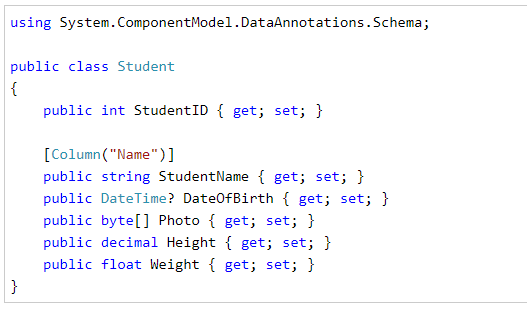
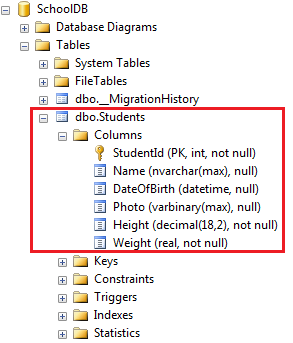
在上面的例子中,我们在StudentName属性上应用Column特性,所以EF将会重写默认约定,为我们创建一个名称为Name的数据列,而不是StudentName数据列:
列的数据类型
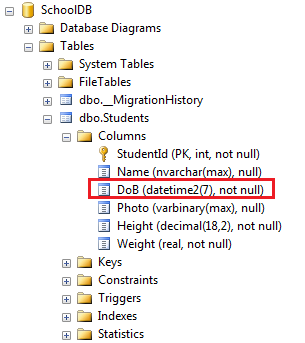
可以使用Column特性中的TypeName参数,来指定列的数据类型,如下:

在上面的例子中,我们在DataOfBirth属性上,设置了TypeName参数值为DataTime2,然后就会为我们生成类型为DataTime2的列,而不是DateTime类型的列。
列的先后顺序
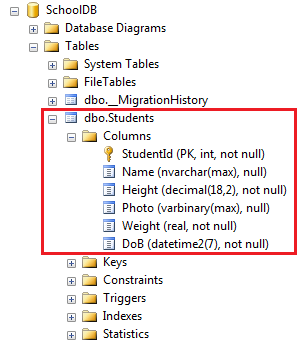
使用从索引0开始的Order参数,来设置数据库中列的顺序。按照默认约定,主键列会是第一个,然后其他的列的顺序,就是基于属性在实体中的先后顺序了。
注意:Order参数必须要应用在实体的所有属性上面,并且索引数不能有一样的,索引从0开始。

上面的例子,将会在数据库中,生成这样的顺序的列:
好了,理论介绍完了,我们何不动手实践一下?
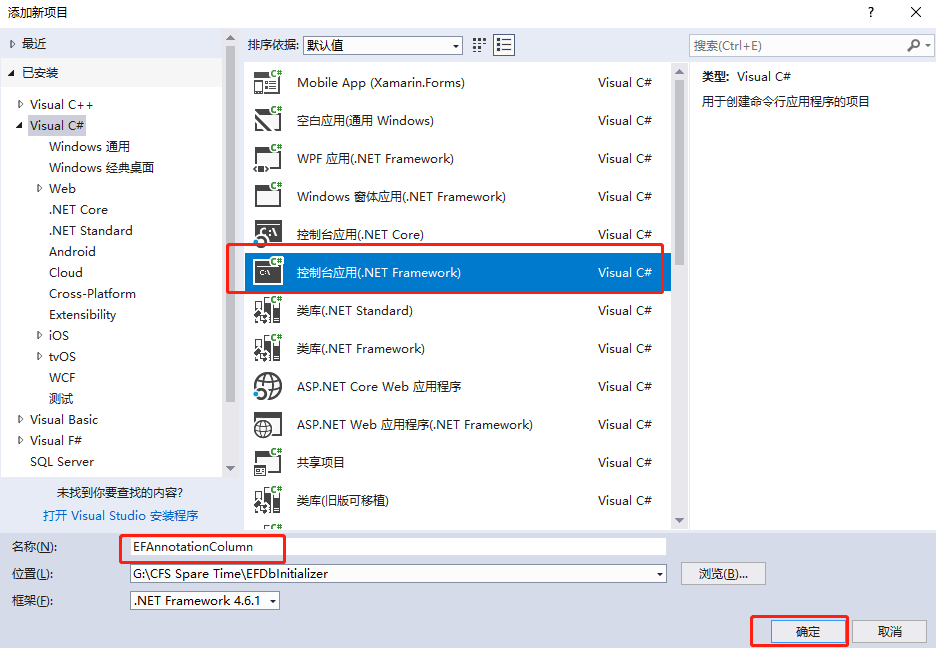
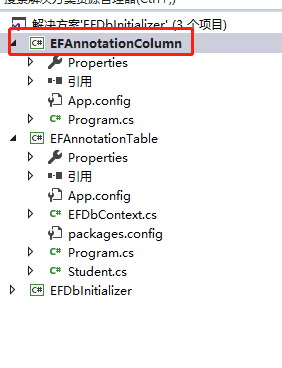
1.创建一个名称为EFAnnotationColumn的控制台应用程序。
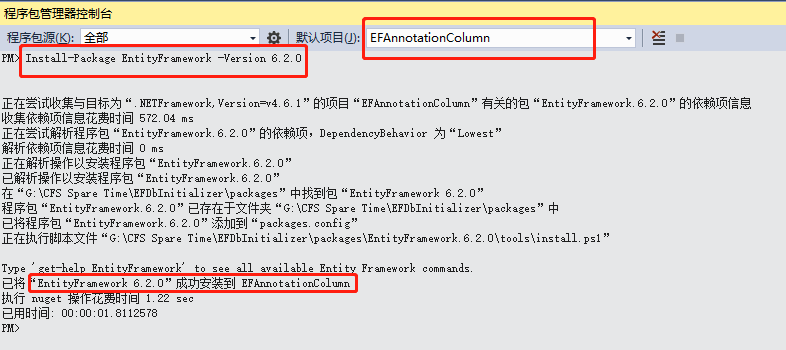
2.安装EF【Install-Package EntityFramework -Version 6.2.0】
3.创建一个Book类:
 public class Book

    {

        public int BookID { get; set; }

        public string BookName { get; set; }

        public string AuthorName { get; set; }

        public DateTime PublishedDate { get; set; }

        public decimal Price { get; set; }

    }
4.创建一个上下文类:BookContext
public class BookContext:DbContext

    {

        public BookContext():base("name=Constr")

        {

            Database.SetInitializer<BookContext>(new DropCreateDatabaseAlways<BookContext>());

        }

        public DbSet<Book> Books { get; set; }

    }
5.SQL连接字符串:
  <connectionStrings>

    <add name="Constr" connectionString="Server=.;Database=EFAnnotationColumnDB;uid=sa;pwd=Password_1" providerName="System.Data.SqlClient"/>

  </connectionStrings>
6.测试代码:
  class Program

    {

        static void Main(string[] args)

        {

            using (var db = new BookContext())

            {

                Book bookModel = new Book()

                {

                    BookName = "西游记",

                    AuthorName = "吴承恩",

                    PublishedDate = DateTime.Now.AddYears(-),

                    Price=109.99M

                };

                db.Entry(bookModel).State = System.Data.Entity.EntityState.Added;

                db.SaveChanges();

            }

            Console.WriteLine("添加数据成功");

            Console.ReadKey();

        }

    }
运行代码:

我们看看数据库:
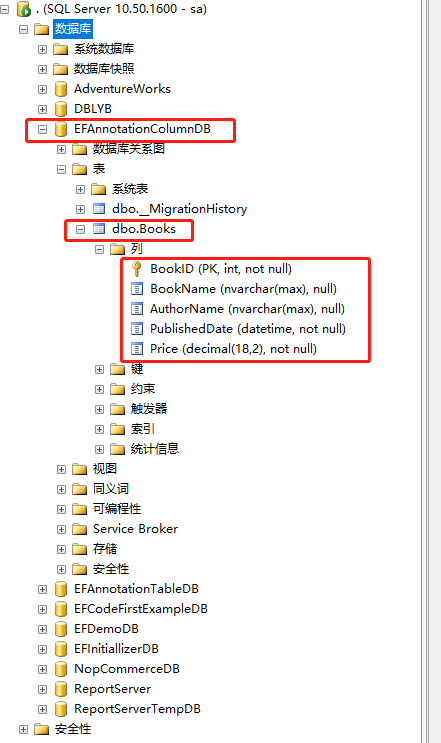
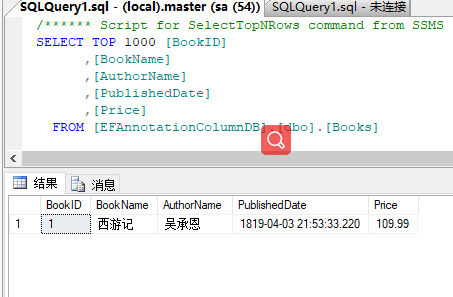
可以看到默认约定,为我们生成了数据库以及数据表Books,列的顺序就和实体中属性先后顺序一样。
我们来修改一下Book实体:
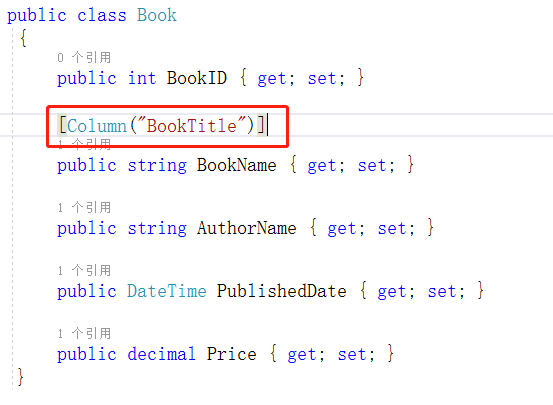
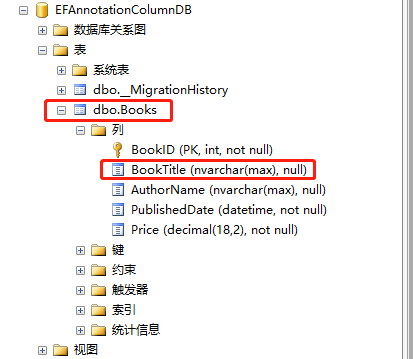
然后运行项目:可以看到BookName字段名称,经过配置,生成了名称为BookTitle列。
我们再修改一下Book实体:
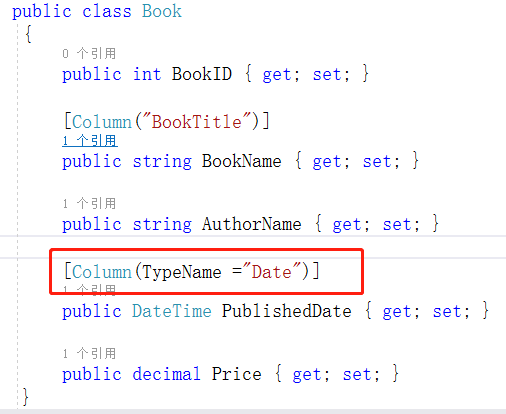
接着运行程序;看到PublishedDate列的数据类型成了我们配置的Date。
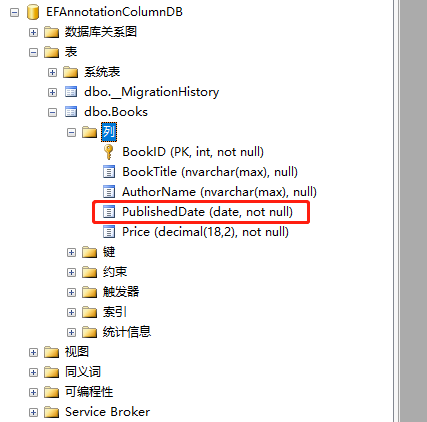
再修改一下Book实体:
 public class Book

    {

        [Column(Order =3)]

        public int BookID { get; set; }

        [Column("BookTitle",Order =4)]

        public string BookName { get; set; }

        [Column(Order =1)]

        public string AuthorName { get; set; }

        [Column(TypeName ="Date",Order =0)]

        public DateTime PublishedDate { get; set; }

        [Column(Order =2)]

        public decimal Price { get; set; }

    }
我们使用数据注解,配置列的顺序是:PublishedDate -->AuthorName-->Price-->BookID-->BookName.那么实际上是不是这样呢,我们运行项目:
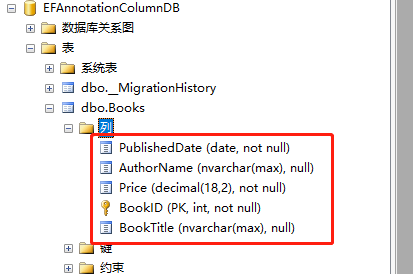
可以看到,列的顺序就是按照我们配置的这样。
有个疑问,上面说到,配置列的顺序的时候,必须对所有的列,都应用于Column的Order参数。我们来看看一个反例:
修改Book实体:
 public class Book

    {

        [Column(Order =)]

        public int BookID { get; set; }

        public string BookName { get; set; }

        [Column(Order =)]

        public string AuthorName { get; set; }

        [Column(TypeName ="Date",Order =)]

        public DateTime PublishedDate { get; set; }

        public decimal Price { get; set; }

    }
上面我们移除了BookName属性和Price属性的Column特性,没有设置Order。我们运行看看:
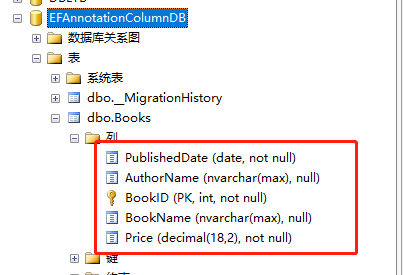
可以看到,EF是按照有设置Order参数的顺序来的,第一个是索引为0 的PublishedDate,第二个是索引为1的AuthorName,第三个就是索引为3的BookID了,然后后面两个就是按照他们在实体中的顺序来的了。
我们再改一下,只对一个属性设置Order,看看:
public int BookID { get; set; }
public string BookName { get; set; }
public string AuthorName { get; set; }
public DateTime PublishedDate { get; set; }
[Column(Order = 3)]
public decimal Price { get; set; }
上面代码,只对Price属性设置了Order,索引为3,我们运行看看:【可以看到Price成为了第一个列,排在最前面,然后后面的列的顺序,就是按照属性在实体中的先后顺序了。】
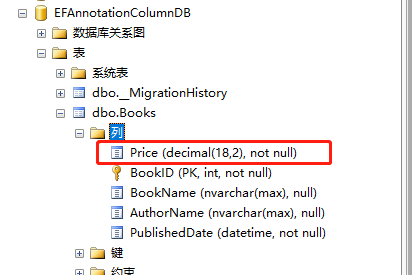
好了,这篇文章就介绍完了,主要讲解了数据注解特性之---Column,值得注意的是,当配置列的顺序的时候,必须对所有的列都应用于Column特性中的Order参数标记,索引从0开始,切记!!!
9.2 翻译系列:数据注解特性之---Column【EF 6 Code First系列】的更多相关文章
- 9.10 翻译系列:EF数据注解特性之StringLength【EF 6 Code-First系列】
原文链接:https://www.entityframeworktutorial.net/code-first/stringlength-dataannotations-attribute-in-co ...
- 9.9 翻译系列:数据注解特性之--MaxLength 【EF 6 Code-First系列】
原文链接:https://www.entityframeworktutorial.net/code-first/maxlength-minlength-dataannotations-attribut ...
- 9.7 翻译系列:EF数据注解特性之--InverseProperty【EF 6 Code-First系列】
原文链接:https://www.entityframeworktutorial.net/code-first/inverseproperty-dataannotations-attribute-in ...
- 9.3 翻译系列:数据注解特性之Key【EF 6 Code-First 系列】
原文链接:http://www.entityframeworktutorial.net/code-first/key-dataannotations-attribute-in-code-first.a ...
- 9.翻译系列:EF 6以及EF Core中的数据注解特性(EF 6 Code-First系列)
原文地址:http://www.entityframeworktutorial.net/code-first/dataannotation-in-code-first.aspx EF 6 Code-F ...
- 9.1 翻译系列:数据注解特性之----Table【EF 6 Code-First 系列】
原文地址:http://www.entityframeworktutorial.net/code-first/table-dataannotations-attribute-in-code-first ...
- 9.5 翻译系列:数据注解之ForeignKey特性【EF 6 Code-First系列】
原文链接:https://www.entityframeworktutorial.net/code-first/foreignkey-dataannotations-attribute-in-code ...
- 9.6 翻译系列:数据注解之Index特性【EF 6 Code-First系列】
原文链接:https://www.entityframeworktutorial.net/entityframework6/index-attribute-in-code-first.aspx EF ...
- 9.8 翻译系列:数据注解特性之--Required 【EF 6 Code-First系列】
原文链接:https://www.entityframeworktutorial.net/code-first/required-attribute-dataannotations-in-code-f ...
随机推荐
- activemq 的那些事1
#关于事务: activemq 遇到的不能消息确认的问题. Session session = connection.createSession(Boolean.FALSE, Session.AU ...
- windows下Mysql8.0.12安装详解
MySQL的安装过程还是比较繁琐,为了以后安装节约时间,将其详细安装过程总结如下: 1>下载对应版本 下载地址:https://dev.mysql.com/downloads/mysql/ 2& ...
- 笔记:MYSQL四种事务隔离级。
1·未提交读(Read Uncommitted):允许脏读,也就是可能读取到其他会话中未提交事务修改的数据 脏读: 脏读就是指当一个事务正在访问数据,并且对数据进行了修改,而这种修改还没有提交到数据库 ...
- html迪士尼网页实现代码
html body> <div> <!-- 导航设置 --> <header> <nav ...
- k8s之创建etcd集群
主机规划 maste01——192.168.10.63 master02——192.168.10.64 node01——192.168.10.65 node02——192.168.10.66 1.为保 ...
- MyBatis :Insert (返回主键、批量插入)
一.前言 数据库操作怎能少了INSERT操作呢?下面记录MyBatis关于INSERT操作的笔记,以便日后查阅. 二.insert元素 属性详解 其属性如下: parameterType , ...
- elasticsearch 动态增加副本
动态调整副本数 PUT /ptt-new-2018-11/_settings{ "number_of_replicas": 2} 重建索引, 增加节点后要重建索引. 日志报错为网络 ...
- 113. Path Sum II 输出每个具体路径
[抄题]: Given a binary tree and a sum, find all root-to-leaf paths where each path's sum equals the gi ...
- SD
Offer(Tcode:VA23;Table: vbak and vbap) billing(Tcode:VF03;Table:vbrk and vbrp) Offer(quotation)-> ...
- [leetcode]57. Insert Interval插入区间
Given a set of non-overlapping intervals, insert a new interval into the intervals (merge if necessa ...