
9.1 翻译系列:数据注解特性之----Table【EF 6 Code-First 系列】
原文地址:http://www.entityframeworktutorial.net/code-first/table-dataannotations-attribute-in-code-first.aspx
EF 6 Code-First系列文章目录:
- 1 翻译系列:什么是Code First(EF 6 Code First 系列)
- 2.翻译系列:为EF Code-First设置开发环境(EF 6 Code-First系列)
- 3.翻译系列:EF Code-First 示例(EF 6 Code-First系列)
- 4.翻译系列:EF 6 Code-First默认约定(EF 6 Code-First系列)
- 5.翻译系列:EF 6中数据库的初始化(EF 6 Code-First 系列)
- 6.翻译系列:EF 6 Code-First中数据库初始化策略(EF 6 Code-First系列
- 7.翻译系列:EF 6中的继承策略(EF 6 Code-First 系列)
- 8.翻译系列: EF 6中配置领域类(EF 6 Code-First 系列)
- 9.翻译系列:EF 6以及EF Core中的数据注解特性(EF 6 Code-First系列)
- 9.1 翻译系列:数据注解特性之----Table【EF 6 Code-First 系列】
- 9.2 翻译系列:数据注解特性之---Column【EF 6 Code First系列】
- 9.3 翻译系列:数据注解特性之Key【EF 6 Code-First 系列】
- 9.4 翻译系列:EF 6以及 EF Core中的NotMapped特性(EF 6 Code-First系列)
- 9.5 翻译系列:数据注解之ForeignKey特性【EF 6 Code-First系列】
- 9.6 翻译系列:数据注解之Index特性【EF 6 Code-First系列】
- 9.7 翻译系列:EF数据注解特性之--InverseProperty【EF 6 Code-First系列】
- 9.8 翻译系列:数据注解特性之--Required 【EF 6 Code-First系列】
- 9.9 翻译系列:数据注解特性之--MaxLength 【EF 6 Code-First系列】
- 9.10 翻译系列:EF数据注解特性之StringLength【EF 6 Code-First系列】
- 9.11 翻译系列:数据注解特性之--Timestamp【EF 6 Code-First系列】
- 9.12 翻译系列:数据注解特性之ConcurrencyCheck【EF 6 Code-First系列】
- 10.翻译系列:EF 6中的Fluent API配置【EF 6 Code-First系列】
- 10.1.翻译系列:EF 6中的实体映射【EF 6 Code-First系列】
- 10.2.翻译系列:使用Fluent API进行属性映射【EF 6 Code-First】
- 11.翻译系列:在EF 6中配置一对零或者一对一的关系【EF 6 Code-First系列】
- 12.翻译系列:EF 6 中配置一对多的关系【EF 6 Code-First系列】
- 13.翻译系列:Code-First方式配置多对多关系【EF 6 Code-First系列】
- 14.翻译系列:从已经存在的数据库中生成上下文类和实体类【EF 6 Code-First系列】
- 15.翻译系列:EF 6中的级联删除【EF 6 Code-First 系列】
- 16.翻译系列:EF 6 Code -First中使用存储过程【EF 6 Code-First系列】
- 17.翻译系列:将Fluent API的配置迁移到单独的类中【EF 6 Code-First系列】
- 18.翻译系列:EF 6 Code-First 中的Seed Data(种子数据或原始测试数据)【EF 6 Code-First系列】
- 19.翻译系列:EF 6中定义自定义的约定【EF 6 Code-First约定】
- 20.翻译系列:Code-First中的数据库迁移技术【EF 6 Code-First系列】
- 20.1翻译系列:EF 6中自动数据迁移技术【EF 6 Code-First系列】
- 20.2.翻译系列:EF 6中基于代码的数据库迁移技术【EF 6 Code-First系列】
- 21.翻译系列:Entity Framework 6 Power Tools【EF 6 Code-First系列】
Table特性可以应用于一个领域类上面,用来在数据库中生成相应名称的数据表。它重写了EF 6和 EF Code 中默认的约定,根据默认约定,EF 6和EF Core创建的表的名称是实体名称+s(或者es),并且创建的数据表的列名称和实体属性名称一样。
Table Attribute: [Table(string name, Properties:[Schema = string])
name:数据表的名称
Schema:数据库的模式名称【可选的】

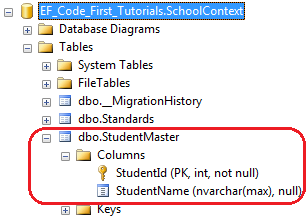
在上面的例子中,Table特性应用于Student实体上。所以,EF将会重写默认的约定,并且创建名称为StudentMaster的数据表,而不是名称为Students的数据表,例如:
使用Schema 属性来指定数据表的模式名称:

EF将会创建StudentMaster表,并且指定表的模式名为Admin:

好了,理论介绍完了,我们动手实践一下:
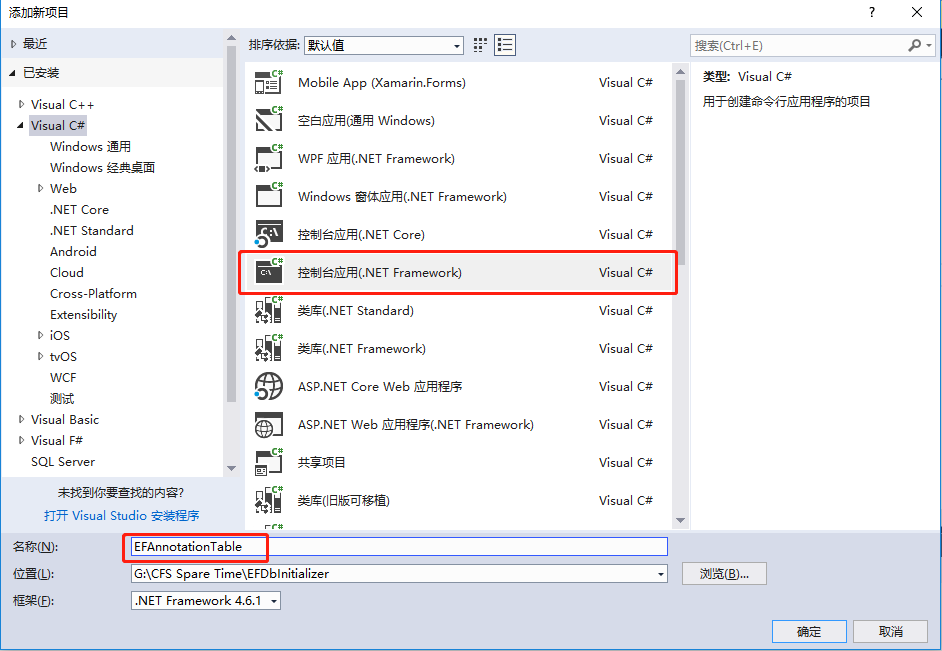
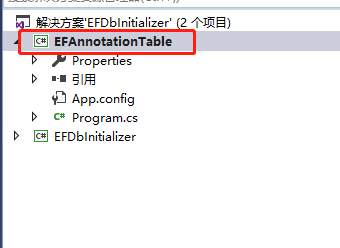
1.创建一个控制台应用程序,名称为:EFAnnotationTable
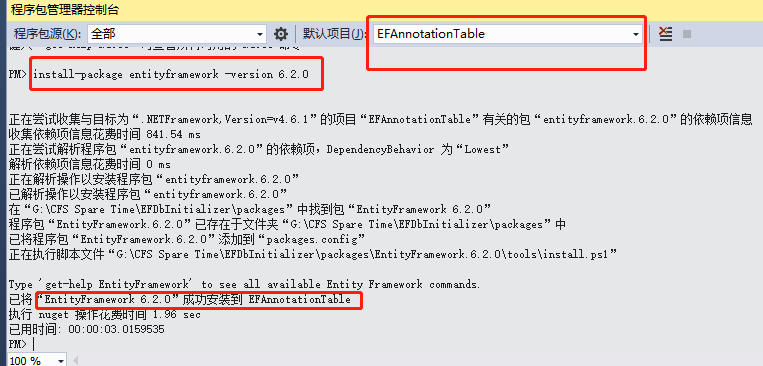
2.安装EF:【install-package entityframework -version 6.2.0】
3. 创建一个Student类:
 public class Student

    {

        public int StudentID { get; set; }

        public string Name { get; set; }

        public int Age { get; set; }

        public string Email { get; set; }

    }
4.创建一个上下文类EFDbContext:【base中的name=后面名称要和SQL连接字符串名称一样。】
public class EFDbContext:DbContext

    {

        public EFDbContext() : base("name=Constr")

        {

        }

        public DbSet<Student> StudentTable { get; set; }

    }
5.配置文件中配置连接字符串:
 <connectionStrings>

    <add name="Constr" connectionString="Server=.;Database=EFAnnotationTableDB;uid=sa;pwd=Password_1" providerName="System.Data.SqlClient"/>

  </connectionStrings>
6.测试程序:
 class Program

    {

        static void Main(string[] args)

        {

            using (var db = new EFDbContext())

            {

               List<Student> lstStuModel= db.StudentTable.ToList();

            }

            Console.WriteLine("success");

            Console.ReadKey();

        }

    }
运行程序:【出现success字样,说明已经生成数据库和数据表成功了!】
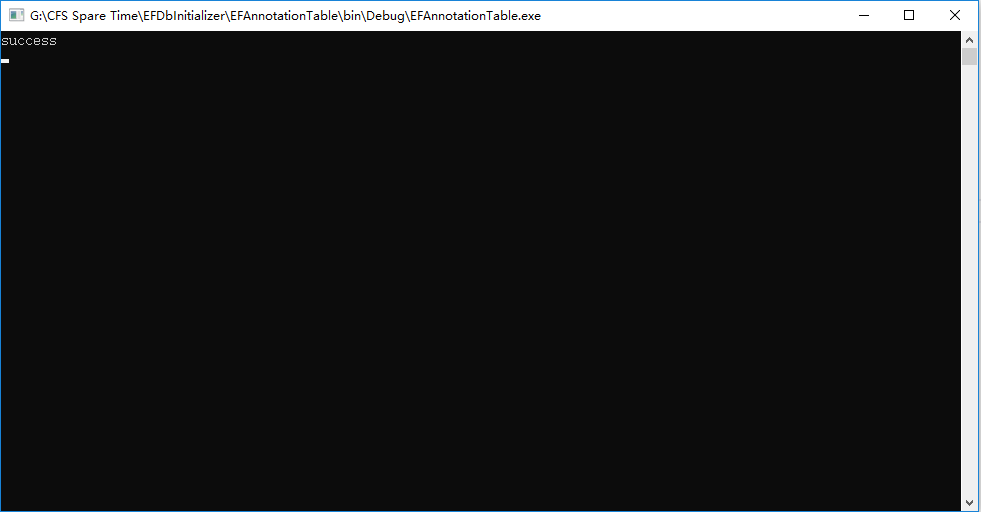
我们看一下数据库:
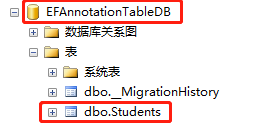
这就是EF默认为我们生成的数据表,可以看到,表名称默认是实体名称+s后缀。
现在我们使用数据注解:修改一下Student实体:
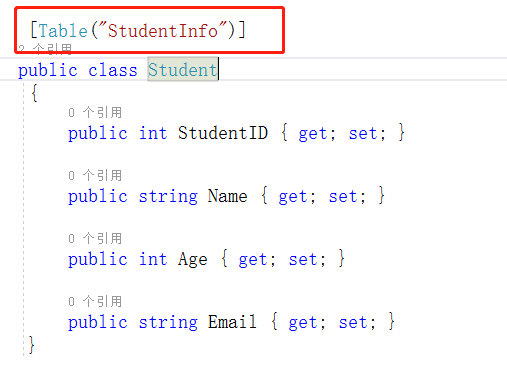
运行之前,我们需要先手动删除一下刚才生成的数据库和数据表。因为这里我没有启用数据库迁移技术。
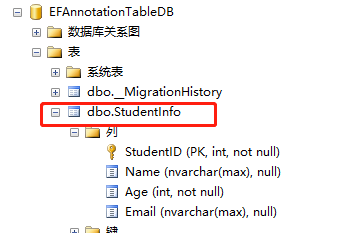
可以看到生成的表名是:StudentInfo了。现在我们使用数据注解,指定一下表的模式名称:
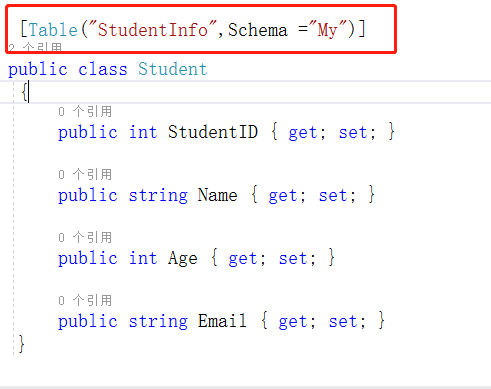
算了,我还是修改一下代码:免得每次测试都要手动删除数据库。【PS:这里直接运行就会报下图错误:】

我们改一下:上下文类的代码,
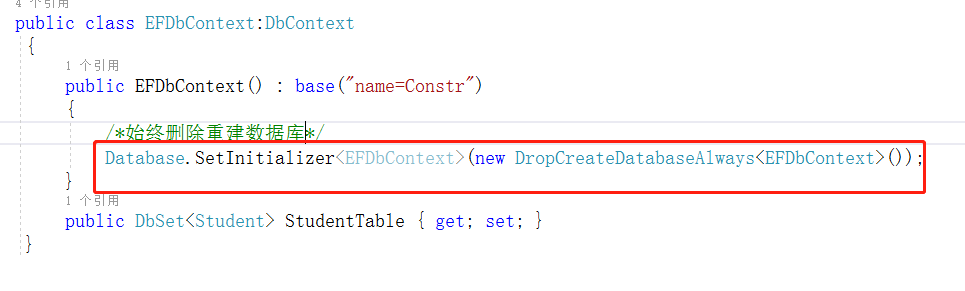
然后运行:
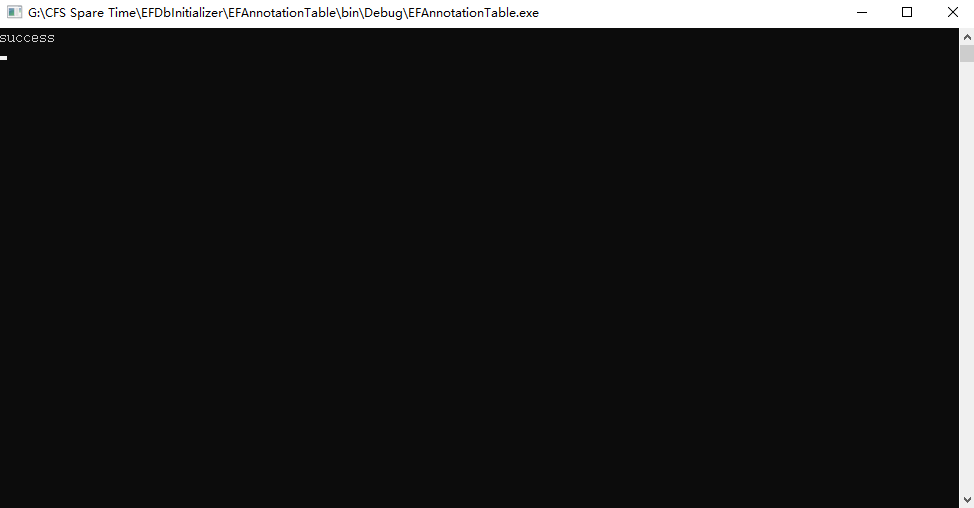
成功了,我们看下数据库:
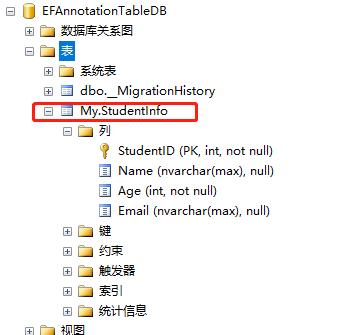
看到了么,模式名,变成了我们设定的My.好了,这一篇数据注解之Table,就介绍完了,大家有不明白的可以留言,我会一一回复,谢谢支持!
9.1 翻译系列:数据注解特性之----Table【EF 6 Code-First 系列】的更多相关文章
- 9.10 翻译系列:EF数据注解特性之StringLength【EF 6 Code-First系列】
原文链接:https://www.entityframeworktutorial.net/code-first/stringlength-dataannotations-attribute-in-co ...
- 9.9 翻译系列:数据注解特性之--MaxLength 【EF 6 Code-First系列】
原文链接:https://www.entityframeworktutorial.net/code-first/maxlength-minlength-dataannotations-attribut ...
- 9.7 翻译系列:EF数据注解特性之--InverseProperty【EF 6 Code-First系列】
原文链接:https://www.entityframeworktutorial.net/code-first/inverseproperty-dataannotations-attribute-in ...
- 9.3 翻译系列:数据注解特性之Key【EF 6 Code-First 系列】
原文链接:http://www.entityframeworktutorial.net/code-first/key-dataannotations-attribute-in-code-first.a ...
- 9.2 翻译系列:数据注解特性之---Column【EF 6 Code First系列】
原文链接:http://www.entityframeworktutorial.net/code-first/column-dataannotations-attribute-in-code-firs ...
- 9.翻译系列:EF 6以及EF Core中的数据注解特性(EF 6 Code-First系列)
原文地址:http://www.entityframeworktutorial.net/code-first/dataannotation-in-code-first.aspx EF 6 Code-F ...
- 9.5 翻译系列:数据注解之ForeignKey特性【EF 6 Code-First系列】
原文链接:https://www.entityframeworktutorial.net/code-first/foreignkey-dataannotations-attribute-in-code ...
- 9.6 翻译系列:数据注解之Index特性【EF 6 Code-First系列】
原文链接:https://www.entityframeworktutorial.net/entityframework6/index-attribute-in-code-first.aspx EF ...
- 9.8 翻译系列:数据注解特性之--Required 【EF 6 Code-First系列】
原文链接:https://www.entityframeworktutorial.net/code-first/required-attribute-dataannotations-in-code-f ...
随机推荐
- 利用sed把一行的文本文件改成每句一行
事实证明,至少在mac-osx上,利用sed插入一个换行符是很难的,常规的命令如: sed 's/[\.\?\!]/\n' file 是不可能的,会把那些标点符号变成n. 尝试了SO上的很多方法 ht ...
- Swagger 常用注解
一.Swagger常用注解 1.与模型相关的注解 两个注解: @ApiModel:用在模型类上,对模型类做注释: @ApiModelProperty:用在属性上,对属性做注释 2.与接口相关的注解 六 ...
- 非常可乐 HDU1495
BFS题 一共有六种状态转移 一一枚举就好 设置一个标记数组. 用二重循环可以很清晰的解决代码长的问题 #include<cstdio> #include<cstring> # ...
- 用户设置与virtual host配置
1.进入localhost:15672yemian 然后选择Admin菜单. 2.添加用户 caojun/123456 3.效果 4.virtual hosts添加 相当于db. /cjhost,一般 ...
- 061 hive中的三种join与数据倾斜
一:hive中的三种join 1.map join 应用场景:小表join大表 一:设置mapjoin的方式: )如果有一张表是小表,小表将自动执行map join. 默认是true. <pro ...
- CI入门
CI入门 一.[查]按条件获取一条记录 获取数据有返回数组形式或对象形式,row_array().result_array()是以数组形式返回:row().result()是以对象形式返回.同样的,更 ...
- 《Gradle权威指南》--自定义Android Gradle工程
No1: minSdkVersion public void minSdkVersion(int minSdkVersion){ setMinSdkVersion(minSdkVersion); } ...
- Web大前端面试题-Day8
1. 说说你对作用域链的理解? 作用域链的作用是保证执行环境里 有权访问的变量和函数是有序的, 作用域链的变量只能向上访问, 变量访问到window对象即被终止, 作用域链向下访问变量是不被允许的; ...
- psssss test
我觉得我不该写博客了
- NOIp模拟赛 现实(DP 拓扑)
题目来源:by lzz \(Description\) 给定一张有向图,求对于哪些点,删除它和它的所有连边后,图没有环. \(n\leq 5\times10^5,m\leq 10^6\). \(Sol ...