
贝塞尔曲线UIBezierPath简单使用
//常用属性
/*
1.CGPath: 将UIBezierPath类转换成CGPath
2.currentPoint: 当前path的位置,可以理解为path的终点
3.lineWidth: 线条宽度
4.lineCapStyle: 端点样式
5.lineJoinStyle: 连接类型
6.flatness: 绘线的精细程度,默认为0.6,数值越大,需要处理的时间越长
7.usesEvenOddFillRule: 判断奇偶数组的规则绘制图像,图形复杂时填充颜色的一种规则。类似棋盘
8.miterLimit: 最大斜接长度(只有在使用kCGLineJoinMiter是才有效,最大限制为10), 边角的角度越小,斜接长度就会越大,为了避免斜接长度过长,使用lineLimit属性限制,如果斜接长度超过miterLimit,边角就会以KCALineJoinBevel类型来显示
9.- setLineDash:count:phase:为path绘制虚线,dash数组存放各段虚线的长度,count是数组元素数量,phase是起始位置
*/
lineCapStyle // 端点类型
/*
kCGLineCapButt, // 无端点
kCGLineCapRound, // 圆形端点
kCGLineCapSquare // 方形端点(样式上和kCGLineCapButt是一样的,但是比kCGLineCapButt长一点)
*/
lineJoinStyle // 交叉点的类型
/*
kCGLineJoinMiter, // 尖角衔接
kCGLineJoinRound, // 圆角衔接
kCGLineJoinBevel // 斜角衔接
*/
 -(void)drawRect:(CGRect)rect{

     //设置路径线条颜色

     [[UIColor redColor] setStroke];

     //绘制直线

     UIBezierPath *path1 = [UIBezierPath bezierPath];

     [path1 moveToPoint:CGPointMake(, )];

     [path1 addLineToPoint:CGPointMake(, )];

     CGFloat dash[] = {3.0, 3.0};

     //这里可以设置线条为虚线,前一个数字表示虚线长度,后者表示虚线间隔。

     //[path1 setLineDash:dash count:2 phase:0];

     [path1 stroke];

     //绘制折线

     UIBezierPath *path = [UIBezierPath bezierPath];

     [path moveToPoint:CGPointMake(, )];

     [path addLineToPoint:CGPointMake(, )];

     [path addLineToPoint:CGPointMake(, )];

     //[path closePath];当端点>=2时,可以闭合路径.

     [path stroke];

     //二次贝塞尔曲线

     UIBezierPath *path2 = [UIBezierPath bezierPath];

     [path2 moveToPoint:CGPointMake(, )];

     [path2 addQuadCurveToPoint:CGPointMake(, ) controlPoint:CGPointMake(, )];

     [path2 stroke];

     //三次贝塞尔曲线方法

     UIBezierPath *path3 = [UIBezierPath bezierPath];

     [path3 moveToPoint:CGPointMake(, )];

     [path3 addCurveToPoint:CGPointMake(, ) controlPoint1:CGPointMake(, ) controlPoint2:CGPointMake(, )];

     [path3 stroke];

     //绘制矩形

     UIBezierPath *path4 = [UIBezierPath bezierPathWithRect:CGRectMake(, , , )];

     [path4 stroke];

     //绘制椭圆,如果长宽相等,则绘制的就是圆形

     UIBezierPath *path5 = [UIBezierPath bezierPathWithOvalInRect:CGRectMake(, , , )];

     [path5 stroke];

     //绘制带圆角的矩形

     UIBezierPath *path6 = [UIBezierPath bezierPathWithRoundedRect:CGRectMake(, , , ) cornerRadius:];

     [path6 stroke];

     //绘制矩形,并可指定某个角为圆角

     //    UIRectCornerTopLeft   左上

     //    UIRectCornerTopRight  右上

     //    UIRectCornerBottomLeft  左下

     //    UIRectCornerBottomRight  右下

     UIBezierPath *path7 = [UIBezierPath bezierPathWithRoundedRect:CGRectMake(, , , ) byRoundingCorners:UIRectCornerTopLeft | UIRectCornerBottomRight cornerRadii:CGSizeMake(, )];

     [path7 stroke];

     //绘制圆弧

     //ArcCenter圆点  radius半径  startAngle开始弧度  endAngle结束弧度 clockwise是否顺时针

     UIBezierPath *path8 = [UIBezierPath bezierPathWithArcCenter:CGPointMake(, ) radius: startAngle: endAngle:M_PI_2* clockwise:YES];

     [path8 stroke];

     //绘制扇形

     UIBezierPath *path9 = [UIBezierPath bezierPath];

     [path9 moveToPoint:CGPointMake(, )];

     [path9 addArcWithCenter:CGPointMake(, ) radius: startAngle: endAngle:M_PI_2 clockwise:YES];

     [[UIColor redColor] setFill];//设置填充颜色

     [path9 closePath];//关闭路径

     [path9 fill];//设置填充

     [path9 stroke];

 }
若不在
-(void)drawRect:(CGRect)rect方法中使用贝塞尔曲线,直接在viewDidLoad中使用,则如下:
其它图形的绘制类似
 UIBezierPath *path = [UIBezierPath bezierPath];

     [path moveToPoint:CGPointMake(, )];

     [path addLineToPoint:CGPointMake(, )];

     //这里是用了CAShapeLayer,个人习惯在layer里设置线宽、断点样式、连接点样式

 //    path.lineWidth = 3;

 //    path.lineCapStyle = kCGLineCapSquare;

 //    path.lineJoinStyle = kCGLineJoinMiter;

     CAShapeLayer *layer = [CAShapeLayer layer];

     layer.path = path.CGPath;

     layer.lineWidth = ;

     layer.lineCap = kCALineCapSquare;

     layer.lineJoin = kCALineJoinRound;

     //填充颜色

     layer.fillColor = [UIColor clearColor].CGColor;

     //线条填充颜色

     layer.strokeColor = [UIColor redColor].CGColor;

     [self.view.layer addSublayer:layer];
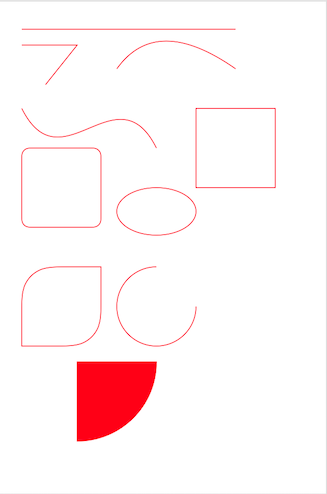
效果图:
贝塞尔曲线UIBezierPath简单使用的更多相关文章
- iOS开发 贝塞尔曲线UIBezierPath(2)
使用CAShapeLayer与UIBezierPath可以实现不在view的drawRect方法中就画出一些想要的图形 . 1:UIBezierPath: UIBezierPath是在 UIKit 中 ...
- iOS开发 贝塞尔曲线UIBezierPath(后记)
使用CAShapeLayer与UIBezierPath可以实现不在view的drawRect方法中就画出一些想要的图形 . 1:UIBezierPath: UIBezierPath是在 UIKit 中 ...
- iOS开发 贝塞尔曲线UIBezierPath
最近项目中需要用到用贝塞尔曲线去绘制路径 ,然后往路径里面填充图片,找到这篇文章挺好,记录下来 自己学习! 转至 http://blog.csdn.net/guo_hongjun1611/articl ...
- cocos2d-x 贝塞尔曲线的简单运用(CCBezierTo,CCBezierBy)
原文链接:http://blog.csdn.net/we000636/article/details/8616355 一.贝赛尔曲线简单介绍 贝塞尔曲线是应用于二维图形应用程序的数学曲线.曲线的定义有 ...
- 关于cubic-bezier 贝塞尔曲线的简单了解
在animation和transition两个属性中,cubic-bezier是控制变化的速度曲线,主要是生成速度曲线的函数 规定用法是: cubic-bezier(<x1>,<y1 ...
- iOS贝塞尔曲线(UIBezierPath)的基本使用方法
简介 UIBezierPath是对Core Graphics框架的一个封装,使用UIBezierPath类我们可以画出圆形(弧线)或者多边形(比如:矩形)等形状,所以在画复杂图形的时候会经常用到. 分 ...
- 通过UIBezierPath贝塞尔曲线画圆形、椭圆、矩形
/**创建椭圆形的贝塞尔曲线*/ UIBezierPath *_ovalPath=[UIBezierPath bezierPathWithOvalInRect:CGRectMake(, , , )]; ...
- iOS开发 贝塞尔曲线
iOS开发 贝塞尔曲线UIBezierPath - 陌云 时间 2014-03-14 11:04:00 博客园-所有随笔区 原文 http://www.cnblogs.com/moyunmo/p/ ...
- 基于CAShapeLayer和贝塞尔曲线的圆形进度条动画
通过CAShapeLayer和贝塞尔曲线搭配的方法,创建的简单的圆形进度条的教程先简单的介绍下CAShapeLayer1,CAShapeLayer继承自CALayer,可使用CALayer的所有属性2 ...
随机推荐
- Linux - 在当前系统内查找信息的方法
查找文本 使用grep命令 grep命令 - 示例 grep命令 - 正则表达式 grep命令 - 统计匹配字符串的行数 grep命令 - 搜索多个单词 结合正则表达式使用grep命令 注意:在搜索指 ...
- mongodb3.x主从配置及备份
本文将介绍下mongodb主从配置及备份 MongoDB 是一个基于分布式文件存储的数据库.由 C++ 语言编写.旨在为 WEB 应用提供可扩展的高性能数据存储解决方案. MongoDB 是一个介于关 ...
- HTTPS 怎样保证数据传输的安全性
大家都知道,在客户端与服务器数据传输的过程中,HTTP协议的传输是不安全的,也就是一般情况下HTTP是明文传输的.但HTTPS协议的数据传输是安全的,也就是说HTTPS数据的传输是经过加密的. 在客户 ...
- vertical-align_CSS参考手册_web前端开发参考手册系列
该属性定义行内元素的基线相对于该元素所在行的基线的垂直对齐.允许指定负长度值和百分比值.这会使元素降低而不是升高.在表单元格中,这个属性会设置单元格框中的单元格内容的对齐方式. <!DOCTYP ...
- python学习之语法
看过python的语法,才知道,这中编程语言是最简洁的,比如if a==b这种判断a和b的值是否相等,其他编程语言是需要小括号的,这个就不用. if语句: cars = ['audi', 'bmw', ...
- CentOS 部署 NodeBB
0x00 前言 NodeBB 是基于 NodeJS 的开源 BBS 系统,可以搭配 redis 或 mongodb 数据库,本文中由于使用 NodeBB 配置中默认的 npm 安装会引起不知原因的 5 ...
- nginx配置指南
nginx(读作engine x)是一款设计优秀的Http服务器, 其占用内存少, 负载能力强且稳定性高, 正在被越来越多的用户所采用. nginx可以为HTTP, HTTPS, SMTP, POP3 ...
- Linux终端命令全面介绍
Linux终端命令 一.文件目录类 1.建立目录:mkdir 目录名2.删除空目录:rmdir 目录名3.无条件删除子目录: rm -rf 目录名4.改变当前目录:cd 目录名 (进入用户home目录 ...
- C++ QT中自定义控件的简单创建
为了给控件添加自定义的方法以及重绘控件,我们需要自定义控件来达到自己希望的结果,网上的自定义控件文章比较少,并且过程比较粗略. 此教程以中文版的QT Creator进行介绍 首先我们创建一个新的项目, ...
- DotNetty项目基本了解和介绍
一.DotNetty背景介绍 DotNetty是微软的Azure团队,使用C#实现的Netty的版本发布.不但使用了C#和.Net平台的技术特点,并且保留了Netty原来绝大部分的编程接口.让我们在使 ...