
WPF 自定义下拉列表
XAML代码:
<Popup x:Name="popupStrategy" StaysOpen="False" PopupAnimation="Scroll" Width="190" MaxHeight="300" AllowsTransparency="True">

    <Border Background="#0c5ab0" BorderThickness="1" BorderBrush="#1992d6">

        <ItemsControl x:Name="itemsCtrlStrategy" Grid.Row="1" Margin="0 5 0 0">

            <ItemsControl.Template>

                <ControlTemplate>

                    <ScrollViewer HorizontalScrollBarVisibility="Auto" MinHeight="{Binding ElementName=itemsCtrlStrategy,Path=ActualHeight}" MinWidth="{Binding ElementName=itemsCtrlStrategy, Path=ActualWidth}">

                        <ItemsPresenter></ItemsPresenter>

                    </ScrollViewer>

                </ControlTemplate>

            </ItemsControl.Template>

            <ItemsControl.ItemsPanel>

                <ItemsPanelTemplate>

                    <StackPanel/>

                </ItemsPanelTemplate>

            </ItemsControl.ItemsPanel>

            <ItemsControl.ItemTemplate>

                <DataTemplate>

                    <StackPanel Orientation="Horizontal" Margin="5 0 5 5" Background="#00234E">

                        <Button x:Name="btnStrategySel" Click="btnStrategySel_Click_1" CommandParameter="{Binding}" Width="120" Margin="5" VerticalAlignment="Center" HorizontalAlignment="Center">

                            <Button.Template>

                                <ControlTemplate>

                                    <TextBlock Text="{Binding Info.STRATEGYNAME}" ToolTip="{Binding Info.STRATEGYNAME}" Width="120" Foreground="#1ba4f6" VerticalAlignment="Center" HorizontalAlignment="Center"></TextBlock>

                                </ControlTemplate>

                            </Button.Template>

                        </Button>

                        <Button x:Name="btnStrategyDel" Margin="5" CommandParameter="{Binding}" Click="btnStrategyDel_Click_1" Height="12" Width="12" VerticalAlignment="Center" HorizontalAlignment="Center">

                            <Button.Template>

                                <ControlTemplate>

                                    <Image Name="img" Width="12" Height="12" VerticalAlignment="Center" Source="/SunCreate.CombatPlatform.Client.Resources;component/Image/CaseExportStrategy/删除.png"></Image>

                                </ControlTemplate>

                            </Button.Template>

                        </Button>

                        <Button x:Name="btnStrategyEdit" Margin="5" CommandParameter="{Binding}" Click="btnStrategyEdit_Click_1" Height="12" Width="12" VerticalAlignment="Center" HorizontalAlignment="Center">

                            <Button.Template>

                                <ControlTemplate>

                                    <Image Name="img" Width="12" Height="12" VerticalAlignment="Center" Source="/SunCreate.CombatPlatform.Client.Resources;component/Image/CaseExportStrategy/编辑.png"></Image>

                                </ControlTemplate>

                            </Button.Template>

                        </Button>

                    </StackPanel>

                </DataTemplate>

            </ItemsControl.ItemTemplate>

        </ItemsControl>

    </Border>

</Popup>
后台代码:
itemsCtrlStrategy.ItemsSource = strategyViewModelList;

popupStrategy.PlacementTarget = sender as Button;

popupStrategy.Placement = PlacementMode.Bottom;

popupStrategy.IsOpen = true;
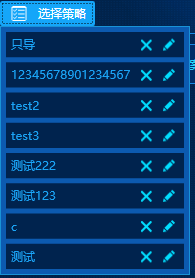
效果图:
WPF 自定义下拉列表的更多相关文章
- WPF 自定义柱状图 BarChart
WPF 自定义柱状图 当前的Telerik控件.DevExpress控件在图表控件方面做得不错,但是有时项目中需要特定的样式,不是只通过修改图表的模板和样式就能实现的. 或者说,通过修改当前的第三方控 ...
- wpf 自定义圆形按钮
wpf 自定义圆形按钮 效果图 默认样式 获取焦点样式 点击样式 下面是实现代码: 一个是自定义控件类,一个是控件类皮肤 using System; using System.Collections. ...
- WPF自定义窗口基类
WPF自定义窗口基类时,窗口基类只定义.cs文件,xaml文件不定义.继承自定义窗口的类xaml文件的根节点就不再是<Window>,而是自定义窗口类名(若自定义窗口与继承者不在同一个命名 ...
- WPF 自定义 MessageBox (相对完善版)
WPF 自定义 MessageBox (相对完善版) 基于WPF的自定义 MessageBox. 众所周知WPF界面美观.大多数WPF元素都可以简单的修改其样式,从而达到程序的风格统一.可是当 ...
- WPF自定义Window样式(2)
1. 引言 在上一篇中,介绍了如何建立自定义窗体.接下来,我们需要考虑将该自定义窗体基类放到类库中去,只有放到类库中,我们才能在其他地方去方便的引用该基类. 2. 创建类库 接上一篇的项目,先添加一个 ...
- WPF自定义Window样式(1)
1. 引言 WPF是制作界面的一大利器.最近在做一个项目,用的就是WPF.既然使用了WPF了,那么理所当然的,需要自定义窗体样式.所使用的代码是在网上查到的,遗憾的是,整理完毕后,再找那篇帖子却怎么也 ...
- WPF自学入门(九)WPF自定义窗口基类
今天简单记录一个知识点:WPF自定义窗口基类,常用winform的人知道,winform的窗体继承是很好用的,写一个基础窗体,直接在后台代码改写继承窗体名.但如果是WPF要继承窗体,我个人感觉没有理解 ...
- WPF自定义TabControl样式
WPF自定义TabControl,TabControl美化 XAML代码: <TabControl x:Class="SunCreate.Common.Controls.TabCont ...
- WPF 自定义ComboBox样式,自定义多选控件
原文:WPF 自定义ComboBox样式,自定义多选控件 一.ComboBox基本样式 ComboBox有两种状态,可编辑和不可编辑状态.通过设置IsEditable属性可以切换控件状态. 先看基本样 ...
随机推荐
- 转)Ubuntu安装mysql5.7
主要参考http://blog.csdn.net/q894523017/article/details/50705392 包去官网下载,解压,安装步骤如下: 上文中有错误,正确如下: sudo dpk ...
- Robotium原理初步--Android自动化测试学习历程
章节:自动化基础篇——Robotium原理初步(第四讲) 主要讲解内容与笔记: 一.基于控件 1.spinner——下拉菜单 2.TabHost——左右滑动选择菜单,类似电话本 3.Gallery—— ...
- sql批量修改字段内容的语句-SQL技巧
--update '表名' set 要修改字段名 = replace (要修改字段名,'被替换的特定字符','替换成的字符')--update tRecord set columnName = rep ...
- forbidden
- sql转化为时间戳
1.转化为时间戳 UNIX_TIMESTAMP():执行使用时间格式如:2009-08-06 10:10:40 .2009-08-06
- Byte字节与位
位(bit)字节(byte)一字节是8位所以2Byte是16位二进制
- [SoapUI] 设置最大等待时间,不断重复的去发送一个request,每次从response中获取一个status,直到这个status从一种状态变成另外一种状态
import com.eviware.soapui.support.GroovyUtils def groovyUtils = new GroovyUtils( context ) def holde ...
- Kubernetes web界面kubernetes-dashboard安装
本文讲述的是如何部署K8s的web UI,前提是已经有一个k8s集群后,按照如下步骤进行即可.(如下步骤都是在master节点上进行操作) 1.下载kubernetes-dashboard.yaml文 ...
- http://localhost:8080/hello?wsdl
<definitions xmlns:wsu="http://docs.oasis-open.org/wss/2004/01/oasis-200401-wss-wssecurity-u ...
- (并查集) Wireless Network --POJ --2236
链接: http://poj.org/problem?id=2236 http://acm.hust.edu.cn/vjudge/contest/view.action?cid=82830#probl ...