
解决使用jedis连接是报DENIED Redis is running in protected mode错误
DENIED Redis is running in protected mode because protected mode is enabled, no bind address was specified,
no authentication password is requested to clients. In this mode connections are only accepted from the loopback interface.
 If you want to connect from external computers to Redis you may adopt one of the following solutions:

 1) Just disable protected mode sending the command 'CONFIG SET protected-mode no' from the loopback interface by connecting to Redis from the same host the server is running, however MAKE SURE Redis is not publicly accessible from internet if you do so. Use CONFIG REWRITE to make this change permanent.

2) Alternatively you can just disable the protected mode by editing the Redis configuration file, and setting the protected mode option to 'no', and then restarting the server.

3) If you started the server manually just for testing, restart it with the '--protected-mode no' option.

4) Setup a bind address or an authentication password. NOTE: You only need to do one of the above things in order for the server to start accepting connections from the outside.
1. 错误原因:由于redis的保护模式开启了,并且没有绑定ip地址,没有密码认证
2. 解决方案
方案一:
1) 使用 设置CONFIG SET protected-mode no
步骤:
1. 在redis本机上打开redis-cli工具,并连接
2. 在其中输入CONFIG SET protected-mode no即可
缺点:
该种方式只是短暂性有效,如果redisServer重新启动后还是不能正常链接
方案二:
1)编辑redis配置文件,将保护模式关闭
步骤:
由于我是直接使用redis-server 命令启动的,所以说其服务是按照其默认设置进行启动,修改/usr/local/etc/redis.conf
如果没有请从下载的redis中复制一个redis.conf到这里,
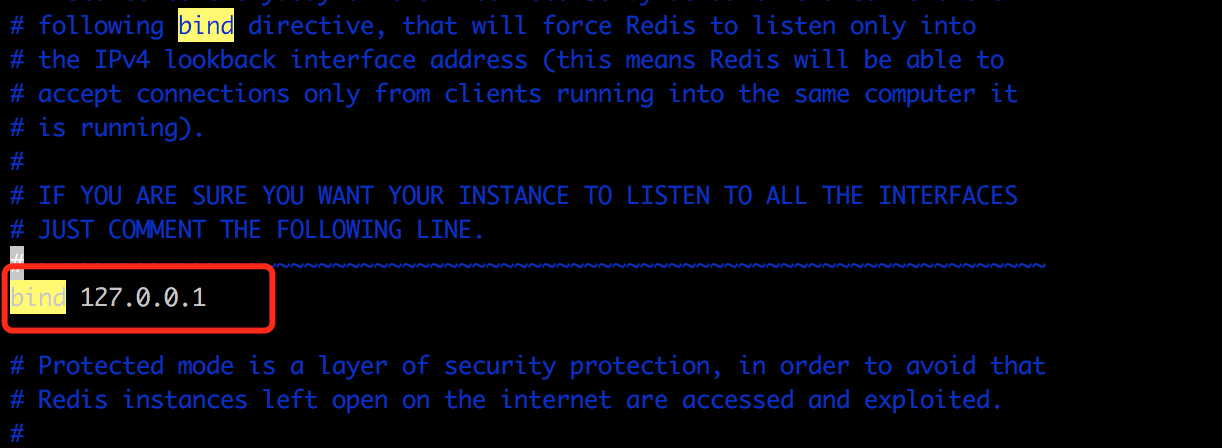
将bind 后面绑定的ip后面加入你本机外网的ip
bind 127.0.0.1 192.168.21.4
然后保存,再使用redis-server /usr/local/etc/redis.conf启动
问题:
1.redis-cli不能直接使用,必须输入绑定的ip+d端口号才能正常使用
2.不安全
2). 将redis.conf中安全模式关闭
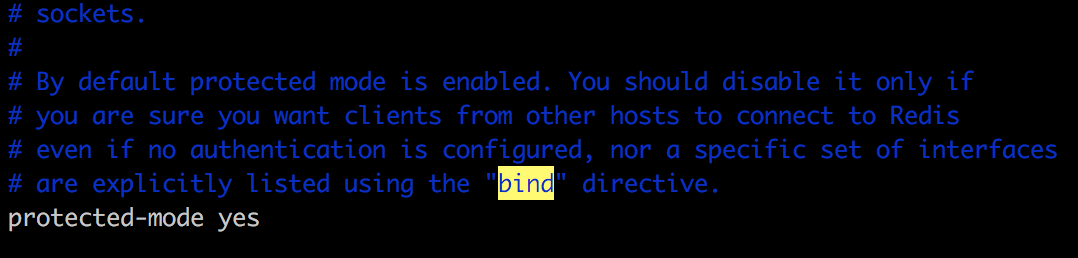
将该保护模式改为no
再试
缺点:1.保护模式关闭后不安全
3)设置密码访问模式
在redis.conf中加入一行密码设置
require 你的密码
保存,再重新启动redis客户端
以上四种方式解决该错误都可以,但是根据上面的优缺点,
选择第四种方式最佳,安全性最高
解决使用jedis连接是报DENIED Redis is running in protected mode错误的更多相关文章
- 2017.7.10 Redis报错:DENIED Redis is running in protected mode
参考来自: java 客户端链接不上redis解决方案 DENIED Redis is running in protected mode 完整错误信息: Caused by: redis.clien ...
- springboot2集成redis5报错:io.lettuce.core.RedisException: io.lettuce.core.RedisConnectionException: DENIED Redis is running in protected
报错信息如下: Caused by: io.lettuce.core.RedisException: io.lettuce.core.RedisConnectionException: DENIED ...
- error) DENIED Redis is running in protected mode because protected mode is enabled报错
官网地址:https://redis.io/download 官方安装文档如下: Installation Download, extract and compile Redis with: $ wg ...
- DENIED Redis is running in protected mode
1.开源软件往往做的非常出色,错误的时候,会告诉你原因,以及怎么修改,仔细阅读就能明白.比如这个错误: [root@localhost src]# ./redis-cli -h 172.16.2.16 ...
- Redis异常 | DENIED Redis is running in protected mode because protected mode is enabled
背景 今天重新搭了个redis环境,用简单的代码去测试下是否正常, @RunWith(SpringRunner.class) @SpringBootTest public class Springbo ...
- (error) DENIED Redis is running in protected mode because protected mode is enabled
在通过Java程序链接配置好的redis服务时出现 DENIED Redis is running in protected mode because protected mode is enable ...
- DENIED Redis is running in protected mode because protected mode is enabled
DENIED Redis is running in protected mode because protected mode is enabled redisson连接错误 Unable to i ...
- 关于Jedis连接Linux上的redis出现 DENIED Redis is running in protected mode问题的解决方案
redis 添加了requirepass 123456后还是报错,原来是重新启动的时候./redis-cli 没有指定配置文件. https://blog.csdn.net/a532672728/a ...
- 【Redis】【报错】redis.exceptions.ResponseError: DENIED Redis is running in protected mode
(一)报错前提 写flask 项目的时候,因为连接了私有云中的redis地址指定了IP host,启动项目的时候报错 (二)解决方法 首先要切换到root用户 root@:/etc/redis# pw ...
随机推荐
- MySQL数据库性能优化思路与解决方法(二转)
原文:http://bbs.landingbj.com/t-0-242512-1.html 1.锁定表 尽管事务是维护数据库完整性的一个非常好的方法,但却因为它的独占性,有时会影响数据库的性能,尤其是 ...
- JavaScript中的函数和C#中的匿名函数(委托、lambda表达式)
在js中function是一个一个引用类型,所以可以出现这样的代码: 'use strict'; var compare=function(value1, value2) { if (value1&l ...
- 本地数据访问时出现跨域问题Cross origin requests are only supported for protocol schemes: ……
从桌面找到Chrome图标,右键属性,快捷方式,起始位置(安装路径) 注:在cmd中访问Program Files文件的方法 %ProgramFiles%=C:\Program Files %Prog ...
- RDD
scala> val rdd1=sc.parallelize(Array("coffe","coffe","hellp"," ...
- python爬虫之win7Mongod安装使用
1.下载地址:https://www.mongodb.com/download-center#community 下载完成以后下一步下一步安装. 安装路径 还需要建立一个数据库存储位置C:\mongo ...
- Spring中使用Ehcache的方法和注意事项
如何调用方法数据增加缓存 @Cacheable(value="MY_CACHE", key="'cache_business_' + #business_id" ...
- Mysql如何快速插入100万条记录?
1.java程序拼接insert带多个value,使一次提交多个值. 2.插入数据之前先删除索引(注意主键不能删除),然后插入数据,最后重建索引 3.可以设置手动commit,用来提高效率 4.使用批 ...
- Nginx安装- CentOS7
1.确认是否具备安装环境 g++ -v 如果不打印则不具备. 解决办法:联网执行如下命令 yum install gcc yum install gcc-c++ 2.需要材料 pcre-8.37.t ...
- 4面向对象(OOP)
学习线路 初学: 熟悉语法 进阶: 1.23种设计模式 2.6中开发原则 高级: 1.优化 2.架构 3.安全 概念 类:一类具有相同特性的事物的抽象描述,用一个java类表示. 成员变量:抽取的属性 ...
- 【纪录】Hash about
backup a easy implement # coding: utf-8 def add(k, v): pass def get(target): pass class LinearMap(ob ...