
NightWatch端到端测试
NightWatch
http://nightwatchjs.org/
Nightwatch.js
Browser automated testing done easy.
Write End-to-End tests in Node.js quickly and effortlessly that run against a Selenium/WebDriver server.
Browser Automation
Nightwatch.js is an easy to use Node.js based End-to-End (E2E) testing solution for browser based apps and websites. It uses the powerful W3C WebDriver API to perform commands and assertions on DOM elements.
安装
https://github.com/nightwatchjs/nightwatch
1. Install Nightwatch
Install Node.js (together with the NPM tool) by following instructions available on nodejs.org.
From NPM:
$ npm install nightwatchFrom GitHub:
$ git clone https://github.com/nightwatchjs/nightwatch.git

$ cd nightwatch

$ npm install
2. Download WebDriver
Nightwatch uses a WebDriver compatible server to control the browser. WebDriver is a W3C specification and industry standard which provides a platform and HTTP protocol to interact with a browser.
Nightwatch includes support for automatically managing the following services:
ChromeDriver
- for running tests against the Chrome browser;
- download url: https://sites.google.com/a/chromium.org/chromedriver/downloads.
Selenium Standalone Server
- allows managing multiple browser configurations in one place and also to make use of the Selenium Grid service;
- the selenium server jar file
selenium-server-standalone-3.x.x.jarcan be downloaded from the Selenium releases page: https://selenium-release.storage.googleapis.com/index.htmlIt's important to note that, while the Selenium Server was required with older Nightwatch versions (
v0.9and prior), starting with version1.0Selenium is no longer necessary.
安装报错解决方法:
https://github.com/nightwatchjs/nightwatch/issues/913
Nightwatch: Error retrieving a new session from the selenium server #913
https://github.com/nightwatchjs/nightwatch/issues/1390
        "chromeOptions" : {

          "args" : ["disable-web-security", "ignore-certificate-errors", "headless"],

        }
他山之石
https://blog.risingstack.com/end-to-end-testing-with-nightwatch-js-node-js-at-scale/
th these three tools, we are going to implement the flow this diagram shows below.

自己动手
https://github.com/fanqingsong/code-snippet/tree/master/web/night_watch
package.json
{

  "name": "night_watch",

  "version": "1.0.0",

  "description": "",

  "main": "index.js",

  "scripts": {

    "dev": "./node_modules/.bin/nightwatch"

  },

  "author": "",

  "license": "ISC",

  "devDependencies": {

    "chromedriver": "^2.41.0",

    "nightwatch": "^0.9.21",

    "selenium-server": "^3.14.0"

  }

}
nigthwatch.json
{

  "src_folders" : ["./examples/tests"],

  "output_folder" : "./examples/reports",

  "selenium" : {

    "start_process" : true,

    "server_path" : "./node_modules/selenium-server/lib/runner/selenium-server-standalone-3.14.0.jar",

    "log_path" : "",

    "host": "127.0.0.1",

    "port" : 4444,

    "cli_args" : {

      "webdriver.chrome.driver" : "./node_modules/chromedriver/lib/chromedriver/chromedriver.exe"

    }

  },

  "test_settings" : {

    "default" : {

      "launch_url" : "http://localhost",

      "selenium_port"  : 4444,

      "selenium_host"  : "localhost",

      "desiredCapabilities": {

        "browserName": "chrome",

        "javascriptEnabled": true,

        "acceptSslCerts": true,

        "chromeOptions" : {

          "args" : ["disable-web-security", "ignore-certificate-errors"]

        }

      }

    }

  }

}
nightwatch.js
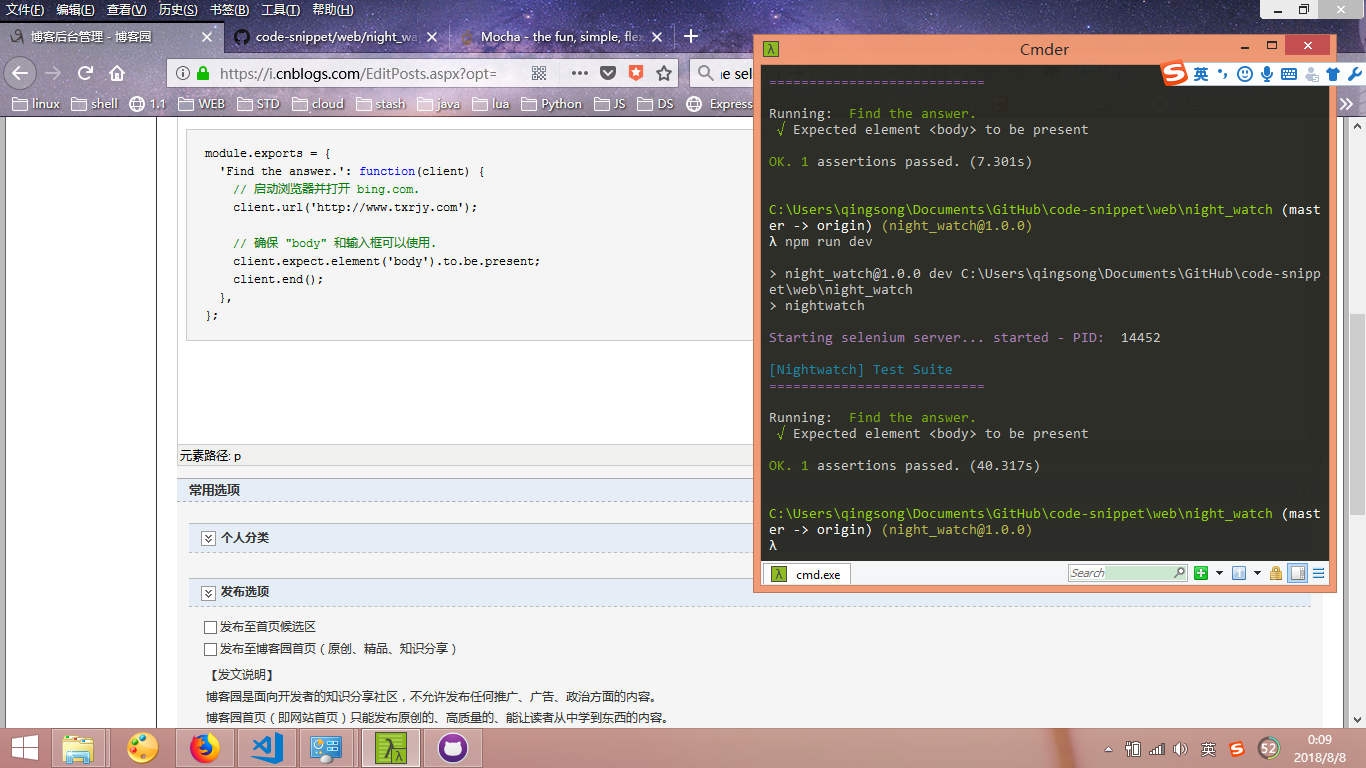
module.exports = {

  'Find the answer.': function(client) {

    // 启动浏览器并打开 bing.com.

    client.url('http://www.txrjy.com');

    // 确保 "body" 和输入框可以使用.

    client.expect.element('body').to.be.present;

    client.end();

  },

};
NightWatch端到端测试的更多相关文章
- 脚手架vue-cli系列五:基于Nightwatch的端到端测试环境
不同公司和组织之间的测试效率迥异.在这个富交互和响应式处理随处可见的时代,很多组织都使用敏捷的方式来开发应用,因此测试自动化也成为软件项目的必备部分.测试自动化意味着使用软件工具来反复运行项目中的测试 ...
- 最受欢迎的5款Node.js端到端测试框架
测试,尤其是自动化测试在现代 WEB 工程中有着非常重要的角色,与交付过程集成良好的自动化测试流程可以在新版发布时帮你快速回归产品功能,也可以充当产品文档.测试因粒度不同又可以分为单元测试.接口测试. ...
- Nightwatch——自动化测试(端对端e2e)
背景: 前端页面模拟仿真操作,目的是避免每次更新相关内容重复之前的测试操作,减少不必要的时间投入,以及校验功能的可用性.但是目前元素定位是个问题(每次页面有修改都要重设某些元素定位) 测试分类: 一. ...
- nightwatch 基于Webdriver的端到端自动化测试框架
nightwatch 是使用nodejs编写的,基于Webdriver api 的端到端自动化测试框架 包含以下特性 清晰的语法,基于js 以及css 还有xpath 的选择器 内置测试runner, ...
- pc端和android端应用程序测试有什么区别?(ps面试题)
pc端和android端应用程序测试有什么区别?(ps面试题) [VIP7]大连-凭海临风(215687736) 2014/4/10 8:56:171.测试环境不同PC平台一般都是windows an ...
- 移动web开发之移动端真机测试
× 目录 [1]特性 [2]安装 [3]设置[4]移动端 前面的话 chrome的开发者工具可以很好地做好模拟工作,但毕竟模拟和实际还是有差别的.所以,真机测试是一定要做的,如何高效地进行真机测试呢. ...
- 端到端测试工具--testcafe
写在前面 随着业务的增加,复杂性的增加,我们更需要保证页面不能出错,之前需要每次上线之前需要每次人工测试,如果有好多改动,为保证业务不出错,需要耗费更多的时间来测试,所以我们需要写一些测试来保证业务的 ...
- cypress 端到端测试框架试用
cypress 包含的特性 端到端测试 集成测试 单元测试 安装 yarn add cypress --dev 运行测试项目 初始化项目 yarn init -y 安装cypress yarn add ...
- 前端端对端测试:基于PhantomJS的CasperJS
简介 Casperjs是一个基于PhantomJS和SlimerJS的前端端对端测试框架,当然你也可以使用它完成网络爬虫功能,它的特点的通过简单的脚本模拟浏览器行为, 主要有casper.tester ...
- socket服务端开发之测试使用threading和gevent框架
socket服务端开发之测试使用threading和gevent框架 话题是测试下多线程和gevent在socket服务端的小包表现能力,测试的方法不太严谨,也没有用event loop + pool ...
随机推荐
- 英语口语练习系列-C04-学校生活
连接到英语口语系列总分类 连接到上一章常用问句 登鹳雀楼 登鹳雀楼 唐代:王之涣 白日依山尽,黄河入海流. 欲穷千里目,更上一层楼. He is a fraternity brother. 他是兄弟会 ...
- ORACLESQL语句的优化
ORACLESQL语句的优化: 选择最有效率的表名顺序:应该选择记录条数最少的表作为基表! 因为Oracle解析器的处理顺序是从右至左的.当ORACLE处理多个表时, 会运用排序及合并的方式连接它们. ...
- ideal中把项目打成war包,并放在tomcat运行,遇见的问题。。。
先说下我遇见的问题吧:最近做项目要把项目放在tomcat上运行,用的springboot框架, 在建项目时选择的是 jar包,项目写完要部署打包是,在pom中虽然把包改成了war ,可是每次放入to ...
- 消耗CPU和内存的脚本
用法 ./shell.sh 4 (4为4内核) 查看cpu内核数量 > lscpu 执行后会出现一堆kill命令,方便kill掉进程 #!/bin/bash endless_loop() { e ...
- python3 闭包函数
'''闭包函数:内部函数引用外部函数变量(非全局变量)'''def func(y): x = 1 def func1(): print(x, y) return func1 f = func(2)pr ...
- python3 二分法查找
'''二分法查找有序列表掐头去尾取中间查找列表中xx在不在列表中,在,则返回索引值'''# lst = [1, 4, 6, 8, 9, 21, 23, 26, 35, 48, 49, 54, 67, ...
- DeeplabV3+ 训练自己的遥感数据
一.预处理数据部分 1.创建 tfrecord(修改 deeplab\ dateasets\ build_data.py) 模型本身是把一张张 jpg 和 png 格式图片读到一个 Example 里 ...
- Spring Security Oauth2 的配置
使用oauth2保护你的应用,可以分为简易的分为三个步骤 配置资源服务器 配置认证服务器 配置spring security 前两点是oauth2的主体内容,但前面我已经描述过了,spring sec ...
- 在 .NET Core 中结合 HttpClientFactory 使用 Polly(上篇)
译者:王亮作者:Polly 团队原文:http://t.cn/EhZ90oq 译者序一:前两天写了一篇文章 .NET Core 开源项目 Polly 介绍,在写这篇文章查看 Polly 资料时,看到了 ...
- 排序算法(sorting)
学习到的排序算法的总结,包括对COMP20003中排序部分进行总结,部分图片来自COMP20003 有部分内容来自http://www.cnblogs.com/eniac12/p/5329396.ht ...