
NightWatch端到端测试
NightWatch
http://nightwatchjs.org/
Nightwatch.js
Browser automated testing done easy.
Write End-to-End tests in Node.js quickly and effortlessly that run against a Selenium/WebDriver server.
Browser Automation
Nightwatch.js is an easy to use Node.js based End-to-End (E2E) testing solution for browser based apps and websites. It uses the powerful W3C WebDriver API to perform commands and assertions on DOM elements.
安装
https://github.com/nightwatchjs/nightwatch
1. Install Nightwatch
Install Node.js (together with the NPM tool) by following instructions available on nodejs.org.
From NPM:
$ npm install nightwatchFrom GitHub:
$ git clone https://github.com/nightwatchjs/nightwatch.git

$ cd nightwatch

$ npm install
2. Download WebDriver
Nightwatch uses a WebDriver compatible server to control the browser. WebDriver is a W3C specification and industry standard which provides a platform and HTTP protocol to interact with a browser.
Nightwatch includes support for automatically managing the following services:
ChromeDriver
- for running tests against the Chrome browser;
- download url: https://sites.google.com/a/chromium.org/chromedriver/downloads.
Selenium Standalone Server
- allows managing multiple browser configurations in one place and also to make use of the Selenium Grid service;
- the selenium server jar file
selenium-server-standalone-3.x.x.jarcan be downloaded from the Selenium releases page: https://selenium-release.storage.googleapis.com/index.htmlIt's important to note that, while the Selenium Server was required with older Nightwatch versions (
v0.9and prior), starting with version1.0Selenium is no longer necessary.
安装报错解决方法:
https://github.com/nightwatchjs/nightwatch/issues/913
Nightwatch: Error retrieving a new session from the selenium server #913
https://github.com/nightwatchjs/nightwatch/issues/1390
        "chromeOptions" : {

          "args" : ["disable-web-security", "ignore-certificate-errors", "headless"],

        }
他山之石
https://blog.risingstack.com/end-to-end-testing-with-nightwatch-js-node-js-at-scale/
th these three tools, we are going to implement the flow this diagram shows below.

自己动手
https://github.com/fanqingsong/code-snippet/tree/master/web/night_watch
package.json
{

  "name": "night_watch",

  "version": "1.0.0",

  "description": "",

  "main": "index.js",

  "scripts": {

    "dev": "./node_modules/.bin/nightwatch"

  },

  "author": "",

  "license": "ISC",

  "devDependencies": {

    "chromedriver": "^2.41.0",

    "nightwatch": "^0.9.21",

    "selenium-server": "^3.14.0"

  }

}
nigthwatch.json
{

  "src_folders" : ["./examples/tests"],

  "output_folder" : "./examples/reports",

  "selenium" : {

    "start_process" : true,

    "server_path" : "./node_modules/selenium-server/lib/runner/selenium-server-standalone-3.14.0.jar",

    "log_path" : "",

    "host": "127.0.0.1",

    "port" : 4444,

    "cli_args" : {

      "webdriver.chrome.driver" : "./node_modules/chromedriver/lib/chromedriver/chromedriver.exe"

    }

  },

  "test_settings" : {

    "default" : {

      "launch_url" : "http://localhost",

      "selenium_port"  : 4444,

      "selenium_host"  : "localhost",

      "desiredCapabilities": {

        "browserName": "chrome",

        "javascriptEnabled": true,

        "acceptSslCerts": true,

        "chromeOptions" : {

          "args" : ["disable-web-security", "ignore-certificate-errors"]

        }

      }

    }

  }

}
nightwatch.js
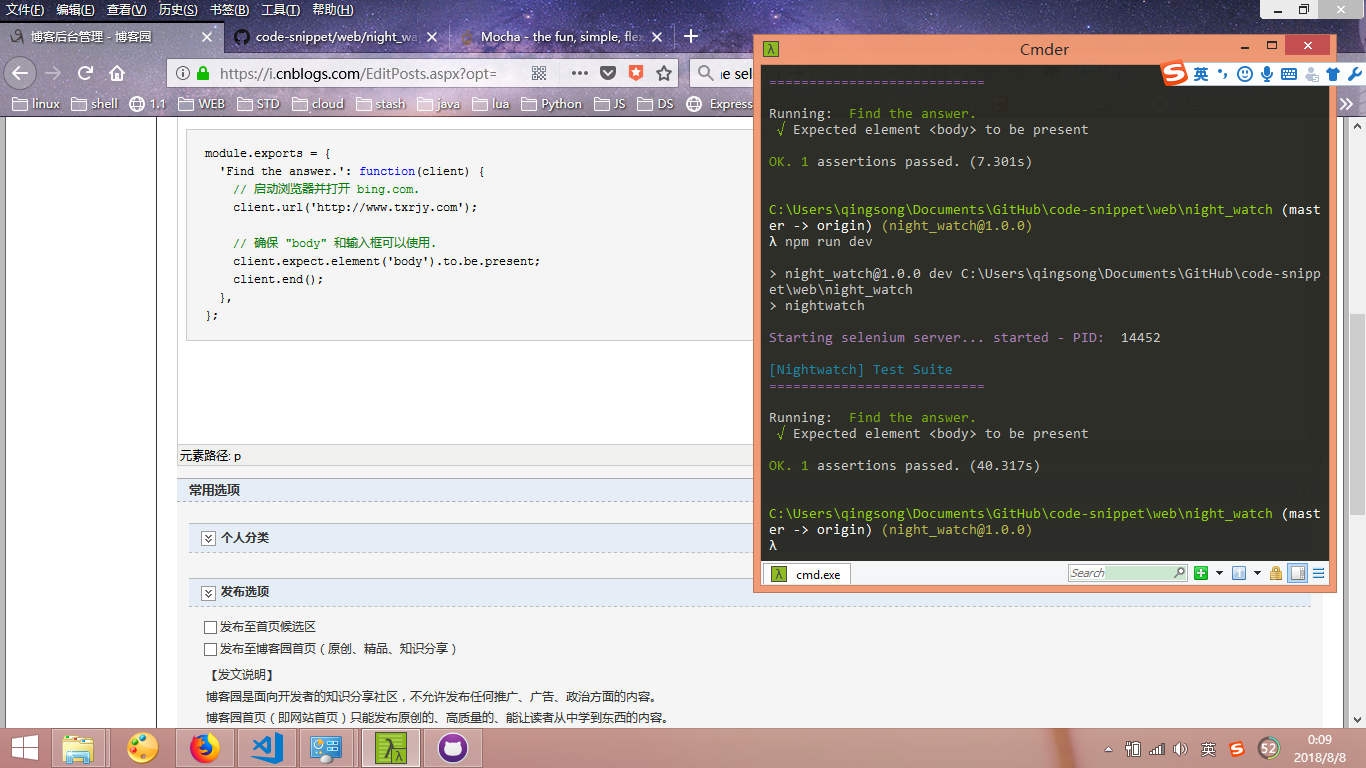
module.exports = {

  'Find the answer.': function(client) {

    // 启动浏览器并打开 bing.com.

    client.url('http://www.txrjy.com');

    // 确保 "body" 和输入框可以使用.

    client.expect.element('body').to.be.present;

    client.end();

  },

};
NightWatch端到端测试的更多相关文章
- 脚手架vue-cli系列五:基于Nightwatch的端到端测试环境
不同公司和组织之间的测试效率迥异.在这个富交互和响应式处理随处可见的时代,很多组织都使用敏捷的方式来开发应用,因此测试自动化也成为软件项目的必备部分.测试自动化意味着使用软件工具来反复运行项目中的测试 ...
- 最受欢迎的5款Node.js端到端测试框架
测试,尤其是自动化测试在现代 WEB 工程中有着非常重要的角色,与交付过程集成良好的自动化测试流程可以在新版发布时帮你快速回归产品功能,也可以充当产品文档.测试因粒度不同又可以分为单元测试.接口测试. ...
- Nightwatch——自动化测试(端对端e2e)
背景: 前端页面模拟仿真操作,目的是避免每次更新相关内容重复之前的测试操作,减少不必要的时间投入,以及校验功能的可用性.但是目前元素定位是个问题(每次页面有修改都要重设某些元素定位) 测试分类: 一. ...
- nightwatch 基于Webdriver的端到端自动化测试框架
nightwatch 是使用nodejs编写的,基于Webdriver api 的端到端自动化测试框架 包含以下特性 清晰的语法,基于js 以及css 还有xpath 的选择器 内置测试runner, ...
- pc端和android端应用程序测试有什么区别?(ps面试题)
pc端和android端应用程序测试有什么区别?(ps面试题) [VIP7]大连-凭海临风(215687736) 2014/4/10 8:56:171.测试环境不同PC平台一般都是windows an ...
- 移动web开发之移动端真机测试
× 目录 [1]特性 [2]安装 [3]设置[4]移动端 前面的话 chrome的开发者工具可以很好地做好模拟工作,但毕竟模拟和实际还是有差别的.所以,真机测试是一定要做的,如何高效地进行真机测试呢. ...
- 端到端测试工具--testcafe
写在前面 随着业务的增加,复杂性的增加,我们更需要保证页面不能出错,之前需要每次上线之前需要每次人工测试,如果有好多改动,为保证业务不出错,需要耗费更多的时间来测试,所以我们需要写一些测试来保证业务的 ...
- cypress 端到端测试框架试用
cypress 包含的特性 端到端测试 集成测试 单元测试 安装 yarn add cypress --dev 运行测试项目 初始化项目 yarn init -y 安装cypress yarn add ...
- 前端端对端测试:基于PhantomJS的CasperJS
简介 Casperjs是一个基于PhantomJS和SlimerJS的前端端对端测试框架,当然你也可以使用它完成网络爬虫功能,它的特点的通过简单的脚本模拟浏览器行为, 主要有casper.tester ...
- socket服务端开发之测试使用threading和gevent框架
socket服务端开发之测试使用threading和gevent框架 话题是测试下多线程和gevent在socket服务端的小包表现能力,测试的方法不太严谨,也没有用event loop + pool ...
随机推荐
- 解决connect() failed (111: Connection refused) while connecting to upstream
使用nginx时, 有可能遇到connect() failed (111: Connection refused) while connecting to upstream的问题. 如果upstrea ...
- python3 json模块
import json '''把python对象转化为json串(字符串), ensure_ascii处理中文乱码'''dic = {"复联4": "好看吗", ...
- 基础数据类型:整型int、布尔值bool、字符串str、与for循环
1.整型 int() p2 long 长整型 p3 全部都是整型 2.布尔值 bool() True --- int() int(True) int() --- True bool(int) 注意点: ...
- Spring Cloud:Security OAuth2 自定义异常响应
对于客户端开发或者网站开发而言,调用接口返回有统一的响应体,可以针对性的设计界面,代码结构更加清晰,层次也更加分明. 默认异常响应 在使用 Spring Security Oauth2 登录和鉴权失败 ...
- Android/Linux Thermal框架分析及其Governor对比
图表 1 Thermal框架 随着SoC性能的快速提升,功耗也极大提高,带来的负面影响是SoC的温度提高很快,甚至有可能造成物理损坏.同时功耗浪费也降低了电池寿命. 从上图可知,Thermal框架可以 ...
- 3-STM32带你入坑系列(自己封装点亮一个灯的库--Keil)
2-STM32带你入坑系列(点亮一个灯--Keil) 首先建一个stm32f103x.h的文件,然后 #include "stm32f103x.h" 还记得上一节 现在呢就是做一个 ...
- auth mysql
DROP TABLE IF EXISTS tky_auth_role;CREATE TABLE tky_auth_role ( roleid MEDIUMINT (8) UNSIGNED NOT NU ...
- 剖析height百分比和min-height百分比
height的百分比 当我们给块元素设置百分比高度时,往往没能看到效果.因为百分比的大小是相对其最近的父级元素的高的大小,也就是说,其最近的父级元素应该有一个明确的高度值才能使其百分比高度生效. &l ...
- NPOI “发现 中的部分内容有问题,是否要恢复此工作薄的内容?如果信任此工作薄的来源。。。”的问题的解决方法
网上说的方法是调整Sheet可见和顺序:https://blog.csdn.net/hulihui/article/details/21196951 stackoverflow给出的解释是:单元格存储 ...
- 进程初识和multiprocessing模块之Process
一.什么是进程 进程就是运行中的程序 进程是操作系统中最小的资源分配单位 进程与进程之间的关系 : 数据隔离的 进程的id:Process id = pid pid是一个全系统唯一的对某个进程的标识, ...