
Web前端:博客美化:一、模板美化
1、选用模板simplememory

2、写css放在
这些会覆盖掉原来的css样式
我是在网上找的css代码二次加工的 : )
/*1、针对simplememory的修改*/

#google_ad_c1, #google_ad_c2 {display:none;}

.syntaxhighlighter a, .syntaxhighlighter div, .syntaxhighlighter code, .syntaxhighlighter table, .syntaxhighlighter table td, .syntaxhighlighter table tr, .syntaxhighlighter table tbody, .syntaxhighlighter table thead, .syntaxhighlighter table caption, .syntaxhighlighter textarea {

font-size: 14px!important;

}

#home {

opacity: 0.80;

margin: 0 auto;

width: 85%;

min-width: 950px;

background-color: #fff;

padding: 30px;

margin-top: 30px;

margin-bottom: 50px;

box-shadow: 0 2px 6px rgba(100, 100, 100, 0.3);

}

#blogTitle h1 {

font-size: 30px;

font-weight: bold;

font-family: "Comic Sans MS";

line-height: 1.5em;

margin-top: 20px;

color: #515151;

}

#navList a:hover {

color: #4C9ED9;

text-decoration: none;

}

#navList a {

display: block;

width: 5em;

height: 22px;

float: left;

text-align: center;

padding-top: 18px;

}

#navigator {

font-size: 15px;

border-bottom: 1px solid #ededed;

border-top: 1px solid #ededed;

height: 50px;

clear: both;

margin-top: 25px;

}

.catListTitle {

margin-top: 21px;

margin-bottom: 10.5px;

text-align: left;

border-left: 10px solid rgba(82, 168, 236, 0.8);

padding: 10px 0 14px 10px;

background-color: #f5f5f5;

}

#ad_under_post_holder #google_ad_c1,#google_ad_c2{

display: none !important;

}

body {

color: #000;

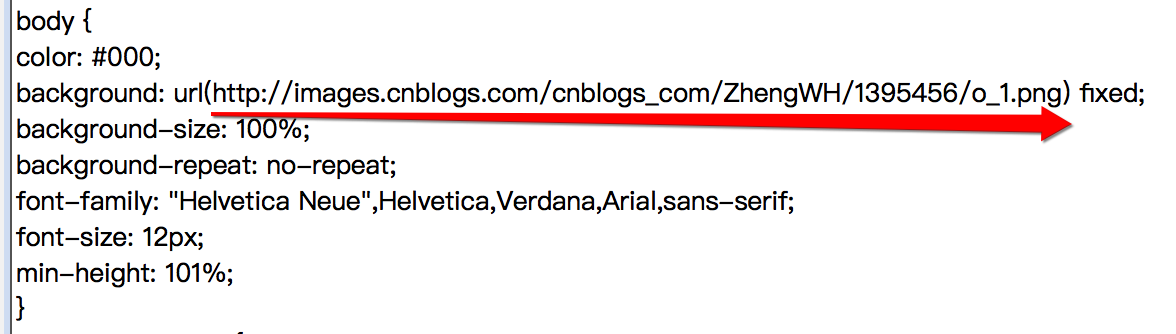
background: url(http://images.cnblogs.com/cnblogs_com/ZhengWH/1395456/o_1.png) fixed;

background-size: 100%;

background-repeat: no-repeat;

font-family: "Helvetica Neue",Helvetica,Verdana,Arial,sans-serif;

font-size: 12px;

min-height: 101%;

}

#topics .postTitle {

border: 0px;

font-size: 200%;

font-weight: bold;

float: left;

line-height: 1.5;

width: 100%;

padding-left: 5px;

}

div.commentform p{

margin-bottom:10px;

}

.comment_btn {

padding: 5px 10px;

height: 35px;

width: 90px;

border: 0 none;

border-radius: 5px;

background: #ddd;

color: #999;

cursor:pointer;

font-family: "Lato", Helvetica Neue, Helvetica, Microsoft Yahei, 宋体, Arial, sans-serif;

text-shadow: 0 0 1px #fff;

display: inline !important;

}

.comment_btn:hover{

padding: 5px 10px;

height: 35px;

width: 90px;

border: 0 none;

border-radius: 5px;

background: #258fb8;

color: white;

cursor:pointer;

font-family: "Lato", Helvetica Neue, Helvetica, Microsoft Yahei, 宋体, Arial, sans-serif;

text-shadow: 0 0 1px #fff;

display: inline !important;

}

#commentform_title {

background-image:none;

background-repeat:no-repeat;

margin-bottom:10px;

padding:0;

font-size:24px;

}

#commentbox_opt,#commentbox_opt + p {

text-align:center;

}

.commentbox_title {

width: 100%;

}

#tbCommentBody {

font-family:'Microsoft Yahei', Microsoft Yahei, 宋体, sans-serif;

margin-top:10px;

max-width:100%;

min-width:100%;

background:white;

color:#333;

border:2px solid #fff;

box-shadow:inset 0 0 8px #aaa;

// padding:10px;

height:250px;

font-size:14px;

min-height:120px;

}

.feedbackItem {

font-size:14px;

line-height:24px;

margin:10px 0;

padding:20px;

background:#F2F2F2;

box-shadow:0 0 5px #aaa;

}

.feedbackListSubtitle {

font-weight:normal;

}

#blog-comments-placeholder, #comment_form {

padding: 20px;

background: #fff;

-webkit-box-shadow: 1px 2px 3px #ddd;

box-shadow: 1px 2px 3px #ddd;

margin-bottom: 50px;

}

.feedback_area_title {

margin-bottom: 15px;

font-size: 1.8em;

}

.feedbackItem {

border-bottom: 1px solid #CCC;

margin-bottom: 10px;

padding: 5px;

background: rgb(248, 248, 248);

}

.color_shine {background: rgb(226, 242, 255);}

.feedbackItem:hover {-webkit-animation-name: color_shine;-webkit-animation-duration: 2s;-webkit-animation-iteration-count: infinite;}

#comment_form .title {

font-weight: normal;

margin-bottom: 15px;

}
3、更改背景
1)选好图片
2)上传到博客园相册:别的地方需要引用在线图片文档什么的,都可以放在这里 -(可惜不能太大)
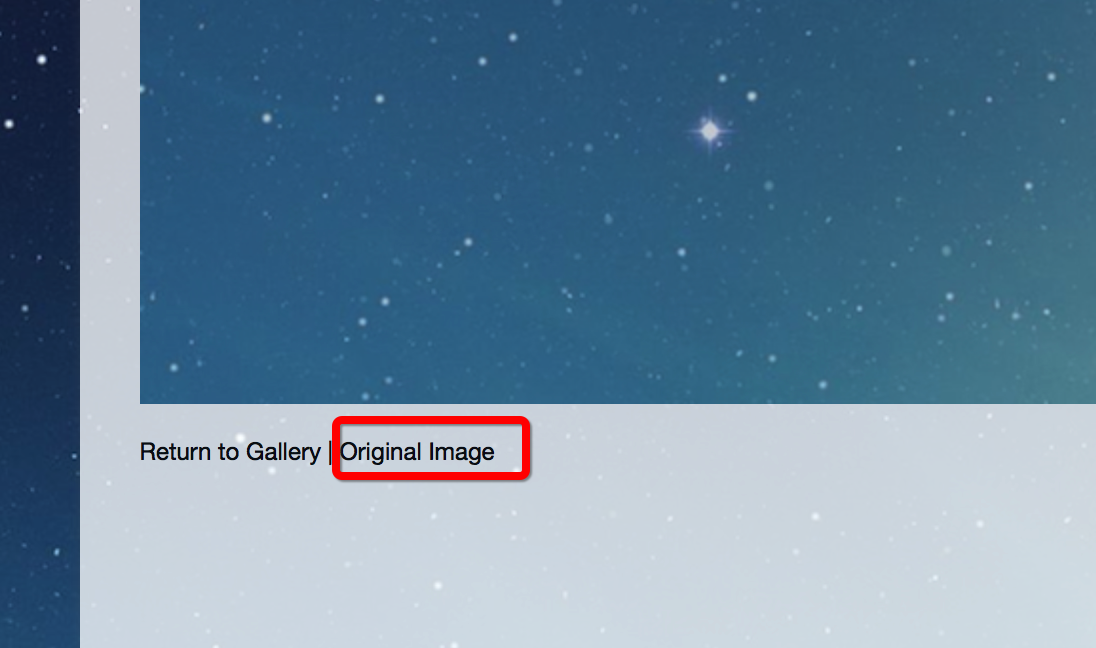
3)点击相册里上传好的图片,在好看的博客页面查看
4)在图片左下角点开,复制网址,这个就是用来指定地址的
5)更改css代码中的url,括号里那一坨
以上。模板美化就,哦可了。
参考:https://www.cnblogs.com/kousak/p/9118960.html
2019/04/25更新:
光看内容不留评论的都是LIUMANG~
Web前端:博客美化:一、模板美化的更多相关文章
- Web前端,HTML5开发,前端资源,前端网址,前端博客,前端框架整理 - 转改
Web前端/H5开发,前端资源,前端网址,前端博客,前端框架整理 综合类 前端知识体系 前端知识结构 Web前端开发大系概览 Web前端开发大系概览-中文版 Web Front-end Stack v ...
- Node.js 从零开发 web server博客项目[express重构博客项目]
web server博客项目 Node.js 从零开发 web server博客项目[项目介绍] Node.js 从零开发 web server博客项目[接口] Node.js 从零开发 web se ...
- Node.js 从零开发 web server博客项目[安全]
web server博客项目 Node.js 从零开发 web server博客项目[项目介绍] Node.js 从零开发 web server博客项目[接口] Node.js 从零开发 web se ...
- Node.js 从零开发 web server博客项目[日志]
web server博客项目 Node.js 从零开发 web server博客项目[项目介绍] Node.js 从零开发 web server博客项目[接口] Node.js 从零开发 web se ...
- Node.js 从零开发 web server博客项目[登录]
web server博客项目 Node.js 从零开发 web server博客项目[项目介绍] Node.js 从零开发 web server博客项目[接口] Node.js 从零开发 web se ...
- Node.js 从零开发 web server博客项目[项目介绍]
web server博客项目 Node.js 从零开发 web server博客项目[项目介绍] Node.js 从零开发 web server博客项目[接口] Node.js 从零开发 web se ...
- django 简易博客开发 2 模板和数据查询
首先还是贴一下项目地址 https://github.com/goodspeedcheng/sblog 因为代码全在上面 上一篇博客我们介绍了 django的安装配置,新建project,新建a ...
- Node.js 从零开发 web server博客项目[数据存储]
web server博客项目 Node.js 从零开发 web server博客项目[项目介绍] Node.js 从零开发 web server博客项目[接口] Node.js 从零开发 web se ...
- Node.js 从零开发 web server博客项目[koa2重构博客项目]
web server博客项目 Node.js 从零开发 web server博客项目[项目介绍] Node.js 从零开发 web server博客项目[接口] Node.js 从零开发 web se ...
- Node.js 从零开发 web server博客项目[接口]
web server博客项目 Node.js 从零开发 web server博客项目[项目介绍] Node.js 从零开发 web server博客项目[接口] Node.js 从零开发 web se ...
随机推荐
- Mesos源码分析(12): Mesos-Slave接收到RunTask消息
在前文Mesos源码分析(8): Mesos-Slave的初始化中,Mesos-Slave接收到RunTaskMessage消息,会调用Slave::runTask. void Slave::ru ...
- 详解AMD规范及具体实现requireJS在工程中的使用
前面的话 由CommonJS组织提出了许多新的JavaScript架构方案和标准,希望能为前端开发提供统一的指引.AMD规范就是其中比较著名一个,全称是Asynchronous Module Defi ...
- [Swift]LeetCode42. 接雨水 | Trapping Rain Water
Given n non-negative integers representing an elevation map where the width of each bar is 1, comput ...
- [Swift]LeetCode152. 乘积最大子序列 | Maximum Product Subarray
Given an integer array nums, find the contiguous subarray within an array (containing at least one n ...
- [Swift]LeetCode443. 压缩字符串 | String Compression
Given an array of characters, compress it in-place. The length after compression must always be smal ...
- [Swift]LeetCode735. 行星碰撞 | Asteroid Collision
We are given an array asteroids of integers representing asteroids in a row. For each asteroid, the ...
- java初见
public class Diyi{ public static void main(String[] args){ System.out.println("Hello,world" ...
- 用了 HTTPS 还不安全,问题就出在低版本 TLS 上
HTTPS 加密时代已经来临,近两年,Google.Baidu.Facebook 等互联网巨头,不谋而合地开始大力推行 HTTPS, 2018 年 7 月 25 日,Chrome 68 上线,所有 H ...
- CentOS 7 源码编译安装 Nginx
这里安装的是nginx 1.14版本 1.下载源码 #下载 wget http://nginx.org/download/nginx-1.14.0.tar.gz #解压 tar -xzf nginx- ...
- 使用ML.NET预测纽约出租车费
有了上一篇<.NET Core玩转机器学习>打基础,这一次我们以纽约出租车费的预测做为新的场景案例,来体验一下回归模型. 场景概述 我们的目标是预测纽约的出租车费,乍一看似乎仅仅取决于行程 ...