
EF Code First一对一、一对多、多对多关联关系配置
1、EF Code First一对一关联关系
项目结构图:
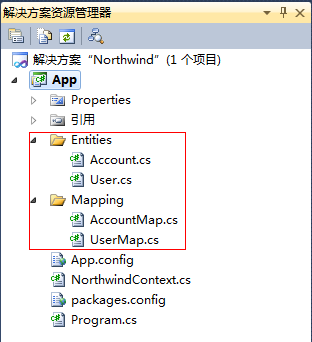
实体类:
Account.cs

using System;

using System.Collections.Generic;

using System.Linq;

using System.Text;

namespace Northwind.App.Entities

{

   public class Account

    {

       /// <summary>

       /// 账户ID

       /// </summary>

       public int AccountID { get; set; }

       /// <summary>

       /// 账户名

       /// </summary>

       public string AccountName { get; set; }

       /// <summary>

       /// 密码

       /// </summary>

       public string Password { get; set; }

       /// <summary>

       /// 用户信息

       /// </summary>

       public virtual User User { get; set; }

    }

}
User.cs
using System;

using System.Collections.Generic;

using System.Linq;

using System.Text;

namespace Northwind.App.Entities

{

   public class Account

    {

       /// <summary>

       /// 账户ID

       /// </summary>

       public int AccountID { get; set; }

       /// <summary>

       /// 账户名

       /// </summary>

       public string AccountName { get; set; }

       /// <summary>

       /// 密码

       /// </summary>

       public string Password { get; set; }

       /// <summary>

       /// 用户信息

       /// </summary>

       public virtual User User { get; set; }

    }

}
实体映射类:
AccountMap.cs
using System;

using System.Collections.Generic;

using System.Linq;

using System.Text;

using System.Data.Entity.ModelConfiguration;

using System.ComponentModel.DataAnnotations.Schema;

using Northwind.App.Entities;

namespace Northwind.App.Mapping

{

    public class AccountMap : EntityTypeConfiguration<Account>

    {

        public AccountMap()

        {

            // Primary Key

            this.HasKey(t => t.AccountID);

            // Properties

            this.Property(t => t.AccountName).HasMaxLength(50);

            this.Property(t => t.Password).HasMaxLength(100);

            // Table & Column Mappings

            this.ToTable("Account");

            this.Property(t => t.AccountID).HasColumnName("AccountID");

            this.Property(t => t.AccountName).HasColumnName("AccountName");

            this.Property(t => t.Password).HasColumnName("Password");

        }

    }

}
UserMap.cs
using System;

using System.Collections.Generic;

using System.Linq;

using System.Text;

using System.Data.Entity.ModelConfiguration;

using System.ComponentModel.DataAnnotations.Schema;

using Northwind.App.Entities;

namespace Northwind.App.Mapping

{

    public class UserMap : EntityTypeConfiguration<User>

    {

        public UserMap()

        {

            // Primary Key

            this.HasKey(t => t.AccountID);

            // Properties

            this.Property(t => t.AccountID).HasDatabaseGeneratedOption(DatabaseGeneratedOption.None);

            this.Property(t => t.UserName).HasMaxLength(50);

            this.Property(t => t.Email).HasMaxLength(100);

            // Table & Column Mappings

            this.ToTable("User");

            this.Property(t => t.AccountID).HasColumnName("AccountID");

            this.Property(t => t.UserName).HasColumnName("UserName");

            this.Property(t => t.Email).HasColumnName("Email");

            this.Property(t => t.RegisterDate).HasColumnName("RegisterDate");

            // Relationships

            this.HasRequired(t => t.Account)

                .WithRequiredDependent(t => t.User);

        }

    }

}
NorthwindContext.cs
using System;

using System.Collections.Generic;

using System.Linq;

using System.Text;

using System.Data.Entity;

using Northwind.App.Entities;

using Northwind.App.Mapping;

namespace Northwind.App

{

    public class NorthwindContext : DbContext

    {

        static NorthwindContext()

        {

            Database.SetInitializer(new DropCreateDatabaseIfModelChanges<NorthwindContext>());

        }

        public DbSet<Account> Accounts { get; set; }

        public DbSet<User> Users { get; set; }

        protected override void OnModelCreating(DbModelBuilder modelBuilder)

        {

            modelBuilder.Configurations.Add(new AccountMap());

            modelBuilder.Configurations.Add(new UserMap());

        }

    }

}
Program.cs
using System;

using System.Collections.Generic;

using System.Linq;

using System.Text;

using Northwind.App.Entities;

namespace Northwind.App

{

    class Program

    {

        static void Main(string[] args)

        {

            using (NorthwindContext db = new NorthwindContext())

            {

                Account account = new Account { AccountName = "Test", Password = "1" };

                db.Accounts.Add(account);

                User user = new User { AccountID = account.AccountID, UserName = "测试", Email = "test@126.com", RegisterDate = DateTime.Now };

                db.Users.Add(user);

                db.SaveChanges();

            }

        }

    }

}
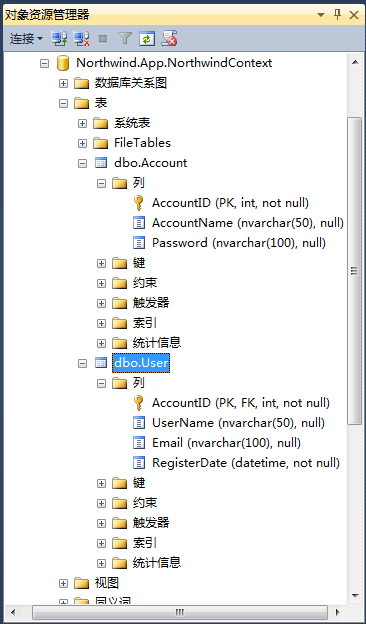
代码运行后生成的数据库结构图:
2、EF Code First一对多关联关系
关联表:Product 产品表、Category分类表
关联关系:一个产品属于一个分类,一个分类可以有多个产品
实体代码:
Category.cs
using System;

using System.Collections.Generic;

using System.Linq;

using System.Text;

namespace Northwind.App.Entities

{

    public class Category

    {

        /// <summary>

        /// 分类ID

        /// </summary>

        public Guid CategoryID { get; set; }

        /// <summary>

        /// 分类名称

        /// </summary>

        public string CategoryName { get; set; }

        /// <summary>

        /// 产品

        /// </summary>

        public virtual ICollection<Product> Products { get; set; }

    }

}
Product.cs
using System;

using System.Collections.Generic;

using System.Linq;

using System.Text;

namespace Northwind.App.Entities

{

    public class Product

    {

        /// <summary>

        /// 产品ID

        /// </summary>

        public Guid ProductID { get; set; }

        /// <summary>

        /// 产品名称

        /// </summary>

        public string ProductName { get; set; }

        /// <summary>

        /// 单价

        /// </summary>

        public decimal UnitPrice { get; set; }

        /// <summary>

        /// 数量

        /// </summary>

        public Nullable<int> Quantity { get; set; }

        /// <summary>

        /// 库存

        /// </summary>

        public Nullable<int> UnitsInStock { get; set; }

        /// <summary>

        /// 产品类别ID

        /// </summary>

        public Guid CategoryID { get; set; }

        /// <summary>

        /// 产品类别

        /// </summary>

        public virtual Category Category { get; set; }

    }

}
实体映射类:
CategoryMap.cs
using System;

using System.Collections.Generic;

using System.Linq;

using System.Text;

using System.Data.Entity.ModelConfiguration;

using System.ComponentModel.DataAnnotations.Schema;

using Northwind.App.Entities;

namespace Northwind.App.Mapping

{

    public class CategoryMap : EntityTypeConfiguration<Category>

    {

        public CategoryMap()

        {

            // Primary Key

            this.HasKey(t => t.CategoryID);

            // Properties

            this.Property(t => t.CategoryID)

                .HasDatabaseGeneratedOption(DatabaseGeneratedOption.Identity);

            this.Property(t => t.CategoryName).IsRequired()

                .HasMaxLength(100);

            // Table & Column Mappings

            this.ToTable("Category");

            this.Property(t => t.CategoryID).HasColumnName("CategoryID");

            this.Property(t => t.CategoryName).HasColumnName("CategoryName");

        }

    }

}
ProductMap.cs
using System;

using System.Collections.Generic;

using System.Linq;

using System.Text;

using System.Data.Entity.ModelConfiguration;

using System.ComponentModel.DataAnnotations.Schema;

using Northwind.App.Entities;

namespace Northwind.App.Mapping

{

    public class ProductMap : EntityTypeConfiguration<Product>

    {

        public ProductMap()

        {

            // Primary Key

            this.HasKey(t => t.ProductID);

            // Properties

            this.Property(t => t.ProductID)

                .HasDatabaseGeneratedOption(DatabaseGeneratedOption.Identity);

            this.Property(t => t.ProductName).IsRequired()

                .HasMaxLength(100);

            this.Property(t => t.UnitPrice).HasPrecision(10, 2);

            // Table & Column Mappings

            this.ToTable("Product");

            this.Property(t => t.ProductID).HasColumnName("ProductID");

            this.Property(t => t.ProductName).HasColumnName("ProductName");

            this.Property(t => t.UnitPrice).HasColumnName("UnitPrice");

            this.Property(t => t.Quantity).HasColumnName("Quantity");

            this.Property(t => t.UnitsInStock).HasColumnName("UnitsInStock");

            this.Property(t => t.CategoryID).HasColumnName("CategoryID");

            // Relationships

            this.HasRequired(t => t.Category)

                .WithMany(t => t.Products)

                .HasForeignKey(t => t.CategoryID)

                .WillCascadeOnDelete(false);

        }

    }

}
NorthwindContext.cs
using System;

using System.Collections.Generic;

using System.Linq;

using System.Text;

using System.Data.Entity;

using Northwind.App.Entities;

using Northwind.App.Mapping;

namespace Northwind.App

{

    public class NorthwindContext : DbContext

    {

        static NorthwindContext()

        {

            Database.SetInitializer(new DropCreateDatabaseIfModelChanges<NorthwindContext>());

        }

        public DbSet<Account> Accounts { get; set; }

        public DbSet<User> Users { get; set; }

        public DbSet<Category> Categories { get; set; }

        public DbSet<Product> Products { get; set; }

        protected override void OnModelCreating(DbModelBuilder modelBuilder)

        {

            modelBuilder.Configurations.Add(new AccountMap());

            modelBuilder.Configurations.Add(new UserMap());

            modelBuilder.Configurations.Add(new CategoryMap());

            modelBuilder.Configurations.Add(new ProductMap());

        }

    }

}
Program.cs
using System;

using System.Collections.Generic;

using System.Linq;

using System.Text;

using Northwind.App.Entities;

namespace Northwind.App

{

    class Program

    {

        static void Main(string[] args)

        {

            using (NorthwindContext db = new NorthwindContext())

            {

                Category category = new Category { CategoryName = "手机数码" };

                db.Categories.Add(category);

                Product product = new Product { CategoryID = category.CategoryID, ProductName = "IPhone5", UnitPrice = 5000m, Quantity = 100, UnitsInStock = 60 };

                db.Products.Add(product);

                db.SaveChanges();

            }

        }

    }

}
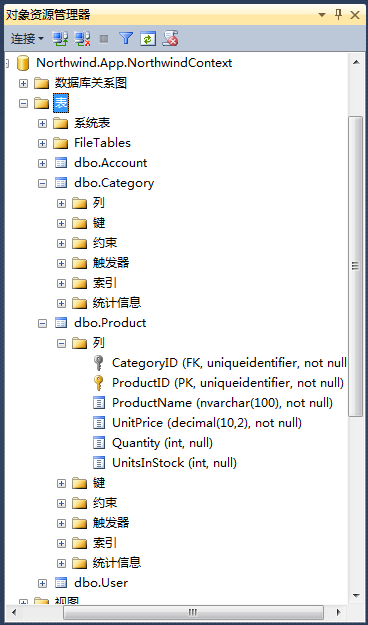
运行代码后生成的数据表:
http://www.cnblogs.com/libingql/archive/2013/01/31/2888201.html
EF Code First一对一、一对多、多对多关联关系配置的更多相关文章
- JPA级联(一对一 一对多 多对多)注解【实际项目中摘取的】并非自己实际应用
下面把项目中的用户类中有个:一对一 一对多 多对多的注解对应关系列取出来用于学习 说明:项目运行正常 问题类:一对多.一对一.多对多 ============一对多 一方的设置 @One ...
- Python进阶----表与表之间的关系(一对一,一对多,多对多),增删改查操作
Python进阶----表与表之间的关系(一对一,一对多,多对多),增删改查操作,单表查询,多表查询 一丶表与表之间的关系 背景: 由于如果只使用一张表存储所有的数据,就会操作数 ...
- mybatis 一对一 一对多 多对多
一对一 一对多 多对多
- 【EF Code First】 一对多、多对多的多重关系配置
这里使用用户表(User)和项目(Project)表做示例 有这样一个需求: 用户与项目的关系是:一个用户可以发多个项目,可以参加多个项目,而项目可以有多个参与成员和一个发布者 [其中含1-n和n-n ...
- 使用NHibernate(7)-- 一对一 && 一对多 && 多对多
1, 一对一. 对于数据量比较大的时候,考虑查询的性能,肯能会把一个对象的属性分到两个表中存放:比如用户和用户资料,经常使用的一般是Id和用户名,用户资料(学校,籍贯等)是不经常被查询的,所以就会分成 ...
- day 69-70 一对一 一对多 多对一联表查询
day 69 orm操作之表关系,多对多,多对一 多对一/一对多, 多对多{类中的定义方法} day69 1. 昨日内容回顾 1. 单表增删改查 2. 单表查询API 返回QuerySet对象的: 1 ...
- JPA 一对一 一对多 多对一 多对多配置
1 JPA概述 1.1 JPA是什么 JPA (Java Persistence API) Java持久化API.是一套Sun公司 Java官方制定的ORM 方案,是规范,是标准 ,sun公司自己并没 ...
- SQLAlchemy_定义(一对一/一对多/多对多)关系
目录 Basic Relationship Patterns One To Many One To One Many To Many Basic Relationship Patterns 基本关系模 ...
- MySQL一对一:一对多:多对多: 实例!!!!
学生表和课程表可以多对多 一个学生可以学多门课程 一门课程可以有多个学生: 多对多 *** 一个学生对应一个班级 一个班级对应多个学生: 一对多 *** 一个老师对应多个学生 多个学生对应一个老师:一 ...
随机推荐
- CynosDB技术详解——架构设计
本文由腾讯云数据库发表 前言 CynosDB是新一代分布式数据库,100%兼容MySQL和PostgreSQL,支持存储弹性扩展,一主多从共享数据,性能更是超越社区原生MySQL和PostgreSQL ...
- EJS 语法
教程
- Cleartext HTTP traffic to xxx not permitted解决办法
,为保证用户数据和设备的安全,针对下一代 Android 系统(Android P) 的应用程序,将要求默认使用加密连接,这意味着 Android P 将禁止 App 使用所有未加密的连接,因此运行 ...
- 【js】Number与数组
定义和用法 Number() 函数把对象的值转换为数字. 语法 Number(object):参数必须是对象 如果参数是 Date 对象,Number() 返回从 1970 年 1 月 1 日至今的毫 ...
- 012_python在shell下单行执行多行代码
一.有时候只是简单的获取下时间戳,不想在python解释器的交互模式下再去执行python代码,如何实现呢? 以循环输出多行为例: (1)第一种方式: python -c "exec(\&q ...
- 03 前端篇(JS)
参考博客:http://www.cnblogs.com/yuanchenqi/articles/5980312.html JavaScript包括三部分: ECMAScript.DOM.BOM Jav ...
- 爬虫基础(五)-----scrapy框架简介
---------------------------------------------------摆脱穷人思维 <五> :拓展自己的视野,适当做一些眼前''无用''的事情,防止进入只关 ...
- OpenStack之Fuel架构及其工作原理
一.Fuel架构 Fuel是一个开源的OpenStack部署和管理的工具,它允许用户通过Web UI进行OpenStack的部署和管理,并可以通过插件来扩展. Fuel的目标:加快和简化不同配置的 ...
- jQuery 模拟操作
1.常用模拟 有时,需要通过模拟用户操作,来达到单击的效果.例如在用户进入页面后,就触发 click 事件,而不需要用户去主动单击.在 jQuery 中,可以使用 trigger() 方法完成模拟操作 ...
- 【微信小程序】rpx尺寸单位的应用
前言:微信小程序中的rpx尺寸单位用起来很方便.他是怎么实现计算的呢?(这里要注意的是,常规浏览器解析css代码的时候会把font-size小于12px的字体转成12px,不会让他小于12px的,而微 ...