
Struts2文件上传和文件下载
一.单个文件上传
文件上传需要两个jar包:

首先制作一个简单的页面,用于实现文件上传
<h1>单个文件上传</h1>

        <s:form action="upload.action" enctype="multipart/form-data"

            method="post" namespace="/">

            <s:textfield name="title" lable="标题"></s:textfield>

            <s:file name="upload" lable="选择文件"></s:file>

            <s:submit value="上传文件"></s:submit>

        </s:form>
开发实现文件上传的Action
package cn.action;

import java.io.File;

import java.io.FileInputStream;

import java.io.FileNotFoundException;

import java.io.FileOutputStream;

import java.io.IOException;

import org.apache.struts2.ServletActionContext;

import com.opensymphony.xwork2.ActionSupport;

public class UploadAction  extends ActionSupport{

    //封装上传文件属性

        private File upload;

        //封装上传文件的类型

        private String uploadContentType;

        //封装上传文件名称

        private String uploadFileName;

        //封装文件上传的路径

        private String savePath;

        public String execute(){

            byte[] buffer=new byte[1024];

            try {

                FileInputStream fis=new FileInputStream(getUpload());

                FileOutputStream fos=new FileOutputStream(getSavePath()+"\\"+this.getUploadFileName());

                int length=fis.read(buffer);

                while(length>0){

                    fos.write(buffer, 0, length);

                    length=fis.read(buffer);

                }

                fos.flush();

                fos.close();

                fis.close();

            } catch (FileNotFoundException e) {

                e.printStackTrace();

            } catch (IOException e) {

                e.printStackTrace();

            }

            System.out.println("========================");

            return SUCCESS;

        }

        public File getUpload() {

            return upload;

        }

        public void setUpload(File upload) {

            this.upload = upload;

        }

        public String getUploadContentType() {

            return uploadContentType;

        }

        public void setUploadContentType(String uploadContentType) {

            this.uploadContentType = uploadContentType;

        }

        public String getUploadFileName() {

            return uploadFileName;

        }

        public void setUploadFileName(String uploadFileName) {

            this.uploadFileName = uploadFileName;

        }

        public String getSavePath() {

            return ServletActionContext.getServletContext().getRealPath(savePath);

        }

        public void setSavePath(String savePath) {

            this.savePath = savePath;

        }

}
在Action中使用了三个属性封装文件信息
File类型的XXX属性,与表单的File控件的name属性一样,用于封装File控件对应的文件内容
String类型的xxxFileName属性,该属性名称由前面的File类型属性和FileName组合,是固定的语法,是封装File控件对应文件的文件名
String类型的XXXContentType属性,同样由xxx属性和ContentType组合而成,是固定语法,封装File控件对应文件的文件类型
配置Action
<!-- 单个文件上传 -->

        <action name="upload" class="cn.action.UploadAction">

            <!-- 通过param参数设置保存目录的路径 -->

            <param name="savePath">/upload</param>

            <result name="success">success.jsp</result>

        </action>
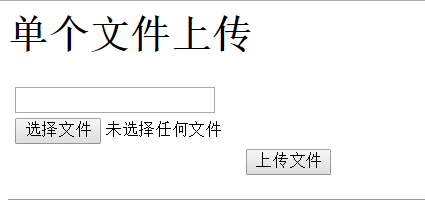
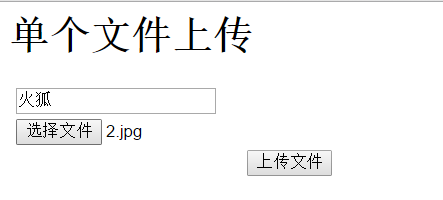
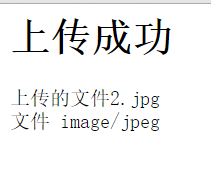
效果图:
二.多个文件上传
只需在上传Action中将原本处理单个文件的操作改成对集合操作即可。
其他的都跟单个上传的一样
页面
<!-- 多个文件上传 -->

        <action name="someupload" class="cn.action.SomeUploadAction">

            <!-- 通过param参数设置保存目录的路径 -->

            <param name="savePath">/upload</param>

            <result name="success">success.jsp</result>

        </action>
开发实现文件上传的Action
package cn.action;

import java.io.File;

import java.io.FileInputStream;

import java.io.FileOutputStream;

import org.apache.struts2.ServletActionContext;

import com.opensymphony.xwork2.ActionSupport;

public class SomeUploadAction extends ActionSupport {

    //封装上传文件属性

        private File[] upload;

        //封装上传文件的类型

        private String[] uploadContentType;

        //封装上传文件名称

        private String[] uploadFileName;

        //封装文件上传的路径

        private String savePath;

        public String execute() throws Exception{

            byte[] buffer=new byte[1024];

            for (int i = 0; i < upload.length; i++) {

                FileInputStream fis=new FileInputStream(getUpload()[i]);

                FileOutputStream fos=new FileOutputStream(getSavePath()+"\\"+this.getUploadFileName()[i]);

                int length=fis.read(buffer);

                while(length>0){

                    fos.write(buffer, 0, length);

                    length=fis.read(buffer);

                }

                fos.flush();

                fos.close();

                fis.close();

            }

            return SUCCESS;

        }

        public File[] getUpload() {

            return upload;

        }

        public void setUpload(File[] upload) {

            this.upload = upload;

        }

        public String[] getUploadContentType() {

            return uploadContentType;

        }

        public void setUploadContentType(String[] uploadContentType) {

            this.uploadContentType = uploadContentType;

        }

        public String[] getUploadFileName() {

            return uploadFileName;

        }

        public void setUploadFileName(String[] uploadFileName) {

            this.uploadFileName = uploadFileName;

        }

        public String getSavePath() {

            return ServletActionContext.getServletContext().getRealPath(savePath);

        }

        public void setSavePath(String savePath) {

            this.savePath = savePath;

        }

}
配置Action
<!-- 多个文件上传 -->

        <action name="someupload" class="cn.action.SomeUploadAction">

            <!-- 通过param参数设置保存目录的路径 -->

            <param name="savePath">/upload</param>

            <result name="success">success.jsp</result>

        </action>
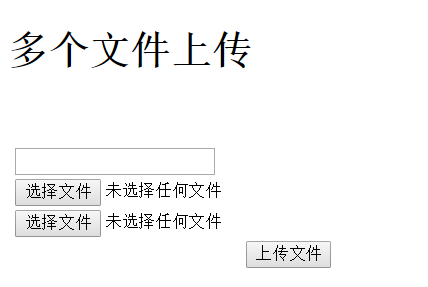
效果:
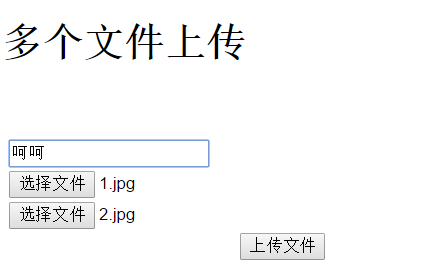
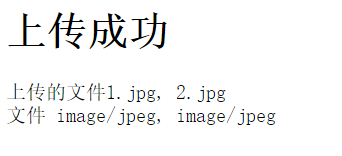
三.文件下载
文件下载需要InputStream,首先在文件下载Action中提供一个获得InputStream的方法,通过输入流可以获取希望下载的文件内容
package cn.action;

import java.io.BufferedInputStream;

import java.io.FileInputStream;

import java.io.FileNotFoundException;

import java.io.InputStream;

import org.apache.struts2.ServletActionContext;

import com.opensymphony.xwork2.ActionSupport;

public class FileDownAction extends ActionSupport {

    //读取下载文件的目录

        private String inputPath;

        //下载文件的文件名

        private String fileName;

        //读取下载文件的输入流

        private InputStream inputStream;

        //下载文件的类型

        private String conetntType;

        public String execute(){

            return SUCCESS;

        }

        public String getInputPath() {

            return inputPath;

        }

        public void setInputPath(String inputPath) {

            this.inputPath = inputPath;

        }

        public String getFileName() {

            return fileName;

        }

        public void setFileName(String fileName) {

            this.fileName = fileName;

        }

        //创建InputStream输入流

        public InputStream getInputStream() throws Exception {

            String path=ServletActionContext.getServletContext().getRealPath(inputPath);

            BufferedInputStream stream = new BufferedInputStream(new FileInputStream(path+"\\"+fileName));

            return stream;

        }

        public void setInputStream(InputStream inputStream) {

            this.inputStream = inputStream;

        }

        public String getConetntType() {

            return conetntType;

        }

        public void setConetntType(String conetntType) {

            this.conetntType = conetntType;

        }

}
通过Context得到下载文件的实际路径,构建一个InputStream输入流实现文件的下载读取。
在配置文件中,同样对Action进行配置,并对stream结果类型的参数进行设置。
<!-- download指定的Action -->

        <action name="download" class="cn.action.FileDownAction">

            <param name="inputPath">/upload</param>

            <result name="success" type="stream">

                <param name="contentType">application/octet-stream</param>

                <param name="inputName">inputStream</param>

                <param name="contentDisposition">

                    attachment;filename="${fileName}"

                </param>

                <param name="bufferSize">4096</param>

            </result>

        </action>
ContentType参数决定了下载文件的类型,不同的文件类型对应的参数值也是不同的。
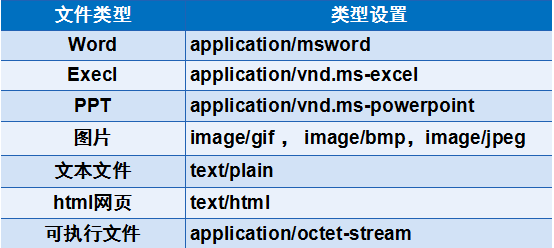
通常情况下,ContentType参数直接设置为application/octet-stream即可。
contentDisposition参数由两部分组成,前面的部分表示处理文件的形式,如attachement表示在下载时弹出对话框,提出用户保存或直接打开该文件;而后一部分表示下载文件的文件名称。两部分之间用“;”进行分隔。
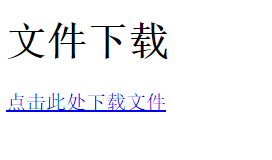
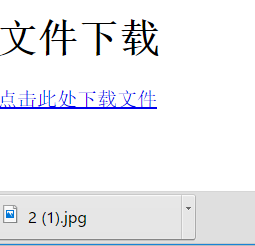
然后开发一个简单的下载页面,在页面中设置一个超链接,通过超链接请求下载Action
<h1>文件下载</h1>

        <s:a href="download.action?fileName=2.jpg">点击此处下载文件</s:a>
效果:
Struts2文件上传和文件下载的更多相关文章
- 分享知识-快乐自己:Struts2文件上传及文件下载
1)Struts2单文件上传 action:类文件 package com.mlq.action; import com.opensymphony.xwork2.ActionSupport; impo ...
- Struts2 文件上传和文件下载
一.单个文件上传 文件上传需要两个jar包: 首先制作一个简单的页面,用于实现文件上传 <h1>单个文件上传</h1> <s:form action="uplo ...
- struts2的文件上传和文件下载
实现使用Struts2文件上传和文件下载: 注意点: (1)对应表单的file1和私有成员变量的名称必须一致 <input type="file" name="fi ...
- Struts2文件上传下载
Struts2文件上传 Struts2提供 FileUpload拦截器,用于解析 multipart/form-data 编码格式请求,解析上传文件的内容,fileUpload拦截器 默认在defau ...
- Struts2文件上传和下载(原理)
转自:http://zhou568xiao.iteye.com/blog/220732 1. 文件上传的原理:表单元素的enctype属性指定的是表单数据的编码方式,该属性有3个值:1) ...
- JAVA Web 之 struts2文件上传下载演示(二)(转)
JAVA Web 之 struts2文件上传下载演示(二) 一.文件上传演示 详细查看本人的另一篇博客 http://titanseason.iteye.com/blog/1489397 二.文件下载 ...
- JAVA Web 之 struts2文件上传下载演示(一)(转)
JAVA Web 之 struts2文件上传下载演示(一) 一.文件上传演示 1.需要的jar包 大多数的jar包都是struts里面的,大家把jar包直接复制到WebContent/WEB-INF/ ...
- (八)Struts2 文件上传和下载
所有的学习我们必须先搭建好Struts2的环境(1.导入对应的jar包,2.web.xml,3.struts.xml) 第一节:Struts2 文件上传 Struts2 文件上传基于Struts2 拦 ...
- 学习Struts--Chap07:Struts2文件上传和下载
1.struts2文件上传 1.1.struts2文件上传的基本概述 在开发web应用的时候,我们一般会为用户提供文件上传的功能,比如用户上传一张图像作为头像等.为了能上传文件,我们必须将表单的met ...
随机推荐
- 移动H5前端性能优化指南
移动H5前端性能优化指南 概述 1. PC优化手段在Mobile侧同样适用2. 在Mobile侧我们提出三秒种渲染完成首屏指标3. 基于第二点,首屏加载3秒完成或使用Loading4. 基于联通3G网 ...
- ["1", "2", "3"].map(parseInt)?
["1", "2", "3"].map(parseInt)得到什么? 答案是:[1, NaN, NaN]. 原因:parseInt接收的是两 ...
- javascript随笔20160808
var jsondata=$.parseJSON(@ViewBag.x); //转换为Json数据 var fruits = ["Banana", "Orange&quo ...
- arcgis server之路网服务发布
路网服务发布首先需要建立好道路的网络集,为了保证道路网络分析的准确性,建立网络集之前,要对道路图层进行拓扑差错,确保道路的连通性.具体操作流程为:道路拓扑差错-建立几何网络集-路网服务发布. 1.道路 ...
- MyEclipse使用心得:SVN插件安装方法
1.在线安装,打开myeclipse,help--->MyEclipse Configuration Center 2.点击Add Site 打开对话框,在对话框Name输入Svn,URL中输入 ...
- Handler.sendMessage 与 Handler.obtainMessage.sendToTarget比较
原文地址: http://www.cnblogs.com/android007/archive/2012/05/10/2494766.html 话说在工作中第一次接触android 的Handler ...
- 使用AIDL调用远程服务设置系统时间
在实际工作中,经常遇到客户需要用代码设置系统时间的需求,但是Android非系统应用是无法设置系统时间的.于是,我设计了一个使用系统签名的时间设置服务,客户通过bind调用服务里的方法就能达到设置时间 ...
- 【代码笔记】iOS-获得设备型号
一,代码. - (void)viewDidLoad { [super viewDidLoad]; // Do any additional setup after loading the view. ...
- UITextFeild的用法
一. 修改占位字符串的 颜色: =======方法一 ====================================== #import "ViewController.h&quo ...
- Mac使用极简教程
最近领导让我写一篇关于Mac的使用教程,因为使用人群未知,所以尽量写的通俗易懂,可谓是关于Mac电脑使用的精简教程吧,在此发表出来以供参考. Mac因为安全性而闻名,我们拥有了一部Mac,那么我们来了 ...