
monkeyrunner录制和回放功能
脚本录制
网上先是搜索了一下,说是SDK--tools目录下有monkey_recorder.py和monkey_playback.py的脚本,但是我的没有找到所以可以自己编辑个脚本保存即可~
先编辑以下代码为monkey_recorder.py,保存在tools中
from com.android.monkeyrunner import MonkeyRunner as mr
from com.android.monkeyrunner.recorder import MonkeyRecorder as recorder
device = mr.waitForConnection()
recorder.start(device)
这个是回放的代码monkey_playback.py
#!/usr/bin/env monkeyrunner
# Copyright 2010, The Android Open Source Project
#
# Licensed under the Apache License, Version 2.0 (the "License");
# you may not use this file except in compliance with the License.
# You may obtain a copy of the License at
#
# http://www.apache.org/licenses/LICENSE-2.0
#
# Unless required by applicable law or agreed to in writing, software
# distributed under the License is distributed on an "AS IS" BASIS,
# WITHOUT WARRANTIES OR CONDITIONS OF ANY KIND, either express or implied.
# See the License for the specific language governing permissions and
# limitations under the License.
import sys
from com.android.monkeyrunner import MonkeyRunner
# The format of the file we are parsing is very carfeully constructed.
# Each line corresponds to a single command. The line is split into 2
# parts with a | character. Text to the left of the pipe denotes
# which command to run. The text to the right of the pipe is a python
# dictionary (it can be evaled into existence) that specifies the
# arguments for the command. In most cases, this directly maps to the
# keyword argument dictionary that could be passed to the underlying
# command.
# Lookup table to map command strings to functions that implement that
# command.
CMD_MAP = {
'TOUCH': lambda dev, arg: dev.touch(**arg),
'DRAG': lambda dev, arg: dev.drag(**arg),
'PRESS': lambda dev, arg: dev.press(**arg),
'TYPE': lambda dev, arg: dev.type(**arg),
'WAIT': lambda dev, arg: MonkeyRunner.sleep(**arg)
}
# Process a single file for the specified device.
def process_file(fp, device):
for line in fp:
(cmd, rest) = line.split('|')
try:
# Parse the pydict
rest = eval(rest)
except:
print('unable to parse options')
continue
if cmd not in CMD_MAP:
print('unknown command: ' + cmd)
continue
CMD_MAP[cmd](device, rest)
def main():
file = sys.argv[1]
fp = open(file, 'r')
device = MonkeyRunner.waitForConnection()
process_file(fp, device)
fp.close();
if __name__ == '__main__':
main()
然后执行,monkeyrunner monkey_recorder.py,会出现一个录制弹窗

Wait 是设置等待时间
press a Button 是发送MENU HOME SEARCH按钮的Press Down Up响应事件
type something 是输入字符
Fling 是模拟东西南北的拖动操作
Export Actions 是导出脚本
Refresh Display 是刷新功能
然后就可以进行录制app操作了~
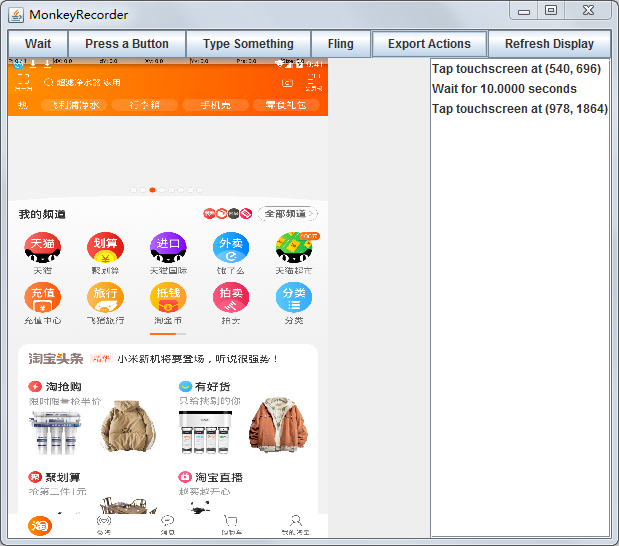
最后导出export Action,cmd中回放此导出文件即可
monkeyrunner monkey_playback.py 导出脚本路径
monkeyrunner录制和回放功能的更多相关文章
- Android自动化测试之MonkeyRunner录制和回放脚本
Android自动化测试之MonkeyRunner录制和回放脚本(十一) 分类: 自动化测试 Android自动化 2013-02-22 10:57 7346人阅读 评论(2) 收藏 举报 andro ...
- Monkeyrunner 录制脚本&回放
本文主要解释如何使用monkeyrunner来实现脚本的录制和回放 一:准备条件 在电脑端配置 Android SDK环境 java 环境 下载好 SDK后添加环境变量 E:\android- ...
- [转] Android自动化测试之MonkeyRunner录制和回放脚本(四)
测试脚本录制: 方案一: 我们先看看以下monkeyrecoder.py脚本: #Usage: monkeyrunner recorder.py #recorder.py http://mirror ...
- 【转】Android自动化测试之MonkeyRunner录制和回放脚本(四)
测试脚本录制: 方案一: 我们先看看以下monkeyrecoder.py脚本: #Usage: monkeyrunner recorder.py #recorder.py http://mirror ...
- Android自动化学习笔记之MonkeyRunner:MonkeyRunner的录制和回放
---------------------------------------------------------------------------------------------------- ...
- Unity-Animator深入系列---录制与回放
回到 Animator深入系列总目录 Animator自带了简单的动画录制,回放功能.但可惜的是不支持持久化的数据输出.因而不能作为录像保存 不过这种可以作为竞速,格斗类游戏在结束时经常出现的游戏回放 ...
- 性能测试--Jmeter录制、回放
Jmeter录制.回放 在jmeter2.1版本之前,jmeter应该是不支持录制和回放功能的,那时候如果需要录制jmeter的性能测试脚本的话,就需要使用第三方工具——badboy.现在jmeter ...
- monkeyrunner之录制与回放(七)
monkeyrunner为我们提供了录制 回放的功能. 录制与回放使用原因:实际项目,需求变更频繁,且测试任务多,我们没有足够时间去写测试脚本,这是就可以进行录制脚本,然后通过回放,跑完需要的流程. ...
- IOS开发之小实例--创建一个简单的用于视频录制和回放的应用程序
前言:还是看了一下国外的入门IOS文章:<Create a Simple App for Video Recording and Playback>,主要涉及视频录制和回放的功能的基本实现 ...
随机推荐
- java发送邮件(一)--补充添加附件
今天来记录一下如何使用java来发送邮件 背景 之前项目有个需求,当产品出现故障时会把情况上送给服务器,服务器发送邮件将故障产品的位置以及故障信息等告知维修人员.发送邮件的接口不是我负责的,但是有兴趣 ...
- CF444A DZY Loves Physics【结论】
题目传送门 话说这道题不分析样例实在是太亏了...结论题啊... 但是话说回来不知道它是结论题的时候会不会想到猜结论呢...毕竟样例一.二都有些特殊. 观察样例发现选中的子图都只有一条边. 于是猜只有 ...
- 深入理解C语言-深入理解void
void的字面意思是"无类型",void *则为"无类型指针",void *可以指向任何类型的数据 void含义 void几乎只有注释和限制程序的作用,定义一个 ...
- C学习笔记-小程序(长期更新)
产生随机数 int t = (int)time(NULL); srand(t); int num = rand() % 10; 利用keybd_event函数自动打印,mouse_event函数保存文 ...
- git升级与报错问题
一般小于1.7.10的 git 版本会报如下错 error: The requested URL returned error: 401 Unauthorized while accessing 解决 ...
- 【LOJ】#3089. 「BJOI2019」奥术神杖
LOJ#3089. 「BJOI2019」奥术神杖 看见乘积就取log,开根号就是除法,很容易发现这就是一道01分数规划.. 然后建出AC自动机直接dp就行,判断条件要设成>0,因为起点的值是1, ...
- intelliJ idea安装go开发环境 并 搭建go项目 打包
本人使用的是 idea 开发go项目 也是一个初学者 将自己遇到的问题记录分享 在晚上查找了很多资料 没有什么可以直接使用 本人再次整理一下 我使用的idea 时 2017.2.6 版本的 查 ...
- JXOI 2018滚粗记
--Update5.2 成绩出了,见后文 听说省选VAN写游记是传统,本蒟蒻也来发一篇吧. DAY 0 本来以为省选不在JKFZ举行的结果又是在JKFZ,本校作战感觉终究会是好一些吧,和jyh一起向教 ...
- luogu P5471 [NOI2019]弹跳
luogu 因为是一个点向矩形区域连边,所以可以二维数据结构优化连边,但是会MLE.关于维护矩形的数据结构还有\(KD-Tree\),所以考虑\(KDT\)优化连边,空间复杂度\(m\sqrt n\) ...
- Redis之过期策略
一.设置过期时间 Redis对存储值的过期处理实际上是针对该值的键(key)处理的,即时间的设置也是设置key的有效时间.Expires字典保存了所有键的过期时间,Expires也被称为过期字段. e ...