
Notepad++ 用法技巧
1 搜索技巧
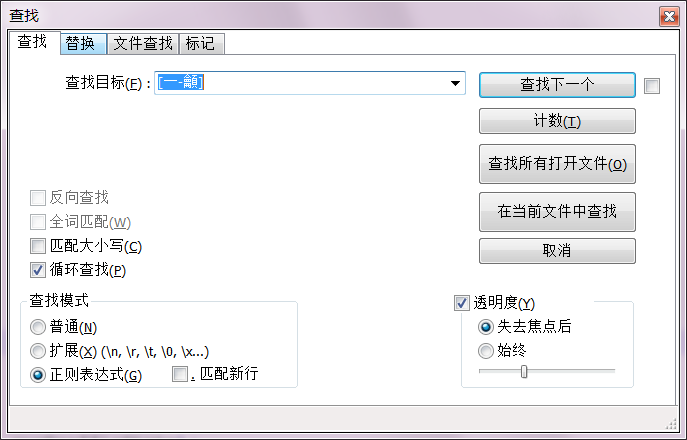
【搜索中文】用正则表达式搜索:[一-龥]
2 用于SWIG语法的模板配置
notepad++是Windows平台上非常优秀的文本编辑器,速度快,功能强,还能自定义语言模板呢。很好用!
这里记录一下针对SWIG 语言的模板设置(直接复制粘贴到一个文本文件中,用notepad++ “语言”“自定义”加载就可以了):
<NotepadPlus>

    <UserLang name="SWIG" ext="i swg" udlVersion="2.1">

        <Settings>

            <Global caseIgnored="yes" allowFoldOfComments="yes" foldCompact="no" forcePureLC="0" decimalSeparator="0" />

            <Prefix Keywords1="yes" Keywords2="yes" Keywords3="yes" Keywords4="yes" Keywords5="no" Keywords6="no" Keywords7="no" Keywords8="no" />

        </Settings>

        <KeywordLists>

            <Keywords name="Comments">00// 01 02 03/* 04*/</Keywords>

            <Keywords name="Numbers, prefix1"></Keywords>

            <Keywords name="Numbers, prefix2"></Keywords>

            <Keywords name="Numbers, extras1"></Keywords>

            <Keywords name="Numbers, extras2"></Keywords>

            <Keywords name="Numbers, suffix1"></Keywords>

            <Keywords name="Numbers, suffix2"></Keywords>

            <Keywords name="Numbers, range"></Keywords>

            <Keywords name="Operators1"></Keywords>

            <Keywords name="Operators2"></Keywords>

            <Keywords name="Folders in code1, open">%define</Keywords>

            <Keywords name="Folders in code1, middle"></Keywords>

            <Keywords name="Folders in code1, close">%enddef</Keywords>

            <Keywords name="Folders in code2, open">{</Keywords>

            <Keywords name="Folders in code2, middle"></Keywords>

            <Keywords name="Folders in code2, close">}</Keywords>

            <Keywords name="Folders in comment, open"></Keywords>

            <Keywords name="Folders in comment, middle"></Keywords>

            <Keywords name="Folders in comment, close"></Keywords>

            <Keywords name="Keywords1">%typemap</Keywords>

            <Keywords name="Keywords2">%</Keywords>

            <Keywords name="Keywords3">AUTOWRAPPER_IGNORE
AUTOWRAPPER_DTO
AUTOWRAPPER_CALLBACK
AUTOWRAPPER_CLASS
VECTOR_TO_LIST_STRUCT
VECTOR_TO_LIST_CLASS
VECTOR_TO_ARRAY_STRUCT
VECTOR_TO_ARRAY_STRUCT
NEST_VECTOR_TO_LIST_STRUCT
AUTOWRAPPER_BIND_PARAMS_TO_ARRAY
AUTOWRAPPER_RET_BYTEARRAY_FROM_PTR</Keywords>

            <Keywords name="Keywords4">#include</Keywords>

            <Keywords name="Keywords5"></Keywords>

            <Keywords name="Keywords6"></Keywords>

            <Keywords name="Keywords7"></Keywords>

            <Keywords name="Keywords8"></Keywords>

            <Keywords name="Delimiters"></Keywords>

        </KeywordLists>

        <Styles>

            <WordsStyle name="DEFAULT" fgColor="000000" bgColor="FFFFFF" fontName="Times New Roman" fontStyle="0" fontSize="10" nesting="0" />

            <WordsStyle name="COMMENTS" fgColor="008000" bgColor="FFFFFF" fontName="" fontStyle="1" nesting="0" />

            <WordsStyle name="LINE COMMENTS" fgColor="008000" bgColor="FFFFFF" fontName="" fontStyle="1" nesting="0" />

            <WordsStyle name="NUMBERS" fgColor="000000" bgColor="FFFFFF" fontName="" fontStyle="0" nesting="0" />

            <WordsStyle name="KEYWORDS1" fgColor="FF0000" bgColor="FFFFFF" fontName="Tahoma" fontStyle="1" fontSize="10" nesting="0" />

            <WordsStyle name="KEYWORDS2" fgColor="0000FF" bgColor="FFFFFF" fontName="Times New Roman" fontStyle="1" fontSize="10" nesting="0" />

            <WordsStyle name="KEYWORDS3" fgColor="008080" bgColor="FFFFFF" fontName="Tahoma" fontStyle="0" fontSize="10" nesting="0" />

            <WordsStyle name="KEYWORDS4" fgColor="8080C0" bgColor="FFFFFF" fontName="" fontStyle="3" nesting="0" />

            <WordsStyle name="KEYWORDS5" fgColor="000000" bgColor="FFFFFF" fontName="" fontStyle="0" nesting="0" />

            <WordsStyle name="KEYWORDS6" fgColor="000000" bgColor="FFFFFF" fontName="" fontStyle="0" nesting="0" />

            <WordsStyle name="KEYWORDS7" fgColor="000000" bgColor="FFFFFF" fontName="" fontStyle="0" nesting="0" />

            <WordsStyle name="KEYWORDS8" fgColor="000000" bgColor="FFFFFF" fontName="" fontStyle="0" nesting="0" />

            <WordsStyle name="OPERATORS" fgColor="000000" bgColor="FFFFFF" fontName="" fontStyle="0" nesting="0" />

            <WordsStyle name="FOLDER IN CODE1" fgColor="0000FF" bgColor="FFFFFF" fontName="Tahoma" fontStyle="1" fontSize="10" nesting="0" />

            <WordsStyle name="FOLDER IN CODE2" fgColor="000000" bgColor="FFFFFF" fontName="" fontStyle="0" nesting="0" />

            <WordsStyle name="FOLDER IN COMMENT" fgColor="000000" bgColor="408080" fontName="Times New Roman" fontStyle="1" fontSize="10" nesting="0" />

            <WordsStyle name="DELIMITERS1" fgColor="000000" bgColor="FFFFFF" fontName="" fontStyle="0" nesting="0" />

            <WordsStyle name="DELIMITERS2" fgColor="000000" bgColor="FFFFFF" fontName="" fontStyle="0" nesting="0" />

            <WordsStyle name="DELIMITERS3" fgColor="000000" bgColor="FFFFFF" fontName="" fontStyle="0" nesting="0" />

            <WordsStyle name="DELIMITERS4" fgColor="000000" bgColor="FFFFFF" fontName="" fontStyle="0" nesting="0" />

            <WordsStyle name="DELIMITERS5" fgColor="000000" bgColor="FFFFFF" fontName="" fontStyle="0" nesting="0" />

            <WordsStyle name="DELIMITERS6" fgColor="000000" bgColor="FFFFFF" fontName="" fontStyle="0" nesting="0" />

            <WordsStyle name="DELIMITERS7" fgColor="000000" bgColor="FFFFFF" fontName="" fontStyle="0" nesting="0" />

            <WordsStyle name="DELIMITERS8" fgColor="000000" bgColor="FFFFFF" fontName="" fontStyle="0" nesting="0" />

        </Styles>

    </UserLang>

</NotepadPlus>
Notepad++ 用法技巧的更多相关文章
- Oracle数据迁移笔记-Rownum与序列的自增长的组合用法技巧
Rownum与序列的自增长的组合用法技巧 根据序列自增长的步长规律,结合表行记录Rownum值的规则批量生成表的行记录主键的用法技巧 案例如下: CREATE OR REPLACE PROCEDURE ...
- Notepad++ 实用技巧
Notepad++是一款开源的文本编辑器,功能强大.很适合用于编辑.注释代码.它支持绝大部分主流的编程语言. 本文主要列举了本人在实际使用中遇到的一些技巧. 快捷键 自定义快捷键 首先,需要知道的是: ...
- Java中Split函数的用法技巧
在java.lang包中也有String.split()方法,与.net的类似,都是返回是一个字符型数组,但使用过程中还有一些小技巧.如执行:"2|33|4".split(&quo ...
- notepad++使用技巧及插件汇总
NppAutoIndent 自动缩进CCompletion 自动补全.TextFX 插件nppFTP 运行程序 ============================================ ...
- 【转】25个Git用法技巧
Andy Jeffries 给 Git 中级用户总结分享的 25 个小贴士.你不需要去做大量搜索,或许这些小贴士对你就很有帮助的. 我从开始使用git到现在已经差不多18个月了,以为自己已经很懂git ...
- [struts2]jstl标签用法技巧
1.<c:if test="${var} != null"></c:if> 2. <c:foreach var="singleVar&quo ...
- 正则化—Java中Split函数的用法技巧_(转载修改)
原文地址:http://www.cnblogs.com/liubiqu/archive/2008/08/14/1267867.html java.lang.string.split split 方法 ...
- notepad++使用技巧
1.将tab设置为插入4个空格而不是tab字符 1)点击设置-->首选项 2)选中转换为空格.点击蓝色数字,可以设置制表符宽度 2.对已有文档,进行tab和空格的相互转换 选中编辑-->空 ...
- vue2.0用法技巧汇总
1.class拼接: 2.select下拉截取: <template> <!--vip班支付报名页面--> <div id="payRecordMain&quo ...
随机推荐
- SpringMVC拦截静态资源的解决方法
本文中的各软件版本简要信息: IDE:Myeclise17 JDK:1.8.0_111 spring:5.1.8 springMVC:5.1.8 mybatis:3.2.2 Tomcat:9.0 在使 ...
- CI环境搭建-创建git
添加如下配置: 上图说的需每次启动的即下面这个文件: 默认用户名.密码是admin/admin 创建代码仓库: 选择版本库: 使用方法: 1,创建一个文件夹 选择版本库地址: 也可以通过c ...
- 011_linuxC++之_继承的引入
(一)面向对象程序设计中最重要的一个概念是继承.继承允许我们依据另一个类来定义一个类,这使得创建和维护一个应用程序变得更容易.这样做,也达到了重用代码功能和提高执行时间的效果. (二)引入继承程序 # ...
- sudo/su
linux用户分为根用户/ 普通用户 系统用户 根用户和普通用户是可以实际登录到系统中的,普通用户是没办法使用useradd添加新用户的,只有根用户有权限 当然,也可以使用su su 是切换用户的意思 ...
- 第二章 Python数据导入
数据导入 数据存储的两个地方: 文件 CSV.Excel.TXT(学习层面) 数据库(公司实战层面) Mysql.Access.SQL Server 导入CSV文件 CSV文件第一行是列名,第二行到最 ...
- AVL平衡树(非指针实现)
看了网上三四篇博客,学习了AVL树维护平衡的方式.但感觉他们给出的代码都有一点瑕疵或者遗漏,懂得了思想之后,花了一些时间把他们几篇的长处结合起来,没有使用指针,实现了一下.每个小逻辑功能都抽象成了函数 ...
- synchronized的对象锁和类锁
概念 synchronized 是 Java 中的关键字,是利用锁的机制来实现同步的. 锁机制有如下两种特性: 互斥性:即在同一时间只允许一个线程持有某个对象锁,通过这种特性来实现多线程中的协调机制, ...
- 利用Apache shiro SimpleHash 加密字符串
1.导入包 import org.apache.shiro.crypto.hash.SimpleHash; 1 2.代码 import org.apache.shiro.crypto.hash.Sim ...
- token的解码及 判断值不为空的方法
token 的解码要使用插件:jwt-decode 判断值不为空的方法: function isEmpty(value){ return ( value === undefined || value ...
- pi币--π币--手机离线式挖矿软件--pi中文教程!
Pi Network派型网络,国外热度很高手机移动式挖矿软件 一个新出的手机移动式挖矿软件,在国外热度很高,国内玩的人目前很少.项目团队成员均来自斯坦福大学,三个创始人斯坦福博士教授,现在处于挖矿第一 ...