
Identity Server 4客户端认证控制访问API
项目源码:
链接:https://pan.baidu.com/s/1H3Y0ct8xgfVkgq4XsniqFA
提取码:nzl3
一、说明
我们将定义一个api和要访问它的客户端,客户端将在identityser上请求访问令牌,并使用访问令牌调用api
二、项目结构与准备
1、创建项目QuickStartIdentityServer4的asp.net 3.1项目,端口号5001,NuGet: IdentityServer4
2、创建项目API的asp.net 3.1项目,端口号5000,NuGet: Microsoft.AspNetCore.Authentication.JwtBearer
3、创建项目Client控制台项目(sp.net 3.1),模拟客户端请求,NuGet: IdentityModel
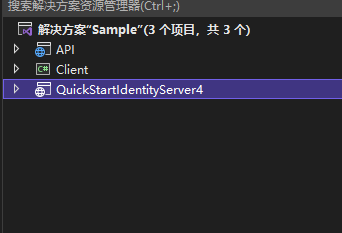
三、QuickStartIdentityServer4项目编码
1、在QuickStartIdentityServer4项目中添加Config.cs文件
public static class Config

    {

        // 定义api范围

        public static IEnumerable<ApiScope> ApiScopes => new []

        {

            new ApiScope

            {

                Name="sample_api", // 范围名称,自定义

                DisplayName="Sample API" // 范围显示名称,自定义

            }

        };

        // 定义客户端

        public static IEnumerable<Client> Clients => new[]

        {

            new Client

            {

                ClientId="sample_client", // 客户端id

                ClientSecrets =

                {

                    new Secret("sample_client_secret".Sha256()) // 客户端秘钥

                },

                AllowedGrantTypes=GrantTypes.ClientCredentials, //授权类型为客户端

                AllowedScopes={ "sample_api" } // 设置该客户端允许访问的api范围

            }

        };

    }
2、在QuickStartIdentityServer4项目中Startup.cs文件添加配置
public void ConfigureServices(IServiceCollection services)

        {

            var builder=services.AddIdentityServer();

            builder.AddDeveloperSigningCredential();

            builder.AddInMemoryApiScopes(Config.ApiScopes);

            builder.AddInMemoryClients(Config.Clients);

        }
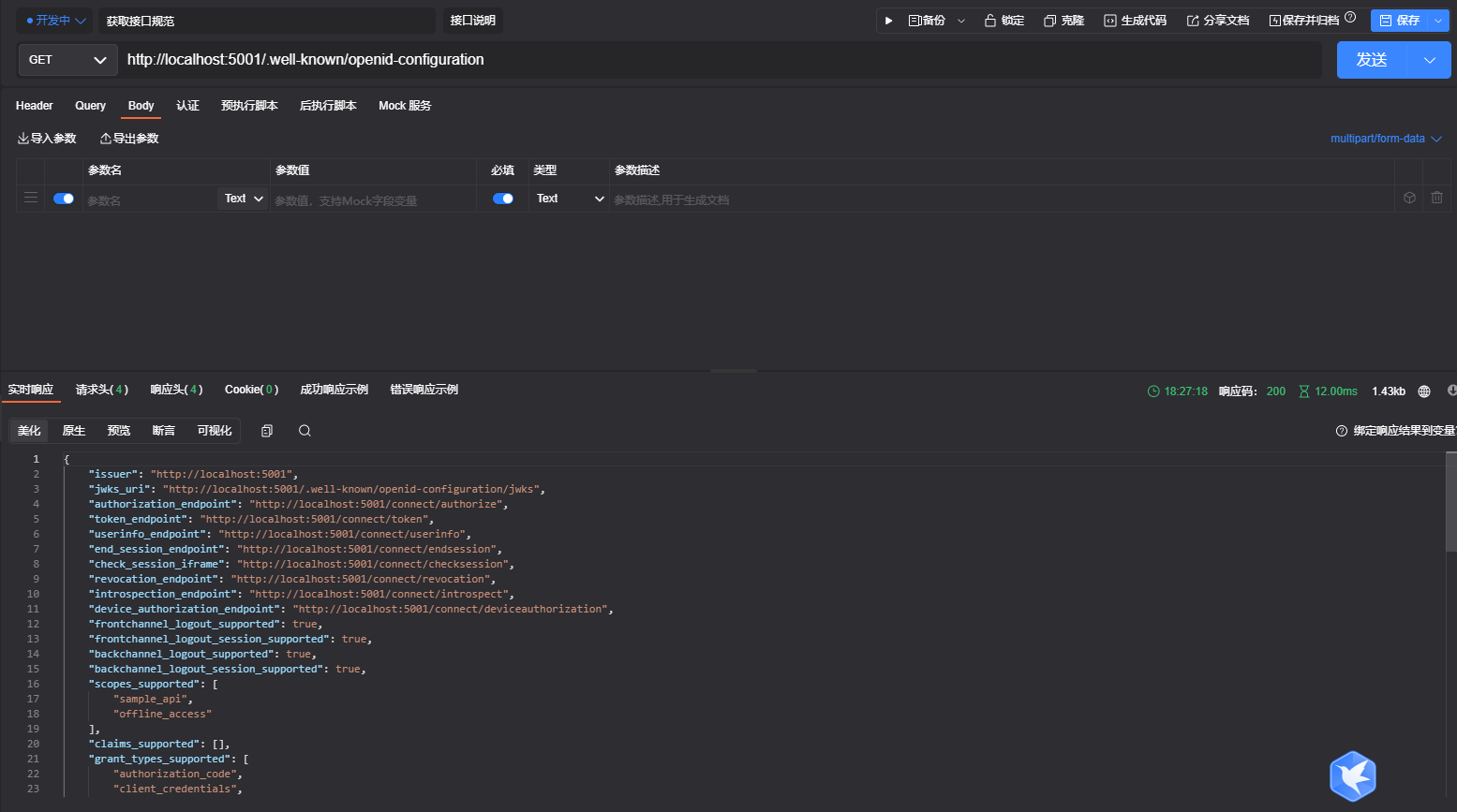
3、访问http://localhost:5001/.well-known/openid-configuration
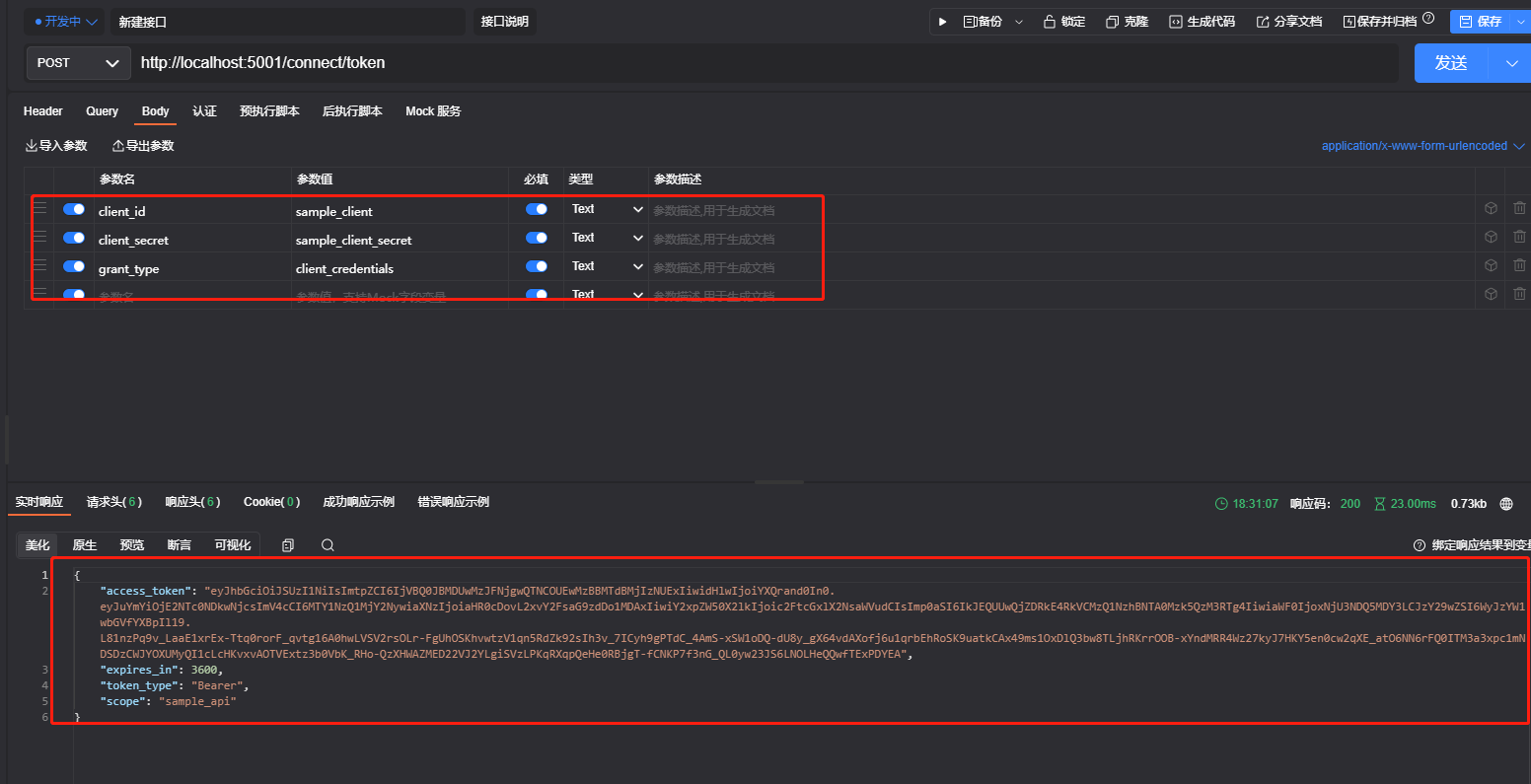
4、访问http://localhost:5001/connect/token即可拿到令牌token
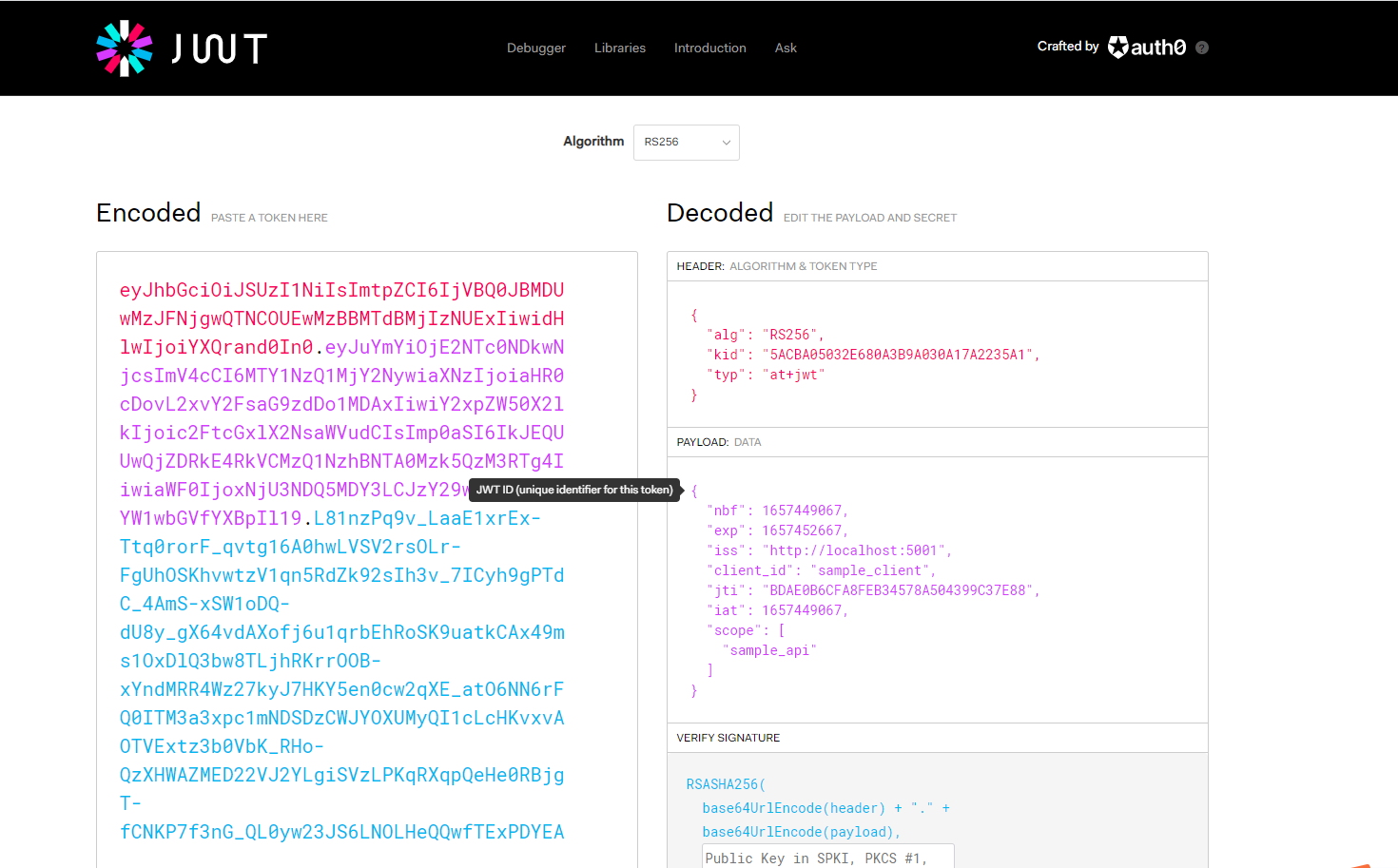
该token是基于jwt,我们可以在jwt官网进行查看验证,如图
四、API项目编码
1、Startup.cs文件配置
public void ConfigureServices(IServiceCollection services)

        {

            services.AddControllers();

            // 添加JWT认证方案

            services.AddAuthentication("Bearer")

                     .AddJwtBearer("Bearer", option => {

                         // OIDC服务地址

                         option.Authority = "http://localhost:5001";

                         // 不使用Https

                         option.RequireHttpsMetadata = false;

                         // 设置JWT的验证参数

                         option.TokenValidationParameters = new Microsoft.IdentityModel.Tokens.TokenValidationParameters()

                         {

                            // 因为使用的是api范围访问,该参数需设置false

                            ValidateAudience=false

                         };

                     });

            // 添加api授权策略

            services.AddAuthorization(options => {

                // "ApiScope"为策略名称

                options.AddPolicy("ApiScope", builder =>

                {

                    builder.RequireAuthenticatedUser();

                    // 鉴定claim是否存在

                    builder.RequireClaim("scope", "sample_api");

                });

            });

        }

        // This method gets called by the runtime. Use this method to configure the HTTP request pipeline.

        public void Configure(IApplicationBuilder app, IWebHostEnvironment env)

        {

            if (env.IsDevelopment())

            {

                app.UseDeveloperExceptionPage();

            }

            app.UseRouting();

            // 认证

            app.UseAuthentication();

            // 授权

            app.UseAuthorization();

            app.UseEndpoints(endpoints =>

            {

                endpoints.MapControllers();

                // 设置全局策略,应用于所有api

                //endpoints.MapControllers().RequireAuthorization("ApiScope");

            });

        }
2、添加控制器IdentityServerController并增加授权
[Route("IdentityServer")]

    [Authorize("ApiScope")]

    public class IdentityServerController : ControllerBase

    {

       public IActionResult Get()

        {

            return new JsonResult(from claim in User.Claims select new { claim.Type,claim.Value });

        }

    }
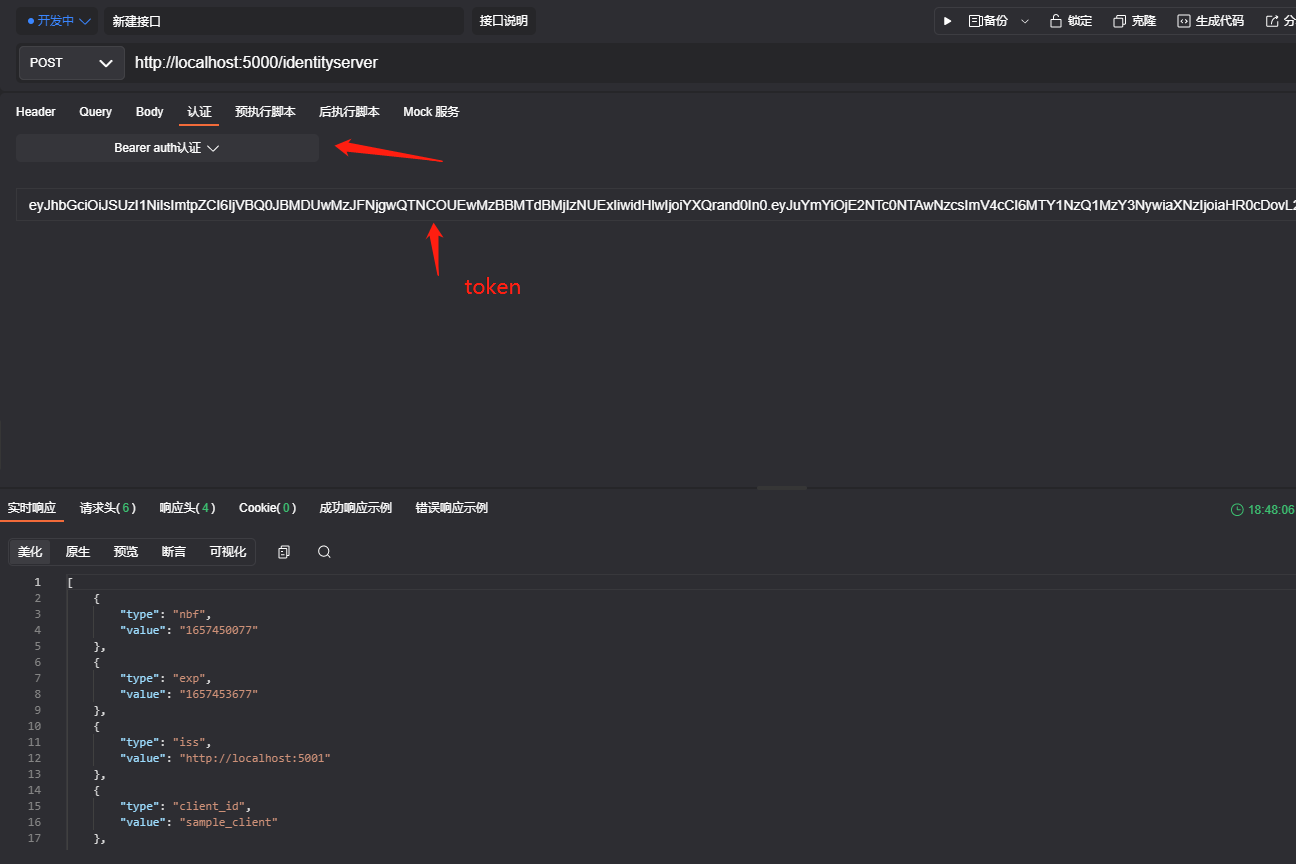
3、拿到token并请求api
五、Client项目模拟客户端请求
internal class Program

    {

        static async Task Main(string[] args)

        {

            var client = new HttpClient();

            var disco = await client.GetDiscoveryDocumentAsync("http://localhost:5001");

            if (disco.IsError)

            {

                Console.WriteLine(disco.Error);

                return;

            }

            var tokenResponse = await client.RequestClientCredentialsTokenAsync(

                    new ClientCredentialsTokenRequest

                    {

                        Address= disco.TokenEndpoint,

                        ClientId= "sample_client",

                        ClientSecret= "sample_client_secret"

                    }

                );

            if(tokenResponse.IsError)

            {

                Console.WriteLine(tokenResponse.Error);

                return;

            }

            Console.WriteLine(tokenResponse.Json);

            var apiClient = new HttpClient();

            apiClient.SetBearerToken(tokenResponse.AccessToken);

            var response = await apiClient.PostAsync("http://localhost:5000/IdentityServer", null);

            if (!response.IsSuccessStatusCode)

            {

                Console.WriteLine(response.StatusCode);

            }

            else

            {

                var content = await response.Content.ReadAsStringAsync();

                Console.WriteLine(JArray.Parse(content));

            }

            Console.ReadKey();

        }

    }
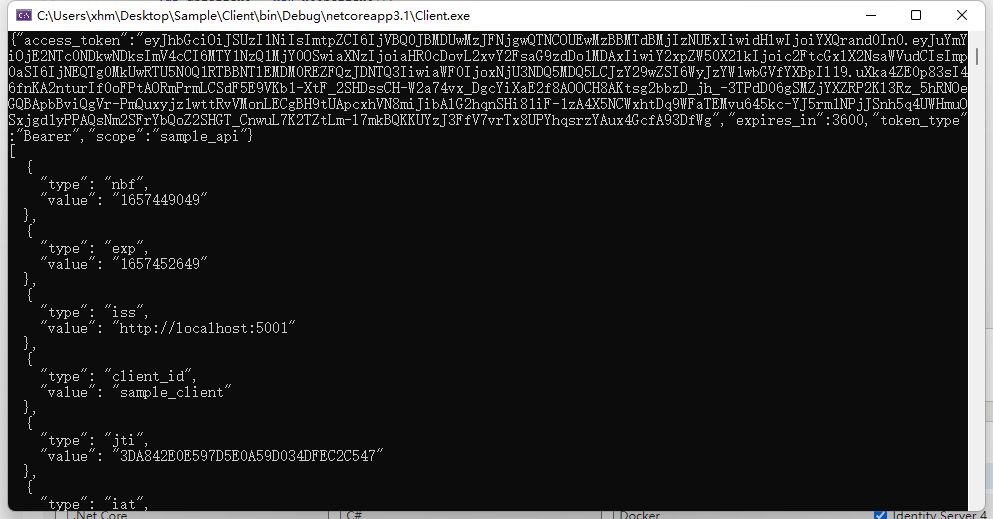
项目运行效果如图
学习链接地址:https://www.cnblogs.com/stulzq/p/7495129.html
Identity Server 4客户端认证控制访问API的更多相关文章
- Identity Server 4资源拥有者密码认证控制访问API
基于上一篇文章中的代码进行继续延伸,只需要小小的改动即可,不明白的地方可以先看看本人上一篇文章及源码: Identity Server 4客户端认证控制访问API 一.QuickStartIdenti ...
- IdentityServer4[3]:使用客户端认证控制API访问(客户端授权模式)
使用客户端认证控制API访问(客户端授权模式) 场景描述 使用IdentityServer保护API的最基本场景. 我们定义一个API和要访问API的客户端.客户端从IdentityServer请求A ...
- IdentityServer4(7)- 使用客户端认证控制API访问(客户端授权模式)
一.前言 本文已更新到 .NET Core 2.2 本文包括后续的Demo都会放在github:https://github.com/stulzq/IdentityServer4.Samples (Q ...
- k8s使用自定义证书将客户端认证接入到API Server
自定义证书使用kubectl认证接入API Serverkubeconfig是API Server的客户端连入API Server时使用的认证格式的客户端配置文件.使用kubectl config v ...
- SQL Server新增用户并控制访问权限设置。
新增用户: 一.进入数据库:[安全性]—>[登录名]—>[新建登录名] 二.在常规选项卡中.如图所示,创建登录名.注意设置默认的数据库. 三.在[用户映射]下设置该用户所能访问的数据库.并 ...
- Identity Server 4使用OpenID Connect添加用户身份验证(三)
一.说明 基于上一篇文章中的代码进行继续延伸,只需要小小的改动即可,不明白的地方可以先看看本人上一篇文章及源码: Identity Server 4资源拥有者密码认证控制访问API(二) GitHub ...
- Identity Server 4 从入门到落地(三)—— 创建Web客户端
书接上回,我们已经搭建好了基于Identity Server 4的认证服务和管理应用(如果还没有搭建,参看本系列前两部分,相关代码可以从github下载:https://github.com/zhen ...
- Identity Server 4 从入门到落地(四)—— 创建Web Api
前面的部分: Identity Server 4 从入门到落地(一)-- 从IdentityServer4.Admin开始 Identity Server 4 从入门到落地(二)-- 理解授权码模式 ...
- Asp.Net Core: Swagger 与 Identity Server 4
Swagger不用多说,可以自动生成Web Api的接口文档和客户端调用代码,方便开发人员进行测试.通常我们只需要几行代码就可以实现这个功能: ... builder.Services.AddSwag ...
随机推荐
- 如何配置JAVA环境并安装IEAD软件
安装IDEA软件之前需要做哪些准备? 在安装IDEA软件之前,需要先确定电脑中有没有JDK,如果没有需要先安装JDK. JDK是整个JAVA的核心,包括了Java运行环境,Java工具(javac/j ...
- Java基础语法Day_02-03(数据类型、运算符、方法、循环结构)
第5节 数据类型转换 day02_01_数据类型转换_自动转换 day02_02_数据类型转换_强制转换 day02_03_数据类型转换_注意事项 day02_04_ASCII编码表 第6节 运算符 ...
- 为什么HttpContextAccessor要这么设计?
前言 周五在群里面有小伙伴问,ASP.NET Core这个HttpContextAccessor为什么改成了这个样子? 在印象中,这已经是第三次遇到有小伙伴问这个问题了,特意来写一篇记录,来回答一下这 ...
- python基础-基本数据类型(二)
一.序列类型 序列类型是用来表示有序的元素集合 1.字符串(str) python中字符串通常用str表示,字符串是使用单引号,双引号,三引号包裹起来的字符的序列,用来表示文本信息. 1.1 字符串的 ...
- spring-data-jpa操作数据库
1.spring-data-jpa是spring对hibernate的整合 2.spring boot工程在实体类添加注解.添加两个依赖.写配置文件,可以自动生成数据库表 实体类: @Entity / ...
- Linux-centos8实现私有CA和证书申请
创建CA相关目录,centos8不存在这些目录,需手动建立 [root@centos8-liyj ~]#mkdir -pv /etc/pki/CA/{certs,cr1,newcerts,privat ...
- Spring Ioc源码分析系列--Ioc的基础知识准备
Spring Ioc源码分析系列--Ioc的基础知识准备 本系列文章代码基于Spring Framework 5.2.x Ioc的概念 在Spring里,Ioc的定义为The IoC Containe ...
- python读写excel表格,4泼水板房
import shutilimport osfrom openpyxl import load_workbookfrom xlutils.copy import copyimport win32com ...
- linux部署项目(前后端分离项目)
参考博客 技术栈 路飞学城部署 vue + nginx + uwsgi + django + mysql + redis(就是一个key - value型数据库,缓存型数据库,内存型数据库) 部署步骤 ...
- 使用client-go实现自定义控制器
使用client-go实现自定义控制器 介绍 我们已经知道,Service对集群之外暴露服务的主要方式有两种:NodePort和LoadBalancer,但是这两种方式,都有一定的缺点: NodePo ...