
MVC4多语言IHttpModule实现
由于项目页面较多,逐个Action去读取资源文件不大现实.就想到了使用 IHttpModule配合MVC的路由规则来实现.
首先创建以个mvc4的应用程序,
添加资源文件夹(自定义)Lang ,
然后在此文件夹下添加Home.Index.resx文件,
资源的访问修饰符用public
再添加Home.Index.en-us.resx文件
添加个字符串TEST
再添加Home.Index.zh-cn.resx文件
添加个字符串TEST


在home/index的视图中添加如下代码:
@MVC4多语言IHttpModule实现.Lang命名空间
Home_Index生成的类名
TEST要国际化的字段
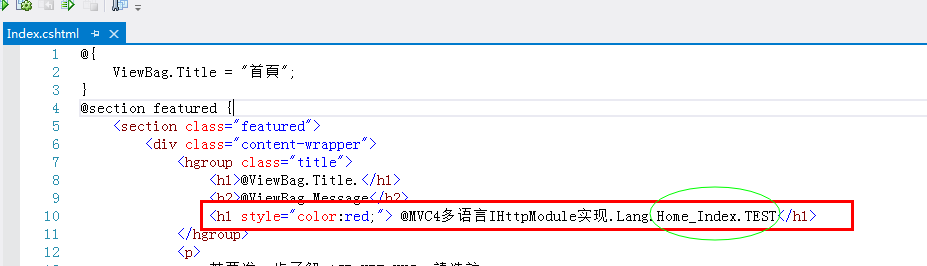
注意: 只有Home.Index.resx会生成一个叫Home_Index的类,其他无类
然后添加以个实现了IHttpModule的类,暂且命名为MyModule
此类需要实现2个方法
public void Dispose() { } 即可
public void Init(HttpApplication context)方法
MyModule类的具体实现:
using System;

using System.Collections.Generic;

using System.Globalization;

using System.Linq;

using System.Threading;

using System.Web;

using System.Web.Routing;

namespace MVC4多语言IHttpModule实现.Lang

{

    public class MyModule:IHttpModule

    {

        private CultureInfo currentCulture;

        private CultureInfo currentUICulture;

        public void Dispose() { }

        public void Init(HttpApplication context)

        {

            context.BeginRequest += SetCurrentCulture;

            context.EndRequest += RecoverCulture;

        }

        private void SetCurrentCulture(object sender, EventArgs args)

        {

            currentCulture = Thread.CurrentThread.CurrentCulture;

            currentUICulture = Thread.CurrentThread.CurrentUICulture;

            HttpContextBase contextWrapper = new HttpContextWrapper(HttpContext.Current);

            RouteData routeData = RouteTable.Routes.GetRouteData(contextWrapper);

            if (routeData == null)

            {

                return;

            }

            object culture;

            if (routeData.Values.TryGetValue("lang", out culture))

            {

                try

                {

                    Thread.CurrentThread.CurrentCulture = new CultureInfo(culture.ToString());

                    Thread.CurrentThread.CurrentUICulture = new CultureInfo(culture.ToString());

                }

                catch

                { }

            }

        }

        private void RecoverCulture(object sender, EventArgs args)

        {

            Thread.CurrentThread.CurrentCulture = currentCulture;

            Thread.CurrentThread.CurrentUICulture = currentUICulture;

        }

    }

}
然后添加路由 规则:
using System;

using System.Collections.Generic;

using System.Linq;

using System.Web;

using System.Web.Http;

using System.Web.Mvc;

using System.Web.Optimization;

using System.Web.Routing;

namespace MVC4多语言IHttpModule实现

{

    // 注意: 如需啟用 IIS6 或 IIS7 傳統模式的說明,

    // 請造訪 http://go.microsoft.com/?LinkId=9394801

    public class MvcApplication : System.Web.HttpApplication

    {

        protected void Application_Start()

        {

            AreaRegistration.RegisterAllAreas();

            WebApiConfig.Register(GlobalConfiguration.Configuration);

            FilterConfig.RegisterGlobalFilters(GlobalFilters.Filters);

            RouteConfig.RegisterRoutes(RouteTable.Routes);//在此方法中添加路由规则

            BundleConfig.RegisterBundles(BundleTable.Bundles);

            AuthConfig.RegisterAuth();

        }

    }

}
RouteConfig.RegisterRoutes(RouteTable.Routes);//在此方法中添加路由规则
using System;

using System.Collections.Generic;

using System.Linq;

using System.Web;

using System.Web.Mvc;

using System.Web.Routing;

namespace MVC4多语言IHttpModule实现

{

    public class RouteConfig

    {

        public static void RegisterRoutes(RouteCollection routes)

        {

            routes.IgnoreRoute("{resource}.axd/{*pathInfo}");

            routes.MapRoute(

               "Globalization", // 路由名称

               "{lang}/{controller}/{action}/{id}", // 带有参数的 URL

               new { lang = "zh", controller = "Home", action = "Index", id = UrlParameter.Optional }, // 参数默认值

               new { lang = "^[a-zA-Z]{2}(-[a-zA-Z]{2})?$" }    //参数约束

           );

            routes.MapRoute(

                name: "Default",

                url: "{controller}/{action}/{id}",

                defaults: new { controller = "Home", action = "Index", id = UrlParameter.Optional }

            );

        }

    }

}
然后在配置文件中声明:
在web.config下的system.web下
<configuration>
<system.web>
<httpModules>
<add name="MyModule" type="MyModule"/>
</httpModules>
</system.web>
</configuration>
事践显示这种声明注册方法在IIS7.0下,即win7下是不work的。
必须按如下声明:
<configuration>
<system.webServer>
<modules>
<add name="MyModule" type="MyModule"/>
</modules>
</system.webServer>
</configuration>
参考 : http://msdn.microsoft.com/zh-cn/library/ms227673
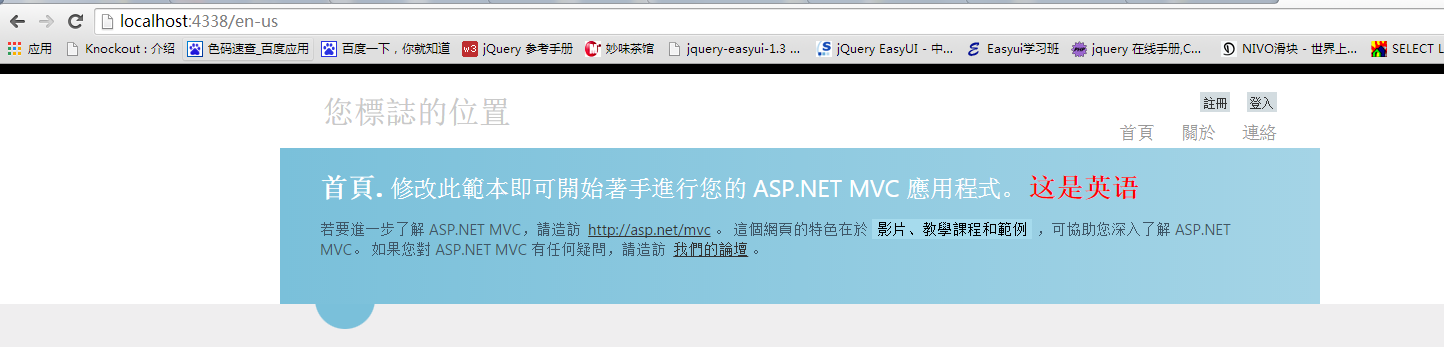
完成后具体请参照下图:



MVC4多语言IHttpModule实现的更多相关文章
- asp.net mvc4 登录界面
说明:开发环境 asp.net mvc4 c#语言 1.项目目录结构 2.Login控制器中 public ActionResult Index() { return View(); } 对应Inde ...
- jquery 访问后台方法 并且获取后方法返回的数据
说明: 1.开发环境 asp.net MVC4 c#语言. 后台方法位于控制器中ProController.cs中 后台方法如下: public string GetNumber() { string ...
- 构建ASP.NET MVC4+EF5+EasyUI+Unity2.x注入的后台管理系统(30)-本地化(多语言)
原文:构建ASP.NET MVC4+EF5+EasyUI+Unity2.x注入的后台管理系统(30)-本地化(多语言) 我们的系统有时要扩展到其他国家,或者地区,需要更多的语言环境,微软提供了一些解决 ...
- 在mvc4中多语言建站的实例
环境:vs2012 asp.net mvc4. 实现方式:resource 资源文件,根据路由规则中Lang参数来判断载入哪种语言方式 在网上找到了相关资料,顺便自己做了个练习,新建工程之类的步骤就免 ...
- ASP.NET MVC5+EF6+EasyUI 后台管理系统(30)-本地化(多语言)
系列目录 我们的系统有时要扩展到其他国家,或者地区,需要更多的语言环境,微软提供了一些解决方案,原始我们是用js来控制的,现在不需要了. 我们只要创建简单的资源文件,通过MVC的路由设置就可以轻松的进 ...
- ASP.NET MVC4+EF5+EasyUI+Unity2.x注入的后台管理系统
构建ASP.NET MVC4+EF5+EasyUI+Unity2.x注入的后台管理系统(30)-本地化(多语言) 我们的系统有时要扩展到其他国家,或者地区,需要更多的语言环境,微软提供了一些解决方 ...
- ASP.NET MVC 多语言解决方案
1:打开VS,新建ASP.NET MVC4项目 2:创建一个放本地化资源的文件夹并命名为"Language",右键选择添加新项,选择资源文件并命名为"Com" ...
- [入门级] 基于 visual studio 2010 mvc4 的图书管理系统开发初步 (二)
[入门级] 基于 visual studio 2010 mvc4 的图书管理系统开发初步 (二) Date 周六 10 一月 2015 By 钟谢伟 Category website develop ...
- [译]MVC网站教程(四):MVC4网站中集成jqGrid表格插件(系列完结)
目录 1. 介绍 2. 软件环境 3. 在运行示例代码之前(源代码 + 示例登陆帐号) 4. jqGrid和AJAX 5. GridSettings 6. ...
随机推荐
- CSS3 box-flex属性和box-orient属性
比较有意思的是虽然目前没有浏览器支持box-flex,box-orient属性,但CSS3问世以来,这两个属性却一直很火.2014年阿里校招第5题要求使用CSS3中的功能实现三个矩形的布局,总的宽度为 ...
- django 学习-7 模型数据操作
1.首先还是创建办一个项目和一个应用 django.admin.py startproject ssj cd ssj django.admin.py startapp sdj 那 ...
- HDOJ2021发工资咯:)
发工资咯:) Time Limit: 2000/1000 MS (Java/Others) Memory Limit: 65536/32768 K (Java/Others)Total Subm ...
- HDOJ2012素数判定
素数判定 Time Limit: 2000/1000 MS (Java/Others) Memory Limit: 65536/32768 K (Java/Others)Total Submis ...
- 自定义ListView适配器
继承BaseAdapter类 覆盖以下4个方法: @Override public int getCount() { return users.size(); } @Override public O ...
- SQL 行转列
---1.最简单的行转列/* 问题:假设有张学生成绩表(tb)如下:姓名 课程 分数张三 语文 74张三 数学 83张三 物理 93李四 语文 74李四 数学 84李四 物理 94 想变成(得到如下结 ...
- batch 数字进制的问题
when set viable to number type in cmdexample: set /a num=0833echo %num% display: Invalid number. Nu ...
- 解决TextView在显示文字的时候,一行还没显示满就跳到下一行
转载请注明:转自 http://blog.csdn.NET/u011176685/article/details/48295185 一.问题描述: Android的TextView在显示文字的时候,如 ...
- st_mode 的位定义
先前所描述的st_mode 则定义了下列数种情况: S_IFMT 0170000 文件类型的位遮罩 S_IFSOCK 0140000 scoket S_IFLNK 0120000 符号连接 S_IFR ...
- Cocos开发中性能优化工具介绍之使用Windows任务管理器
说到Windows平台,我们很快就想到了Visual Studio 2012,然而Visual Studio 2012在这方面没有很好的工具.如果我们只是想知道大体上内存.CPU等在某一事件前后变化情 ...