
Android学习11
Android存储概念
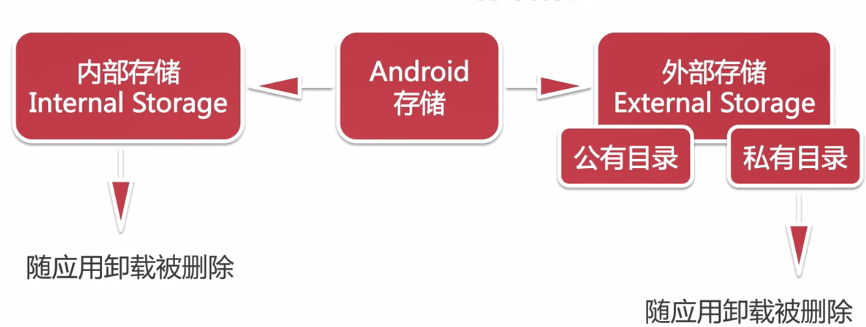
File内部存储
通过file=openFileOutput()获得,将数据存储在data/data/+包名+files下面。
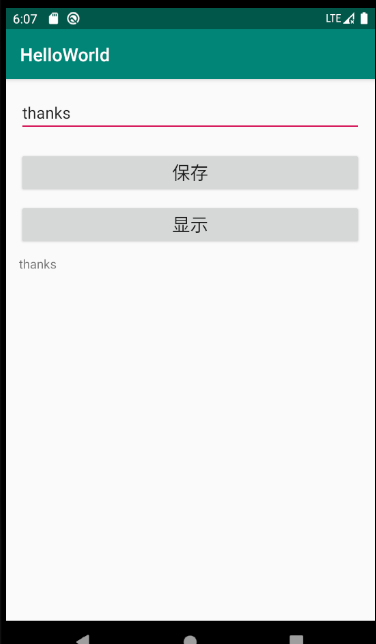
layout布局文件:
<?xml version="1.0" encoding="utf-8"?>

<LinearLayout xmlns:android="http://schemas.android.com/apk/res/android"

    android:layout_width="match_parent"

    android:layout_height="match_parent"

    android:orientation="vertical"

    android:padding="15dp">

    <EditText

        android:id="@+id/et_name"

        android:layout_width="match_parent"

        android:layout_height="wrap_content"

        android:hint="输入内容"/>

    <Button

        android:id="@+id/btn_save"

        android:layout_width="match_parent"

        android:layout_height="wrap_content"

        android:layout_marginTop="20dp"

        android:text="保存"

        android:textSize="20sp"/>

    <Button

        android:id="@+id/btn_show"

        android:layout_width="match_parent"

        android:layout_height="wrap_content"

        android:layout_marginTop="10dp"

        android:text="显示"

        android:textSize="20sp"/>

    <TextView

        android:id="@+id/tv_content"

        android:layout_width="match_parent"

        android:layout_height="wrap_content"

        android:layout_marginTop="10dp"/>

</LinearLayout>
activity_file
Activity:
package com.example.helloworld.datastorage;

import androidx.appcompat.app.AppCompatActivity;

import android.os.Bundle;

import android.view.View;

import android.widget.Button;

import android.widget.EditText;

import android.widget.TextView;

import com.example.helloworld.R;

import java.io.FileInputStream;

import java.io.FileOutputStream;

import java.io.IOException;

public class FileActivity extends AppCompatActivity {

    private EditText mEtName;

    private Button mBtnSave,mBtnShow;

    private TextView mTvContent;

    private final String mFileName = "test.txt";

    @Override

    protected void onCreate(Bundle savedInstanceState) {

        super.onCreate(savedInstanceState);

        setContentView(R.layout.activity_file);

        mEtName = findViewById(R.id.et_name);

        mBtnSave = findViewById(R.id.btn_save);

        mBtnShow = findViewById(R.id.btn_show);

        mTvContent = findViewById(R.id.tv_content);

        mBtnSave.setOnClickListener(new View.OnClickListener() {

            @Override

            public void onClick(View v) {

                save(mEtName.getText().toString());

            }

        });

        mBtnShow.setOnClickListener(new View.OnClickListener() {

            @Override

            public void onClick(View v) {

                mTvContent.setText(read());

            }

        });

    }

    //存储数据

    private void save(String content){

        FileOutputStream fileOutputStream = null;

        try {

            fileOutputStream = openFileOutput(mFileName,MODE_PRIVATE);

            fileOutputStream.write(content.getBytes());

        } catch (IOException e) {

            e.printStackTrace();

        } finally {

            if(fileOutputStream != null){

                try{

                    fileOutputStream.close();

                } catch (IOException e) {

                    e.printStackTrace();

                }

            }

        }

    }

    //读取数据

    private String read(){

        FileInputStream fileInputStream = null;

        try {

            fileInputStream = openFileInput(mFileName);

            byte[] buff = new byte[1024];

            //用StringBuilder来实现字符串拼接

            StringBuilder sb = new StringBuilder();

            int len = 0;

            while((len = fileInputStream.read(buff)) > 0){

                sb.append(new String(buff,0,len));

            }

            return sb.toString();

        } catch (IOException e) {

            e.printStackTrace();

        }finally {

            if(fileInputStream != null){

                try{

                    fileInputStream.close();

                } catch (IOException e) {

                    e.printStackTrace();

                }

            }

        }

        return null;

    }

}
FileActivity
Android学习11的更多相关文章
- android学习11——Handler,Looper,MessageQueue工作原理
Message是Handler接收和处理的消息对象. 每个线程只能拥有一个Looper.它的loop方法读取MessageQueue中的消息,读到消息之后就把消息交给发送该消息的Handler进行处理 ...
- Android学习系列(11)--App列表之拖拽ListView(下)
接着上篇Android学习系列(10)--App列表之拖拽ListView(上)我们继续实现ListView的拖拽效果. 7.重写onTouchEvent()方法. 在这个方法中我们主要是处理 ...
- 【转】Pro Android学习笔记(二三):用户界面和控制(11):其他控件
目录(?)[-] Chronometer计时器控件 倒计时CountDownTimer Switch控件 Space控件 其他控件 Android提供了很多控件,基本上都是view的扩展. Chron ...
- Android学习路线总结,绝对干货
title: Android学习路线总结,绝对干货 tags: Android学习路线,Android学习资料,怎么学习android grammar_cjkRuby: true --- 一.前言 不 ...
- Android学习——windows下搭建Cygwin环境
在上一篇博文<Android学习——windows下搭建NDK_r9环境>中,我们详细的讲解了在windows下进行Android NDK开发环境的配置,我们也讲到了在NDk r7以后,我 ...
- [转]Android 学习资料分享(2015 版)
转 Android 学习资料分享(2015 版) 原文地址:http://www.jianshu.com/p/874ff12a4c01 目录[-] 我是如何自学Android,资料分享(2015 版) ...
- Android学习系列(37)--App调试内存泄露之Context篇(下)
接着<Android学习系列(36)--App调试内存泄露之Context篇(上)>继续分析. 5. AsyncTask对象 我N年前去盛大面过一次试,当时面试官极力推荐我使用AsyncT ...
- Android – 学习操作NFC – 2
在<Android – 学习操作NFC – 1>说明了Android在处理NFC tag的机制.tag dispatch system的运作流程,以及三种ACTION_NDEF_DISCO ...
- android学习系列:jercy——AI3 的博客
[android学习之十七]——特色功能2:桌面组件(快捷方式,实时文件夹) 二.桌面组件 1.快捷方式 Android手机上得快捷方式的意思可以以我们实际PC机器上程序的快捷方式来理解.而andro ...
随机推荐
- linux - 删除软件包
# 参数e的作用是使rpm进入卸载模式,对名为[package name]的软件包进行卸载 rpm -e [package name] # 由于系统中各个软件包之间相互有依赖关系,使用-nodeps忽 ...
- 2020牛客寒假算法基础集训营5 G.街机争霸 (bfs)
https://ac.nowcoder.com/acm/problem/201961 预处理出僵尸走的路径,僵尸走的周期长度应该为2k-2,在普通的bfs基础上加上一维表示时间,从当前位置x,y和和时 ...
- 4817 [Sdoi2017]树点涂色
题目描述 Bob 有一棵 n 个点的有根树,其中 1 号点是根节点.Bob 在每个点上涂了颜色,并且每个点上的颜色不同. 定义一条路径的权值是:这条路径上的点(包括起点和终点)共有多少种不同的颜色. ...
- js--javascript学习
js -- javascript ECMAscript5 ECMAscript6 -- vue.js react .. 由三个部分组成 1 ECMAscript5的核心 js语言 2 BOM 浏览器对 ...
- AdaBoost级联分类器
Haar分类器使用AdaBoost算法,但是把它组织为筛选式的级联分类器,每个节点是多个树构成的分类器,且每个节点的正确识别率很高.在任一级计算中,一旦获得“不在类别中”的结论,则计算终止.只有通过分 ...
- OpenCV中imread失败cvLoadImage成功
MYLAF 环境说明 编程环境:Windows 10(64bit), VS2013, OpenCV 2.4.12; 编程语言:C/C++: MYLAF 现象 在代码中,调用imread读取图片失败,但 ...
- 自己动手系列----使用数组实现一个简单的Map
数组对于每一门编程语言来说都是重要的数据结构之一,当然不同语言对数组的实现及处理也不尽相同.Java 语言中提供的数组是用来存储固定大小的同类型元素. 这里提一下,数组的优缺点: 优点: 1. 使用索 ...
- [一本通学习笔记] AC自动机
AC自动机可以看作是在Trie树上建立了fail指针,在这里可以看作fail链.如果u的fail链指向v,那么v的对应串一定是u对应串在所给定字符串集合的后缀集合中的最长的后缀. 我们考虑一下如何实现 ...
- js - 子节点
子节点数量:this.wdlgLossInfo.childNodes.length
- SpringMVC 配置.html拦截时,返回JSON数据时出现406错误解决方案
[说明]在SpringMVC框架的使用中常常会使用@ResponseBody注解,修饰"处理器"(Controller的方法),这样在处理器在返回完毕后,就不走逻辑视图,而是将返回 ...