
9.1 翻译系列:数据注解特性之----Table【EF 6 Code-First 系列】
原文地址:http://www.entityframeworktutorial.net/code-first/table-dataannotations-attribute-in-code-first.aspx
EF 6 Code-First系列文章目录:
- 1 翻译系列:什么是Code First(EF 6 Code First 系列)
- 2.翻译系列:为EF Code-First设置开发环境(EF 6 Code-First系列)
- 3.翻译系列:EF Code-First 示例(EF 6 Code-First系列)
- 4.翻译系列:EF 6 Code-First默认约定(EF 6 Code-First系列)
- 5.翻译系列:EF 6中数据库的初始化(EF 6 Code-First 系列)
- 6.翻译系列:EF 6 Code-First中数据库初始化策略(EF 6 Code-First系列
- 7.翻译系列:EF 6中的继承策略(EF 6 Code-First 系列)
- 8.翻译系列: EF 6中配置领域类(EF 6 Code-First 系列)
- 9.翻译系列:EF 6以及EF Core中的数据注解特性(EF 6 Code-First系列)
- 9.1 翻译系列:数据注解特性之----Table【EF 6 Code-First 系列】
- 9.2 翻译系列:数据注解特性之---Column【EF 6 Code First系列】
- 9.3 翻译系列:数据注解特性之Key【EF 6 Code-First 系列】
- 9.4 翻译系列:EF 6以及 EF Core中的NotMapped特性(EF 6 Code-First系列)
- 9.5 翻译系列:数据注解之ForeignKey特性【EF 6 Code-First系列】
- 9.6 翻译系列:数据注解之Index特性【EF 6 Code-First系列】
- 9.7 翻译系列:EF数据注解特性之--InverseProperty【EF 6 Code-First系列】
- 9.8 翻译系列:数据注解特性之--Required 【EF 6 Code-First系列】
- 9.9 翻译系列:数据注解特性之--MaxLength 【EF 6 Code-First系列】
- 9.10 翻译系列:EF数据注解特性之StringLength【EF 6 Code-First系列】
- 9.11 翻译系列:数据注解特性之--Timestamp【EF 6 Code-First系列】
- 9.12 翻译系列:数据注解特性之ConcurrencyCheck【EF 6 Code-First系列】
- 10.翻译系列:EF 6中的Fluent API配置【EF 6 Code-First系列】
- 10.1.翻译系列:EF 6中的实体映射【EF 6 Code-First系列】
- 10.2.翻译系列:使用Fluent API进行属性映射【EF 6 Code-First】
- 11.翻译系列:在EF 6中配置一对零或者一对一的关系【EF 6 Code-First系列】
- 12.翻译系列:EF 6 中配置一对多的关系【EF 6 Code-First系列】
- 13.翻译系列:Code-First方式配置多对多关系【EF 6 Code-First系列】
- 14.翻译系列:从已经存在的数据库中生成上下文类和实体类【EF 6 Code-First系列】
- 15.翻译系列:EF 6中的级联删除【EF 6 Code-First 系列】
- 16.翻译系列:EF 6 Code -First中使用存储过程【EF 6 Code-First系列】
- 17.翻译系列:将Fluent API的配置迁移到单独的类中【EF 6 Code-First系列】
- 18.翻译系列:EF 6 Code-First 中的Seed Data(种子数据或原始测试数据)【EF 6 Code-First系列】
- 19.翻译系列:EF 6中定义自定义的约定【EF 6 Code-First约定】
- 20.翻译系列:Code-First中的数据库迁移技术【EF 6 Code-First系列】
- 20.1翻译系列:EF 6中自动数据迁移技术【EF 6 Code-First系列】
- 20.2.翻译系列:EF 6中基于代码的数据库迁移技术【EF 6 Code-First系列】
- 21.翻译系列:Entity Framework 6 Power Tools【EF 6 Code-First系列】
Table特性可以应用于一个领域类上面,用来在数据库中生成相应名称的数据表。它重写了EF 6和 EF Code 中默认的约定,根据默认约定,EF 6和EF Core创建的表的名称是实体名称+s(或者es),并且创建的数据表的列名称和实体属性名称一样。
Table Attribute: [Table(string name, Properties:[Schema = string])
name:数据表的名称
Schema:数据库的模式名称【可选的】

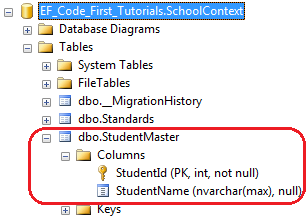
在上面的例子中,Table特性应用于Student实体上。所以,EF将会重写默认的约定,并且创建名称为StudentMaster的数据表,而不是名称为Students的数据表,例如:
使用Schema 属性来指定数据表的模式名称:

EF将会创建StudentMaster表,并且指定表的模式名为Admin:

好了,理论介绍完了,我们动手实践一下:
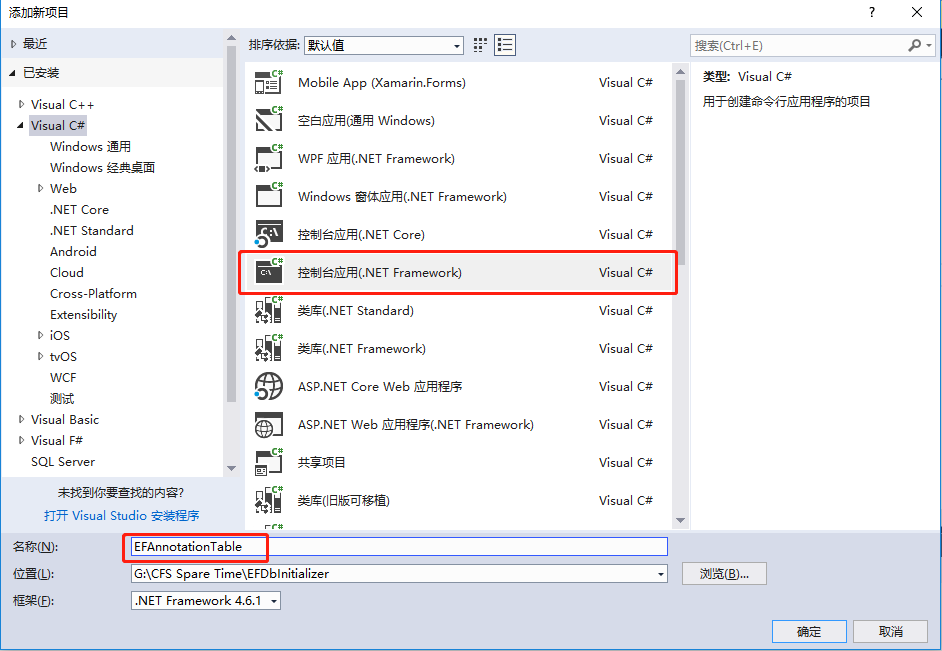
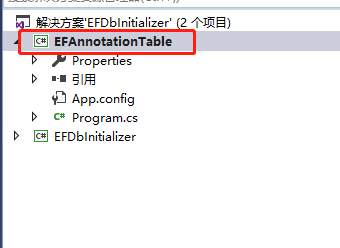
1.创建一个控制台应用程序,名称为:EFAnnotationTable
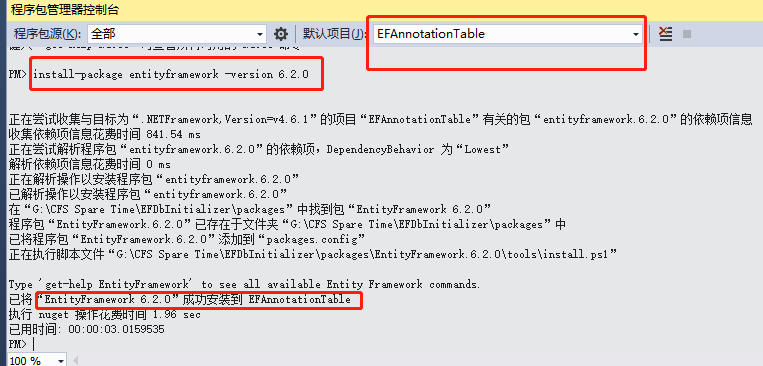
2.安装EF:【install-package entityframework -version 6.2.0】
3. 创建一个Student类:
 public class Student

    {

        public int StudentID { get; set; }

        public string Name { get; set; }

        public int Age { get; set; }

        public string Email { get; set; }

    }
4.创建一个上下文类EFDbContext:【base中的name=后面名称要和SQL连接字符串名称一样。】
public class EFDbContext:DbContext

    {

        public EFDbContext() : base("name=Constr")

        {

        }

        public DbSet<Student> StudentTable { get; set; }

    }
5.配置文件中配置连接字符串:
 <connectionStrings>

    <add name="Constr" connectionString="Server=.;Database=EFAnnotationTableDB;uid=sa;pwd=Password_1" providerName="System.Data.SqlClient"/>

  </connectionStrings>
6.测试程序:
 class Program

    {

        static void Main(string[] args)

        {

            using (var db = new EFDbContext())

            {

               List<Student> lstStuModel= db.StudentTable.ToList();

            }

            Console.WriteLine("success");

            Console.ReadKey();

        }

    }
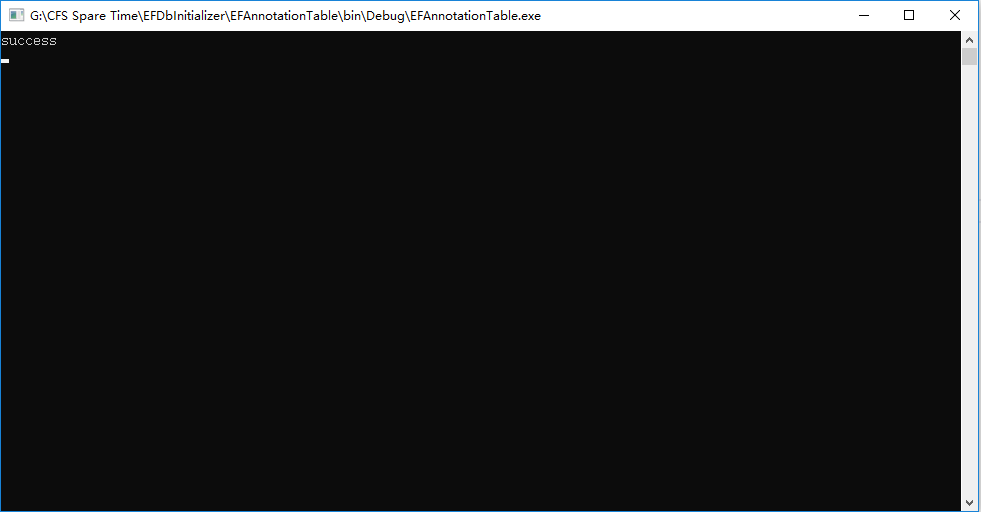
运行程序:【出现success字样,说明已经生成数据库和数据表成功了!】
我们看一下数据库:
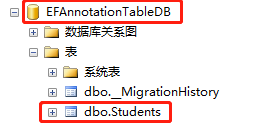
这就是EF默认为我们生成的数据表,可以看到,表名称默认是实体名称+s后缀。
现在我们使用数据注解:修改一下Student实体:
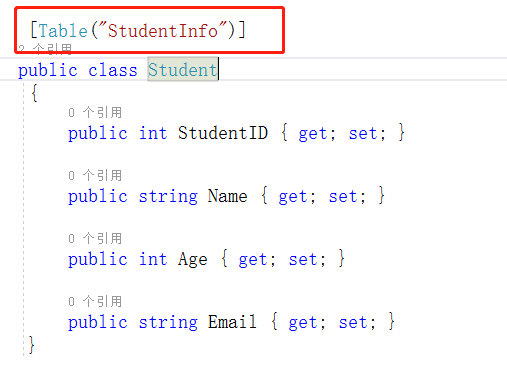
运行之前,我们需要先手动删除一下刚才生成的数据库和数据表。因为这里我没有启用数据库迁移技术。
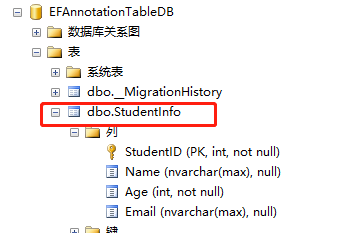
可以看到生成的表名是:StudentInfo了。现在我们使用数据注解,指定一下表的模式名称:
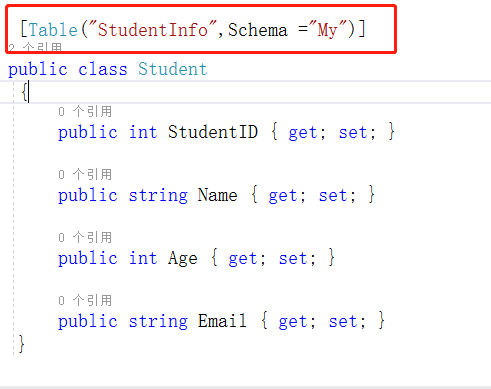
算了,我还是修改一下代码:免得每次测试都要手动删除数据库。【PS:这里直接运行就会报下图错误:】

我们改一下:上下文类的代码,
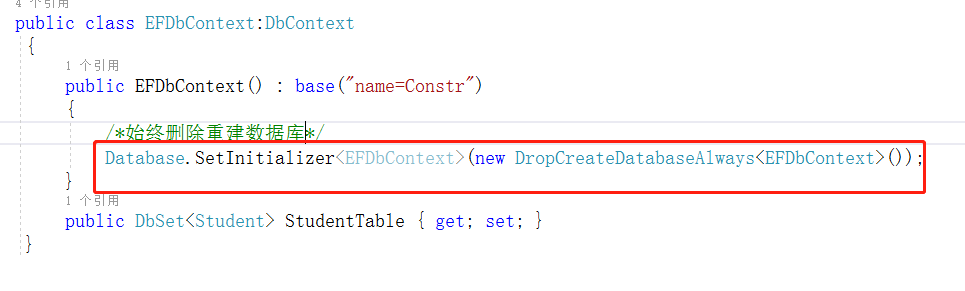
然后运行:
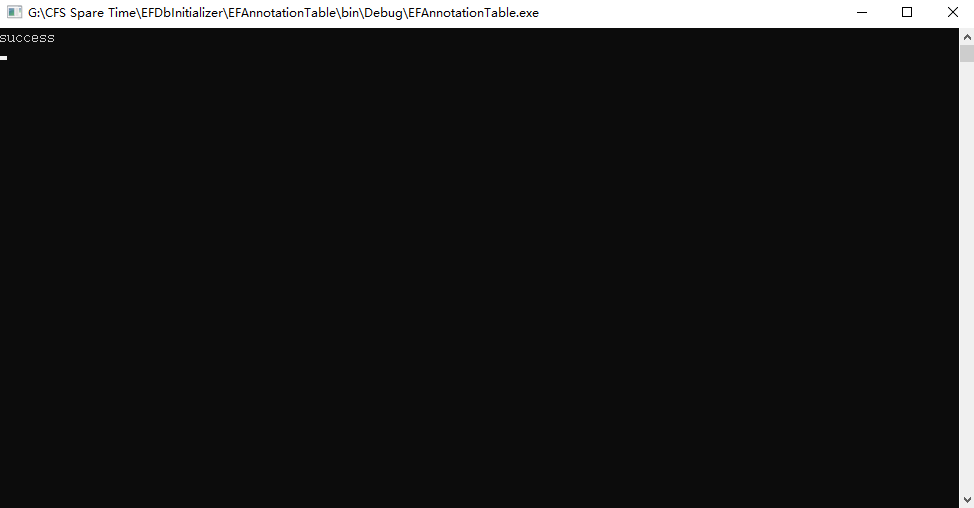
成功了,我们看下数据库:
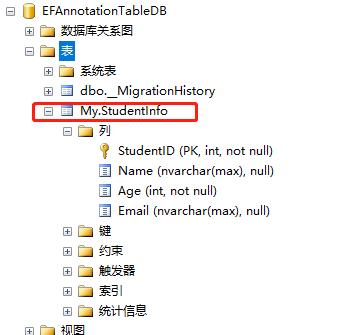
看到了么,模式名,变成了我们设定的My.好了,这一篇数据注解之Table,就介绍完了,大家有不明白的可以留言,我会一一回复,谢谢支持!
9.1 翻译系列:数据注解特性之----Table【EF 6 Code-First 系列】的更多相关文章
- 9.10 翻译系列:EF数据注解特性之StringLength【EF 6 Code-First系列】
原文链接:https://www.entityframeworktutorial.net/code-first/stringlength-dataannotations-attribute-in-co ...
- 9.9 翻译系列:数据注解特性之--MaxLength 【EF 6 Code-First系列】
原文链接:https://www.entityframeworktutorial.net/code-first/maxlength-minlength-dataannotations-attribut ...
- 9.7 翻译系列:EF数据注解特性之--InverseProperty【EF 6 Code-First系列】
原文链接:https://www.entityframeworktutorial.net/code-first/inverseproperty-dataannotations-attribute-in ...
- 9.3 翻译系列:数据注解特性之Key【EF 6 Code-First 系列】
原文链接:http://www.entityframeworktutorial.net/code-first/key-dataannotations-attribute-in-code-first.a ...
- 9.2 翻译系列:数据注解特性之---Column【EF 6 Code First系列】
原文链接:http://www.entityframeworktutorial.net/code-first/column-dataannotations-attribute-in-code-firs ...
- 9.翻译系列:EF 6以及EF Core中的数据注解特性(EF 6 Code-First系列)
原文地址:http://www.entityframeworktutorial.net/code-first/dataannotation-in-code-first.aspx EF 6 Code-F ...
- 9.5 翻译系列:数据注解之ForeignKey特性【EF 6 Code-First系列】
原文链接:https://www.entityframeworktutorial.net/code-first/foreignkey-dataannotations-attribute-in-code ...
- 9.6 翻译系列:数据注解之Index特性【EF 6 Code-First系列】
原文链接:https://www.entityframeworktutorial.net/entityframework6/index-attribute-in-code-first.aspx EF ...
- 9.8 翻译系列:数据注解特性之--Required 【EF 6 Code-First系列】
原文链接:https://www.entityframeworktutorial.net/code-first/required-attribute-dataannotations-in-code-f ...
随机推荐
- 解决/bin/sh: 1: syntax error: "(" unexpected错误,以及更换bash仍然无法解决的问题
编译文件的时候出现 /bin/sh: 1: syntax error: "(" unexpected 错误. 网上查到的资料都是: (1)在脚本前写#!/bin/bash (2)执 ...
- 【spring基础】spring声明式事务详解
一.spring声明式事务 1.1 spring的事务管理器 spring没有直接管理事务,而是将管理事务的责任委托给JTA或相应的持久性机制所提供的某个特定平台的事务实现.spring容器负责事物的 ...
- 在Visual Studio代码中使用Flask
Flask是一个用于Web应用程序的轻量级Python框架,它提供了URL路由和页面呈现的基础知识. Flask被称为“微”框架,因为它不直接提供表单验证,数据库抽象,身份验证等功能.这些功能由称为F ...
- Burp Suite之Scaner模块(三)
Burp Suite之Scaner模块(三) Scaner模块配置详解 Scan Queue Active Scanning(主动扫描)过程通常包括发送大量请求到服务器为所扫描的每个基本的请求,这可能 ...
- Web大前端面试题-Day10
1. px和em的区别? px和em都是长度单位; 区别是: px的值是固定的,指定是多少就是多少, 计算比较容易. em得值不是固定的,并且em会继承父级元素的字体大小. 浏览器的默认字体高都是16 ...
- BZOJ.2741.[FOTILE模拟赛]L(分块 可持久化Trie)
题目链接 首先记\(sum\)为前缀异或和,那么区间\(s[l,r]=sum[l-1]^{\wedge}sum[r]\).即一个区间异或和可以转为求两个数的异或和. 那么对\([l,r]\)的询问即求 ...
- Android工程运用阿里freeline10秒快速编译分享
git地址:https://github.com/alibaba/freeline 目前已经更新到0.6.0版本. 原来编译一次需要几分钟甚至几十分钟的android工程,运用freeline,1分钟 ...
- linux上 安装软件
一.rpm包安装方式步骤: 1.找到相应的软件包,比如soft.version.rpm,下载到本机某个目录: 2.打开一个终端,su -成root用户: 3.cd soft.version.rpm所 ...
- 基本数据类型、包装类、String之间的转换
package 包装类; /** *8种基本数据类型对应一个类,此类即为包装类 * 基本数据类型.包装类.String之间的转换 * 1.基本数据类型转成包装类(装箱): * ->通过构造器 : ...
- getOutputStream() has already been called for this response解释以及解决方法
异常:getOutputStream() has already been called for this response 的解决方法 今天在第一次接触使用“验证码”功能时,在执行时出现了异常信息: ...