
(六十三)c#Winform自定义控件-箭头(工业)-HZHControls
官网
前提
入行已经7,8年了,一直想做一套漂亮点的自定义控件,于是就有了本系列文章。
GitHub:https://github.com/kwwwvagaa/NetWinformControl
码云:https://gitee.com/kwwwvagaa/net_winform_custom_control.git
如果觉得写的还行,请点个 star 支持一下吧
欢迎前来交流探讨: 企鹅群568015492 
麻烦博客下方点个【推荐】,谢谢
NuGet
Install-Package HZH_Controls
目录
https://www.cnblogs.com/bfyx/p/11364884.html
用处及效果
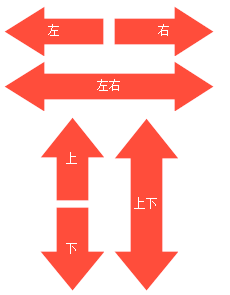
准备工作
依然用GDI+,请自行百度了解
开始
添加一个类UCArrow,继承UserControl
添加枚举,控制方向
 /// <summary>

     /// Enum ArrowDirection

     /// </summary>

     public enum ArrowDirection

     {

         /// <summary>

         /// The left

         /// </summary>

         Left,

         /// <summary>

         /// The right

         /// </summary>

         Right,

         /// <summary>

         /// The top

         /// </summary>

         Top,

         /// <summary>

         /// The bottom

         /// </summary>

         Bottom,

         /// <summary>

         /// The left right

         /// </summary>

         Left_Right,

         /// <summary>

         /// The top bottom

         /// </summary>

         Top_Bottom

     }
一些属性
  /// <summary>

         /// The arrow color

         /// </summary>

         private Color arrowColor = Color.FromArgb(, , );

         /// <summary>

         /// Gets or sets the color of the arrow.

         /// </summary>

         /// <value>The color of the arrow.</value>

         [Description("箭头颜色"), Category("自定义")]

         public Color ArrowColor

         {

             get { return arrowColor; }

             set

             {

                 arrowColor = value;

                 Refresh();

             }

         }

         /// <summary>

         /// The border color

         /// </summary>

         private Color? borderColor = null;

         /// <summary>

         /// Gets or sets the color of the border.

         /// </summary>

         /// <value>The color of the border.</value>

         [Description("箭头边框颜色,为空则无边框"), Category("自定义")]

         public Color? BorderColor

         {

             get { return borderColor; }

             set

             {

                 borderColor = value;

                 Refresh();

             }

         }

         /// <summary>

         /// The direction

         /// </summary>

         private ArrowDirection direction = ArrowDirection.Right;

         /// <summary>

         /// Gets or sets the direction.

         /// </summary>

         /// <value>The direction.</value>

         [Description("箭头方向"), Category("自定义")]

         public ArrowDirection Direction

         {

             get { return direction; }

             set

             {

                 direction = value;

                 ResetPath();

                 Refresh();

             }

         }

         /// <summary>

         /// 获取或设置控件显示的文字的字体。

         /// </summary>

         /// <value>The font.</value>

         /// <PermissionSet>

         ///   <IPermission class="System.Security.Permissions.EnvironmentPermission, mscorlib, Version=2.0.3600.0, Culture=neutral, PublicKeyToken=b77a5c561934e089" version="1" Unrestricted="true" />

         ///   <IPermission class="System.Security.Permissions.FileIOPermission, mscorlib, Version=2.0.3600.0, Culture=neutral, PublicKeyToken=b77a5c561934e089" version="1" Unrestricted="true" />

         ///   <IPermission class="System.Security.Permissions.SecurityPermission, mscorlib, Version=2.0.3600.0, Culture=neutral, PublicKeyToken=b77a5c561934e089" version="1" Flags="UnmanagedCode, ControlEvidence" />

         ///   <IPermission class="System.Diagnostics.PerformanceCounterPermission, System, Version=2.0.3600.0, Culture=neutral, PublicKeyToken=b77a5c561934e089" version="1" Unrestricted="true" />

         /// </PermissionSet>

         public override Font Font

         {

             get

             {

                 return base.Font;

             }

             set

             {

                 base.Font = value;

                 Refresh();

             }

         }

         /// <summary>

         /// 获取或设置控件的前景色。

         /// </summary>

         /// <value>The color of the fore.</value>

         /// <PermissionSet>

         ///   <IPermission class="System.Security.Permissions.FileIOPermission, mscorlib, Version=2.0.3600.0, Culture=neutral, PublicKeyToken=b77a5c561934e089" version="1" Unrestricted="true" />

         /// </PermissionSet>

         public override Color ForeColor

         {

             get

             {

                 return base.ForeColor;

             }

             set

             {

                 base.ForeColor = value;

                 Refresh();

             }

         }

         /// <summary>

         /// The text

         /// </summary>

         private string text;

         /// <summary>

         /// Gets or sets the text.

         /// </summary>

         /// <value>The text.</value>

         [Bindable(true)]

         [Browsable(true)]

         [DesignerSerializationVisibility(DesignerSerializationVisibility.Visible)]

         [EditorBrowsable(EditorBrowsableState.Always)]

         [Localizable(true)]

         [Description("箭头文字"), Category("自定义")]

         public override string Text

         {

             get

             {

                 return text;

             }

             set

             {

                 text = value;

                 Refresh();

             }

         }

         /// <summary>

         /// The m path

         /// </summary>

         GraphicsPath m_path;
根据方向和大小设置path
   private void ResetPath()

         {

             Point[] ps = null;

             switch (direction)

             {

                 case ArrowDirection.Left:

                     ps = new Point[]

                     {

                         new Point(,this.Height/),

                         new Point(,),

                         new Point(,this.Height/),

                         new Point(this.Width-,this.Height/),

                         new Point(this.Width-,this.Height-this.Height/),

                         new Point(,this.Height-this.Height/),

                         new Point(,this.Height),

                         new Point(,this.Height/)

                     };

                     break;

                 case ArrowDirection.Right:

                     ps = new Point[]

                     {

                         new Point(,this.Height/),

                         new Point(this.Width-,this.Height/),

                         new Point(this.Width-,),

                         new Point(this.Width-,this.Height/),

                         new Point(this.Width-,this.Height),

                         new Point(this.Width-,this.Height-this.Height/),

                         new Point(,this.Height-this.Height/),

                         new Point(,this.Height/)

                     };

                     break;

                 case ArrowDirection.Top:

                     ps = new Point[]

                     {

                        new Point(this.Width/,),

                        new Point(this.Width,),

                        new Point(this.Width-this.Width/,),

                        new Point(this.Width-this.Width/,this.Height-),

                        new Point(this.Width/,this.Height-),

                        new Point(this.Width/,),

                        new Point(,),

                        new Point(this.Width/,),

                     };

                     break;

                 case ArrowDirection.Bottom:

                     ps = new Point[]

                     {

                        new Point(this.Width-this.Width/,),

                        new Point(this.Width-this.Width/,this.Height-),

                        new Point(this.Width,this.Height-),

                        new Point(this.Width/,this.Height-),

                        new Point(,this.Height-),

                        new Point(this.Width/,this.Height-),

                        new Point(this.Width/,),

                        new Point(this.Width-this.Width/,),

                     };

                     break;

                 case ArrowDirection.Left_Right:

                     ps = new Point[]

                     {

                         new Point(,this.Height/),

                         new Point(,),

                         new Point(,this.Height/),

                         new Point(this.Width-,this.Height/),

                         new Point(this.Width-,),

                         new Point(this.Width-,this.Height/),

                         new Point(this.Width-,this.Height),

                         new Point(this.Width-,this.Height-this.Height/),

                         new Point(,this.Height-this.Height/),

                         new Point(,this.Height),

                         new Point(,this.Height/),

                     };

                     break;

                 case ArrowDirection.Top_Bottom:

                     ps = new Point[]

                     {

                        new Point(this.Width/,),

                        new Point(this.Width,),

                        new Point(this.Width-this.Width/,),

                        new Point(this.Width-this.Width/,this.Height-),

                        new Point(this.Width,this.Height-),

                        new Point(this.Width/,this.Height-),

                        new Point(,this.Height-),

                        new Point(this.Width/,this.Height-),

                        new Point(this.Width/,),

                        new Point(,),

                        new Point(this.Width/,),

                     };

                     break;

             }

             m_path = new GraphicsPath();

             m_path.AddLines(ps);

             m_path.CloseAllFigures();

         }
重绘
   protected override void OnPaint(PaintEventArgs e)

         {

             base.OnPaint(e);

             var g = e.Graphics;

             g.SetGDIHigh();

             g.FillPath(new SolidBrush(arrowColor), m_path);

             if (borderColor != null && borderColor != Color.Empty)

                 g.DrawPath(new Pen(new SolidBrush(borderColor.Value)), m_path);

             if (!string.IsNullOrEmpty(text))

             {

                 var size = g.MeasureString(Text, Font);

                 g.DrawString(Text, Font, new SolidBrush(ForeColor), new PointF((this.Width - size.Width) / , (this.Height - size.Height) / ));

             }

         }
完整代码
 // ***********************************************************************

 // Assembly         : HZH_Controls

 // Created          : 2019-09-10

 //

 // ***********************************************************************

 // <copyright file="UCArrow.cs">

 //     Copyright by Huang Zhenghui(黄正辉) All, QQ group:568015492 QQ:623128629 Email:623128629@qq.com

 // </copyright>

 //

 // Blog: https://www.cnblogs.com/bfyx

 // GitHub:https://github.com/kwwwvagaa/NetWinformControl

 // gitee:https://gitee.com/kwwwvagaa/net_winform_custom_control.git

 //

 // If you use this code, please keep this note.

 // ***********************************************************************

 using System;

 using System.Collections.Generic;

 using System.Linq;

 using System.Text;

 using System.Windows.Forms;

 using System.Drawing;

 using System.Drawing.Drawing2D;

 using System.ComponentModel;

 namespace HZH_Controls.Controls

 {

     /// <summary>

     /// Class UCArrow.

     /// Implements the <see cref="System.Windows.Forms.UserControl" />

     /// </summary>

     /// <seealso cref="System.Windows.Forms.UserControl" />

     public class UCArrow : UserControl

     {

         /// <summary>

         /// The arrow color

         /// </summary>

         private Color arrowColor = Color.FromArgb(, , );

         /// <summary>

         /// Gets or sets the color of the arrow.

         /// </summary>

         /// <value>The color of the arrow.</value>

         [Description("箭头颜色"), Category("自定义")]

         public Color ArrowColor

         {

             get { return arrowColor; }

             set

             {

                 arrowColor = value;

                 Refresh();

             }

         }

         /// <summary>

         /// The border color

         /// </summary>

         private Color? borderColor = null;

         /// <summary>

         /// Gets or sets the color of the border.

         /// </summary>

         /// <value>The color of the border.</value>

         [Description("箭头边框颜色,为空则无边框"), Category("自定义")]

         public Color? BorderColor

         {

             get { return borderColor; }

             set

             {

                 borderColor = value;

                 Refresh();

             }

         }

         /// <summary>

         /// The direction

         /// </summary>

         private ArrowDirection direction = ArrowDirection.Right;

         /// <summary>

         /// Gets or sets the direction.

         /// </summary>

         /// <value>The direction.</value>

         [Description("箭头方向"), Category("自定义")]

         public ArrowDirection Direction

         {

             get { return direction; }

             set

             {

                 direction = value;

                 ResetPath();

                 Refresh();

             }

         }

         /// <summary>

         /// 获取或设置控件显示的文字的字体。

         /// </summary>

         /// <value>The font.</value>

         /// <PermissionSet>

         ///   <IPermission class="System.Security.Permissions.EnvironmentPermission, mscorlib, Version=2.0.3600.0, Culture=neutral, PublicKeyToken=b77a5c561934e089" version="1" Unrestricted="true" />

         ///   <IPermission class="System.Security.Permissions.FileIOPermission, mscorlib, Version=2.0.3600.0, Culture=neutral, PublicKeyToken=b77a5c561934e089" version="1" Unrestricted="true" />

         ///   <IPermission class="System.Security.Permissions.SecurityPermission, mscorlib, Version=2.0.3600.0, Culture=neutral, PublicKeyToken=b77a5c561934e089" version="1" Flags="UnmanagedCode, ControlEvidence" />

         ///   <IPermission class="System.Diagnostics.PerformanceCounterPermission, System, Version=2.0.3600.0, Culture=neutral, PublicKeyToken=b77a5c561934e089" version="1" Unrestricted="true" />

         /// </PermissionSet>

         public override Font Font

         {

             get

             {

                 return base.Font;

             }

             set

             {

                 base.Font = value;

                 Refresh();

             }

         }

         /// <summary>

         /// 获取或设置控件的前景色。

         /// </summary>

         /// <value>The color of the fore.</value>

         /// <PermissionSet>

         ///   <IPermission class="System.Security.Permissions.FileIOPermission, mscorlib, Version=2.0.3600.0, Culture=neutral, PublicKeyToken=b77a5c561934e089" version="1" Unrestricted="true" />

         /// </PermissionSet>

         public override Color ForeColor

         {

             get

             {

                 return base.ForeColor;

             }

             set

             {

                 base.ForeColor = value;

                 Refresh();

             }

         }

         /// <summary>

         /// The text

         /// </summary>

         private string text;

         /// <summary>

         /// Gets or sets the text.

         /// </summary>

         /// <value>The text.</value>

         [Bindable(true)]

         [Browsable(true)]

         [DesignerSerializationVisibility(DesignerSerializationVisibility.Visible)]

         [EditorBrowsable(EditorBrowsableState.Always)]

         [Localizable(true)]

         [Description("箭头文字"), Category("自定义")]

         public override string Text

         {

             get

             {

                 return text;

             }

             set

             {

                 text = value;

                 Refresh();

             }

         }

         /// <summary>

         /// The m path

         /// </summary>

         GraphicsPath m_path;

         /// <summary>

         /// Initializes a new instance of the <see cref="UCArrow"/> class.

         /// </summary>

         public UCArrow()

         {

             this.SetStyle(ControlStyles.AllPaintingInWmPaint, true);

             this.SetStyle(ControlStyles.DoubleBuffer, true);

             this.SetStyle(ControlStyles.ResizeRedraw, true);

             this.SetStyle(ControlStyles.Selectable, true);

             this.SetStyle(ControlStyles.SupportsTransparentBackColor, true);

             this.SetStyle(ControlStyles.UserPaint, true);

             this.ForeColor = Color.White;

             this.AutoScaleMode = System.Windows.Forms.AutoScaleMode.None;

             this.SizeChanged += UCArrow_SizeChanged;

             this.Size = new Size(, );

         }

         /// <summary>

         /// Handles the SizeChanged event of the UCArrow control.

         /// </summary>

         /// <param name="sender">The source of the event.</param>

         /// <param name="e">The <see cref="EventArgs"/> instance containing the event data.</param>

         void UCArrow_SizeChanged(object sender, EventArgs e)

         {

             ResetPath();

         }

         /// <summary>

         /// Resets the path.

         /// </summary>

         private void ResetPath()

         {

             Point[] ps = null;

             switch (direction)

             {

                 case ArrowDirection.Left:

                     ps = new Point[]

                     {

                         new Point(,this.Height/),

                         new Point(,),

                         new Point(,this.Height/),

                         new Point(this.Width-,this.Height/),

                         new Point(this.Width-,this.Height-this.Height/),

                         new Point(,this.Height-this.Height/),

                         new Point(,this.Height),

                         new Point(,this.Height/)

                     };

                     break;

                 case ArrowDirection.Right:

                     ps = new Point[]

                     {

                         new Point(,this.Height/),

                         new Point(this.Width-,this.Height/),

                         new Point(this.Width-,),

                         new Point(this.Width-,this.Height/),

                         new Point(this.Width-,this.Height),

                         new Point(this.Width-,this.Height-this.Height/),

                         new Point(,this.Height-this.Height/),

                         new Point(,this.Height/)

                     };

                     break;

                 case ArrowDirection.Top:

                     ps = new Point[]

                     {

                        new Point(this.Width/,),

                        new Point(this.Width,),

                        new Point(this.Width-this.Width/,),

                        new Point(this.Width-this.Width/,this.Height-),

                        new Point(this.Width/,this.Height-),

                        new Point(this.Width/,),

                        new Point(,),

                        new Point(this.Width/,),

                     };

                     break;

                 case ArrowDirection.Bottom:

                     ps = new Point[]

                     {

                        new Point(this.Width-this.Width/,),

                        new Point(this.Width-this.Width/,this.Height-),

                        new Point(this.Width,this.Height-),

                        new Point(this.Width/,this.Height-),

                        new Point(,this.Height-),

                        new Point(this.Width/,this.Height-),

                        new Point(this.Width/,),

                        new Point(this.Width-this.Width/,),

                     };

                     break;

                 case ArrowDirection.Left_Right:

                     ps = new Point[]

                     {

                         new Point(,this.Height/),

                         new Point(,),

                         new Point(,this.Height/),

                         new Point(this.Width-,this.Height/),

                         new Point(this.Width-,),

                         new Point(this.Width-,this.Height/),

                         new Point(this.Width-,this.Height),

                         new Point(this.Width-,this.Height-this.Height/),

                         new Point(,this.Height-this.Height/),

                         new Point(,this.Height),

                         new Point(,this.Height/),

                     };

                     break;

                 case ArrowDirection.Top_Bottom:

                     ps = new Point[]

                     {

                        new Point(this.Width/,),

                        new Point(this.Width,),

                        new Point(this.Width-this.Width/,),

                        new Point(this.Width-this.Width/,this.Height-),

                        new Point(this.Width,this.Height-),

                        new Point(this.Width/,this.Height-),

                        new Point(,this.Height-),

                        new Point(this.Width/,this.Height-),

                        new Point(this.Width/,),

                        new Point(,),

                        new Point(this.Width/,),

                     };

                     break;

             }

             m_path = new GraphicsPath();

             m_path.AddLines(ps);

             m_path.CloseAllFigures();

         }

         /// <summary>

         /// 引发 <see cref="E:System.Windows.Forms.Control.Paint" /> 事件。

         /// </summary>

         /// <param name="e">包含事件数据的 <see cref="T:System.Windows.Forms.PaintEventArgs" />。</param>

         protected override void OnPaint(PaintEventArgs e)

         {

             base.OnPaint(e);

             var g = e.Graphics;

             g.SetGDIHigh();

             g.FillPath(new SolidBrush(arrowColor), m_path);

             if (borderColor != null && borderColor != Color.Empty)

                 g.DrawPath(new Pen(new SolidBrush(borderColor.Value)), m_path);

             if (!string.IsNullOrEmpty(text))

             {

                 var size = g.MeasureString(Text, Font);

                 g.DrawString(Text, Font, new SolidBrush(ForeColor), new PointF((this.Width - size.Width) / , (this.Height - size.Height) / ));

             }

         }

     }

     /// <summary>

     /// Enum ArrowDirection

     /// </summary>

     public enum ArrowDirection

     {

         /// <summary>

         /// The left

         /// </summary>

         Left,

         /// <summary>

         /// The right

         /// </summary>

         Right,

         /// <summary>

         /// The top

         /// </summary>

         Top,

         /// <summary>

         /// The bottom

         /// </summary>

         Bottom,

         /// <summary>

         /// The left right

         /// </summary>

         Left_Right,

         /// <summary>

         /// The top bottom

         /// </summary>

         Top_Bottom

     }

 }
最后的话
如果你喜欢的话,请到 https://gitee.com/kwwwvagaa/net_winform_custom_control 点个星星吧
(六十三)c#Winform自定义控件-箭头(工业)-HZHControls的更多相关文章
- (四十六)c#Winform自定义控件-水波进度条-HZHControls
官网 http://www.hzhcontrols.com 前提 入行已经7,8年了,一直想做一套漂亮点的自定义控件,于是就有了本系列文章. GitHub:https://github.com/kww ...
- (十六)c#Winform自定义控件-文本框哪里去了?-HZHControls
官网 http://www.hzhcontrols.com 前提 入行已经7,8年了,一直想做一套漂亮点的自定义控件,于是就有了本系列文章. GitHub:https://github.com/kww ...
- (二十六)c#Winform自定义控件-有确定取消的窗体(二)
前提 入行已经7,8年了,一直想做一套漂亮点的自定义控件,于是就有了本系列文章. 开源地址:https://gitee.com/kwwwvagaa/net_winform_custom_control ...
- (八十六)c#Winform自定义控件-表格优化
出处:http://www.hzhcontrols.com/原文:http://www.hzhcontrols.com/blog-149.html本文版权归www.hzhcontrols.com所有欢 ...
- (五十六)c#Winform自定义控件-瓶子(工业)-HZHControls
官网 http://www.hzhcontrols.com 前提 入行已经7,8年了,一直想做一套漂亮点的自定义控件,于是就有了本系列文章. GitHub:https://github.com/kww ...
- (三十六)c#Winform自定义控件-步骤控件-HZHControls
官网 http://www.hzhcontrols.com 前提 入行已经7,8年了,一直想做一套漂亮点的自定义控件,于是就有了本系列文章. GitHub:https://github.com/kww ...
- (六)c#Winform自定义控件-单选框
前提 入行已经7,8年了,一直想做一套漂亮点的自定义控件,于是就有了本系列文章. 开源地址:https://gitee.com/kwwwvagaa/net_winform_custom_control ...
- (七十六)c#Winform自定义控件-表单验证组件
前提 入行已经7,8年了,一直想做一套漂亮点的自定义控件,于是就有了本系列文章. GitHub:https://github.com/kwwwvagaa/NetWinformControl 码云:ht ...
- (八十一)c#Winform自定义控件-时间轴-HZHControls
官网 http://www.hzhcontrols.com 前提 入行已经7,8年了,一直想做一套漂亮点的自定义控件,于是就有了本系列文章. GitHub:https://github.com/kww ...
随机推荐
- 异常日志文件errorlong
#region log ////////////////////use/////////////// /// <summary> /// 异常日志 /// </summary> ...
- js中正则表达式的易错点
文章目录 1. 匹配符部分匹配规则 2. 分组匹配规则: 3. 注意^的不同用法 4. 不要忘记转义 5. 正则表达式对象中lastIndex属性 6. exec VS match 1. 匹配符部分匹 ...
- SpringBoot集成Swagger2在线文档
目录 SpringBoot集成Swagger2在线文档 前言 集成SpringBoot 登录接口文档示例 代码 效果 注解说明 总结 SpringBoot集成Swagger2在线文档 前言 不得不说, ...
- 【重大更新】AppWizard来了,emWin6.10版本来了
说明: 1.快圣诞节了,MDK和SEGGER都太生猛了,发布了大量软件更新,而且都是比较大的改进,待我周报再给大家分享. 2.不枉我这么多年对emWin的支持,官方也用心,终于带来AppWizard, ...
- 网易极客战记官方攻略-地牢-Kithgard 地牢
关卡连接: https://codecombat.163.com/play/level/dungeons-of-kithgard 夺取宝石,逃出地牢--注意不要触碰其他东西.在这个关卡里,你会学习编写 ...
- Nginx配置实例-动静分离实例:搭建静态资源服务器
场景 Nginx入门简介和反向代理.负载均衡.动静分离理解: https://blog.csdn.net/BADAO_LIUMANG_QIZHI/article/details/102790862 U ...
- vue组件初始化过程
之前文章有写到vue构造函数的实例化过程,只是对vue实例做了个粗略的描述,并没有说明vue组件实例化的过程.本文主要对vue组件的实例化过程做一些简要的描述. 组件的实例化与vue构造函数的实例化, ...
- gdisk转fdisk
分区测试的时候发现之前用gdisk分区之后,就无法用fdisk进行分区了,哪怕格式化了也不行,通过fdisk 查看硬盘,发现硬盘都变成了GPT分区,无法通过fdisk进行分区操作,所以要通过parte ...
- ffmpeg+nginx 实现rtsp转rtmp并通过nginx转发
Windows安装 ffmpeg ffmpeg windows版下载地址https://ffmpeg.zeranoe.com/builds/ static版本就行 配置环境变量:下载的压缩包解压后的路 ...
- 简洁优雅的Python教你如何在工作中“偷懒”
前言 本文的文字及图片来源于网络,仅供学习.交流使用,不具有任何商业用途,版权归原作者所有,如有问题请及时联系我们以作处理. 作者: A字头 PS:如有需要Python学习资料的小伙伴可以加点击下方链 ...