
基于rtmp+nginx 、vlc实现FFmpeg推流与wpf端拉流
这周在研究基于rtmp+nginx直播流的实现,现总结如下:
0.所需文件:
链接:https://pan.baidu.com/s/1U5gsNI8Rcl684l5gVL6swg
提取码:dli9
1.nginx部署
1.1将nginx_1.7.11.3_Gryphon.zip解压,启动nginx.bat文件移动至nginx_1.7.11.3_Gryphon解压后文件夹内,双击bat,启动nginx
1.2浏览器输入:http://localhost:1234/ 若出现如下页面,恭喜你部署成功!如未出现,可能是防火墙或者端口被占用,可修改nginx_1.7.11.3_Gryphon\conf\nginx-win-rtmp.conf中的端口号。

2.FFmpeg推流至服务器
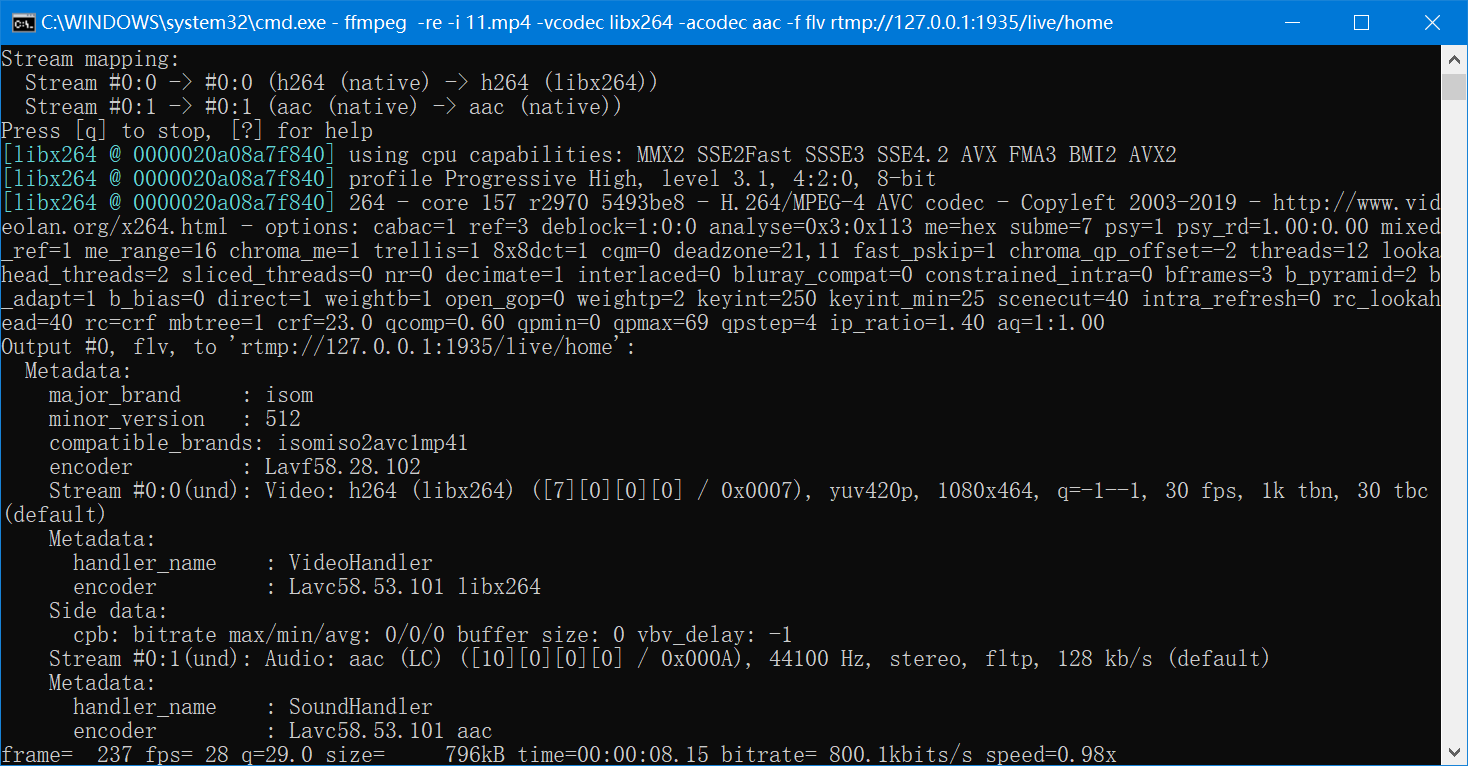
2.1推流命令示例:打开cmd,cd到nginx_1.7.11.3_Gryphon路径下 输入 ffmpeg -re -i 11.mp4 -vcodec libx264 -acodec aac -f flv rtmp://127.0.0.1:1935/live/home 并回车 。rtmp://127.0.0.1:1935/live为推流应用,home为具体流的名称,值随意,如需多个推流同时进行,只需更改home,如rtmp://127.0.0.1:1935/live/test
3.WPF端集成vlc拉流
3.1 项目里先添加Vlc.DotNet.Core.dll,Vlc.DotNet.Core.Interops.dll,Vlc.DotNet.Wpf.dll,可直接用我的 .net4.0版本,亦可下载源码自己编译(https://github.com/ZeBobo5/Vlc.DotNet 需用vs2017及以上编译)并在xaml中添加xmlns:local="clr-namespace:Vlc.DotNet.Wpf;assembly=Vlc.DotNet.Wpf"引用,将libvlc解压至wpf生成路径下,libvlc包含必须的解码库文件及插件
3.2 后台代码:
 using System;

 using System.Collections.Generic;

 using System.Linq;

 using System.Text;

 using System.Windows;

 using System.Windows.Controls;

 using System.Windows.Data;

 using System.Windows.Documents;

 using System.Windows.Input;

 using System.Windows.Media;

 using System.Windows.Media.Imaging;

 using System.Windows.Navigation;

 using System.Windows.Shapes;

 using Vlc.DotNet.Wpf;

 using System.Reflection;

 using System.IO;

 using Vlc.DotNet.Core;

 namespace LiveStreamTest

 {

     /// <summary>

     /// MainWindow.xaml 的交互逻辑

     /// </summary>

     public partial class MainWindow : Window

     {

         private VlcVideoSourceProvider sourceProvider;

         public MainWindow()

         {

             InitializeComponent();

         }

         private void Window_Loaded(object sender, RoutedEventArgs e)

         {

             var currentAssembly = Assembly.GetEntryAssembly();

             var currentDirectory = new FileInfo(currentAssembly.Location).DirectoryName;

             // Default installation path of VideoLAN.LibVLC.Windows

             var libDirectory = new DirectoryInfo(System.IO.Path.Combine(currentDirectory, "libvlc", IntPtr.Size ==  ? "win-x86" : "win-x64"));

             this.sourceProvider = new VlcVideoSourceProvider(this.Dispatcher);

             this.sourceProvider.CreatePlayer(libDirectory/* pass your player parameters here */);

             var mediaOptions = new[]

                 {

                     " :network-caching=2000"

                 };

             this.sourceProvider.MediaPlayer.Play("rtmp://127.0.0.1:1935/live/home",mediaOptions);//rtmp://114.242.105.17:1935/live/test

             //string file =@"D:\01_soft\rtmp\nginx_1.7.11.3_Gryphon\11.mp4";

             //this.sourceProvider.MediaPlayer.Play(new FileInfo(file));//本地文件

             this.sourceProvider.MediaPlayer.Log += new EventHandler<VlcMediaPlayerLogEventArgs>(MediaPlayer_Log);

             this.sourceProvider.MediaPlayer.Manager.SetFullScreen(this.sourceProvider.MediaPlayer.Manager.CreateMediaPlayer(), true);

             Binding bing = new Binding();

             bing.Source = sourceProvider;

             bing.Path = new PropertyPath("VideoSource");

             img.SetBinding(Image.SourceProperty, bing);

         }

         void MediaPlayer_Log(object sender, VlcMediaPlayerLogEventArgs e)

         {

             string message = "libVlc : " + e.Level + e.Message + e.Module;

             System.Diagnostics.Debug.WriteLine(message);

             //System.Diagnostics.Trace.WriteLine(message);

         }

         private void imgClose_MouseDown(object sender, MouseButtonEventArgs e)

         {

             this.Close();

             Application.Current.Shutdown();

         }

         private void imgMin_MouseDown(object sender, MouseButtonEventArgs e)

         {

            // WindowStateUtil.FullOrMin(this, WindowState.Minimized);

         }

     }

 }
3.3前端 只需添加 image组件即可
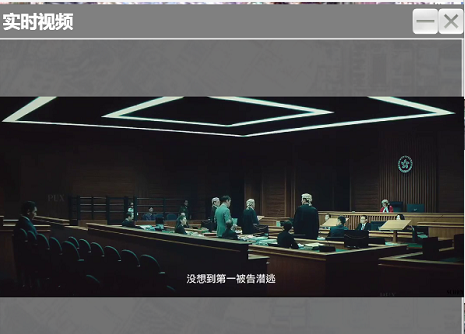
3.4最终效果:
基于rtmp+nginx 、vlc实现FFmpeg推流与wpf端拉流的更多相关文章
- c# 基于RTMP推流 PC+移动端 拉流播放
网上关于直播相关的文章很多,但是讲解还是不够系统,对于刚刚接触直播开发的朋友实施起来会浪费不少时间.下面结合我自己的经验, 介绍一下直播方面的实战经验. 分成两个部分 第一部分是标题中介绍的基于RTM ...
- SRS服务器搭建,ffmpeg 本地推流,srs从本地拉流
参考: https://github.com/ossrs/srs/wiki/v2_CN_SampleFFMPEG git clone https://github.com/ossrs/srs cd s ...
- 直播推流之blibli和拉流LFLiveKit
执行上面操作后,导入合成的拉流blibli包到工程中,然后新建个播放控制器来设置播放 1. 播放的一些操作. 2. 高斯模糊. 3. 新建聊天控制器. - (void)viewDidLoad { [ ...
- SRS流媒体服务器搭建+ffmpeg推流VLC取流观看
一.编译SRS https://github.com/winlinvip/simple-rtmp-server 目前有1.0-release.2.0.3.0等版本 2.0官方文档地址:https:// ...
- iOS - 直播流程,视频推流,视频拉流,简介,SMTP、RTMP、HLS、 PLPlayerKit
收藏笔记 1 . 音视频处理的一般流程: 数据采集→数据编码→数据传输(流媒体服务器) →解码数据→播放显示1.数据采集:摄像机及拾音器收集视频及音频数据,此时得到的为原始数据涉及技术或协议:摄像机: ...
- 【转】直播流程,视频推流,视频拉流,简介,SMTP、RTMP、HLS、 PLPlayerKit
原:https://www.cnblogs.com/baitongtong/p/11248966.html 1 .音视频处理的一般流程: 数据采集→数据编码→数据传输(流媒体服务器) →解码数据→播放 ...
- 利用Nginx搭建RTMP视频直播,点播服务器,ffmpeg推流,回看
一.环境和工具 ubuntu 14.04 desktop 不用server的原因是一部分的演示用到了linux视频播放和直播软件,自己还要装桌面,麻烦. 不建议使用 最新的16TLS,我一开始 ...
- iOS 直播推流 - 搭建基于RTMP的本地Nginx服务器
前端时间,公司要调研直播相关的内容,特地花时间进行了一番调研. 本篇将记录其中的推流篇-本地推理播放测试. 关于Nginx: 配置Nginx以支持HLS.RTMP的推流与拉流,iOS系统使用LFLiv ...
- 三、Windows下用FFmpeg+nginx+rtmp搭建直播环境 实现推流、拉流
一.环境 1.开发环境:windows 2.开发工具:FFmpeg.nginx.nginx-rmtp-module (链接:https://pan.baidu.com/s/119d2GeMzddas_ ...
随机推荐
- Docker安装并运行mysql5.6数据库
1.在/home目录下新建mysql目录 mysql目录中新建三个目录:conf目录.logs目录.data目录,建这些目录的目的是用来挂载docker中的mysql下的目录的. 结果如下: 1.1. ...
- JavaScript—字符串(String)用法
字符串(String)去除空格 str = " hello python " // 去除左空格: str=str.replace( /^\s*/, ''); // 去除右空格: s ...
- [PHP] 深度解析Nginx下的PHP框架路由实现
所有的框架处理业务请求时,都会处理URL的路径部分,分配到指定的代码中去处理.实现这一功能的关键就是获取$_SERVER全局变量中对于URL部分的数据 当请求的路径为http://test.com/a ...
- Day_02
1.无参数无返回值函数的使用 package main import "fmt" //无参无返回值函数的定义 func MyFunc() { a := 666 fmt.Printl ...
- Ambassador中,启用不同的Load balancing算法
默认就是轮循,如果要其它hash或是最少请求,那就需要作更多的设置了. https://www.getambassador.io/reference/core/load-balancer/#sourc ...
- 【bzoj4559】[JLoi2016]成绩比较(dp+拉格朗日插值)
bzoj 题意: 有\(n\)位同学,\(m\)门课. 一位同学在第\(i\)门课上面获得的分数上限为\(u_i\). 定义同学\(A\)碾压同学\(B\)为每一课\(A\)同学的成绩都不低于\(B\ ...
- 如何在类中根据枚举值,获取枚举的message的工具类
枚举类为: public enum OrderStatusEnum implements CondeEnum{ NEW(0, "新订单"), FINISHED(1, "完 ...
- 人工智能+Python:十大Markdown语法简明教程
Markdown 是一种轻量级的标记语言,用户可以使用诸如 * # 等简单的标记符号以最小的输入代价生成极富表现力的文档,目前也被越来越多的写作爱好者,撰稿者广泛使用.本文希望用直观的方法来讲述Mar ...
- RAID几种方式
RAID(Redundant Array of Independent Disk 独立冗余磁盘阵列)技术是加州大学伯克利分校1987年提出,最初是为了组合小的廉价磁盘来代替大的昂贵磁盘,同时希望磁盘失 ...
- MySQL SQL DML (数据操作语言)
包括 SELECT, UPDATE, DELETE, INSERT SELECT 从数据库表中获取数据 用法 SELECT name FROM students; SELECT name,age FR ...