
GitLab能通过ssh克隆无法通过http克隆,也无法进行流水线,提示port 80: Connection refused
问题记录:VM-Ubuntu20.04刚开始时使用NAT模式连接,后来改成桥接模式,改完之后原来使用docker启动的gitlab服务无法克隆,一直提示:fatal...没有远程库什么的,没解决后来删除映射目录和容器、镜像,重新启动了新的容器,配置后可以进行ssh克隆但是无法通过http克隆,进行gitlab-ci流水线时提示Failed to connect to 192.168.xx.83 port 80: Connection refused
通过尝试使用命令:git clone http://192.168.1.83/liutaiqiang/test.git 无法克隆提示:Failed to connect to 192.168.xx.83 port 80: Connection refused
通过尝试使用命令:git clone http://192.168.1.83:9001/liutaiqiang/test.git 可以进行克隆,在/srv/gitlab/data/gitlab-rails/etc下修改gitlab.yml把端口80改为9001后重启gitlab服务,又会变回80端口
通过以下方式进行修改,解决了问题
自定义使用的端口
查看容器的ID
wmg@debian:~$ sudo docker ps

CONTAINER ID        IMAGE                     COMMAND             CREATED             STATUS                   PORTS                                                            NAMES

1132de0d1960        gitlab/gitlab-ce:latest   "/assets/wrapper"   19 hours ago        Up 2 minutes (healthy)   80/tcp, 443/tcp, 0.0.0.0:8081->8081/tcp, 0.0.0.0:10022->22/tcp   gitlab
记住CONTAINER ID
在做操作之前,为了防止意外,先将容器和docker停了
docker stop gitlab         // 停止容器,gitlab是容器的名字

systemctl stop docker      // 停止docker
我们需要将http的端口改为访问9001,同时在克隆的时候的地址是对的,gitlab的ssh的端口改为宿主机的8022。
修改宿主机的 /var/lib/docker/containers/容器ID/ 目录下的config.v2.json,hostconfig.json文件
root@debian:~# cd /var/lib/docker/containers/1132de0d1960e1049a3f1f014b2ba215442a6c7f23f4983b324e055306822c52/

root@debian:/var/lib/docker/containers/1132de0d1960e1049a3f1f014b2ba215442a6c7f23f4983b324e055306822c52# ls

1132de0d1960e1049a3f1f014b2ba215442a6c7f23f4983b324e055306822c52-json.log  checkpoints  config.v2.json  hostconfig.json  hostname  hosts  mounts  resolv.conf  resolv.conf.hash
config.v2.json
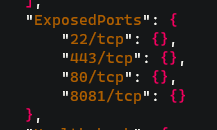
hostconfig.json

Tips:使用vim编辑是如果没有格式化的话,可读性会非常差,我是把文件复制到本地用notepad++改的
修改容器内的gitlab配置文件/etc/gitlab/gitlab.rb
因为我将/etc/gitlab映射到了/backup/gitlab/config下了,所以我直接进这个目录修改gitlab.rb文件,以下几行参数
external 'http://192.168.88.213:8081'

nginx['listen_port'] = 8081

gitlab_rails['gitlab_shell_ssh_port'] = 10022
改好之后将docker和容器启动就好了
systemctl start docker
docker start gitlab
文字参考:https://www.cnblogs.com/FFFirer/p/docker_gitlab.html
GitLab能通过ssh克隆无法通过http克隆,也无法进行流水线,提示port 80: Connection refused的更多相关文章
- ssh: connect to git@gitlab.xxxxx.com:xxxxx.git port 22: Connection refused
公司服务器上的gitlab项目添加了ssh密钥,但是操作时却报错ssh: connect to git@gitlab.xxxxx.com:xxxxx.git port 22: Connection r ...
- 新手git: ssh: connect to host localhost port 22: Connection refused
由于gitlab上要git pull或者git clone,可是每次都出现这个问题.之前偶尔出现这个问题.可是仅仅是偶尔.这是为什么呢?然后就開始搜索网上的解决方式了. 这个问题搜索网上非常多答案.可 ...
- ssh: connect to host github.com port 22: Connection refused
假设git例如,下面的问题时,远程推送: [fulinux@ubuntu learngit]$ git push -u origin master ssh: connect to host githu ...
- Ubuntu下 ssh : connect to host localhost port 22:Connection refused
Ubuntu下测试ssh时使用ssh localhost 命令,出现错误提示connect to host localhost port 22:Connection refused 造成这个错误的原因 ...
- 运行Hadoop start-all.sh遇到的错误ssh: connect to host localhost port 22: Connection refused
ssh: connect to host localhost port 22: Connection refused 我的情况是ssh server没装,查看方法: ps -e |grep ssh 1 ...
- scp出现ssh port 22: Connection refused 问题解决具体步骤
[root(0)@sys11 09:20:29 /home/work/Code_release/bj]# scp ./release.sh root@192.168.161.151:/Users/a ...
- ssh: connect to host localhost port 22: Connection refused
1.hadoop安装好之后,执行ssh localhost无法执行, 提示“ssh: connect to host localhost port 22: Connection refused”. 2 ...
- ssh本机失败(ssh: connect to host localhost port 22: Connection refused)
ssh本机失败(ssh: connect to host localhost port 22: Connection refused) 一. 问题描述 之前一直在服务上使用宝塔面板, 今天突发奇想, ...
- 阿里云配置通用服务的坑 ssh: connect to host 47.103.101.102 port 22: Connection refused
1.~ wjw$ ssh root@47.103.101.102 ssh: connect to host 47.103.101.102 port 22: Connection refused ssh ...
- ssh: connect to host localhost port 22: Connection refused 问题
错误原因:1.sshd 未安装2.sshd 未启动 3.防火墙 4需重新启动ssh 服务 解决方法:1.确定安装sshd: $ sudo apt-get install openssh-server ...
随机推荐
- dp 优化
dp 优化 \(\text{By DaiRuiChen007}\) I. [ARC085D] - NRE \(\text{Link}\) 思路分析 将最终的第 \(i\) 对 \(a_i\) 和 \( ...
- SpringBoot源码学习3——SpringBoot启动流程
系列文章目录和关于我 一丶前言 在 <SpringBoot源码学习1--SpringBoot自动装配源码解析+Spring如何处理配置类的>中我们学习了SpringBoot自动装配如何实现 ...
- 函数式编程思想概述-冗余的Runnable代码
函数式编程思想概述 在数学中,函数就是有输入量.输出星的一套计算方案,也就是"拿什么东西做什么事情".相对而言,面向对象过分强调"必须通过对象的形式来做事情", ...
- Java 进阶P-1.1+P-1.2
用类制造对象 对象与类 对象是实体,需要被创建,可以为我们做事情 类是规范,根据类的定义来创建对象 对象=属性+服务 数据:属性或状态 操作:函数 从这些例子可以看出来 class是提供服务的,数据是 ...
- 在Spring Boot中整合Katharsis,来快速开发JSON API的Web应用
1 简介 我们进行Web API开发的时候,经常会使用Json格式的消息体,而Json格式非常灵活,不同的人会有不同的设计风格和实现,而JSON API提供了一套标准.但它并不提供直接实现. Kath ...
- 如何用Python实现http客户端和服务器
功能:客户端可以向服务器发送get,post等请求,而服务器端可以接收这些请求,并返回给客户端消息. 客户端: #coding=utf-8import http.clientfrom urllib i ...
- 面试必问:说一下 Java 虚拟机的内存布局?
我们通常所说的 Java 虚拟机(JVM)的内存布局,一般是指 Java 虚拟机的运行时数据区(Runtime Data Area),也就是当字节码被类加载器加载之后的执行区域划分.当然它通常是 JV ...
- Python函数式编程之map/filter/reduce/sorted
Python函数式编程之map/filter/reduce/sorted 关于函数式编程 函数式编程Functional Programming,其思想更接近数学计算 函数式编程就是一种抽象程度很高的 ...
- 不用Blazor WebAssembly,开发在浏览器端编译和运行C#代码的网站
本文中,我将会为大家分享一个如何用.NET技术开发"在浏览器端编译和运行C#代码的工具",核心的技术就是用C#编写不依赖于Blazor框架的WebAssembly以及Roslyn技 ...
- wsl ubuntu vscode 安装 Fira Code
如果使用windows terminal(其实就是powershell)那么只需要在windows 中安装 Fira Code 即可,但是如果需要让wsl 中的vscode 也用Fira Code 就 ...