
Run P4 without P4factory - A Simple Example In Tutorials. -2
Reference:Github-Tutorial Exercise 2: Implementing TCP flowlet switching
实验准备:
参考之前的博客:Run P4 without P4factory - A Simple Example In Tutorials.
由于本次实验在初始阶段大部分内容已经完成,所以贴出几个关键文件的内容。
command.txt(无需改动)
table_set_default ecmp_group _drop

table_set_default ecmp_nhop _drop

table_set_default forward _drop

table_set_default send_frame _drop

table_add ecmp_group set_ecmp_select 10.0.0.1/32 => 0 2

table_add ecmp_nhop set_nhop 0 => 10.0.1.1 1

table_add ecmp_nhop set_nhop 1 => 10.0.2.1 2

table_add forward set_dmac 10.0.1.1 => 00:04:00:00:00:00

table_add forward set_dmac 10.0.2.1 => 00:04:00:00:00:01

table_add send_frame rewrite_mac 1 => 00:aa:bb:00:00:00

table_add send_frame rewrite_mac 2 => 00:aa:bb:00:00:01
env.sh(其中bmv2和p4c-bm修改为自己的路径)
拷贝到目录:/home/wasdns/tutorials/SIGCOMM_2015/flowlet_switching
THIS_DIR=$( cd "$( dirname "${BASH_SOURCE[0]}" )" && pwd )

# ---------------- EDIT THIS ------------------

BMV2_PATH=/home/wasdns/bmv2

# e.g. BMV2_PATH=$THIS_DIR/../bmv2

P4C_BM_PATH=/home/wasdns/p4c-bmv2

# e.g P4C_BM_PATH=$THIS_DIR/../p4c-bm

# ---------------- END ------------------
run_demo.sh(修改路径)
#!/bin/bash

# Copyright 2013-present Barefoot Networks, Inc.

#

# Licensed under the Apache License, Version 2.0 (the "License");

# you may not use this file except in compliance with the License.

# You may obtain a copy of the License at

#

#    http://www.apache.org/licenses/LICENSE-2.0

#

# Unless required by applicable law or agreed to in writing, software

# distributed under the License is distributed on an "AS IS" BASIS,

# WITHOUT WARRANTIES OR CONDITIONS OF ANY KIND, either express or implied.

# See the License for the specific language governing permissions and

# limitations under the License.

THIS_DIR=$( cd "$( dirname "${BASH_SOURCE[0]}" )" && pwd )

source $THIS_DIR/env.sh

P4C_BM_SCRIPT=$P4C_BM_PATH/p4c_bm/__main__.py

SWITCH_PATH=$BMV2_PATH/targets/simple_switch/simple_switch

CLI_PATH=$BMV2_PATH/tools/runtime_CLI.py

# Probably not very elegant but it works nice here: we enable interactive mode

# to be able to use fg. We start the switch in the background, sleep for 2

# minutes to give it time to start, then add the entries and put the switch

# process back in the foreground

set -m

$P4C_BM_SCRIPT p4src/simple_router.p4 --json simple_router.json

# This gets root permissions, and gives libtool the opportunity to "warm-up"

sudo $SWITCH_PATH >/dev/null 2>&1

sudo $SWITCH_PATH simple_router.json \

    -i 0@veth0 -i 1@veth2 -i 2@veth4 -i 3@veth6 -i 4@veth8 \

    --nanolog ipc:///tmp/bm-0-log.ipc \

    --pcap &

sleep 2

$CLI_PATH --json simple_router.json < commands.txt

echo "READY!!!"

fg
实验过程:
实验中运行的交换机如图所示:
             --------------------------------- nhop-0 10.0.1.1

             |                                        00:04:00:00:00:00

          1 - 00:aa:bb:00:00:00

             |

-------- 3--sw

             |

          2 - 00:aa:bb:00:00:01

             |

             --------------------------------- nhop-1 10.0.2.1

                                                      00:04:00:00:00:01
第一部分
原理
使用的P4程序(详细的代码:->Github),关键部分:
field_list l3_hash_fields {

    ipv4.srcAddr;

    ipv4.dstAddr;

    ipv4.protocol;

    tcp.srcPort;

    tcp.dstPort;

}

field_list_calculation ecmp_hash {

    input {

        l3_hash_fields;

    }

    algorithm : crc16;

    output_width : ECMP_BIT_WIDTH;

}
可以看到,采用的是简单的五元组匹配进行路径和端口的选择,实现简单的ECMP - flowlet switching。
Github中的介绍:
Flowlet switching leverages the burstiness of TCP flows to achieve better load balancing of TCP traffic. In this exercise, you will start from a program that load-balances based on layer 4 flows: this is generally considered "classic" ECMP. **To do this, we compute a hash over the 5-tuple and use this value to choose from a set of possible next hops. This means that all packets belonging to the same flow (i.e. with the same 5-tuple) will be routed to the same nexthop. **
通过五元组hash的计算,我们知道,多个属于同一条业务流的数据报结果计算会产生相同的hash值,从而走同一个端口。
1.启动交换机
首先,执行打开端口:
./veth_setup.sh
运行P4交换机:
./run_demo.sh
结果如下:
root@ubuntu:/home/wasdns/tutorials/SIGCOMM_2015/flowlet_switching# ./run_demo. h

parsing successful

semantic checking successful

Header type standard_metadata_t not byte-aligned, adding padding

Header type ingress_metadata_t not byte-aligned, adding padding

WARNING:gen_json:The P4 program defines a checksum verification on field 'ipv4.hdrChecksum'; as of now bmv2 ignores all checksum verifications; checksum updates are processed correctly.

Generating json output to /home/wasdns/tutorials/SIGCOMM_2015/flowlet_switching/simple_router.json

Thrift port was not specified, will use 9090

Calling target program-options parser

Adding interface veth0 as port 0

Adding interface veth2 as port 1

Adding interface veth4 as port 2

Adding interface veth6 as port 3

Adding interface veth8 as port 4

Thrift server was started

Control utility for runtime P4 table manipulation

RuntimeCmd: Setting default action of ecmp_group

action:              _drop

runtime data:

RuntimeCmd: Setting default action of ecmp_nhop

action:              _drop

runtime data:

RuntimeCmd: Setting default action of forward

action:              _drop

runtime data:

RuntimeCmd: Setting default action of send_frame

action:              _drop

runtime data:

RuntimeCmd: Adding entry to lpm match table ecmp_group

match key:           LPM-0a:00:00:01/32

action:              set_ecmp_select

runtime data:        00:00	00:02

Entry has been added with handle 0

RuntimeCmd: Adding entry to exact match table ecmp_nhop

match key:           EXACT-00:00

action:              set_nhop

runtime data:        0a:00:01:01	00:01

Entry has been added with handle 0

RuntimeCmd: Adding entry to exact match table ecmp_nhop

match key:           EXACT-00:01

action:              set_nhop

runtime data:        0a:00:02:01	00:02

Entry has been added with handle 1

RuntimeCmd: Adding entry to exact match table forward

match key:           EXACT-0a:00:01:01

action:              set_dmac

runtime data:        00:04:00:00:00:00

Entry has been added with handle 0

RuntimeCmd: Adding entry to exact match table forward

match key:           EXACT-0a:00:02:01

action:              set_dmac

runtime data:        00:04:00:00:00:01

Entry has been added with handle 1

RuntimeCmd: Adding entry to exact match table send_frame

match key:           EXACT-00:01

action:              rewrite_mac

runtime data:        00:aa:bb:00:00:00

Entry has been added with handle 0

RuntimeCmd: Adding entry to exact match table send_frame

match key:           EXACT-00:02

action:              rewrite_mac

runtime data:        00:aa:bb:00:00:01

Entry has been added with handle 1

RuntimeCmd:

READY!!!

sudo $SWITCH_PATH simple_router.json -i 0@veth0 -i 1@veth2 -i 2@veth4 -i 3@veth6 -i 4@veth8 --nanolog ipc:///tmp/bm-0-log.ipc --pcap
其中,veth3是实验中的端口1,veth5是实验中的端口2,veth7是实验中的端口3.
2.打开新的终端运行test样例:
New Terminal:
./run_test.py
这里我对脚本略作修改,将脚本中的:
NUM_PACKETS = 500
改为
NUM_PACKETS = 100
从发500个包,变为发100个包,以节省运行时间。
此时,数据报的目的IP地址为:10.0.0.1,TTL均为64.
结果如下:
root@ubuntu:/home/wasdns/tutorials/SIGCOMM_2015/flowlet_switching# ./run_test1.py

WARNING: No route found for IPv6 destination :: (no default route?)

Sending 100 packets ...

[2, 2, 2, 2, 2, 2, 2, 2, 2, 2, 2, 2, 2, 2, 2, 2, 2, 2, 2, 2, 2, 2, 2, 2, 2, 2, 2, 2, 2, 2, 2, 2, 2, 2, 2, 2, 2, 2, 2, 2, 2, 2, 2, 2, 2, 2, 2, 2, 2, 2, 2, 2, 2, 2, 2, 2, 2, 2, 2, 2, 2, 2, 2, 2, 2, 2, 2, 2, 2, 2, 2, 2, 2, 2, 2, 2, 2, 2, 2, 2, 2, 2, 2, 2, 2, 2, 2, 2, 2, 2, 2, 2, 2, 2, 2, 2, 2, 2, 2, 2]
可以看到,这一条流所有的数据报均选择了端口2作为出端口。
第二部分:
原理
在上面的实验中,我们看到五元组匹配局限于源目IP、源目Mac以及传输层协议,同一条的业务流所属的数据报只能走同一条路由。
通过改动交换机的P4程序,我们可以实现基于Flowlet_switching的L4LB。
这里的原理是利用时间戳,当某条流的某一个数据报的时间戳-第一个数据报的时间戳大于某一个值的时候,从这个数据报开始改变它的流id,从而走不同的路。
For each flow, you need to store 2 things: a) a timestamp for the last observed packet belonging to this flow and b) a flowlet_id. Flowlet switching is very simple: for each packet which belongs to the flow, you need to update the timestamp. Then, if the time delta between the last observed packet and the current packet exceeds a certain timeout value (in our case, we suggest using 50ms), then the flowlet_id needs to be incremented.
P4程序中,利用寄存器register来实现这个方法:
To maintain state in P4, you will need to use 'register' objects (look them up in the spec). In this case, you will need to use two separate registers for each packet (one for the timestamp and one for the flowlet_id).
P4程序中的关键部分,时间戳和流id的寄存器及Table如下:
register flowlet_lasttime {

    width : 32;

    instance_count : 8192;

}

register flowlet_id {

    width : 16;

    instance_count : 8192;

}

action lookup_flowlet_map() {

    modify_field_with_hash_based_offset(ingress_metadata.flowlet_map_index, 0,

                                        flowlet_map_hash, FLOWLET_MAP_SIZE);

    register_read(ingress_metadata.flowlet_id,

                  flowlet_id, ingress_metadata.flowlet_map_index);

    modify_field(ingress_metadata.flow_ipg,

                 intrinsic_metadata.ingress_global_timestamp);

    register_read(ingress_metadata.flowlet_lasttime,

    flowlet_lasttime, ingress_metadata.flowlet_map_index);

    subtract_from_field(ingress_metadata.flow_ipg,

                        ingress_metadata.flowlet_lasttime);

    register_write(flowlet_lasttime, ingress_metadata.flowlet_map_index,

                   intrinsic_metadata.ingress_global_timestamp);

}

table flowlet {

    actions { lookup_flowlet_map; }

}
command.txt如下:
table_set_default ecmp_group _drop

table_set_default ecmp_nhop _drop

table_set_default forward _drop

table_set_default send_frame _drop

table_set_default flowlet lookup_flowlet_map

table_set_default new_flowlet update_flowlet_id

table_add ecmp_group set_ecmp_select 10.0.0.1/32 => 0 2

table_add ecmp_nhop set_nhop 0 => 10.0.1.1 1

table_add ecmp_nhop set_nhop 1 => 10.0.2.1 2

table_add forward set_dmac 10.0.1.1 => 00:04:00:00:00:00

table_add forward set_dmac 10.0.2.1 => 00:04:00:00:00:01

table_add send_frame rewrite_mac 1 => 00:aa:bb:00:00:00

table_add send_frame rewrite_mac 2 => 00:aa:bb:00:00:01
1.启动P4交换机(同上)
变化:
RuntimeCmd: Setting default action of flowlet

action:              lookup_flowlet_map

runtime data:

RuntimeCmd: Setting default action of new_flowlet

action:              update_flowlet_id

runtime data:
新增了两个默认动作。
2.运行测试样例
打开新终端,进入目录,执行命令。
New Terminal:
./run_test.py
这里我没有对脚本进行修改,以便看的更加清晰。
结果:
root@ubuntu:/home/wasdns/tutorials/SIGCOMM_2015/flowlet_switching# ./run_test.py

WARNING: No route found for IPv6 destination :: (no default route?)

Sending 500 packets ...

[1, 1, 1, 1, 1, 1, 1, 1, 1, 1, 1, 1, 1, 1, 1, 1, 1, 1, 1, 1, 1, 1, 1, 1, 1, 1, 1, 1, 1, 1, 1, 1, 1, 1, 1, 1, 1, 1, 1, 1, 2, 2, 2, 2, 2, 2, 2, 2, 2, 2, 1, 1, 1, 1, 1, 1, 1, 1, 1, 1, 2, 2, 2, 2, 2, 2, 2, 2, 2, 2, 2, 2, 2, 2, 2, 2, 2, 2, 2, 2, 1, 1, 1, 1, 1, 1, 1, 1, 1, 1, 1, 1, 1, 1, 1, 1, 1, 1, 1, 1, 1, 1, 1, 1, 1, 1, 1, 1, 1, 1, 2, 2, 2, 2, 2, 2, 2, 2, 2, 2, 2, 2, 2, 2, 2, 2, 2, 2, 2, 2, 2, 2, 2, 2, 2, 2, 2, 2, 2, 2, 1, 1, 1, 1, 1, 1, 1, 1, 1, 1, 2, 2, 2, 2, 2, 2, 2, 2, 2, 2, 2, 2, 2, 2, 2, 2, 2, 2, 2, 2, 2, 2, 2, 2, 2, 2, 2, 2, 2, 2, 1, 1, 1, 1, 1, 1, 1, 1, 1, 1, 1, 1, 1, 1, 1, 1, 1, 1, 1, 1, 1, 1, 1, 1, 1, 1, 1, 1, 1, 1, 2, 2, 2, 2, 2, 2, 2, 2, 2, 2, 1, 1, 1, 1, 1, 1, 1, 1, 1, 1, 2, 2, 2, 2, 2, 2, 2, 2, 2, 2, 2, 2, 2, 2, 2, 2, 2, 2, 2, 2, 1, 1, 1, 1, 1, 1, 1, 1, 1, 1, 2, 2, 2, 2, 2, 2, 2, 2, 2, 2, 2, 2, 2, 2, 2, 2, 2, 2, 2, 2, 1, 1, 1, 1, 1, 1, 1, 1, 1, 1, 1, 1, 1, 1, 1, 1, 1, 1, 1, 1, 2, 2, 2, 2, 2, 2, 2, 2, 2, 2, 2, 2, 2, 2, 2, 2, 2, 2, 2, 2, 2, 2, 2, 2, 2, 2, 2, 2, 2, 2, 1, 1, 1, 1, 1, 1, 1, 1, 1, 1, 1, 1, 1, 1, 1, 1, 1, 1, 1, 1, 2, 2, 2, 2, 2, 2, 2, 2, 2, 2, 2, 2, 2, 2, 2, 2, 2, 2, 2, 2, 1, 1, 1, 1, 1, 1, 1, 1, 1, 1, 2, 2, 2, 2, 2, 2, 2, 2, 2, 2, 2, 2, 2, 2, 2, 2, 2, 2, 2, 2, 2, 2, 2, 2, 2, 2, 2, 2, 2, 2, 1, 1, 1, 1, 1, 1, 1, 1, 1, 1, 1, 1, 1, 1, 1, 1, 1, 1, 1, 1, 1, 1, 1, 1, 1, 1, 1, 1, 1, 1, 2, 2, 2, 2, 2, 2, 2, 2, 2, 2, 2, 2, 2, 2, 2, 2, 2, 2, 2, 2, 2, 2, 2, 2, 2, 2, 2, 2, 2, 2, 2, 2, 2, 2, 2, 2, 2, 2, 2, 2, 1, 1, 1, 1, 1, 1, 1, 1, 1, 1, 2, 2, 2, 2, 2, 2, 2, 2, 2, 2]

root@ubuntu:/home/wasdns/tutorials/SIGCOMM_2015/flowlet_switching#
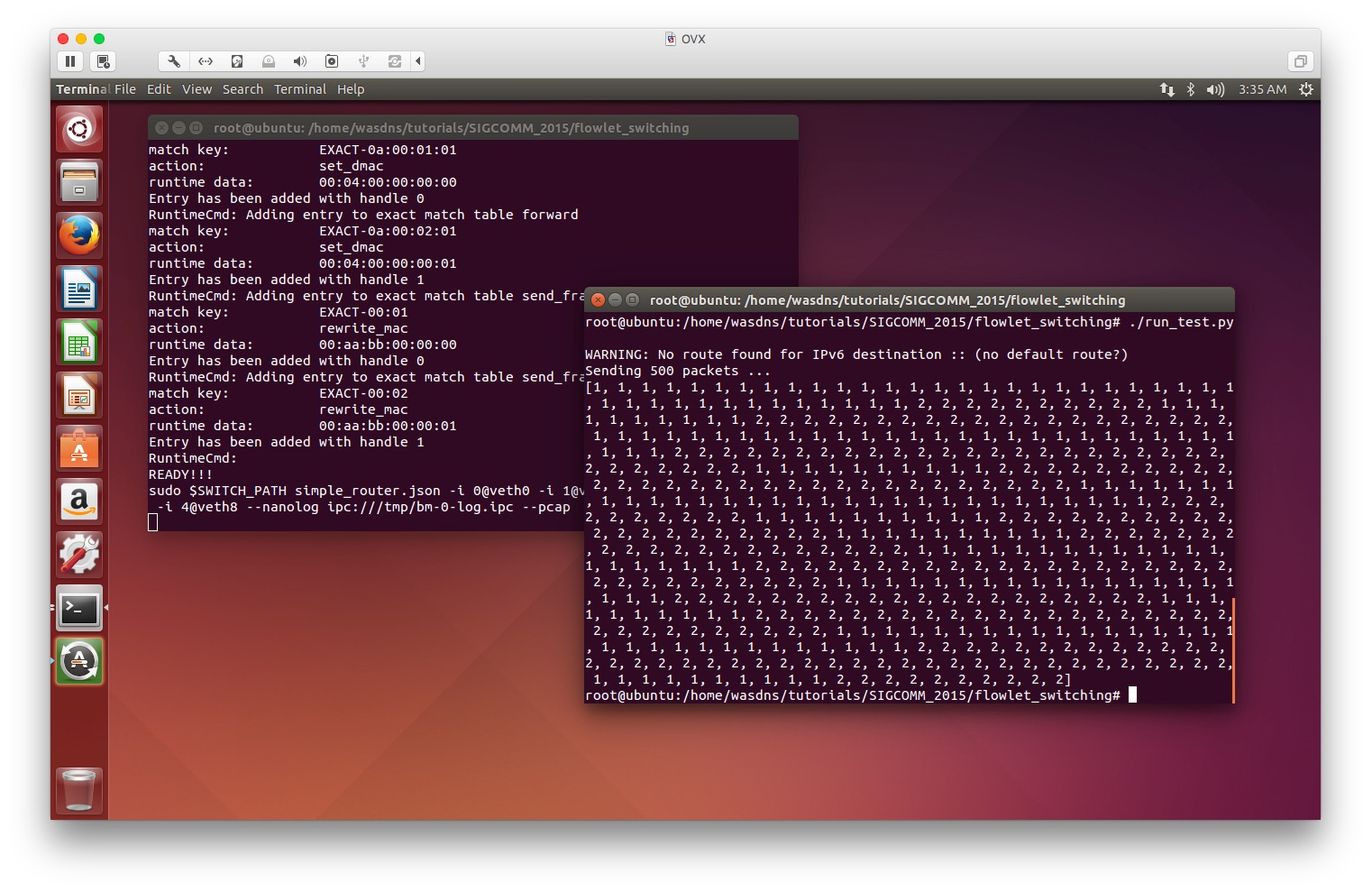
可以看到,该条流的数据报基于流id选择了不同的端口。
实验结论
我们能够通过P4语言编写程序,部署到P4交换机中来实现L4的LB,从而更好的支持ECMP,妥善的处理多条TCP业务流并发的情况,最大化链路利用率。
2016/12/21 冬至阳生
Run P4 without P4factory - A Simple Example In Tutorials. -2的更多相关文章
- Run P4 without P4factory - A Simple Example In Tutorials.
前言 本文是我运行P4社区于Github开源教程Tutorials中的P4 SIGCOMM 2015 Tutorial一些实战小结,Github链接: Github. 测试的例子:P4 SIGCOMM ...
- Run P4 without P4factory - A Simple Example In Tutorials. -2 附 simple_router源码
/* Copyright 2013-present Barefoot Networks, Inc. Licensed under the Apache License, Version 2.0 (th ...
- NSP4——Network Simulator for P4
NSP4--Network Simulator for P4 一.前言 NSP4旨在为P4开发者,创建一个可视化的P4流表管理及拓扑建立工具,帮助P4开发者,更好的调试自己的P4程序.此开发工具是基于 ...
- Run JavaScript on your PeopleSoft pages conditionally
Here, PeopleCode sets the logic that determines when the JavaScript code will run. This is not as si ...
- Pascal编译器大全(非常难得)
http://www.pascaland.org/pascall.htm Some titles (french) : Compilateurs Pascal avec sources = compi ...
- [Intel Edison开发板] 04、Edison开发基于nodejs和redis的服务器搭建
一.前言 intel-iot-examples-datastore 是Intel提供用于所有Edison开发板联网存储DEMO所需要的服务器工程.该工程是基于nodejs和redis写成的一个简单的工 ...
- 【GOF23设计模式】工厂模式
来源:http://www.bjsxt.com/ 一.[GOF23设计模式]_简单工厂模式详解.面向对象设计原则.开闭原则.依赖反转原则.迪米特法则 没有工厂模式的情况 package com.te ...
- 一步一步了解Cocos2dx 3.0 正式版本开发环境搭建(Win32/Android)
cocos2d-x 3.0发布有一段时间了,作为一个初学者,我一直觉得cocos2d-x很坑.每个比较大的版本变动,都会有不一样的项目创建方式,每次的跨度都挺大…… 但是凭心而论,3.0RC版本开始 ...
- 加州大学伯克利分校Stat2.3x Inference 统计推断学习笔记: Section 4 Dependent Samples
Stat2.3x Inference(统计推断)课程由加州大学伯克利分校(University of California, Berkeley)于2014年在edX平台讲授. PDF笔记下载(Acad ...
随机推荐
- PHP 汉字转拼音
<?php/** *+------------------------------------------------------ * PHP 汉字转拼音 *+----------------- ...
- 从新注册 .DLL CMD 运行regsvr32 *.dll注册该DLL 或 regsvr32 /s *.DLL 求证
从新注册 .DLL CMD 运行regsvr32 *.dll注册该DLL 或 regsvr32 /s *.DLL 求证
- App测试时,区分客户端或服务器端导致问题产生的方法
1.先确定产生问题的地方是否与服务器产生交互/通信,若无则非服务器问题: 2.通过Fiddler抓包,查看操作时调用的服务器接口是否正常并检查对应返回值: 3.若接口返回值正常,则需查看客户端对业务的 ...
- The 2015 China Collegiate Programming Contest K Game Rooms hdu 5550
Game Rooms Time Limit: 4000/4000 MS (Java/Others) Memory Limit: 65535/65535 K (Java/Others)Total ...
- hihoCoder#1384 : Genius ACM
对于一个固定的区间$[l,r]$,显然只要将里面的数字从小到大排序后将最小的$m$个和最大的$m$个配对即可. 如果固定左端点,那么随着右端点的右移,$SPD$值单调不降,所以尽量把右端点往右移,贪心 ...
- 在Web应用中接入微信支付的流程之极简清晰版 (转)
在Web应用中接入微信支付的流程之极简清晰版 背景: 在Web应用中接入微信支付,我以为只是调用几个API稍作调试即可. 没想到微信的API和官方文档里隐坑无数,致我抱着怀疑人生的心情悲愤踩遍了丫们布 ...
- Android Service与Activity之间通信
主要分为: 通过Binder对象 通过broadcast(广播)的形式 Activity调用bindService (Intent service, ServiceConnection conn, i ...
- CentOS 命令【备忘】
1.查看物理cpu个数 grep 'physical id' /proc/cpuinfo | sort -u | wc -l 2.查看核心数量 grep 'core id' /proc/cpuinfo ...
- Leetcode Unique Binary Search Trees
Given n, how many structurally unique BST's (binary search trees) that store values 1...n? For examp ...
- ACM 找点
找点 时间限制:2000 ms | 内存限制:65535 KB 难度:2 描述 上数学课时,老师给了LYH一些闭区间,让他取尽量少的点,使得每个闭区间内至少有一个点.但是这几天LYH太忙了,你 ...