
Drawing Arc Using ArcSegment in XAML
We can use the Arc XAML element to draw arcs in XAML. Besides drawing arcs using the Arc element, we can also use the ArcSegment element. The ArcSegment is useful when an arc becomes a part of a graphics path or a larger geometric object.
In this article, we will see how to use the ArcSegment to draw arcs in XAMLand WPF.
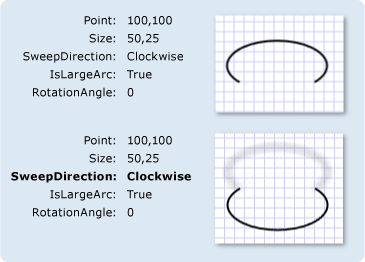
The ArcSegment object represents an elliptical arc between two points. The ArcSegment class has the five properties Point, Size, SweepDirection, IsLargeArc and RotationAngle.
- The Point property represents the endpoints of an arc.
- The Size property represents the x and y radiuses of an arc.
- The SweepDirection property specifies whether an arc sweep direction is clock wise or counter clock wise.
- The IsLargeArc property returns true if an arc is greater than 180 degrees.
- The RotationAngle property represents the angle by which an ellipse is rotated about the x-axis.
The following figure provided by the MSDN documentation shows these property values and their results.
<ArcSegment Size="300,50" RotationAngle="30"
IsLargeArc="True" SweepDirection="CounterClockwise" Point="200,100" />
A Path object is used to draw an arc by setting a PathGeomerty as Path.Data. The following code snippet creates a Path and sets a ArcSegment as a part of PathFigure.Segments.
<Path Stroke="Black" StrokeThickness="1">
<Path.Data>
<PathGeometry>
<PathGeometry.Figures>
<PathFigureCollection>
<PathFigure StartPoint="0,100">
<PathFigure.Segments>
<PathSegmentCollection>
<ArcSegment Size="300,50" RotationAngle="30"
IsLargeArc="True"
SweepDirection="CounterClockwise"
Point="200,100" />
</PathSegmentCollection>
</PathFigure.Segments>
</PathFigure>
</PathFigureCollection>
</PathGeometry.Figures>
</PathGeometry>
</Path.Data>
</Path>
The output looks like Figure 1.
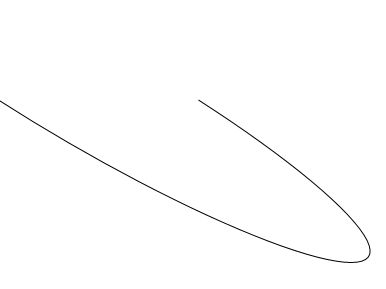
Figure 1
We can paint an arc by simply painting the path using the Fill method. The following code snippet has changes in it from the previous code that fills a path.
<Path Stroke="Black" StrokeThickness="1" Fill="Yellow">
The new output looks like Figure 2.
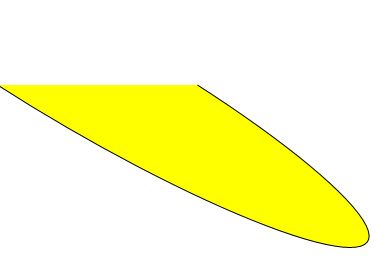
Figure 2
The following code snippet creates an arc segment shown in Figure 2 dynamically.
private void CreateArcSegment()
{
PathFigure pthFigure = new PathFigure();
pthFigure.StartPoint = new Point(0, 100);
ArcSegment arcSeg = new ArcSegment();
arcSeg.Point = new Point(200, 100);
arcSeg.Size = new Size(300,50);
arcSeg.IsLargeArc = true;
arcSeg.SweepDirection = SweepDirection.Counterclockwise;
arcSeg.RotationAngle = 30;
PathSegmentCollection myPathSegmentCollection = new PathSegmentCollection();
myPathSegmentCollection.Add(arcSeg);
pthFigure.Segments = myPathSegmentCollection;
PathFigureCollection pthFigureCollection = new PathFigureCollection();
pthFigureCollection.Add(pthFigure);
PathGeometry pthGeometry = new PathGeometry();
pthGeometry.Figures = pthFigureCollection;
Path arcPath = new Path();
arcPath.Stroke = new SolidColorBrush(Colors.Black);
arcPath.StrokeThickness = 1;
arcPath.Data = pthGeometry;
arcPath.Fill = new SolidColorBrush(Colors.Yellow);
LayoutRoot.Children.Add(arcPath);
}
Drawing Arc Using ArcSegment in XAML的更多相关文章
- WPF Dashboard仪表盘控件的实现
1.确定控件应该继承的基类 从表面上看,目前WPF自带常用控件中,没有一个是接近这个表盘控件的,但将该控件拆分就能够发现,该控件的每个子部分都是在WPF中存在的,因此我们需要将各个子控件组合才能形成这 ...
- WPF画图の利用Path画扇形(仅图形)
一.画弧 Path继承自Sharp,以System.Windows.Shapes.Shape为基类,它是一个具有各种方法的控件. 我们先看一段xaml代码: <Path Stroke=" ...
- wpf 后台绘制圆弧
wpf 前台绘制圆弧很简单,如:<Path x:Name="path_data" Stroke="#FFE23838" StrokeThickness=& ...
- WPF下载远程文件,并显示进度条和百分比
WPF下载远程文件,并显示进度条和百分比 1.xaml <ProgressBar HorizontalAlignment="Left" Height="10&quo ...
- [转]在WPF中使用WinForm控件方法
本文转自:http://blog.csdn.net/lianchangshuai/article/details/6415241 下面以在Wpf中添加ZedGraph(用于创建任意数据的二维线型.条型 ...
- C# Common Code
DatePicker 控件日期格式化,可以在App.xaml.cs中添加下面代码 方法一 不推荐: Thread.CurrentThread.CurrentCulture = (CultureInfo ...
- WPF调用zxing生成二维码
1.登录http://zxingnet.codeplex.com/,下载对应.net版本的zxing库 2.引入zxing.dll 3.新建界面控件 using System; using Syste ...
- WPF GDI+字符串绘制成图片(一)
原文:WPF GDI+字符串绘制成图片(一) 版权声明:本文为博主原创文章,未经博主允许不得转载. https://blog.csdn.net/BYH371256/article/details/83 ...
- 【WPF学习笔记】之如何把数据库里的值读取出来然后显示在页面上:动画系列之(六)(评论处有学习资料及源码)
(应博友们的需要,在文章评论处有源码链接地址,以及WPF学习资料.工具等,希望对大家有所帮助) ...... 承接系列五 上一节讲了,已经把数据保存到数据库并且删除数据,本讲是把已经存在的数据从数据库 ...
随机推荐
- CityEngine基于规则贴图的实现技巧
转自:http://blog.sina.com.cn/s/blog_841eeb5201010p3e.html CityEngine在贴图的实现过程有两种方式:第一种是通过i(geometryPath ...
- sql 查询最近30分钟或者自定义时间数据
) FROM dual; 30分钟或者自定义
- wireshark_Couldn’t run /usr/sbin/dumpcap in child process: Permission denied
关于Wireshark出现:Couldn't run /usr/sbin/dumpcap in child process: Permission denied Are you a member of ...
- 浅析 - Storyboard / Xib
大家都知道纯代码写应用的成本是很高的,特别是涉及到UI界面的实现,相当耗费时间.之前自己写应用时有了解过Storyboard,也简单使用过,但随着最近深入了解它之后,发现自己低估了它的作用和影响力,因 ...
- NYOJ题目769乘数密码
aaarticlea/png;base64,iVBORw0KGgoAAAANSUhEUgAAAsQAAAJYCAIAAADqk2fsAAAgAElEQVR4nO3dPVLrytbG8XcS5AyEWA
- Jquery.Datatables 服务器处理(Server-side processing)
看了看介绍 http://datatables.club/manual/server-side.html 没有经过处理的分页,先显示出来看看效果,就这样写(存储过程自己写) cshtml " ...
- Faster-rnnlm代码分析2 - HSTree的构造
也就是构造一棵Huffman Tree,输入是按照词汇频次由高到低排序的 采用层次SoftMax的做法,是为了使得训练和预测时候的softmax输出加速,原有multinomal softmax,是和 ...
- PHP求时间间隔 n天、周、月、年后的时间
<?php date_default_timezone_set('PRC'); // 设置时区 $date1 = strtotime('2015-01-01'); //把日期转换成时间戳 $da ...
- 重温WCF之数据契约和序列化(四)
一.数据契约 1.使用数据协定可以灵活控制哪些成员应该被客户端识别. [DataContract] public class Employee { [DataMember] public string ...
- Web API 使用上安全吗?
Web API入门指南有些朋友回复问了些安全方面的问题,安全方面可以写的东西实在太多了,这里尽量围绕着Web API的安全性来展开,介绍一些安全的基本概念,常见安全隐患.相关的防御技巧以及Web AP ...