
java实现WC项目
个人项目:WC
wc.exe 是一个常见的工具,它能统计文本文件的字符数、单词数和行数。这个项目要求写一个命令行程序,模仿已有wc.exe 的功能,并加以扩充,给出某程序设计语言源文件的字符数、单词数和行数。
GitHub地址:https://github.com/lllhhhyyy/mygit
基本功能列表
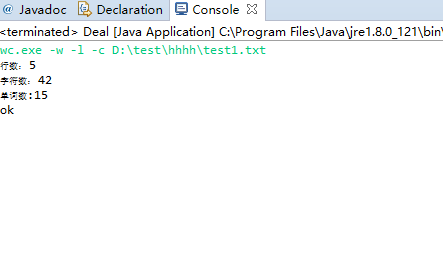
- -c [文件名] 返回文件的字符数(实现)
- -w [文件名] 返回文件词的数目(实现)
- -l [文件名] 返回文件的行数(实现)
扩展功能列表
- -s 递归处理目录下符合条件的文件。(实现)
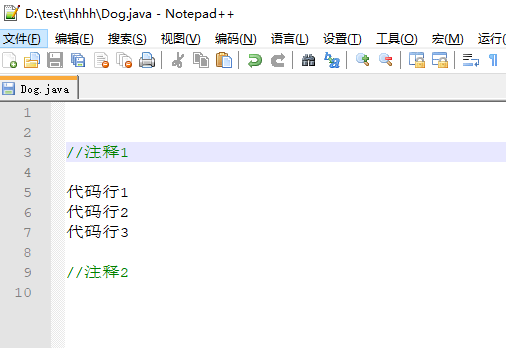
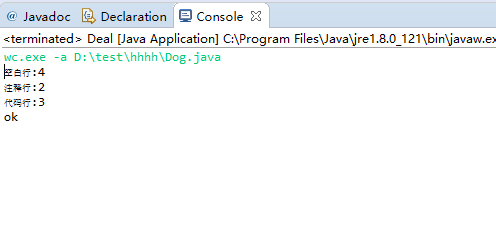
- -a 返回更复杂的数据(代码行 / 空行 / 注释行)(实现)
- .处理通配符(未实现)
高级功能列表
1. -x显示图形界面(未实现)
PSP
| PSP2.1 | Personal Software Process Stages | 预估耗时(分钟) | 实际耗时(分钟) |
|---|---|---|---|
| Planning | 计划 | 30 | 60 |
| · Estimate | · 估计这个任务需要多少时间 | 240 | 300 |
| Development | 开发 | 60 | 120 |
| · Analysis | · 需求分析 (包括学习新技术) | 120 | 240 |
| · Design Spec | · 生成设计文档 | 60 | 120 |
| · Design Review | · 设计复审 (和同事审核设计文档) | 60 | |
| · Coding Standard | · 代码规范 (为目前的开发制定合适的规范) | 0 | 0 |
| · Design | · 具体设计 | 60 | 100 |
| · Coding | · 具体编码 | 60 | 100 |
| · Code Review | · 代码复审 | 20 | 20 |
| · Test | · 测试(自我测试,修改代码,提交修改) | 60 | 120 |
| Reporting | 报告 | 30 | 30 |
| · Test Report | · 测试报告 | 30 | 30 |
| · Size Measurement | · 计算工作量 | 20 | 30 |
| · Postmortem & Process Improvement Plan | · 事后总结, 并提出过程改进计划 | 30 |
30 |
| 合计 | 880 |
1270 |
|
关键代码
 package wc_lhy;

 import java.io.File;

 import java.io.IOException;

 import java.util.HashMap;

 import java.util.Scanner;

 import java.util.regex.Matcher;

 import java.util.regex.Pattern;

 public class Deal {

     public static void main(String []args) throws IOException{

         HashMap<String, Boolean> orderMap = new HashMap<>();

         String standar;

         Pattern pattern;

         Matcher matcher;

         orderMap.put("countLine", false);

         orderMap.put("countChar", false);

         orderMap.put("countWords", false);

         orderMap.put("handleAll", false);

         orderMap.put("complex", false);

         //校验格式

         @SuppressWarnings("resource")

         Scanner scanner = new Scanner(System.in);

         String order = scanner.nextLine();

         //校验标准

         standar = "^wc.exe\\s\\-[wacsl]{1,3}\\s.{0,}";

         //匹配输入格式是否正确

         pattern = Pattern.compile(standar);

         matcher = pattern.matcher(order);

         if(!matcher.matches()){

             System.out.println("请输入正确的命令格式");

         }

         //校验输入格式正确后,对输入命令按空格进行分割

         String[] splitOrder = order.split("\\s+");

         /*对输入命令分析需执行功能*/

         String string = "\\-[wscal]";

         //String path = splitOrder[splitOrder.length-1];

         String path = splitOrder[splitOrder.length-1];

         File file = new File(path);

         for (int i = 1; i < splitOrder.length-1; i++) {

             pattern = Pattern.compile(string);

             Matcher matcher2 = pattern.matcher(splitOrder[i]);

             if(matcher.matches()&&splitOrder[i].equals("-s")){

                 orderMap.put("handleAll", true);//处理所有文件

             }

             else if (matcher2.matches()&&splitOrder[i].equals("-w")) {

                 orderMap.put("countWords", true);//处理单词

             }

             else if(matcher2.matches()&&splitOrder[i].equals("-c")){

                 orderMap.put("countChar", true);//处理字符

             }

             else if(matcher2.matches()&&splitOrder[i].equals("-l")){

                 orderMap.put("countLine", true);

             }

             else if(matcher2.matches()&&splitOrder[i].equals("-a")){

                 orderMap.put("complex", true);//复杂功能

             }

             else {

                 System.out.println("出错!");

             }

         }

         Handle handle = new  Handle(orderMap, path);

         //-s路径非文件夹

         if(file.isDirectory()&&(orderMap.get("handleAll")==false)) System.out.println("非目录操作!请输入文件路径");

         //-s操作+路径为文件夹

         if (orderMap.get("handleAll")&&handle.isFolder()) {

             handle.handleFoler(path);

         }

         //-s操作但路径不正确

         else if((orderMap.get("handleAll") == true)&&(handle.isFolder() == false)){

             System.out.println("请输入一个目录!");

         }

         //非-s操作且路径非文件夹啊

         else if((orderMap.get("handleAll") == false)&&(handle.isFolder() == false)){

             handle.judgeCount(path);

             System.out.println("ok");

         }

     }

}
-s功能,实现对目录所有文件的递归:
     /*对文件夹进行的操作*/

     public void handleFoler(String folderPath){

         this.path = folderPath;

         File file = new File(path);

         //System.out.println("路径为"+file.getAbsolutePath());

         File[] listFile = file.listFiles();

         if(listFile==null){

             return;

         }

         for(int i = 0; i< listFile.length; i++){

             //非文件夹,即可进行对文件进行处理

              if(!listFile[i].isDirectory()){

                 System.out.println("文件路径:"+listFile[i].getAbsolutePath());

                 System.out.println("文件名:"+listFile[i].getName());

                 try{

                     judgeCount(listFile[i].getAbsolutePath());

                 } catch (IOException e) {

                     // TODO Auto-generated catch block

                     e.printStackTrace();

                 }

             }

              else{

                      //为文件目录,递归处理

                     System.out.println("文件目录路径"+file.getAbsolutePath());

                     handleFoler(listFile[i].getAbsolutePath());

              }

         }

     }
-l 实现行数统计:
     public   void  countLine(String path) throws IOException {

         InputStreamReader inputStreamReader = new InputStreamReader(new FileInputStream(path));

         BufferedReader bufferedReader = new BufferedReader(inputStreamReader);

         while (bufferedReader.read()!=-1) {

             String string = bufferedReader.readLine();

             countLine++;//行数

         }

         bufferedReader.close();

         System.out.println("行数: "+getCountLine());

     }
-c 实现字符数统计:
 public   void  countChar(String path) throws IOException {

         InputStreamReader inputStreamReader = new InputStreamReader(new FileInputStream(path));

         BufferedReader bufferedReader = new BufferedReader(inputStreamReader);

         while (bufferedReader.read()!=-1) {

             String string = bufferedReader.readLine();

             if(string != null){

             countChar = countChar + string.length();//字符个数

             }

         }

         bufferedReader.close();

         System.out.println("字符数: "+getCountChar());

     }
-w 实现单词数统计:
     public   void  countWords(String path) throws IOException {

         InputStreamReader inputStreamReader = new InputStreamReader(new FileInputStream(path));

         BufferedReader bufferedReader = new BufferedReader(inputStreamReader);

         while (bufferedReader.read()!=-1) {

             String string = bufferedReader.readLine();

             if(string != null){

             countWords = countWords + string.split("\\s").length;//词的个数

             }

         }

         bufferedReader.close();

         System.out.println("单词数:" + getCountWords());

     }
-a 统计代码行、空行、注释行:
 //计算代码行,注释行。空白行

     @SuppressWarnings("resource")

     public void countComplex(String filePath) throws IOException {

         InputStreamReader inputStreamReader = new InputStreamReader(new FileInputStream(filePath));

         BufferedReader bufferedReader = new BufferedReader(inputStreamReader);

         //注释行匹配

         Pattern commetPattern = Pattern.compile("(^//.*$)|(^/\\*.*\\*/$)|(^/\\*\\*.*$)|(^\\*.*$)|.*\\*/$",

                 Pattern.MULTILINE + Pattern.DOTALL);

         //空白行匹配

         Pattern nullPattern = Pattern.compile("^\\s*$");

         //代码行匹配

         Pattern codePattern = Pattern.compile("\\s*",

                 Pattern.MULTILINE + Pattern.DOTALL);

         //System.out.println(9);

         String row;

         while ((row = bufferedReader.readLine())!= null) {

             if(nullPattern.matcher(row).find()){

                 countNull++;

             }

             //注释

              if ((row!=null)&&commetPattern.matcher(row).matches()) {

                 commetLine++;

             }

             //代码行

              if((row!=null)&&codePattern.matcher(row).find()) {

             //else {

                 codeLine++;

             }

         }

         codeLine = codeLine - commetLine-countNull;

     }
代码测试:
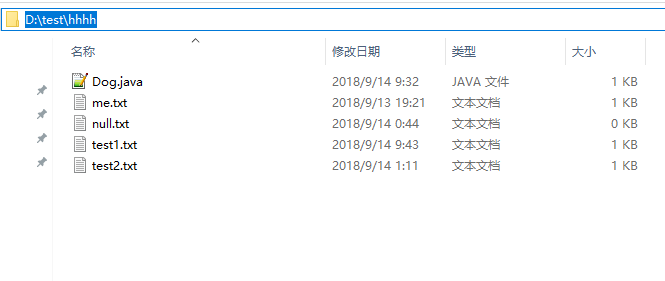
测试文件:
运行结果:
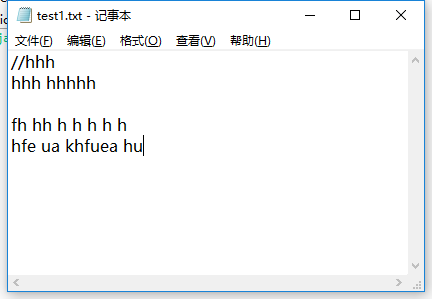
测试文件:
运行结果:
测试文件:

项目总结:
完成了这个项目,感觉收获还是挺多的。首先是加强了自己对java编程的熟悉度,还有就是正则表达式,以前只是囫囵吞枣得匆匆看了一遍,实战是发现自己完全不会用,于是再去认真学习了一遍。在做这个项目的 过程中也是发现了自己存在的一些问题,首先就是算法不过关,考虑不全面,写的也不够精简,所以常常会抛空指针的错误,不过有错误还是挺好的,解决自己的错误才能更好的进步,在以后的编程中才会更加的小心。还有就是在刚开始时会觉得无从下手,特别是对正则表达式不熟悉,不知道要从哪里入手,因此开始编程浪费了挺多时间的。经过这次给了自己以后的一个小经验:即使问题很难,也要尝试着去动手。不要浪费时间去空想,着手,然后一个个的把这些问题解决掉。
java实现WC项目的更多相关文章
- 软件工程:java实现wc项目基本功能
项目相关要求 项目地址:https://github.com/xiawork/wcwork 实现一个统计程序,它能正确统计程序文件中的字符数.单词数.行数,以及还具备其他扩展功能,并能够快速地处理多个 ...
- 个人项目:Java实现WC
Java实现WC Github项目地址:https://github.com/auxshaw/WC 项目要求 wc.exe 是一个常见的工具,它能统计文本文件的字符数.单词数和行数.这个项目要求写一个 ...
- 小白のjava实现wc.exe功能
GitHub地址 项目完成情况 基本功能列表(已实现) wc.exe -c file.c //返回文件 file.c 的字符数 wc.exe -w file.c //返回文件 file. ...
- java实现wc
github项目传送门:https://github.com/yanghuipeng/wc 项目要求 wc.exe 是一个常见的工具,它能统计文本文件的字符数.单词数和行数.这个项目要求写一个命令行程 ...
- 软件工程第三个程序:“WC项目” —— 文件信息统计(Word Count ) 命令行程序
软件工程第三个程序:“WC项目” —— 文件信息统计(Word Count ) 命令行程序 格式:wc.exe [parameter][filename] 在[parameter]中,用户通过输入参数 ...
- 软工作业No.1。Java实现WC.exe
网址:https://github.com/a249970271/WC WC 项目要求 wc.exe 是一个常见的工具,它能统计文本文件的字符数.单词数和行数.这个项目要求写一个命令行程序,模仿已有w ...
- JAVA实现WC.exe功能
项目要求 实现一个统计程序,它能正确统计程序文件中的字符数.单词数.行数,以及还具备其他扩展功能,并能够快速地处理多个文件. 具体功能要求: 程序处理用户需求的模式为: wc.exe [paramet ...
- Java实现WC基本功能
GitHub仓库:https://github.com/douyazai/WCbase 一.WC 项目要求 wc.exe 是一个常见的工具,它能统计文本文件的字符数.单词数和行数.这个项目要求写一个命 ...
- java查看当前项目所有线程列表界面
java查看当前项目所有线程列表界面 1.TestThread(测试类) package com.isoftstone.pcis.isc.job.king.panel; public class Te ...
随机推荐
- T分布(T-Distribution)
1.What is the T Distribution? T分布(也叫Student 's T分布)是一组与正态分布曲线几乎相同的分布,只是更短更胖一点.当有小样本时,使用t分布而不是正态分布.样本 ...
- Django1.8:403错误:CSRF verification failed. Request aborted.
问题:Django 403错误:CSRF verification failed. Request aborted. 原因:需要加cookie验证 解决方法: 1.在view.py中增加 fr ...
- Java SE-基本数据类型对应包装类
包装类 Java是面向对象的编程语言,包装类的出现更好的体现这一思想. 其次,包装类作为类是有属性有方法的,功能比基本数据类型要强大. [八种基本数据类型的包装类] byte ——Byte short ...
- Spring整合Struts2框架的第一种方式(Action由Struts2框架来创建)。在我的上一篇博文中介绍的通过web工厂的方式获取servcie的方法因为太麻烦,所以开发的时候不会使用。
1. spring整合struts的基本操作见我的上一篇博文:https://www.cnblogs.com/wyhluckdog/p/10140588.html,这里面将spring与struts2 ...
- Spring框架之演示JDBC的模板类
1. 步骤一:创建数据库的表结构 create database spring_day03; use spring_day03; create table t_account( id int prim ...
- PAT 1083 是否存在相等的差(20)(代码+思路)
1083 是否存在相等的差(20 分) 给定 N 张卡片,正面分别写上 1.2.--.N,然后全部翻面,洗牌,在背面分别写上 1.2.--.N.将每张牌的正反两面数字相减(大减小),得到 N 个非负差 ...
- SoapUI Script Library
Environment Get active environment via groovy script log.info testRunner.testCase.testSuite.project. ...
- 项目UML设计
团队信息 队名:火箭少男100 本次作业课上成员 短学号 名 本次作业博客链接 2507 俞辛(临时队长) https://www.cnblogs.com/multhree/p/9821080.htm ...
- 判定map中是否存在某元素
判断某key是否存在可以使用map的count方法来间接判定 count接受一个参数key值,返回map中key值为给定值的元素总数 map<int, string> i_to_s_map ...
- 2018.09.30 bzoj3551:Peaks加强版(dfs序+主席树+倍增+kruskal重构树)
传送门 一道考察比较全面的题. 这道题又用到了熟悉的kruskal+倍增来查找询问区间的方法. 查到询问的子树之后就可以用dfs序+主席树统计答案了. 代码: #include<bits/std ...