
WPF中ListBox控件选择多个数据项
XAML:
<Window x:Class="WpfApplication1.MainWindow"

        xmlns="http://schemas.microsoft.com/winfx/2006/xaml/presentation"

        xmlns:x="http://schemas.microsoft.com/winfx/2006/xaml"

        Title="MainWindow" Height="350" Width="525">

    <Grid>

        <StackPanel>

            <TextBlock>在控件中一次选择多个数据项:</TextBlock>

            <ListBox SelectionMode="Multiple">

                <ListBoxItem>a</ListBoxItem>

                <ListBoxItem>b</ListBoxItem>

                <ListBoxItem>c</ListBoxItem>

                <ListBoxItem>d</ListBoxItem>

                <ListBoxItem>e</ListBoxItem>

            </ListBox>

            <TextBlock>在控件中使用Ctrl一次选择多个数据项:</TextBlock>

            <ListBox x:Name="lbx" SelectionMode="Extended">

                <ListBox.ContextMenu>

                    <ContextMenu>

                        <MenuItem Header="Show" Click="btnShowSelectItems"></MenuItem>

                    </ContextMenu>

                </ListBox.ContextMenu>

                <ListBoxItem>张三</ListBoxItem>

                <ListBoxItem>李四</ListBoxItem>

                <ListBoxItem>王五</ListBoxItem>

                <ListBoxItem>赵六</ListBoxItem>

                <ListBoxItem>孙七</ListBoxItem>

            </ListBox>

        </StackPanel>

    </Grid>

</Window>
C#:
using System;

using System.Collections.Generic;

using System.Linq;

using System.Text;

using System.Windows;

using System.Windows.Controls;

using System.Windows.Data;

using System.Windows.Documents;

using System.Windows.Input;

using System.Windows.Media;

using System.Windows.Media.Imaging;

using System.Windows.Navigation;

using System.Windows.Shapes;

namespace WpfApplication1

{

    /// <summary>

    /// MainWindow.xaml 的交互逻辑

    /// </summary>

    public partial class MainWindow : Window

    {

        public MainWindow()

        {

            InitializeComponent();

        }

        private void btnShowSelectItems(object sender, RoutedEventArgs e)

        {

            string msg=string.Empty;

            List<string> list = new List<string>();

            if (lbx.SelectedItems != null && lbx.SelectedItems.Count > )

            {

                //多选

                foreach (ListBoxItem lbi in lbx.SelectedItems)

                {

                    list.Add(lbi.Content.ToString());

                }

                msg = string.Join(",", list);

            }

            else if (lbx.SelectedItems != null && lbx.SelectedItems.Count == )

            {

                //单选

                msg = ((ListBoxItem)lbx.SelectedItem).Content.ToString();

            }

            else

            {

                //没有选中任何项

            }

            MessageBox.Show(msg);

        }

    }

}
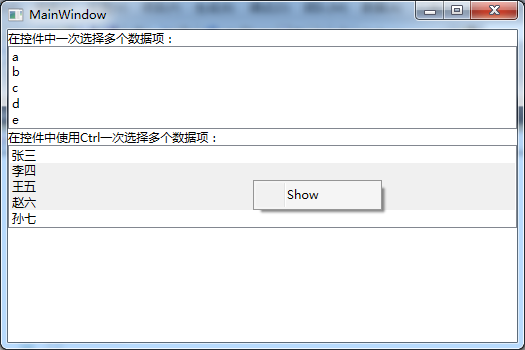
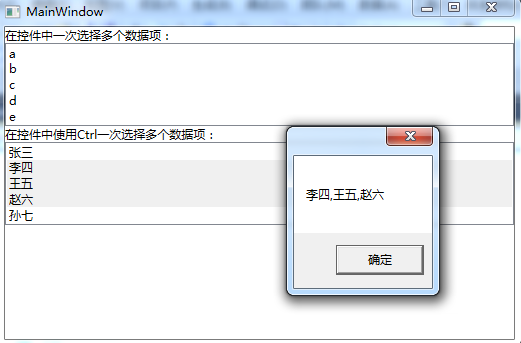
效果: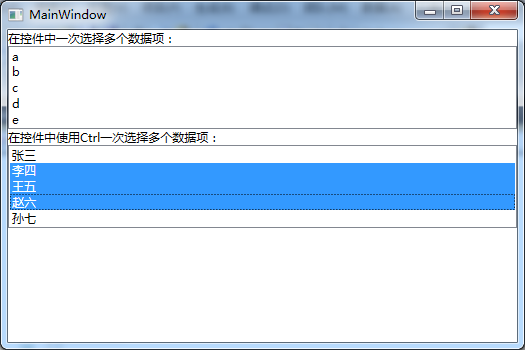
WPF中ListBox控件选择多个数据项的更多相关文章
- WPF中ListBox控件在选择模式(SelectionMode)为Single时仍然出现多个Item被选中的问题
最近在学习WPF过程中使用到了ListBox控件,在使用时遇到下面的奇怪问题: 代码如下: listBox.Items.Add("绘图"); listBox.Items.Add(& ...
- MFC中Listbox控件的简单使用
MFC中listbox控件是为了显示一系列的文本,每个文本占一行. Listbox控件可以设置属性为: LBS_CHILD :(默认)子窗口 LBS_Visible :(默认)可视 LBS_M ...
- WPF中Ribbon控件的使用
这篇博客将分享如何在WPF程序中使用Ribbon控件.Ribbon可以很大的提高软件的便捷性. 上面截图使Outlook 2010的界面,在Home标签页中,将所属的Menu都平铺的布局,非常容易的可 ...
- WPF中查找控件的扩展类
在wpf中查找控件要用到VisualTreeHelper类,但这个类并没有按照名字查找控件的方法,于是搜索网络,整理出下面这个类,感觉用起来很是方便. 贴出来,供大家参考. /// <summa ...
- WPF中Popup控件在Win7以及Win10等中的对齐点方式不一样的解决方案 - 简书
原文:WPF中Popup控件在Win7以及Win10等中的对齐点方式不一样的解决方案 - 简书 最近项目中使用弹出控件Popup,发现弹出框的对齐方式在不同的系统中存在不同(Popup在win10上是 ...
- WPF中Image控件的Source属性
原文:WPF中Image控件的Source属性 imgBook 是一个Image控件,在后台代码中我想给它指定Source的属性.我先如下方式进行: Uri uri = new Uri(strImag ...
- WPF中PasswordBox控件的Password属性的数据绑定
原文:WPF中PasswordBox控件的Password属性的数据绑定 英文原文:http://www.wpftutorial.net/PasswordBox.html 中文原文:http://bl ...
- 浅谈WPF中对控件的位图特效(WPF Bitmap Effects)
原文:浅谈WPF中对控件的位图特效(WPF Bitmap Effects) -------------------------------------------------------------- ...
- 示例:WPF中Slider控件封装的缓冲播放进度条控件
原文:示例:WPF中Slider控件封装的缓冲播放进度条控件 一.目的:模仿播放器播放进度条,支持缓冲任务功能 二.进度: 实现类似播放器中带缓存的播放样式(播放区域.缓冲区域.全部区域等样式) 实现 ...
随机推荐
- PAT 团体程序设计天梯赛-练习集 L1-002. 打印沙漏
本题要求你写个程序把给定的符号打印成沙漏的形状.例如给定17个“*”,要求按下列格式打印 ***** *** * *** ***** 所谓“沙漏形状”,是指每行输出奇数个符号:各行符号中心对齐:相邻两 ...
- Ctrl+Alt+T恢复启动Ubuntu默认终端
对于Ubuntu14.04,如果安装了terminator,那么快捷键Ctrl+Alt+T将不会启动自带的terminal,而是启动安装的terminator,如果想恢复回来,可以执行以下命令: su ...
- java中三大修饰符
一.static 1.属性:类变量 定义在类以内,方法以外,全类有效,全类公共一个属性 类变量与创建对象无关,有默认值0 使用方式 类名.类变量 System.out.println(); ...
- Java IO 文件与流基础
Java IO 文件与流基础 @author ixenos 摘要:创建文件.文件过滤.流分类.流结构.常见流.文件流.字节数组流(缓冲区) 如何创建一个文件 #当我们调用File类的构造器时,仅仅是在 ...
- AOV网
1.定义 用顶点表示活动,用有向边<Vi, Vj>表示活动间的优先关系. Vi必须先于活动Vj进行. 这种有向图叫做顶点表示活动的AOV网络(Activity On Vertices) 2 ...
- openwrt增加串口登录需要密码
https://wiki.openwrt.org/doc/howto/serial.console.password Openwrt 串口默认是没有密码的.Openwrt启动后,一个默认的密码将被启用 ...
- Delphi的StringReplace[转]
原文:http://blog.csdn.net/genispan/article/details/4458319 function StringReplace (const S, OldPattern ...
- iOS相关教程
Xcode Xcode 7中你一定要知道的炸裂调试神技 Xcode 6和Swift中应用程序的国际化和本地化 iOS新版本 兼容iOS 10 资料整理笔记 整理iOS9适配中出现的坑(图文) Swif ...
- iOS 数组字典操作
iOS开发中需要大量对dictionary和array进行操作,因此我们需要一种更加安全可靠的操作方法来避免不必要的crash.当然可以通过自定义dictionary 和array重载增删改查的方法来 ...
- linker command failed with exit code 1 (use -v to see
转自 :http://www.reader8.cn/jiaocheng/20131022/2003334.html Undefined symbols for architecture http:// ...