
jQuery 学习笔记(jQuery: The Return Flight)
第一课.
ajax:$.ajax(url[, settings])
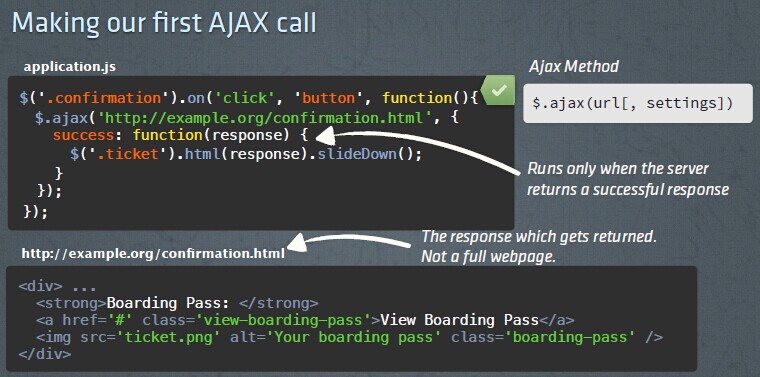
练习代码:
$(document).ready(function() {

  $("#tour").on("click", "button", function() {

    $.ajax('/photos.html', {

      success: function(response) {

        $('.photos').html(response).fadeIn();

      }

    });

  });

});
<div id="tour" data-location="london">

  <button>Get Photos</button>

  <ul class="photos">

  </ul>

</div>
ajax 调用简写:$.get(url, success)
$(document).ready(function() {

  $("#tour").on("click", "button", function() {

    $.get('/photos.html', function(response) {

        $('.photos').html(response).fadeIn();

    });

  });

});
ajax 传递参数:直接在 url 中拼接或使用 data 对象传递,data: { "confNum": 1234 }
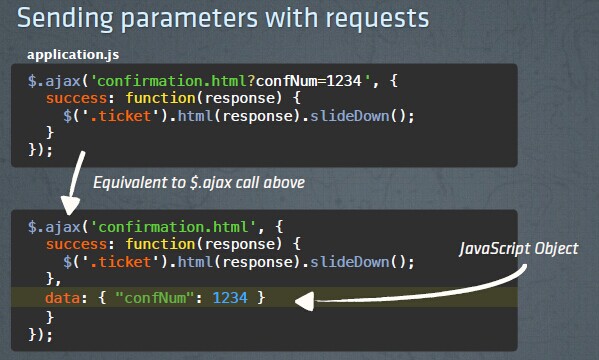
练习代码:获取网页元素中的 data 属性值作为 ajax 参数值传递
$(document).ready(function() {

  $("#tour").on("click", "button", function() {

    $.ajax('/photos.html', {

      success: function(response) {

        $('.photos').html(response).fadeIn();

      },

      data: { "location": $("#tour").data("location")

      }

    });

  });

});
<div id="tour" data-location="london">

  <button>Get Photos</button>

  <ul class="photos">

  </ul>

</div>
第二课.
ajax 异常处理:error: function(request, errorType, errorMessage) { }
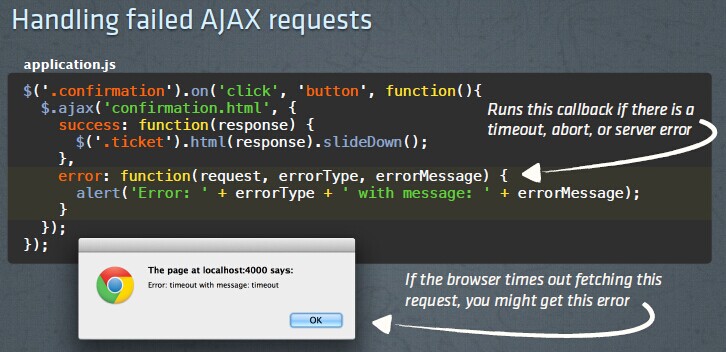
ajax 超时设定:timeout: 3000
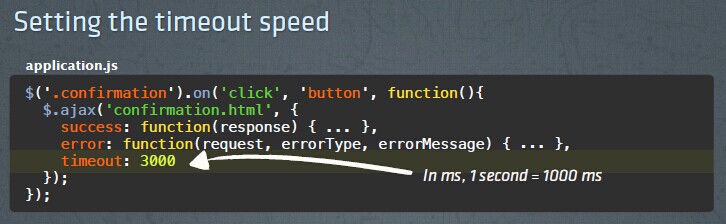
ajax 调用前(beforeSend: function() {})完成后(complete: function() {})执行方法:
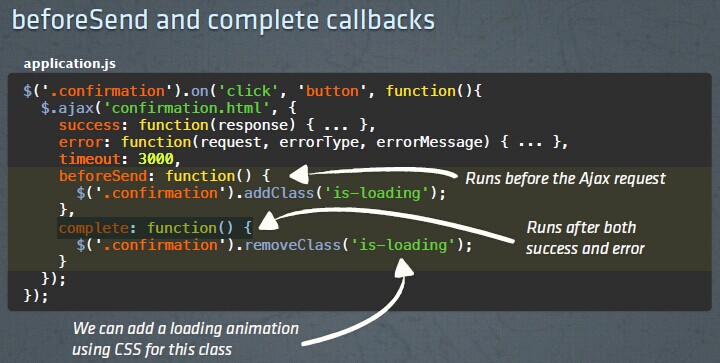
练习代码:
$(document).ready(function() {

  var el = $("#tour");

  el.on("click", "button", function() {

    $.ajax('/photos.html', {

      data: {location: el.data('location')},

      success: function(response) {

        $('.photos').html(response).fadeIn();

      },

      error: function(request, errorType, errorMessage) {

        //var errmsg = $("<li>Error: " + errorType + " with message: " + errorMessage + "</li>");

        //$('.photos').append(errmsg);

        //alert('Error: ' + errorType + ' with message: ' + errorMessage);

        $('.photos').html('<li>There was a problem fetching the latest photos. Please try again.</li>');

      },

      timeout: 3000,

      beforeSend: function() {

        $("#tour").addClass("is-fetching")

      },

      complete: function() {

        $("#tour").removeClass("is-fetching")

      }

    });

  });

});
<div id="tour" data-location="london">

  <button>Get Photos</button>

  <ul class="photos">

  </ul>

</div>
ajax 事件处理:处理 ajax 完成新增的标签元素的事件
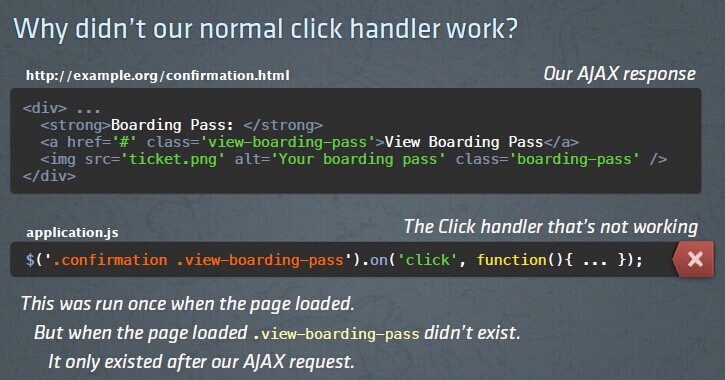
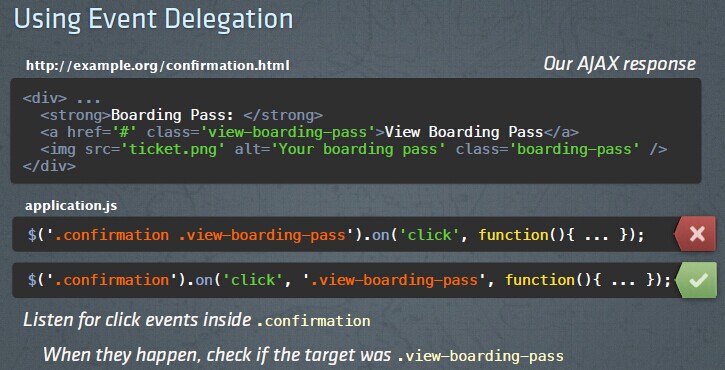
练习代码:
$(document).ready(function() {

  function showPhotos() {

    $(this).find('span').slideToggle();

  }

  $('.photos').on('mouseenter', 'li', showPhotos)

                 .on('mouseleave', 'li', showPhotos);

  var el = $("#tour");

  el.on("click", "button", function() {

    $.ajax('/photos.html', {

      data: {location: el.data('location')},

      success: function(response) {

        $('.photos').html(response).fadeIn();

      },

      error: function() {

        $('.photos').html('<li>There was a problem fetching the latest photos. Please try again.</li>');

      },

      timeout: 3000,

      beforeSend: function() {

        $('#tour').addClass('is-fetching');

      },

      complete: function() {

        $('#tour').removeClass('is-fetching');

      }

    });

  });

});
HTML、AJAX Result
<div id="tour" data-location="london">

  <button>Get Photos</button>

  <ul class="photos">

  </ul>

</div>
<li>

  <img src="/assets/photos/paris1.jpg">

  <span style="display: none;">Arc de Triomphe</span>

</li>

<li>

  <img src="/assets/photos/paris2.jpg">

  <span style="display: none;">The Eiffel Tower</span>

</li>

<li>

  <img src="/assets/photos/london.jpg">

  <span style="display: none;">London</span>

</li>
第三课.
JavaScript Objects:
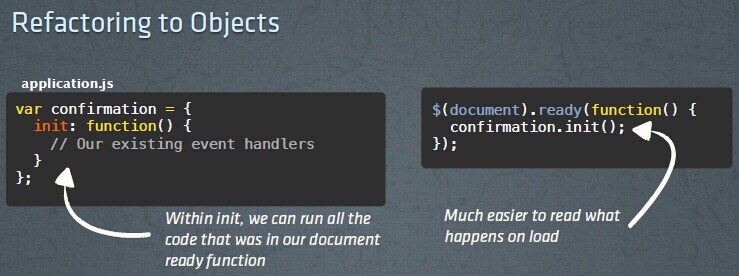
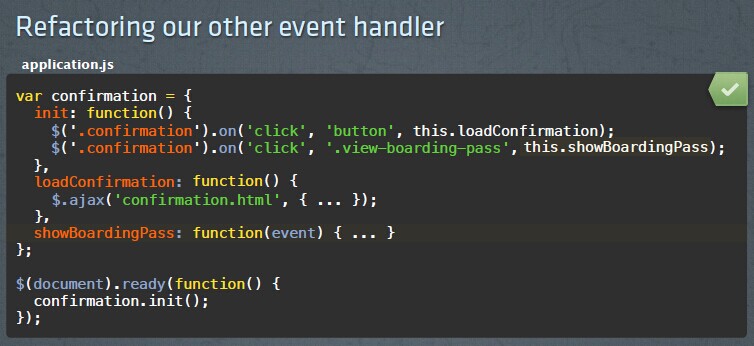
练习代码:
重构前:
$(document).ready(function() {

  $("#tour").on("click", "button", function() {

    $.ajax('/photos.html', {

      data: {location: $("#tour").data('location')},

      success: function(response) {

        $('.photos').html(response).fadeIn();

      },

      error: function() {

        $('.photos').html('<li>There was a problem fetching the latest photos. Please try again.</li>');

      },

      timeout: 3000,

      beforeSend: function() {

        $('#tour').addClass('is-fetching');

      },

      complete: function() {

        $('#tour').removeClass('is-fetching');

      }

    });

  });

});
重构为 JavaScript 对象 tour 后:
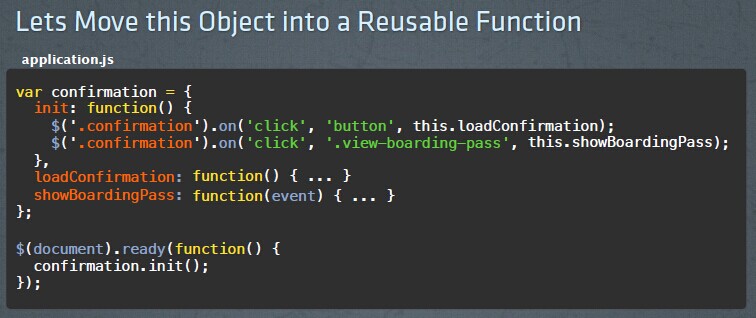
var tour = {

  init: function() {

    $("#tour").on("click", "button", this.fetchPhotos);

  },

  fetchPhotos: function() {

    $.ajax('/photos.html', {

      data: {location: $("#tour").data('location')},

      success: function(response) {

        $('.photos').html(response).fadeIn();

      },

      error: function() {

        $('.photos').html('<li>There was a problem fetching the latest photos. Please try again.</li>');

      },

      timeout: 3000,

      beforeSend: function() {

        $('#tour').addClass('is-fetching');

      },

      complete: function() {

        $('#tour').removeClass('is-fetching');

      }

    })

  }

}

$(document).ready(function() {

  tour.init();

});
第四课.
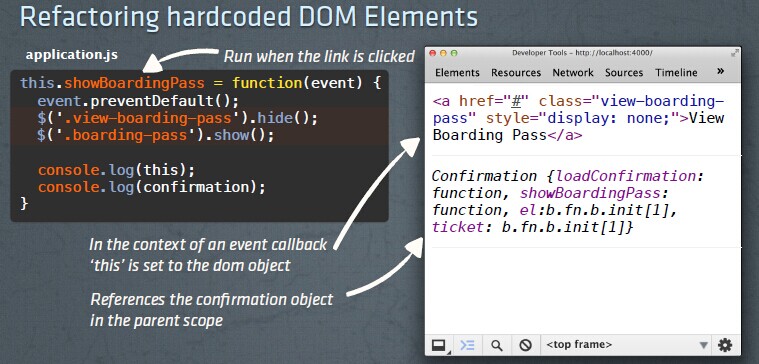
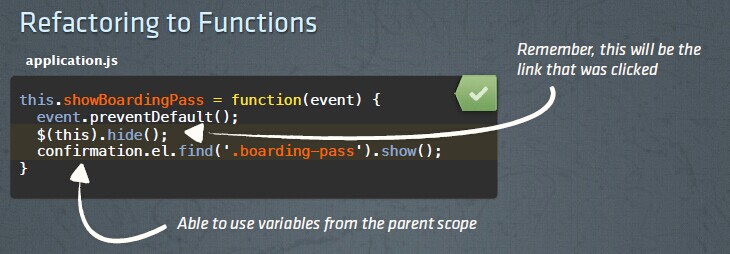
JavaScript Functions:重点理解 this 变量的作用域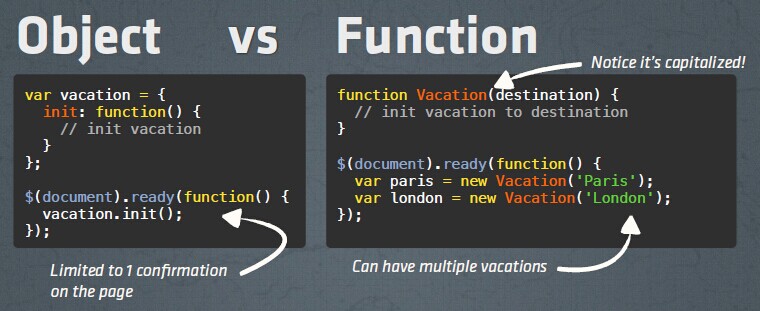
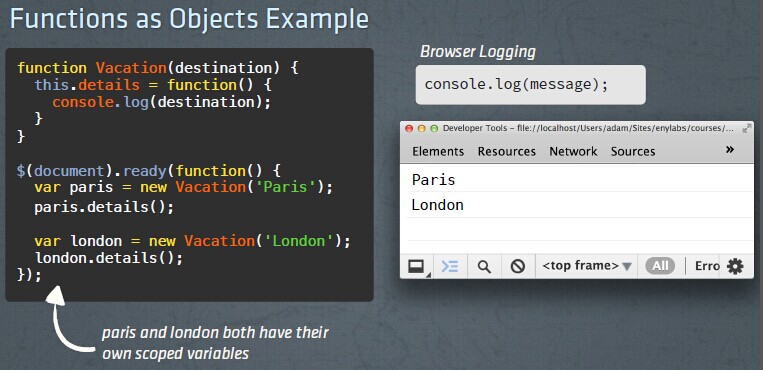
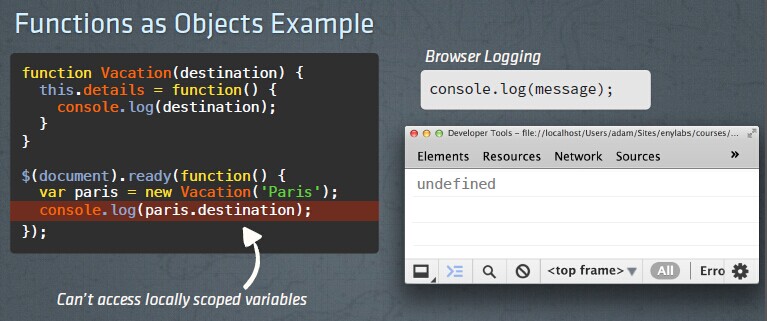
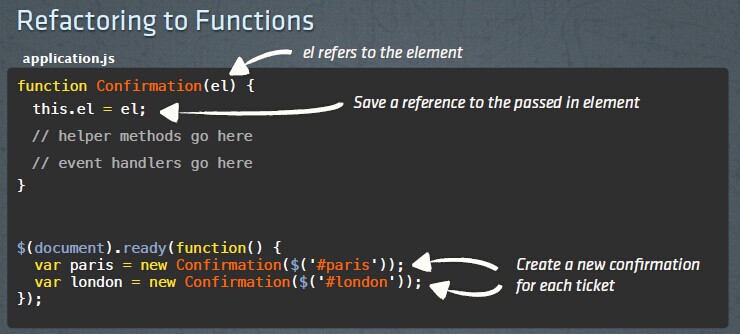
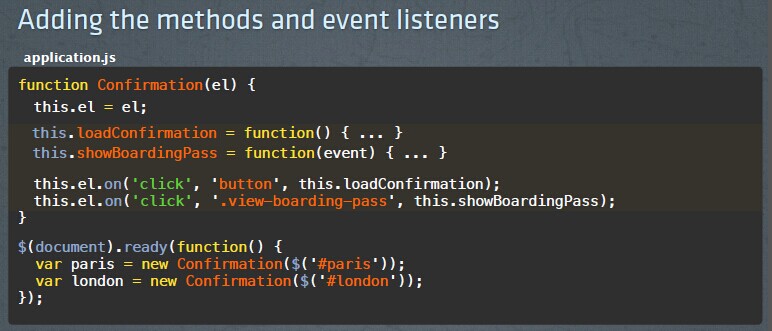
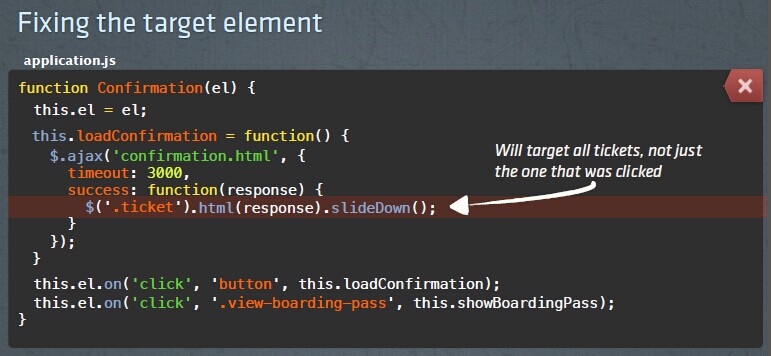
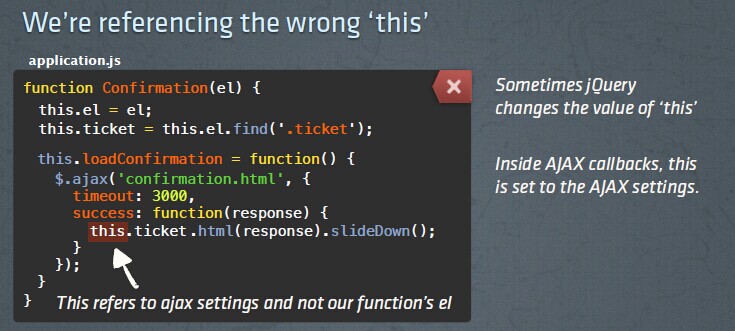
ajax 回调函数中应用调用函数变量 this 时, 需要首先在 ajax 的 context 参数中传入调用函数的 this 变量:
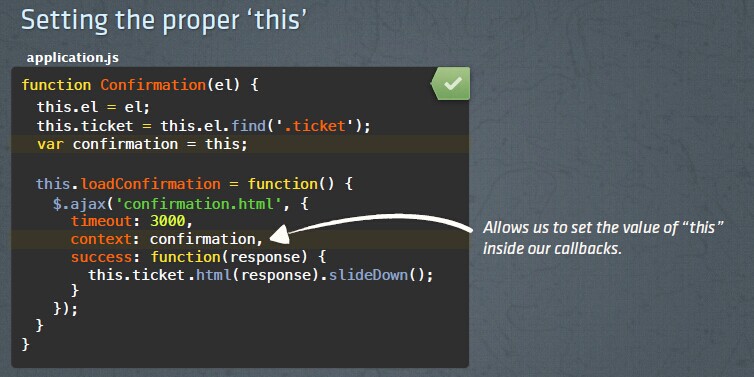
练习代码:
function Tour(el) {

  var tour = this;

  this.el = el;

  this.photos = this.el.find('.photos');

  this.fetchPhotos = function() {

    $.ajax('/photos.html', {

      data: {location: tour.el.data('location')},

      context: tour,

      success: function(response) {

        this.photos.html(response).fadeIn();

      },

      error: function() {

        this.photos.html('<li>There was a problem fetching the latest photos. Please try again.</li>');

      },

      timeout: 3000,

      beforeSend: function() {

        this.el.addClass('is-fetching');

      },

      complete: function() {

        this.el.removeClass('is-fetching');

      }

    });

  }

  this.el.on('click', 'button', this.fetchPhotos);

}

$(document).ready(function() {

  var paris = new Tour($('#paris'));

  var london = new Tour($('#london'));

});
<div id="paris" data-location="paris">

  <button>Get Paris Photos</button>

  <ul class="photos">

  </ul>

</div>

<div id="london" data-location="london">

  <button>Get London Photos</button>

  <ul class="photos">

  </ul>

</div>
第五课.
Ajax Forms
$('form').on('submit', function(event) {}); //表单提交事件
event.preventDefault(); //阻止浏览器的默认表单提交行为
type: 'POST' // POST 方式提交
data:{ "destination": $('#destination').val(), "quantity": $('#quantity').val() } //获取表单中的元素值提交数据
data: $('form').serialize() //通过表单序列化,提交整张表单中的数据

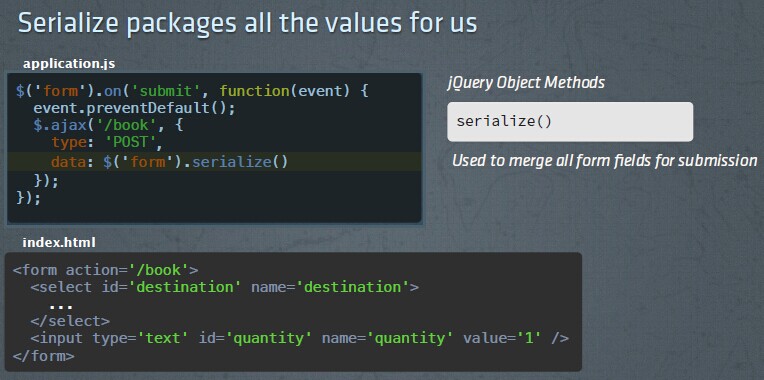

练习代码:
$(document).ready(function() {

  $('form').on('submit', function(event) {

    event.preventDefault();

    $.ajax('/book', {

      type: 'POST',

      data: $('form').serialize(),

      success: function(response){

        $('.tour').html(response);

      }

    });

  });

});
<div class="tour" data-daily-price="357">

  <h2>Paris, France Tour</h2>

  <p>$<span id="total">2,499</span> for <span id="nights-count">7</span> Nights</p>

  <form action="/book" method="POST">

    <p>

      <label for="nights">Number of Nights</label>

    </p>

    <p>

      <input type="number" name="nights" id="nights" value="7">

    </p>

    <input type="submit" value="book">

  </form>

</div>
第六课.
Ajax with JSON
dataType: 'json' // 通知服务器提交的数据类型为 json
contentType: 'application/json' //要求服务器返回的数据类型为 json
attr(<attribute>) //获取 html 对象的属性
attr(<attribute>, <value>) //给 html 对象的属性赋值
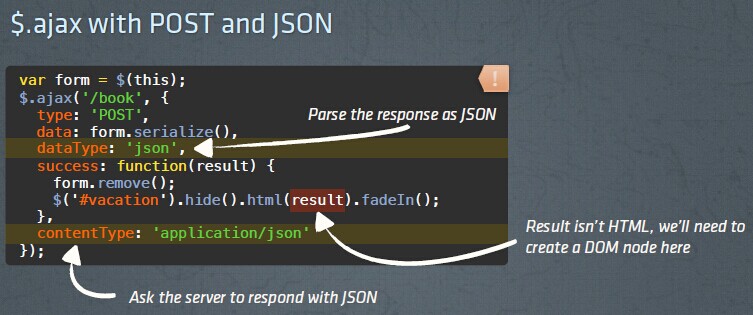
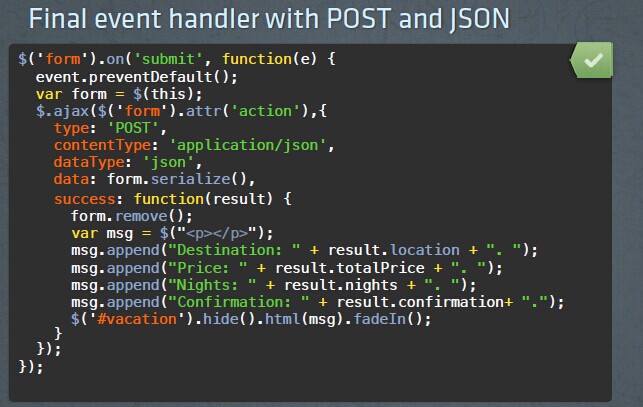
练习代码:
$(document).ready(function() {

  $('form').on('submit', function(event) {

    event.preventDefault();

    $.ajax($('form').attr('action'), {

      type: $('form').attr('method'),

      data: $('form').serialize(),

      dataType: 'json',

      success: function(response) {

        $('.tour').html('<p></p>')

                  .find('p')

                  .append('Trip to ' + response.description)

                  .append(' at $' + response.price)

                  .append(' for ' + response.nights + ' nights')

                  .append('. Confirmation: ' + response.confirmation);

      }

    });

  });

});
<div class="tour" data-daily-price="357">

  <h2>Paris, France Tour</h2>

  <p>$<span id="total">2,499</span> for <span id="nights-count">7</span> Nights</p>

  <form action="/book" method="POST">

    <p>

      <label for="nights">Number of Nights</label>

    </p>

    <p>

      <input type="number" name="nights" id="nights" value="7">

    </p>

    <input type="submit" value="book">

  </form>

</div>
第七课.
Utility Methods
$.each(collection, function(<index>, <object>) {}) //iterate through the array
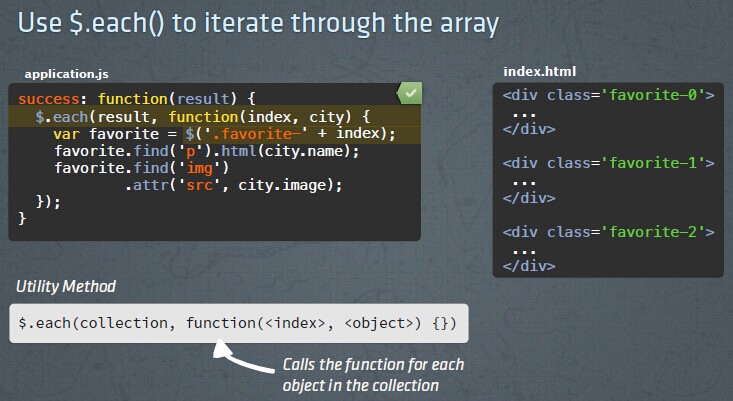
练习代码:
$('button').on('click', function() {

  $.ajax('/cities/deals', {

    contentType: 'application/json',

    dataType: 'json',

    success: function(result) {

      $.each(result, function(index, dealItem) {

        var dealElement = $('.deal-' + index);

        dealElement.find('.name').html(dealItem.name);

        dealElement.find('.price').html(dealItem.price);

      });

    }

  });

});
$.getJSON(url, success); //result will be an array of avaScript Objects
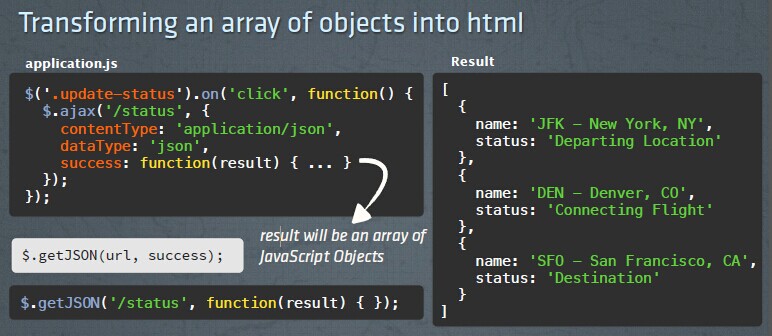
练习代码:
$('button').on('click', function() {

  $.getJSON('/cities/deals', function(result) {

    $.each(result, function(index, dealItem) {

      var dealElement = $('.deal-' + index);

      dealElement.find('.name').html(dealItem.name);

      dealElement.find('.price').html(dealItem.price);

    });

  });

});
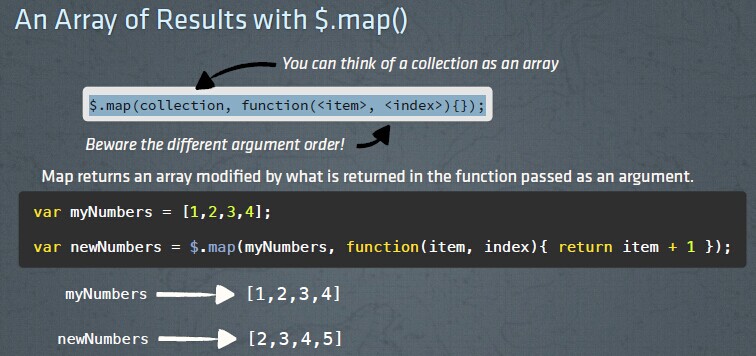
$.map(collection, function(<item>, <index>){});
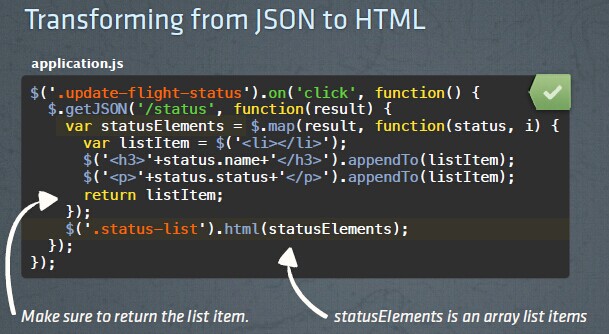
练习代码:
$('.update-available-flights').on('click', function() {

  $.getJSON('/flights/late', function(result) {

    var flightElements = $.map(result, function(flightItem, index){

      var liItem = $('<li></li>');

      liItem.append('<p>'+flightItem.flightNumber+'</p>');

      liItem.append('<p>'+flightItem.time+'</p>');

      return liItem;

    });

    $('.flight-times').html(flightElements);

  });

});
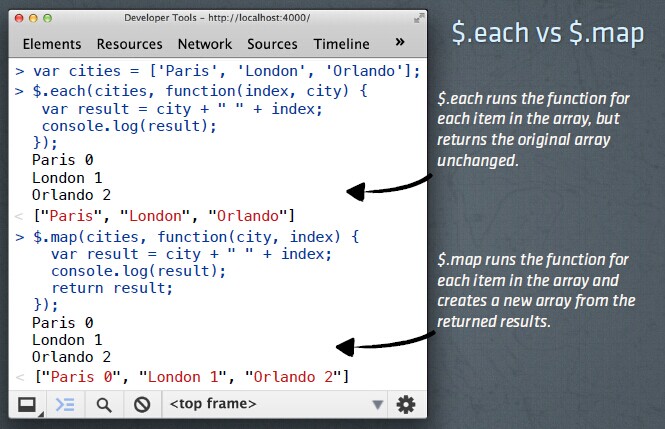
$.each vs $.map
.detach() //.detach() removes an element from the DOM, preserving all data and events.
detach() 方法移除被选元素,包括所有文本和子节点。
这个方法会保留 jQuery 对象中的匹配的元素,因而可以在将来再使用这些匹配的元素。
detach() 会保留所有绑定的事件、附加的数据,这一点与 remove() 不同。
练习代码:
$('.update-available-flights').on('click', function() {

  $.getJSON('/flights/late', function(result) {

    var flightElements = $.map(result, function(flightItem, index){

      var flightEl = $('<li>'+flightItem.flightNumber+'-'+flightItem.time+'</li>');

      return flightEl;

    });

    $('.flight-times').detach().html(flightElements).appendTo('.flights');

  });

});
第八课.
Managing Events:同一个元素同一个事件挂接多个事件处理程序,按顺序执行
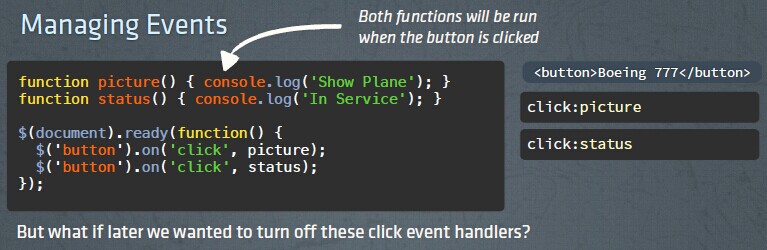
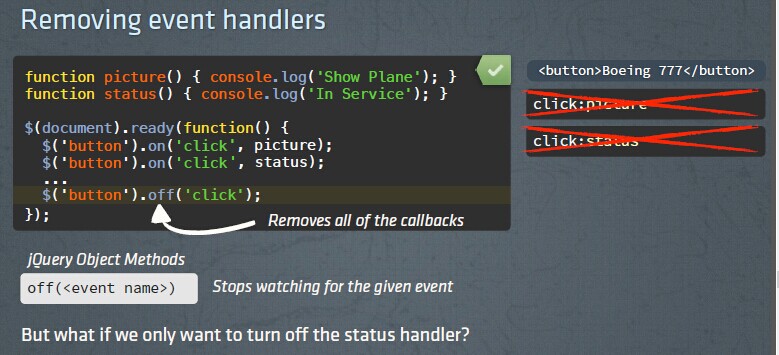
off(<event name>) //停止事件的监听,同时停止当前元素上指定事件的所有监听,如:$('button').off('click');
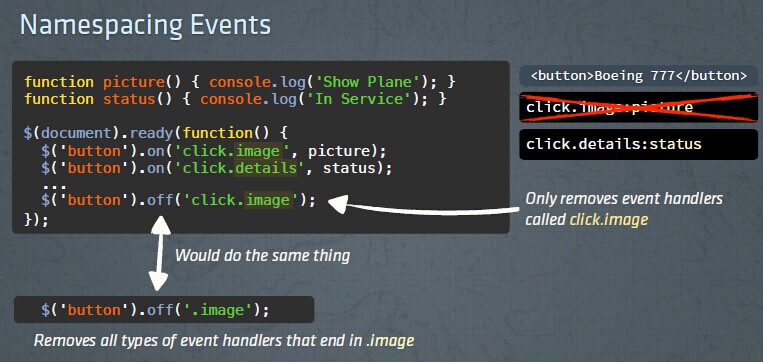
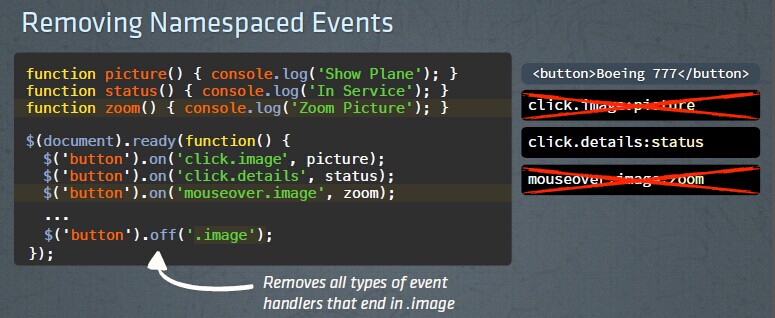
Namespacing Events:给事件监听程序命名,用于同一个元素,相同事件多个监听程序时的区分和禁用、还原等操作
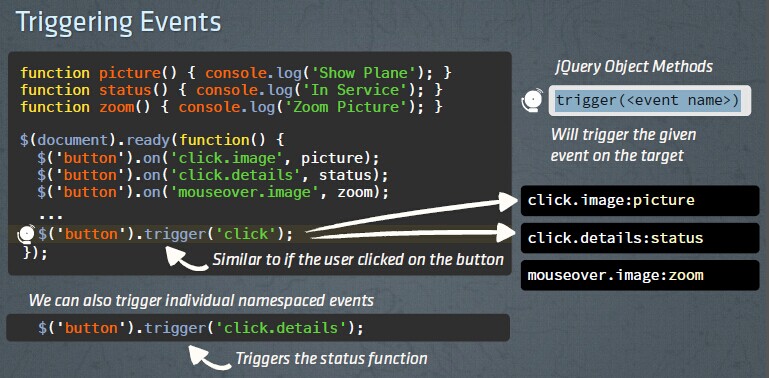
trigger(<event name>):触发被选元素的指定事件类型
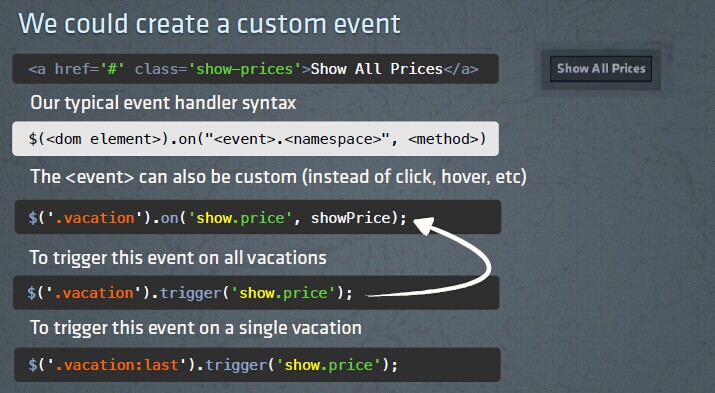
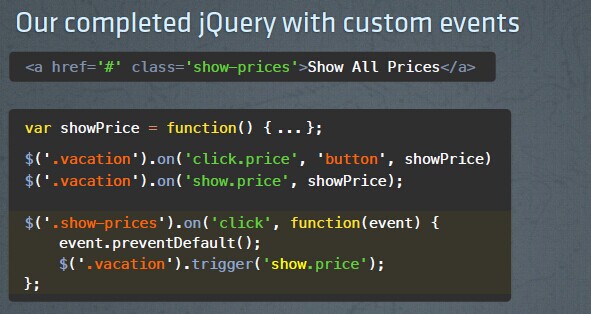
create a custom event:创建自定义事件后,可以通过代码触发的方式同时触发多种页面元素的监听的相同的自定义事件。
$(<dom element>).on("<event>.<namespace>", <method>)
jQuery 学习笔记(jQuery: The Return Flight)的更多相关文章
- jquery学习笔记---jquery插件开发
http://www.cnblogs.com/Wayou/p/jquery_plugin_tutorial.html jquery插件开发:http://www.cnblogs.com/damonla ...
- JQuery学习笔记---jquery对象和DOM对象的关系
1.DOM(Document Object Model,文档对象模型).DOM树 { html (head&&body), head(meta && title) ...
- jquery学习笔记----jquery相关的文档
http://tool.oschina.net/apidocs/apidoc?api=jquery http://www.w3school.com.cn/jquery/jquery_ref_event ...
- JQuery学习笔记——JQuery基础
#,JQuery避免名称冲突的方法 var jq = jQuery.noConfilct(); jq.ready( function(){ jq("p").hidden() ...
- jQuery学习笔记——jQuery常规选择器
一.简单选择器在使用 jQuery 选择器时,我们首先必须使用“$()”函数来包装我们的 CSS 规则.而CSS 规则作为参数传递到 jQuery 对象内部后,再返回包含页面中对应元素的 jQuery ...
- jQuery学习笔记——jQuery基础核心
代码风格 在jQuery程序中,不管是页面元素的选择.内置的功能函数,都是美元符号“$”来起始的.而这个“$”就是jQuery当中最重要且独有的对象:jQuery对象,所以我们在页面元素选择或执行功能 ...
- jQuery 学习笔记
jQuery 学习笔记 一.jQuery概述 宗旨: Write Less, Do More. 基础知识: 1.符号$代替document.getElementById( ...
- jQuery学习笔记 - 基础知识扫盲入门篇
jQuery学习笔记 - 基础知识扫盲入门篇 2013-06-16 18:42 by 全新时代, 11 阅读, 0 评论, 收藏, 编辑 1.为什么要使用jQuery? 提供了强大的功能函数解决浏览器 ...
- jQuery学习笔记之Ajax用法详解
这篇文章主要介绍了jQuery学习笔记之Ajax用法,结合实例形式较为详细的分析总结了jQuery中ajax的相关使用技巧,包括ajax请求.载入.处理.传递等,需要的朋友可以参考下 本文实例讲述了j ...
随机推荐
- Hive 0.12.0安装指南
目录 目录 1 1. 前言 1 2. 约定 1 3. 服务端口 2 4. 安装MySQL 2 4.1. 安装MySQL 2 4.2. 创建Hive元数据库 2 5. 安装步骤 3 5.1. 下载Hiv ...
- iOS Programming Recipe 6: Creating a custom UIView using a Nib
iOS Programming Recipe 6: Creating a custom UIView using a Nib JANUARY 7, 2013 BY MIKETT 12 COMMENTS ...
- 微信小程序自定义事件
案例结构 首先,我还是会以案例的形式向大家讲解(这样也能方便大家更好的理解)简单介绍一下案例项目的内容(以上一章自定义组件的案例为基础)项目名称:component自定义子组件cpt父组件:logs ...
- git 恢复被修改的文件
恢复到最后一次提交的改动: git checkout filename 如果该文件已经 add 到暂存队列中,恢复文件: git reset HEAD filename
- Android-自定义RadioButton
1.控件RadioButton需要用RadioGroup包裹起来,才能使用2.RadioButton必须设置ID才能实现单选功能3.RadioGroup有方向(垂直方向 和 水平方向)默认是垂直方向 ...
- 按照已有的模板输出<一>(如发票)
按照已有的模板输出<一> 普通的发票基本上都是固定模式,所以我们一般写好固定的模板,把其中需要变动的地方,以特定符号来代替.每次打印发票的时候,只需将其中的特定符号转换成我们需要显示的数据 ...
- tf-idf sklearn
第一步:语料转化为词袋向量 step 1. 声明一个向量化工具vectorizer: 本文使用的是CountVectorizer,默认情况下,CountVectorizer仅统计长度超过两个字符的词, ...
- “全栈2019”Java第七十三章:外部类里多个静态非静态内部类详解
难度 初级 学习时间 10分钟 适合人群 零基础 开发语言 Java 开发环境 JDK v11 IntelliJ IDEA v2018.3 文章原文链接 "全栈2019"Java第 ...
- iOS核心动画之anchorpoint
anchorpoint是什么 All geometric manipulations to the view occur about the specified point 就是说所有的动画参考点都是 ...
- IOS面试题(二)
50. 谈谈对Block 的理解?并写出一个使用Block执行UIVew动画? 答:Block是可以获取其他函数局部变量的匿名函数,其不但方便开发,并且可以大幅提高应用的执行效率(多核心CPU可直接处 ...