
IOS Masonry自动布局
之前项目用Frame布局,这个项目登录用了VFL,后来觉得用Masonry,前天布局TableViewCell时用了下 ,觉得还不错。
#import "Masonry.h"
#import "MASViewAttribute.h"
先看效果图:
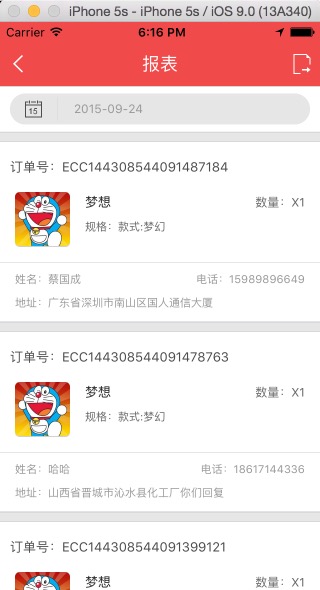
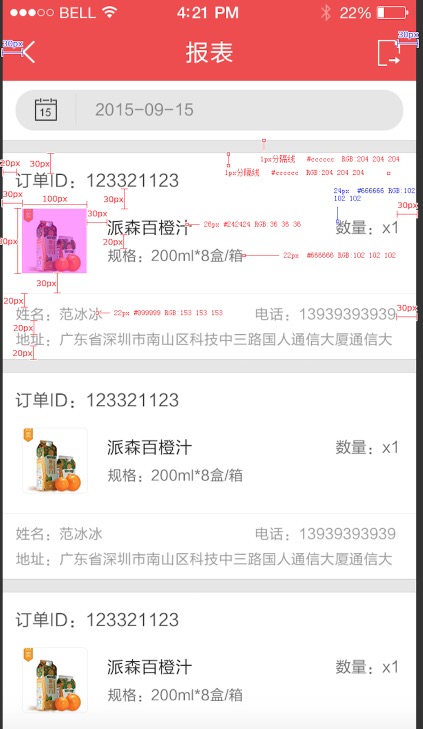
#import "ReportsCell.h"
//#import "Masonry.h"
#import "YZPUIFormatMacros.h"
#import "Global.h"

static const CGFloat kIconWidth                 = 55.0f;
static const CGFloat kIconHeight                = 55.0f;

@implementation ReportsCell
- (id)initWithStyle:(UITableViewCellStyle)style reuseIdentifier:(NSString *)reuseIdentifier
{
    self = [super initWithStyle:style reuseIdentifier:reuseIdentifier];
    if (self) {
         self.backgroundColor = [UIColor whiteColor];

        UIView *headerView = [[UIView alloc]init];
        headerView.backgroundColor = YZPColorDividingLineOutdide;
        [self addSubview:headerView];
        [headerView mas_makeConstraints:^(MASConstraintMaker *make) {
            make.left.equalTo(@);
            make.top.equalTo(@);
            make.width.equalTo(@(MainWidth));
            make.height.equalTo(@(YZPSpaceHSmall));
        }];
        UIView *topLine=[self lineView];
        [headerView addSubview:topLine];
        [topLine mas_makeConstraints:^(MASConstraintMaker *make) {
            make.top.equalTo(headerView.top);
            make.left.equalTo(headerView.left);
            make.width.equalTo(headerView.width);
            make.height.equalTo(@0.5);

        }];

        UIView *bottomLine=[self lineView];
        [headerView addSubview:bottomLine];
        [bottomLine mas_makeConstraints:^(MASConstraintMaker *make) {
            make.top.equalTo(headerView.bottom).with.offset(-0.5);
            make.left.equalTo(headerView.left);
            make.width.equalTo(headerView.width);
            make.height.equalTo(@0.5);

        }];

        _orderIdLabel=[[UILabel alloc]init];
        _orderIdLabel.font = YZPFontSubhead;
        _orderIdLabel.textColor = YZPColorTextSubhead;
        [self addSubview:_orderIdLabel];
        [_orderIdLabel mas_makeConstraints:^(MASConstraintMaker *make) {
            make.top.equalTo(headerView.bottom).with.offset();
            make.left.equalTo(@);
            make.width.equalTo(headerView.width);
            make.height.equalTo(@);
        }];

        _orderIconView=[[UIImageView alloc]init];
         [self addSubview:_orderIconView];
        [_orderIconView makeConstraints:^(MASConstraintMaker *make) {
            make.left.equalTo(@);
            make.top.equalTo(_orderIdLabel.bottom).with.offset();
            make.width.equalTo(@(kIconWidth));
            make.height.equalTo(@(kIconHeight));
        }];

        _orderTitleLabel=[[UILabel alloc]init];
        _orderTitleLabel.font=YZPFontSubhead;
        _orderTitleLabel.textColor=[UIColor colorWithRed:0.141f green:0.141f blue:0.141f alpha:1.00f];
        _orderTitleLabel.numberOfLines=;
        [self addSubview:_orderTitleLabel];
        [_orderTitleLabel mas_makeConstraints:^(MASConstraintMaker *make) {
            make.left.equalTo(_orderIconView.right).with.offset();
            make.top.equalTo(_orderIconView.top).with.offset();
            make.width.equalTo(@(MainWidth-));
            make.height.lessThanOrEqualTo(@());
        }];

        _orderSpecLabel=[[UILabel alloc]init];
        _orderSpecLabel.font=YZPFontExplain;
        _orderSpecLabel.textColor=[UIColor colorWithRed:0.400f green:0.400f blue:0.400f alpha:1.00f];
        [self addSubview:_orderSpecLabel];
        [_orderSpecLabel mas_makeConstraints:^(MASConstraintMaker *make) {
            make.left.equalTo(_orderTitleLabel.left);
            make.top.equalTo(_orderTitleLabel.bottom).offset();
            make.width.equalTo(@(MainWidth-));
            make.height.lessThanOrEqualTo(@());
        }];

        _productsCountLabel=[[UILabel alloc]init];
        _productsCountLabel.font=YZPFontContent;
        _productsCountLabel.textAlignment=NSTextAlignmentRight;
        _productsCountLabel.textColor=[UIColor colorWithRed:0.400f green:0.400f blue:0.400f alpha:1.00f];
        [self addSubview:_productsCountLabel];
        [_productsCountLabel mas_makeConstraints:^(MASConstraintMaker *make) {
            make.top.equalTo(_orderTitleLabel.top);
            make.left.equalTo(_orderTitleLabel.right).offset();
            make.right.equalTo(self.right).with.offset(-);
            make.height.equalTo(_orderTitleLabel.height);
        }];

        UIView *centerLine=[self lineView];
        [self addSubview:centerLine];
        [centerLine mas_makeConstraints:^(MASConstraintMaker *make) {
            make.top.equalTo(_orderIconView.bottom).offset();
            make.left.equalTo(self);
            make.width.equalTo(self);
            make.height.equalTo(@0.5);
        }];

        _userNameLabel=[[UILabel alloc]init];
        _userNameLabel.font=YZPFontExplain;
        _userNameLabel.textColor=YZPColorTextExplain;
//        _userNameLabel.numberOfLines=2;
        _userNameLabel.textAlignment=NSTextAlignmentLeft;
        [self addSubview:_userNameLabel];
        [_userNameLabel mas_makeConstraints:^(MASConstraintMaker *make) {
            make.left.equalTo(self.left).with.offset();
            make.top.equalTo(centerLine.bottom).offset();
            make.width.lessThanOrEqualTo(@);
            make.height.lessThanOrEqualTo(@);
        }];

        _userPhoneLabel=[[UILabel alloc]init];
        _userPhoneLabel.font=YZPFontExplain;
        _userPhoneLabel.textColor=YZPColorTextExplain;
        _userPhoneLabel.textAlignment=NSTextAlignmentRight;
        [self addSubview:_userPhoneLabel];
        [_userPhoneLabel mas_makeConstraints:^(MASConstraintMaker *make) {
            make.top.equalTo(_userNameLabel.top);
            make.right.equalTo(self.right).with.offset(-);
            make.height.lessThanOrEqualTo(@);
            make.width.lessThanOrEqualTo(@);

        }];

        _userAddressLabel=[[UILabel alloc]init];
        _userAddressLabel.font=YZPFontExplain;
        _userAddressLabel.textColor=YZPColorTextExplain;
        [self addSubview:_userAddressLabel];
        [_userAddressLabel mas_makeConstraints:^(MASConstraintMaker *make) {
            make.top.equalTo(_userNameLabel.bottom).with.offset();
            make.left.equalTo(self.left).with.offset();
//            make.bottom.equalTo(self.bottom).with.offset(-10);
            make.width.equalTo(self.width);
            make.height.lessThanOrEqualTo(@);
        }];

    }
    return self;
}
-(UIView *)lineView
{
    UIView *line=[[UIView alloc]init];
//    line.backgroundColor=[UIColor redColor];
    line.backgroundColor=[UIColor colorWithRed:0.800f green:0.800f blue:0.800f alpha:1.00f];
    return line;
}

- (void)awakeFromNib {
    // Initialization code
}

- (void)setSelected:(BOOL)selected animated:(BOOL)animated {
    [super setSelected:selected animated:animated];

    // Configure the view for the selected state
}

@end
IOS Masonry自动布局的更多相关文章
- iOS masonry 不规则tagView布局 并自适应高度
在搜索页面经常会有不规则的tag出现,这种tagView要有点击事件,单个tagView可以设置文字颜色,宽度不固定根据内容自适应,高度固定,数量不固定.总高度就不固定.最近对于masonry的使用又 ...
- iOS AutoLayout自动布局&Masonry介绍与使用实践
Masonry介绍与使用实践:快速上手Autolayout http://www.cnblogs.com/xiaofeixiang/p/5127825.html http://www.cocoachi ...
- iOS SnapKit自动布局使用详解(Swift版Masonry)
对于自动布局: 我们在 StoryBoard 中可以使用约束实现,简单明了,但如果用纯代码来设置约束就很麻烦了 OC里面,我们常用的有Masonry,SDAutoLayout Swift里,我们有Sn ...
- ios - masonry第三方库使用自动布局(参考:http://www.cocoachina.com/ios/20141219/10702.html)
#import "ViewController.h" #import "Masonry.h" #define kWeakSelf(weakSelf) __wea ...
- 【iOS】Masonry 自动布局 MASViewConstraint.m:207 错误
问题详情: Assertion failure 报错原因: make.right.equalTo([_imageView superview]).right.with.offset(-); make. ...
- Masonry自动布局
介绍,入门: http://www.cocoachina.com/ios/20141219/10702.html 下载: http://code.cocoachina.com/detail/30114 ...
- iOS开发-自动布局篇:史上最牛的自动布局教学!
转载自:http://www.jianshu.com/p/f6cf9ef451d9 本文我们将提到: aotulayout(手码) VFL aotulayout(Xib) Masonry(第三方框架) ...
- iOS masonry九宫格 单行 多行布局
Masonry是个好东西,在当前尺寸各异的iOS开发适配中发挥着至关重要的作用,由于项目中Masonry布局用的比较多,对于UI布局也有了一些自己的理解,经常会有人问道Masonry布局九宫格要怎么布 ...
- Masonry自动布局使用
Masonry是一个轻量级的布局框架,采用更好的语法封装自动布局,它有自己的布局DSL.简洁明了并具有高可读性 而且同时支持 iOS 和 Max OS X. 下载 NSLayoutConstraint ...
随机推荐
- linux命令之信息显示与搜索文件命令
1.uname:显示系统信息 该命令用于显示系统相关的信息,比如内核版本号,硬件架构等. 参数 说明 -n(常用) 显示主机名称 -r(常用) 显示内核发行版本号 示例: 1)显示主机名 [root@ ...
- 552. Student Attendance Record II
Given a positive integer n, return the number of all possible attendance records with length n, whic ...
- 前端切图要选择png和jpg呢?
今天特意验证了一下: 切完图分别保存png24.png8和jpg60.jpg80(60和80表示保存图片时品质选择)后, 然后再压缩图片,压缩图片地址:https://tinypng.com/ 图片直 ...
- Visual Studio code安装步骤
1.官方下载:https://code.visualstudio.com/,本人电脑是window系统 下载之后,双击安装,安装完之后左侧栏那边是英文,如何变为中文: 按快捷键ctrl+shift+ ...
- 实时监测input输入变化 jQuery
$('#production_name').on('input propertychange',function(){ alert('输入一个字弹一回'); });
- [ActionScript 3.0] File下载工具
更新数据原理,访问接口,将服务器数据抓取并下载到本地的临时文件夹,当所有下载完成,卸载客户端内容,出现升级界面,此时移动下载的内容到目标文件夹,移动完成再重新加载客户端,访问接口,下载文件,移动文件均 ...
- scrapy入门例子
使用爬取http://quotes.toscrape.com/内容,网站内容很简单 一. 使用scrapy创建项目 scrapy startproject myscrapy1 scrapy gensp ...
- TPS和QPS定义以及影响TPS的因素
一.TPS:Transactions Per Second(每秒传输的事物处理个数),即服务器每秒处理的事务数.TPS包括一条消息入和一条消息出,加上一次用户数据库访问.(业务TPS = CAPS × ...
- Jmeter之线程组详解
hello,更新几天的分享,线程数现在才分享,感觉怪怪的,原谅我没有考虑到一个顺序问题哈,那里总结好了,我就发那里,先把组件都写完,再来项目实战,希望大家不要责怪哈,内容有写的不详细的,或者我说错了, ...
- Google 里的软件工程学
简评:原文作者 Fergus Henderson 在 Google 工作了 10 年以上,目前负责 Google 的 text-tospeech 工程小组.有很多书籍或文章会从 商业/管理 等非技术角 ...