
IOS Masonry自动布局
之前项目用Frame布局,这个项目登录用了VFL,后来觉得用Masonry,前天布局TableViewCell时用了下 ,觉得还不错。
#import "Masonry.h"
#import "MASViewAttribute.h"
先看效果图:
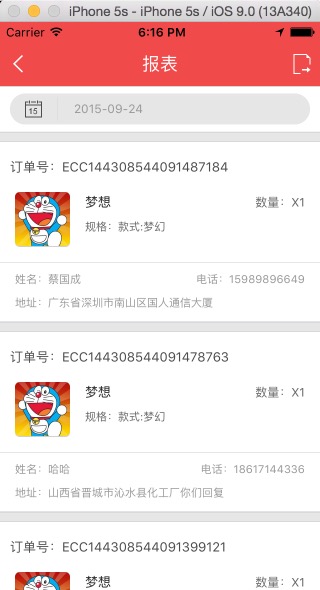
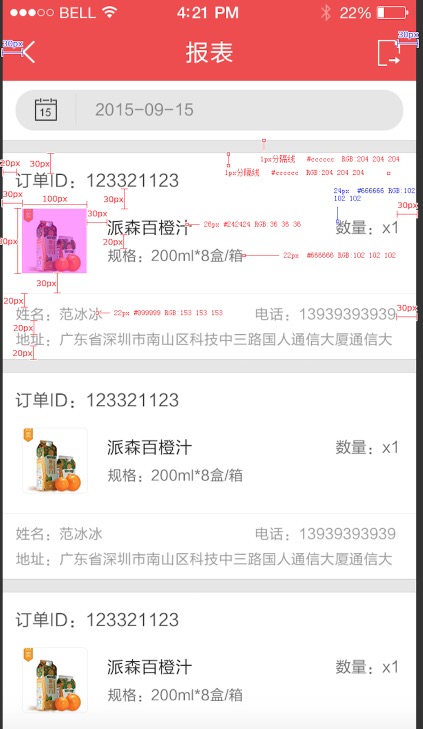
#import "ReportsCell.h"
//#import "Masonry.h"
#import "YZPUIFormatMacros.h"
#import "Global.h"

static const CGFloat kIconWidth                 = 55.0f;
static const CGFloat kIconHeight                = 55.0f;

@implementation ReportsCell
- (id)initWithStyle:(UITableViewCellStyle)style reuseIdentifier:(NSString *)reuseIdentifier
{
    self = [super initWithStyle:style reuseIdentifier:reuseIdentifier];
    if (self) {
         self.backgroundColor = [UIColor whiteColor];

        UIView *headerView = [[UIView alloc]init];
        headerView.backgroundColor = YZPColorDividingLineOutdide;
        [self addSubview:headerView];
        [headerView mas_makeConstraints:^(MASConstraintMaker *make) {
            make.left.equalTo(@);
            make.top.equalTo(@);
            make.width.equalTo(@(MainWidth));
            make.height.equalTo(@(YZPSpaceHSmall));
        }];
        UIView *topLine=[self lineView];
        [headerView addSubview:topLine];
        [topLine mas_makeConstraints:^(MASConstraintMaker *make) {
            make.top.equalTo(headerView.top);
            make.left.equalTo(headerView.left);
            make.width.equalTo(headerView.width);
            make.height.equalTo(@0.5);

        }];

        UIView *bottomLine=[self lineView];
        [headerView addSubview:bottomLine];
        [bottomLine mas_makeConstraints:^(MASConstraintMaker *make) {
            make.top.equalTo(headerView.bottom).with.offset(-0.5);
            make.left.equalTo(headerView.left);
            make.width.equalTo(headerView.width);
            make.height.equalTo(@0.5);

        }];

        _orderIdLabel=[[UILabel alloc]init];
        _orderIdLabel.font = YZPFontSubhead;
        _orderIdLabel.textColor = YZPColorTextSubhead;
        [self addSubview:_orderIdLabel];
        [_orderIdLabel mas_makeConstraints:^(MASConstraintMaker *make) {
            make.top.equalTo(headerView.bottom).with.offset();
            make.left.equalTo(@);
            make.width.equalTo(headerView.width);
            make.height.equalTo(@);
        }];

        _orderIconView=[[UIImageView alloc]init];
         [self addSubview:_orderIconView];
        [_orderIconView makeConstraints:^(MASConstraintMaker *make) {
            make.left.equalTo(@);
            make.top.equalTo(_orderIdLabel.bottom).with.offset();
            make.width.equalTo(@(kIconWidth));
            make.height.equalTo(@(kIconHeight));
        }];

        _orderTitleLabel=[[UILabel alloc]init];
        _orderTitleLabel.font=YZPFontSubhead;
        _orderTitleLabel.textColor=[UIColor colorWithRed:0.141f green:0.141f blue:0.141f alpha:1.00f];
        _orderTitleLabel.numberOfLines=;
        [self addSubview:_orderTitleLabel];
        [_orderTitleLabel mas_makeConstraints:^(MASConstraintMaker *make) {
            make.left.equalTo(_orderIconView.right).with.offset();
            make.top.equalTo(_orderIconView.top).with.offset();
            make.width.equalTo(@(MainWidth-));
            make.height.lessThanOrEqualTo(@());
        }];

        _orderSpecLabel=[[UILabel alloc]init];
        _orderSpecLabel.font=YZPFontExplain;
        _orderSpecLabel.textColor=[UIColor colorWithRed:0.400f green:0.400f blue:0.400f alpha:1.00f];
        [self addSubview:_orderSpecLabel];
        [_orderSpecLabel mas_makeConstraints:^(MASConstraintMaker *make) {
            make.left.equalTo(_orderTitleLabel.left);
            make.top.equalTo(_orderTitleLabel.bottom).offset();
            make.width.equalTo(@(MainWidth-));
            make.height.lessThanOrEqualTo(@());
        }];

        _productsCountLabel=[[UILabel alloc]init];
        _productsCountLabel.font=YZPFontContent;
        _productsCountLabel.textAlignment=NSTextAlignmentRight;
        _productsCountLabel.textColor=[UIColor colorWithRed:0.400f green:0.400f blue:0.400f alpha:1.00f];
        [self addSubview:_productsCountLabel];
        [_productsCountLabel mas_makeConstraints:^(MASConstraintMaker *make) {
            make.top.equalTo(_orderTitleLabel.top);
            make.left.equalTo(_orderTitleLabel.right).offset();
            make.right.equalTo(self.right).with.offset(-);
            make.height.equalTo(_orderTitleLabel.height);
        }];

        UIView *centerLine=[self lineView];
        [self addSubview:centerLine];
        [centerLine mas_makeConstraints:^(MASConstraintMaker *make) {
            make.top.equalTo(_orderIconView.bottom).offset();
            make.left.equalTo(self);
            make.width.equalTo(self);
            make.height.equalTo(@0.5);
        }];

        _userNameLabel=[[UILabel alloc]init];
        _userNameLabel.font=YZPFontExplain;
        _userNameLabel.textColor=YZPColorTextExplain;
//        _userNameLabel.numberOfLines=2;
        _userNameLabel.textAlignment=NSTextAlignmentLeft;
        [self addSubview:_userNameLabel];
        [_userNameLabel mas_makeConstraints:^(MASConstraintMaker *make) {
            make.left.equalTo(self.left).with.offset();
            make.top.equalTo(centerLine.bottom).offset();
            make.width.lessThanOrEqualTo(@);
            make.height.lessThanOrEqualTo(@);
        }];

        _userPhoneLabel=[[UILabel alloc]init];
        _userPhoneLabel.font=YZPFontExplain;
        _userPhoneLabel.textColor=YZPColorTextExplain;
        _userPhoneLabel.textAlignment=NSTextAlignmentRight;
        [self addSubview:_userPhoneLabel];
        [_userPhoneLabel mas_makeConstraints:^(MASConstraintMaker *make) {
            make.top.equalTo(_userNameLabel.top);
            make.right.equalTo(self.right).with.offset(-);
            make.height.lessThanOrEqualTo(@);
            make.width.lessThanOrEqualTo(@);

        }];

        _userAddressLabel=[[UILabel alloc]init];
        _userAddressLabel.font=YZPFontExplain;
        _userAddressLabel.textColor=YZPColorTextExplain;
        [self addSubview:_userAddressLabel];
        [_userAddressLabel mas_makeConstraints:^(MASConstraintMaker *make) {
            make.top.equalTo(_userNameLabel.bottom).with.offset();
            make.left.equalTo(self.left).with.offset();
//            make.bottom.equalTo(self.bottom).with.offset(-10);
            make.width.equalTo(self.width);
            make.height.lessThanOrEqualTo(@);
        }];

    }
    return self;
}
-(UIView *)lineView
{
    UIView *line=[[UIView alloc]init];
//    line.backgroundColor=[UIColor redColor];
    line.backgroundColor=[UIColor colorWithRed:0.800f green:0.800f blue:0.800f alpha:1.00f];
    return line;
}

- (void)awakeFromNib {
    // Initialization code
}

- (void)setSelected:(BOOL)selected animated:(BOOL)animated {
    [super setSelected:selected animated:animated];

    // Configure the view for the selected state
}

@end
IOS Masonry自动布局的更多相关文章
- iOS masonry 不规则tagView布局 并自适应高度
在搜索页面经常会有不规则的tag出现,这种tagView要有点击事件,单个tagView可以设置文字颜色,宽度不固定根据内容自适应,高度固定,数量不固定.总高度就不固定.最近对于masonry的使用又 ...
- iOS AutoLayout自动布局&Masonry介绍与使用实践
Masonry介绍与使用实践:快速上手Autolayout http://www.cnblogs.com/xiaofeixiang/p/5127825.html http://www.cocoachi ...
- iOS SnapKit自动布局使用详解(Swift版Masonry)
对于自动布局: 我们在 StoryBoard 中可以使用约束实现,简单明了,但如果用纯代码来设置约束就很麻烦了 OC里面,我们常用的有Masonry,SDAutoLayout Swift里,我们有Sn ...
- ios - masonry第三方库使用自动布局(参考:http://www.cocoachina.com/ios/20141219/10702.html)
#import "ViewController.h" #import "Masonry.h" #define kWeakSelf(weakSelf) __wea ...
- 【iOS】Masonry 自动布局 MASViewConstraint.m:207 错误
问题详情: Assertion failure 报错原因: make.right.equalTo([_imageView superview]).right.with.offset(-); make. ...
- Masonry自动布局
介绍,入门: http://www.cocoachina.com/ios/20141219/10702.html 下载: http://code.cocoachina.com/detail/30114 ...
- iOS开发-自动布局篇:史上最牛的自动布局教学!
转载自:http://www.jianshu.com/p/f6cf9ef451d9 本文我们将提到: aotulayout(手码) VFL aotulayout(Xib) Masonry(第三方框架) ...
- iOS masonry九宫格 单行 多行布局
Masonry是个好东西,在当前尺寸各异的iOS开发适配中发挥着至关重要的作用,由于项目中Masonry布局用的比较多,对于UI布局也有了一些自己的理解,经常会有人问道Masonry布局九宫格要怎么布 ...
- Masonry自动布局使用
Masonry是一个轻量级的布局框架,采用更好的语法封装自动布局,它有自己的布局DSL.简洁明了并具有高可读性 而且同时支持 iOS 和 Max OS X. 下载 NSLayoutConstraint ...
随机推荐
- 【cocos2d-x 手游研发----博彩大转盘】
博彩大转盘,转盘抽奖的小系统,这是一个很有意思的游戏模块,游戏中增加这样一些趣味的小模块,我会附上源码: 会增进玩家的粘性,每天都想来抽两把试试手气: 我做的这个是个矩形风格的转盘,不是那种圆形的转盘 ...
- 大咖分享 | 一文解锁首届云创大会干货——下篇(文末附演讲ppt文件免费下载)
本文承接上一篇:大咖分享 | 一文解锁首届云创大会干货--上篇(文末附演讲ppt文件免费下载),第一届云创大会留下干货太多,这里追加下篇,同样,文末提供大咖们的干货分享,点击附件可免费下载. ...
- Eclipse导出JAR过程
Eclipse是一款免费的JAVA开发环境,被各个软件公司使用,可以说是目前使用最多的JAVA开发工具了,网址:http://www.eclipse.org 下面演示如何建立JAVA工程和导出JAR: ...
- “全栈2019”Java异常第三章:try代码块作用域详解
难度 初级 学习时间 10分钟 适合人群 零基础 开发语言 Java 开发环境 JDK v11 IntelliJ IDEA v2018.3 文章原文链接 "全栈2019"Java异 ...
- hadoop版本总结
hadoop有两个分支:0.20.x 和0.23.x.其中0.20.x是比较稳定的版本,0.23.x中新特性更多,但相对不稳定. 其中从0.20.x 分支发展出来的是:hadoop1.0,C ...
- sqlmap注入之tamper绕过WAF脚本列表
本文作者:i春秋作者——玫瑰 QQ2230353371转载请保留文章出处 使用方法--tamper xxx.py apostrophemask.py用UTF-8全角字符替换单引号字符 apostrop ...
- 2018年Android面试题含答案--适合中高级(上)
这些面试题是我在今年年初换工作的时候整理,没有重点.包括java基础,数据结构,网络,Android相关等等.适合中高级工程师.由于内容过多,将会分为上下两部分.下部分跳转链接:http://www. ...
- (一)Python装饰器的通俗理解
在学习Python的过程中,我相信有很多人和我一样,对Python的装饰器一直觉得很困惑,我也是困惑了好久,并通过思考和查阅才能略有领悟,我希望以下的内容会对你有帮助,我也努力通过通俗的方式使得对Py ...
- iOS中生成随机的UUID
+ (NSString *)uuidString { CFUUIDRef uuid_ref = CFUUIDCreate(NULL); CFStringRef uuid_string_ref= CFU ...
- Centos7 自定义systemctl服务脚本
序言篇: 之前工作环境一直使用Centos6版本,脚本一直在使用/etc/init.d/xxx:系统升级到Cento7后,虽然之前的启动脚本也可以使用,但一直没有使用systemctl 的自定义脚本. ...