
React_基本原理_ajax
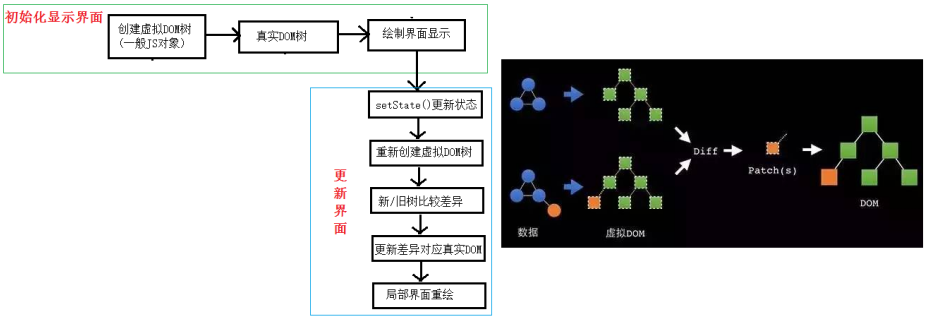
React 基本原理
- 初始化显示界面
创建虚拟DOM树
渲染到 原生 DOM 树
绘制界面显示
- 更新界面
setState() 更新状态机
重新创建虚拟 DOM 树
新/旧树比较差异 (执行一次 DOM Diff 算法)
更新差异并渲染到对应 原生 DOM (捕获差异,并渲染)
局部界面重绘
基于 react 的 ajax 异步显示效果 (比如: 先显示 loading,等有了数据之后再显示正文)
测试接口: https://api.github.com/search/repositories?q=r&sort=stars

<!DOCTYPE html>

<html>

    <head>

        <meta charset="UTF-8"/>

        <title></title>

        <meta http-equiv="X-UA-Compatible" content="ie=edge"/>

        <meta name="viewport"

              content="user-scalable=no,

                       width=device-width,

                       initial-scale=1.0,

                       minimum-scale=1.0,

                       maximum-scale=1.0"/>

        <style rel="stylesheet" type="text/css">

            .unSelectedAble {

                /* 内容不可以被选中 */

                -webkit-user-select: none;

                -moz-user-select: none;

                -ms-user-select: none;

                user-select: none;

            }

            * {

                padding: 0;

                margin: 0;

            }

            a {

                text-decoration: none;

            }

            ul,

            ol {

                list-style: none;

            }

            input {

                outline: none;

            }

            img {

                display: block;

            }

            html,

            body {

                height: 100%;

                /* overflow: hidden; */

            }

            /**** Start ****/

            html {

                /* touch-action: none; */

            }

            #wrap {

                width: 100%;

                min-height: 100%;

                background-color: #b3ccaf;

            }

            #content {

                width: 100%;

                padding-bottom: 50px;

                padding-top: 50px;

                padding-left: 50px;

                -webkit-box-sizing: border-box;

                -moz-box-sizing: border-box;

                box-sizing: border-box;

                font-size: 14px;

                background-color: #b3ccaf;

            }

            #footer {

                width: 100%;

                height: 50px;

                margin-top: -50px;

                color: #b3ccaf;

                background-color: #162454;

                text-align: center;

                line-height: 50px;

            }

            button {

                height: 36px;

                margin: 20px;

                padding: 4px;

                color: #000;

                font-size: 18px;

                background-color: #94b5b2;

                border: 0 none;

                border-radius: 6px;

            }

            input {

                padding: 6px;

                font-size: 18px;

                margin: 0 2px;

                background-color: #b76f59;

                border: 0 none;

            }

        </style>

    </head>

    <body class="unSelectedAble">

        <!-- 模拟屏幕区域 -->

        <div id="wrap">

            <!-- 内容区域 -->

            <div id="content">

            </div>

        </div>

        <!-- 底部区域 -->

        <div id="footer">

            Copyright ©2019 耶梦加德

        </div>

        <!-- javascript 代码 -->

        <script src="https://cdn.bootcss.com/react/16.7.0/umd/react.development.js"></script>

        <script src="https://cdn.bootcss.com/react-dom/16.7.0/umd/react-dom.development.js"></script>

        <script src="https://cdn.bootcss.com/prop-types/15.6.2/prop-types.js"></script>

        <script src="https://cdn.bootcss.com/axios/0.18.0/axios.min.js"></script>

        <script src="https://cdn.bootcss.com/babel-standalone/6.26.0/babel.js"></script>

        <script type="text/babel">

            class MostPopularReponsitory extends React.Component{

                state = {

                    keyword: "",

                    repoUrl: "",

                    repoName: "",

                    points: [".", ".", "."],

                    result:"What do u wanna search ?"

                };

                handleInput = ()=>{

                    const keyword = this.refs.newKeyword.value;

                    this.setState({

                        keyword

                    });

                };

                handleSearch = ()=>{

                    const {keyword, points} = this.state;

                    if(keyword === ""){

                        return ;

                    }

                    this.refs.newKeyword.value = "";

                    this.setState({

                        keyword: "",

                        result: <p>Searching{points.map(each=>each)}</p>

                    });

                    const url = `https://api.github.com/search/repositories?q=${keyword}&sort=stars`;

             axios.get(url).then(response=>{

                  const {name:repoName, html_url:repoUrl} = response.data.items[0];

                  this.setState({

                      repoName,

                      repoUrl

                  });

                  this.setState({

                      result: <span>The most popular Git Reponsitory about {keyword} is

                                  <a href={repoUrl} target="_blank"> {repoName}</a>

                              </span>

                  });

             }).catch(err=>console.log(err?"Search error: "+err:"Search From: "+url));

                };

                render(){

                    const {result} = this.state;

                    return (

                        <div>

                            <label>

                                <input type="text" ref="newKeyword" onBlur={this.handleInput}/>

                            </label>

                            <button onClick={this.handleSearch}>Tips</button>

                            <h2>{result}</h2>

                        </div>

                    )

                }

            }

            ReactDOM.render(<MostPopularReponsitory/>, document.getElementById("content"));

        </script>

    </body>

</html>
React_基本原理_ajax的更多相关文章
- Ognl表达式基本原理和使用方法
Ognl表达式基本原理和使用方法 1.Ognl表达式语言 1.1.概述 OGNL表达式 OGNL是Object Graphic Navigation Language(对象图导航语言)的缩写,他是一个 ...
- Android自定义控件之基本原理
前言: 在日常的Android开发中会经常和控件打交道,有时Android提供的控件未必能满足业务的需求,这个时候就需要我们实现自定义一些控件,今天先大致了解一下自定义控件的要求和实现的基本原理. 自 ...
- HMM基本原理及其实现(隐马尔科夫模型)
HMM(隐马尔科夫模型)基本原理及其实现 HMM基本原理 Markov链:如果一个过程的“将来”仅依赖“现在”而不依赖“过去”,则此过程具有马尔可夫性,或称此过程为马尔可夫过程.马尔可夫链是时间和状态 ...
- 动态令牌-(OTP,HOTP,TOTP)-基本原理
名词解释和基本介绍 OTP 是 One-Time Password的简写,表示一次性密码. HOTP 是HMAC-based One-Time Password的简写,表示基于HMAC算法加密的一次性 ...
- ZooKeeper基本原理
ZooKeeper简介 ZooKeeper是一个开放源码的分布式应用程序协调服务,它包含一个简单的原语集,分布式应用程序可以基于它实现同步服务,配置维护和命名服务等. ZooKeeper设计目的 1. ...
- GBDT的基本原理
这里以二元分类为例子,给出最基本原理的解释 GBDT 是多棵树的输出预测值的累加 GBDT的树都是 回归树 而不是分类树 分类树 分裂的时候选取使得误差下降最多的分裂 计算的技巧 最终分裂收益按照下面 ...
- 全文检索引擎 Solr 部署与基本原理
全文检索引擎 Solr 部署与基本原理 搜索引擎Solr环境搭建实例 关于 solr , schema.xml 的配置说明 全文检索引擎Solr系列-–全文检索基本原理 一.搜索引擎Solr环境搭建实 ...
- 相机位姿估计0:基本原理之如何解PNP问题
关键词:相机位姿估计 PNP问题求解 用途:各种位姿估计 文章类型:原理 @Author:VShawn(singlex@foxmail.com) @Date:2016-11-18 @Lab: CvLa ...
- geohash基本原理
geohash基本原理是将地球理解为一个二维平面,将平面递归分解成更小的子块,每个子块在一定经纬度范围内拥有相同的编码,这种方式简单粗暴,可以满足对小规模的数据进行经纬度的检索 目录: 经纬度常识 认 ...
随机推荐
- .net异步委托
委托Delegate是一个类,定义了方法的类型, 使得可以将方法当做另一个方法的参数来进行传递,这种将方法动态地赋给参数的做法,可以避免在程序中大佬使用If-Else(Switch)语句,同时使得程序 ...
- EffectiveC++ 第1章 让自己习惯C++
我根据自己的理解,对原文的精华部分进行了提炼,并在一些难以理解的地方加上了自己的"可能比较准确"的「翻译」. Chapter 1 让自己习惯C++ 条款 1 :视 C++为一个语言 ...
- Java CAS 比较并且更换值
原文:Java中CAS详解 作者:jayxu无捷之径 在JDK 5之前Java语言是靠synchronized关键字保证同步的,这会导致有锁 锁机制存在以下问题: (1)在多线程竞争下,加锁.释放锁会 ...
- Flink学习(三)状态机制于容错机制,State与CheckPoint
摘自Apache官网 一.State的基本概念 什么叫State?搜了一把叫做状态机制.可以用作以下用途.为了保证 at least once, exactly once,Flink引入了State和 ...
- 爬虫工程师JD归纳
核心能力归纳 负责:多平台信息的抓取,清洗和分析工作 要求: 熟悉常用开源爬虫框架,如 scrapy / pyspider 了解基于Cookie的登录原理,熟悉常用的信息抽取技术,如正则表达式.XP ...
- 整理一下C++语言中的头文件
对于每一个像我一样的蒟蒻来说,C++最重要的东西就是头文件的使用了.由于初学,直到现在我打代码还是靠一些事先写好的的头文件,仍然不能做到使用自己需要的.最近看了几位大佬打代码,心中突然闪过要把自己冗长 ...
- Django之BBS博客项目
一.登陆功能(验证码) from geetest import GeetestLib from django.contrib import auth #使用极验滑动验证码的登陆 def login(r ...
- ES6-Promise.all()使用
Promise.add 方法:将多个 promise 实例,包装成一个新的 promise 实例. const p = Promise.all([p1, p2, p3]); 接受一个数组作为参数,p1 ...
- mysql 备份报错mysqldump: [Warning] Using a password on the command line interface can be insecure.
-------------------------------------------------------------------------------- mysql 备份报错mysqldump ...
- 1、Filebeat概述
Filebeat是一个轻量级的日志托运工具,用于转发和集中日志数据. Filebeat作为代理安装在服务器上,监控指定的日志文件或目录,收集日志事件,并将它们转发到Elasticsearch或Logs ...