
C#使用Windows Service
前言:Microsoft Windows 服务(即,以前的 NT 服务)使您能够创建在它们自己的 Windows 会话中可长时间运行的可执行应用程序。这些服务可以在计算机启动时自动启动,可以暂停和重新启动而且不显示任何用户界面。这种服务非常适合在服务器上使用,或任何时候,为了不影响在同一台计算机上工作的其他用户,需要长时间运行功能时使用。还可以在不同于登录用户的特定用户帐户或默认计算机帐户的安全上下文中运行服务。
- C#创建Windows服务的步骤:
1.创建Windows Service项目
从Visual C# 工程中选取 Windows 服务(Windows Service)选项,给工程一个新文件名,然后点击 确定。
2.向服务中函数功能实现
OnStart函数在启动服务时执行,OnStop函数在停止服务时执行。在这里,当启动和停止服务时,向一个文本文件中写入一些文字信息,代码如下:
using System;

using System.Collections.Generic;

using System.ComponentModel;

using System.Data;

using System.Diagnostics;

using System.IO;

using System.Linq;

using System.ServiceProcess;

using System.Text;

using System.Threading.Tasks;

namespace MyService

{

    public partial class Service1 : ServiceBase

    {

        public Service1()

        {

            InitializeComponent();

        }

        protected override void OnStart(string[] args)

        {

            FileStream fs = new FileStream(@"d:\xx.txt", FileMode.OpenOrCreate, FileAccess.Write);

            StreamWriter sw = new StreamWriter(fs);

            sw.BaseStream.Seek(0, SeekOrigin.End);

            sw.WriteLine("WindowsService: Service Started" + DateTime.Now.ToString() + "\n");

            sw.Flush();

            sw.Close();

            fs.Close();

        }

        //protected override void OnContinue()

        //{

        //    base.OnContinue();

        //}

        //protected override void OnPause()

        //{

        //    base.OnPause(); // father class method inherit

        //}

        //protected override void OnShutdown()

        //{

        //    base.OnShutdown();

        //}

        protected override void OnStop()

        {

            FileStream fs = new FileStream(@"d:\xx.txt", FileMode.OpenOrCreate, FileAccess.Write);

            StreamWriter sw = new StreamWriter(fs);

            sw.BaseStream.Seek(0, SeekOrigin.End);

            sw.WriteLine("WindowsService: Service Stopped" + DateTime.Now.ToString() + "\n");

            sw.Flush();

            sw.Close();

            fs.Close();

        }

    }

}
4.回到设计窗口点右键选择-添加安装程序 -生成serviceInstaller1和 serviceProcessInstaller1两个组件
把serviceInstaller1的属性ServiceName改写为你的服务程序名,并把启动模 式设置为AUTOMATIC
把serviceProcessInstaller1的属性account改写为 LocalSystem
5.编译链接生成服务程序
通过从生成菜单中选择生成来生成项目。
6.安装服务
以管理员的身份运行cmd
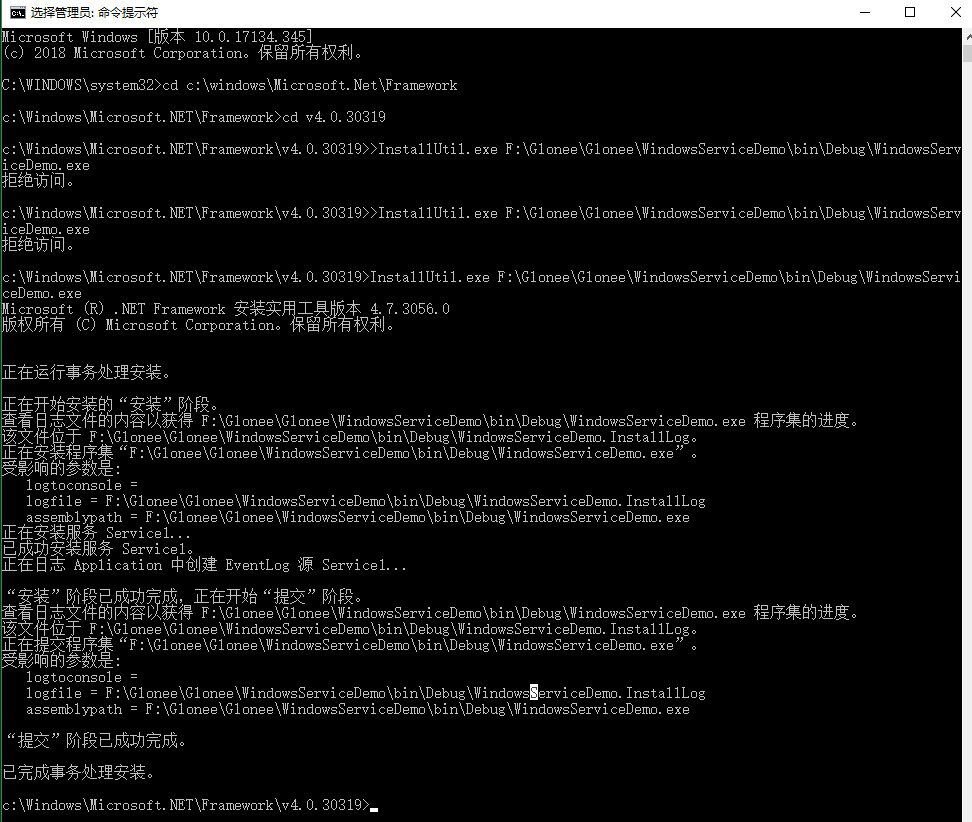
7.卸载服务
用项目的输出作为参数,从命令行运行 InstallUtil.exe。
installutil /u yourproject.exe

你可以在代码编写当中,写入timer定时器,开启服务之后就可以在服务器端不停的跑代码了。例如执行sqlserver数据库存储过程。

C#使用Windows Service的更多相关文章
- C#创建、安装、卸载、调试Windows Service(Windows 服务)的简单教程
前言:Microsoft Windows 服务能够创建在它们自己的 Windows 会话中可长时间运行的可执行应用程序.这些服务可以在计算机启动时自动启动,可以暂停和重新启动而且不显示任何用户界面.这 ...
- 如何利用mono把.net windows service程序迁移到linux上
How to migrate a .NET Windows Service application to Linux using mono? 写在最前:之所以用要把windows程序迁移到Linux上 ...
- 如何托管ASP.NET Core应用到Windows Service中
(此文章同时发表在本人微信公众号"dotNET开发经验谈",欢迎右边二维码来关注.) 题记:正在构思一个中间件的设计,考虑是否既可以使用最新的技术,也可以兼顾传统的部署模式.所以有 ...
- 解决安装mysql的”A Windows service with the name MySQL already exists.“问题
如果以前安装过mysql,卸载重装,很可能会碰到"A Windows service with the name MySQL already exists."这样的提示.即服务已经 ...
- 使用Windows Service Wrapper快速创建一个Windows Service
前言 今天介绍一个小工具的使用.我们都知道Windows Service是一种特殊的应用程序,它的好处是可以一直在后台运行,相对来说,比较适合一些需要一直运行同时不需要过多用户干预的应用程序,这一类我 ...
- Windows Service--Write a Better Windows Service
原文地址: http://visualstudiomagazine.com/Articles/2005/10/01/Write-a-Better-Windows-Service.aspx?Page=1 ...
- 使用Python写Windows Service服务程序
1.背景 如果你想用Python开发Windows程序,并让其开机启动等,就必须写成windows的服务程序Windows Service,用Python来做这个事情必须要借助第三方模块pywin32 ...
- Install Jenkins Slave as Windows Service
https://wiki.jenkins-ci.org/display/JENKINS/Installing+Jenkins+as+a+Windows+service SC 直接创建windows s ...
- How to do code coverage test for windows service
First, instrument the exe or dll by command vsinstr -coverage the dll/exe second, start the performa ...
- windows Service 创建部署
Windows Service简介: 一个Windows服务程序是在Windows操作系统下能完成特定功能的可执行的应用程序.Windows服务程序虽然是可执行的,但是它不像一般的可执行文件通过双击就 ...
随机推荐
- Unity UGUI实现鼠标拖动图片
using System.Collections; using System.Collections.Generic; using UnityEngine; using UnityEngine.UI; ...
- pwn学习之二
刚刚开始学习pwn,记录一下自己学习的过程. 今天get了第二道pwn题目的解答,做的题目是2017年TSCTF的easy fsb,通过这道题了解了一种漏洞和使用该漏洞获取shell的方法:即格式化字 ...
- Linux-软中断通信
进程间通信-软中断 内容 使用软中段机制实现Linux进程间通信 机理说明 软中断信号(signal)是一种简单且最基本的进程通信机制,它最大的特点是提供了一种简单的处理异步事件的方法.例如,常见 ...
- huginn website agent对提取结果排序
当配置好huginn的website之后,想给提取的内容排个序,那就用下面这堆代码,因为官网里也这么说的, "events_order": [ [ "{{date_pub ...
- ajax 文件下载
作为一个后端开发人员,使用java 生成文件,提供前端下载,这个问题倒不大,可是让我们自己去下载文件的时候,这个问题就大了,对不起,我只对前端一知半解,并不精通,谢谢!! 需求如下:前端检索数据,后台 ...
- 【C语言编程练习】5.7填数字游戏求解
之前的东西就不上传了,大致就跟现在的一样 1. 题目要求 计算 ABCD * E DCBA 这个算式中每个字母代表什么数字? 2. 题目分析 如果是我们人去做这道题会怎么办,一定是这样想把,一个四位 ...
- hadoop tez 结合搭建以及测试异常解决
hadoop tez 搭建 1.下载tez,本人下载的是bin.0.92版本. http://www.apache.org/dyn/closer.lua/tez/0.9.2/ hadoop dfs - ...
- noi2018还没想好记
前面说点什么.. 没想到吧 嘴上说着不写的彩笔博主最后还是写了这篇东西.. Day -inf 在雅礼集训,打了四场模拟赛.. 真正说打得好的.. 也就那么一场 身体很差 心态很差 状态很差 虽然有书读 ...
- PHP中获取某个网页或文件内容的方法
1. 通过file_get_contents()函数$contents = file_get_contents('http://demo.com/index.php');echo $contents; ...
- c# winform打印excel(使用NPOI+Spire.xls+PrintDocument直接打印excel)
前言 c#做winform程序要求生成并打印Excel报告,为了不安装Office相应组件,我选择了NPOI来生成Excel报告,用winform的PrintDocument控件来触发打印操作,而难点 ...