
《DSP using MATLAB》Problem 7.14
代码:
%% ++++++++++++++++++++++++++++++++++++++++++++++++++++++++++++++++++++++++++++++++

%%            Output Info about this m-file

fprintf('\n***********************************************************\n');

fprintf('        <DSP using MATLAB> Problem 7.14 \n\n');

banner();

%% ++++++++++++++++++++++++++++++++++++++++++++++++++++++++++++++++++++++++++++++++

% bandpass

ws1 = 0.25*pi; wp1 = 0.35*pi; wp2=0.65*pi; ws2=0.75*pi;

delta1 = 0.05; delta2 = 0.01;

tr_width = min(wp1-ws1, ws2-wp2);

f = [ws1, wp1, wp2, ws2]/pi;

[Rp, As] = delta2db(delta1, delta2)

M = ceil((As-7.95)/(2.285*tr_width)) + 1;                 % Kaiser Window

if As > 21 || As < 50

	beta = 0.5842*(As-21)^0.4 + 0.07886*(As-21);

else

	beta = 0.1102*(As-8.7);

end

fprintf('\nKaiser Window method, Filter Length: M = %d. beta = %.4f\n', M, beta);

n = [0:1:M-1]; wc1 = (ws1+wp1)/2; wc2 = (ws2+wp2)/2;

%wc = (ws + wp)/2,                    % ideal LPF cutoff frequency

hd = ideal_lp(wc2, M) - ideal_lp(wc1, M);

w_kai = (kaiser(M, beta))';  h = hd .* w_kai;

[db, mag, pha, grd, w] = freqz_m(h, [1]);  delta_w = 2*pi/1000;

[Hr,ww,P,L] = ampl_res(h);

Rp = -(min(db(wp1/delta_w :1: wp2/delta_w+1)));                            % Actual Passband Ripple

fprintf('\nActual Passband Ripple is %.4f dB.\n', Rp);

As = -round(max(db(1 : 1 : floor(ws1/delta_w)+1 )));   % Min Stopband attenuation

fprintf('\nMin Stopband attenuation is %.4f dB.\n', As);

[delta1, delta2] = db2delta(Rp, As)

% Plot

figure('NumberTitle', 'off', 'Name', 'Problem 7.14 ideal_lp Method')

set(gcf,'Color','white');

subplot(2,2,1); stem(n, hd); axis([0 M-1 -0.3 0.4]); grid on;

xlabel('n'); ylabel('hd(n)'); title('Ideal Impulse Response');

subplot(2,2,2); stem(n, w_kai); axis([0 M-1 0 1.1]); grid on;

xlabel('n'); ylabel('w(n)'); title('Kaiser Window');

subplot(2,2,3); stem(n, h); axis([0 M-1 -0.3 0.4]); grid on;

xlabel('n'); ylabel('h(n)'); title('Actual Impulse Response');

subplot(2,2,4); plot(w/pi, db); axis([0 1 -100 10]); grid on;

set(gca,'YTickMode','manual','YTick',[-90,-42,0]);

set(gca,'YTickLabelMode','manual','YTickLabel',['90';'42';' 0']);

set(gca,'XTickMode','manual','XTick',[0,f,1]);

xlabel('frequency in \pi units'); ylabel('Decibels'); title('Magnitude Response in dB');

figure('NumberTitle', 'off', 'Name', 'Problem 7.14 h(n) ideal_lp Method')

set(gcf,'Color','white');

subplot(2,2,1); plot(w/pi, db); grid on; axis([0 2 -100 10]);

xlabel('frequency in \pi units'); ylabel('Decibels'); title('Magnitude Response in dB');

set(gca,'YTickMode','manual','YTick',[-90,-42,0])

set(gca,'YTickLabelMode','manual','YTickLabel',['90';'42';' 0']);

set(gca,'XTickMode','manual','XTick',[0,f,1+f,2]);

subplot(2,2,3); plot(w/pi, mag); grid on; %axis([0 2 -100 10]);

xlabel('frequency in \pi units'); ylabel('Absolute'); title('Magnitude Response in absolute');

set(gca,'XTickMode','manual','XTick',[0,f,1+f,2]);

set(gca,'YTickMode','manual','YTick',[0,0.5, 1])

subplot(2,2,2); plot(w/pi, pha); grid on; %axis([0 1 -100 10]);

xlabel('frequency in \pi units'); ylabel('Rad'); title('Phase Response in Radians');

subplot(2,2,4); plot(w/pi, grd*pi/180);  grid on; %axis([0 1 -100 10]);

xlabel('frequency in \pi units'); ylabel('Rad'); title('Group Delay');

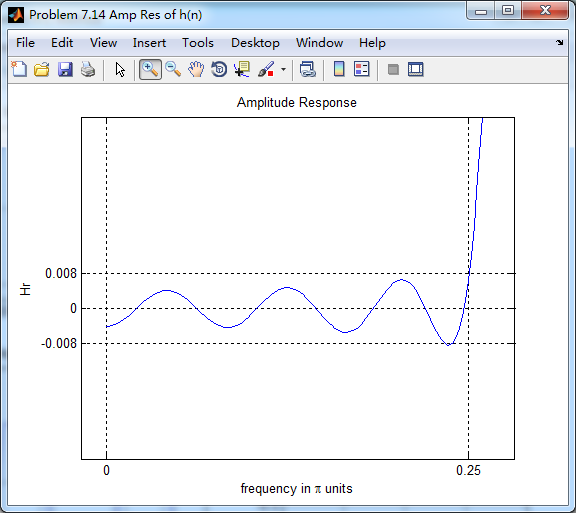
figure('NumberTitle', 'off', 'Name', 'Problem 7.14 Amp Res of h(n)')

set(gcf,'Color','white');

plot(ww/pi, Hr); grid on; %axis([0 1 -100 10]);

xlabel('frequency in \pi units'); ylabel('Hr'); title('Amplitude Response');

set(gca,'YTickMode','manual','YTick',[-delta2,0,delta2,1 - delta1,1, 1 + delta1])

%set(gca,'YTickLabelMode','manual','YTickLabel',['90';'45';' 0']);

set(gca,'XTickMode','manual','XTick',[0,f,2]);

%% +++++++++++++++++++++++++++++++++++++++++

%%          fir1 function method

%% +++++++++++++++++++++++++++++++++++++++++

f = [ws1, wp1, wp2, ws2]/pi;

m = [0 1 0];

ripple = [0.01 0.05 0.01];

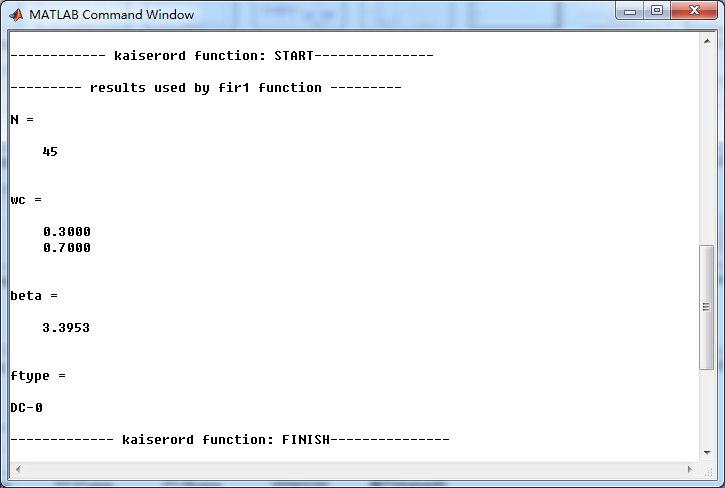
[N, wc, beta, ftype] = kaiserord(f,m,ripple);

fprintf('\n------------ kaiserord function: START---------------\n');

fprintf('\n--------- results used by fir1 function ---------\n');

N

wc

beta

ftype

fprintf('------------- kaiserord function: FINISH---------------\n');

%h_check = fir1(M-1, [wc1 wc2]/pi, 'stop', window(@kaiser, M));

%h_check = fir1(N, wc, ftype, window(@kaiser, N+1));

h_check = fir1(N, wc, ftype, kaiser(N+1, beta));

[db, mag, pha, grd, w] = freqz_m(h_check, [1]);

[Hr,ww,P,L] = ampl_res(h_check);

As = -round(max(db(1 : 1 : floor(ws1/delta_w)+1 )));   % Min Stopband attenuation

fprintf('\nMin Stopband attenuation is %.4f dB.\n', As);

Rp = -(min(db(wp1/delta_w :1: wp2/delta_w+1)));         % Actual Passband Ripple

fprintf('\nActual Passband Ripple is %.4f dB.\n', Rp);

[delta1, delta2] = db2delta(Rp, As)

%% -------------------------------------------

%%     plot

%% -------------------------------------------

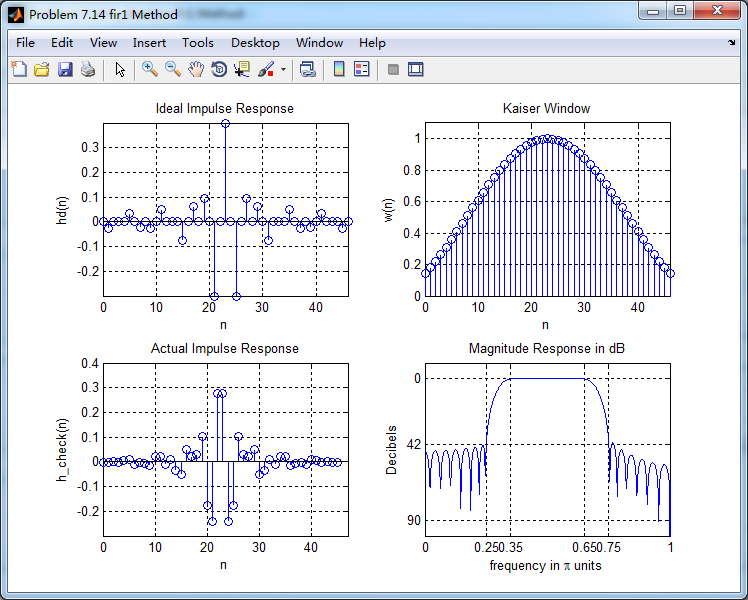
figure('NumberTitle', 'off', 'Name', 'Problem 7.14 fir1 Method')

set(gcf,'Color','white');

subplot(2,2,1); stem(n, hd); axis([0 M-1 -0.3 0.4]); grid on;

xlabel('n'); ylabel('hd(n)'); title('Ideal Impulse Response');

subplot(2,2,2); stem(n, w_kai); axis([0 M-1 0 1.1]); grid on;

xlabel('n'); ylabel('w(n)'); title('Kaiser Window');

subplot(2,2,3); stem([0:N], h_check); axis([0 M -0.3 0.4]); grid on;

xlabel('n'); ylabel('h\_check(n)'); title('Actual Impulse Response');

subplot(2,2,4); plot(w/pi, db); axis([0 1 -100 10]); grid on;

set(gca,'YTickMode','manual','YTick',[-90,-42,0]);

set(gca,'YTickLabelMode','manual','YTickLabel',['90';'42';' 0']);

set(gca,'XTickMode','manual','XTick',[0,f,1]);

xlabel('frequency in \pi units'); ylabel('Decibels'); title('Magnitude Response in dB');

figure('NumberTitle', 'off', 'Name', 'Problem 7.14 h_check(n) fir1 Method')

set(gcf,'Color','white');

subplot(2,2,1); plot(w/pi, db); grid on; axis([0 2 -100 10]);

xlabel('frequency in \pi units'); ylabel('Decibels'); title('Magnitude Response in dB');

set(gca,'YTickMode','manual','YTick',[-90,-42,0])

set(gca,'YTickLabelMode','manual','YTickLabel',['90';'42';' 0']);

set(gca,'XTickMode','manual','XTick',[0,f,1+f,2]);

subplot(2,2,3); plot(w/pi, mag); grid on; %axis([0 2 -100 10]);

xlabel('frequency in \pi units'); ylabel('Absolute'); title('Magnitude Response in absolute');

set(gca,'XTickMode','manual','XTick',[0,f,1+f,2]);

set(gca,'YTickMode','manual','YTick',[0,0.5, 1])

subplot(2,2,2); plot(w/pi, pha); grid on; %axis([0 1 -100 10]);

xlabel('frequency in \pi units'); ylabel('Rad'); title('Phase Response in Radians');

subplot(2,2,4); plot(w/pi, grd*pi/180);  grid on; %axis([0 1 -100 10]);

xlabel('frequency in \pi units'); ylabel('Rad'); title('Group Delay');
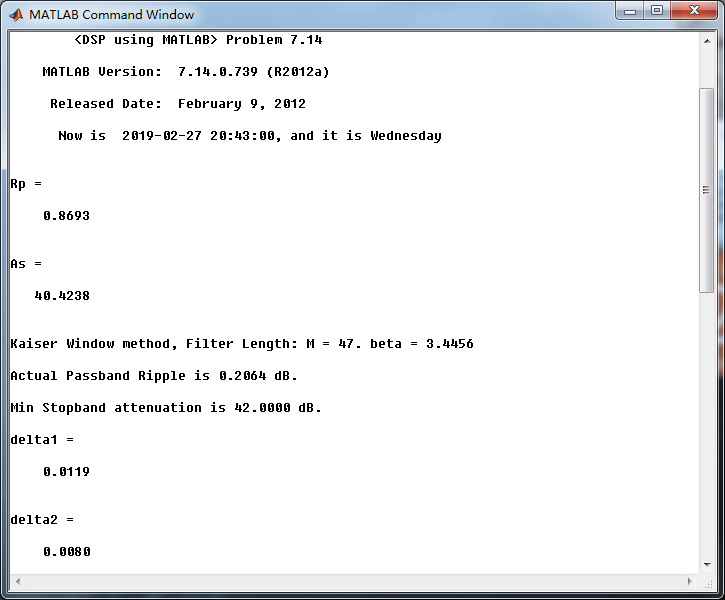
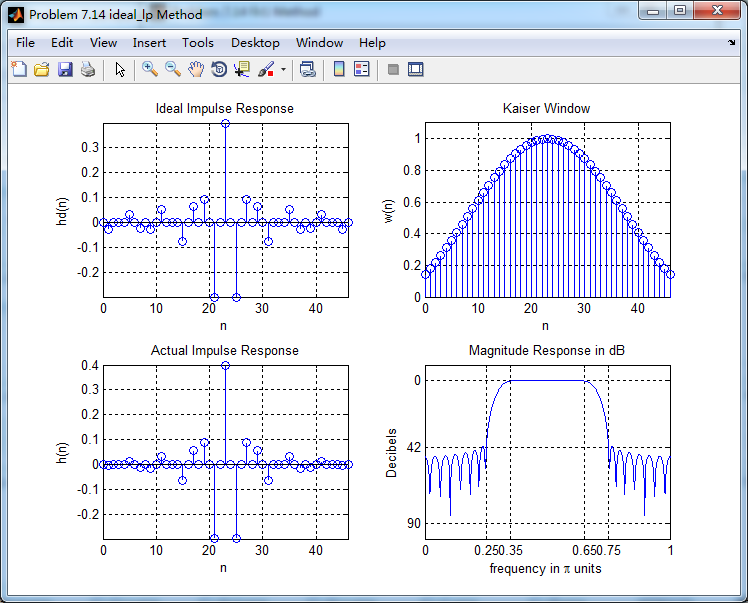
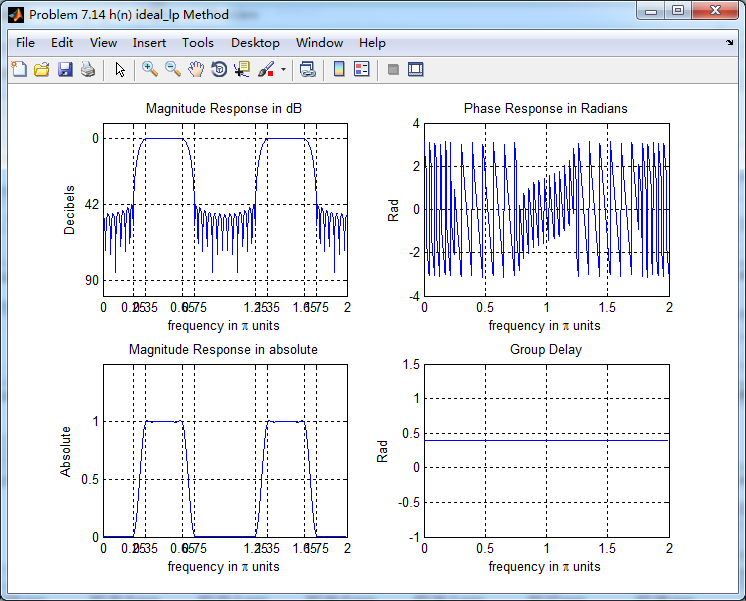
运行结果:


使用fir1函数得到的对应结果


《DSP using MATLAB》Problem 7.14的更多相关文章
- 《DSP using MATLAB》Problem 6.14
代码: %% ++++++++++++++++++++++++++++++++++++++++++++++++++++++++++++++++++++++++++++++++ %% Output In ...
- 《DSP using MATLAB》Problem 5.14
说明:这两个小题的数学证明过程都不会,欢迎博友赐教. 直接上代码: %% +++++++++++++++++++++++++++++++++++++++++++++++++++++++++++++++ ...
- 《DSP using MATLAB》Problem 4.14
代码: %% ---------------------------------------------------------------------------- %% Output Info a ...
- 《DSP using MATLAB》Problem 2.14
代码: %% ------------------------------------------------------------------------ %% Output Info about ...
- 《DSP using MATLAB》Problem 8.14
代码: %% ------------------------------------------------------------------------ %% Output Info about ...
- 《DSP using MATLAB》Problem 7.26
注意:高通的线性相位FIR滤波器,不能是第2类,所以其长度必须为奇数.这里取M=31,过渡带里采样值抄书上的. 代码: %% +++++++++++++++++++++++++++++++++++++ ...
- 《DSP using MATLAB》Problem 6.8
代码: %% ++++++++++++++++++++++++++++++++++++++++++++++++++++++++++++++++++++++++++++++++ %% Output In ...
- 《DSP using MATLAB》Problem 5.7
代码: %% ++++++++++++++++++++++++++++++++++++++++++++++++++++++++++++++++++++++++++++++++ %% Output In ...
- 《DSP using MATLAB》Problem 7.27
代码: %% ++++++++++++++++++++++++++++++++++++++++++++++++++++++++++++++++++++++++++++++++ %% Output In ...
随机推荐
- webpack 简单配置
webpack.config.js const path = require('path'); const HtmlWebpackPlugin=require('html-webpack-plugin ...
- linux&Mysql
安装iptable yum install iptables-services --- 安装并解压相关文件到mysql /usr/local/mysql --- 配置 未完待续(由于阿里云已经安装好我 ...
- Floyd判断环算法总结
Floyd判断环算法 全名Floyd’s cycle detection Algorithm, 又叫龟兔赛跑算法(Floyd's Tortoise and Hare),常用于链表.数组转化成链表的题目 ...
- Spring跟mybatis结合
<?xml version="1.0" encoding="UTF-8"?><beans xmlns="http://www.spr ...
- Python知识体系思维导图:
基础知识 数据类型 1.序列 2.字符串 3.列表和元组 4.字典和集合 循环 & 判断
- SSE 向量乘矩阵
struct Vector4 { float x, y, z, w; }; struct Matrix { ][]; }; void SSE_VectorMultiplyMatrix(const Ve ...
- 1011. World Cup Betting (20)
生词(在文中的意思) tie 平局 lay a bet 打赌 putting their money where their mouths were 把他们的钱用在刀刃上 manner of 的方式 ...
- 集成学习-Adaboost
Adaboost 中文名叫自适应提升算法,是一种boosting算法. boosting算法的基本思想 对于一个复杂任务来说,单个专家的决策过于片面,需要集合多个专家的决策得到最终的决策,通俗讲就是三 ...
- python命令行运行py文件找不到模块的解决办法
问题: 新建了一个项目,目录结构如下: 然后在pycharm中运行glovar是没有问题的,但是在命令行中运行就会提示找不到init模块 这是因为在pycharm中运行的时候,pycharm会自动将项 ...
- JS高德地图应用 ---- 鼠标点击加入标记 & POI搜索
代码如下 (填入Key值) : <!DOCTYPE html> <html> <head> <meta charset="utf-8"&g ...