
《DSP using MATLAB》Problem 7.27

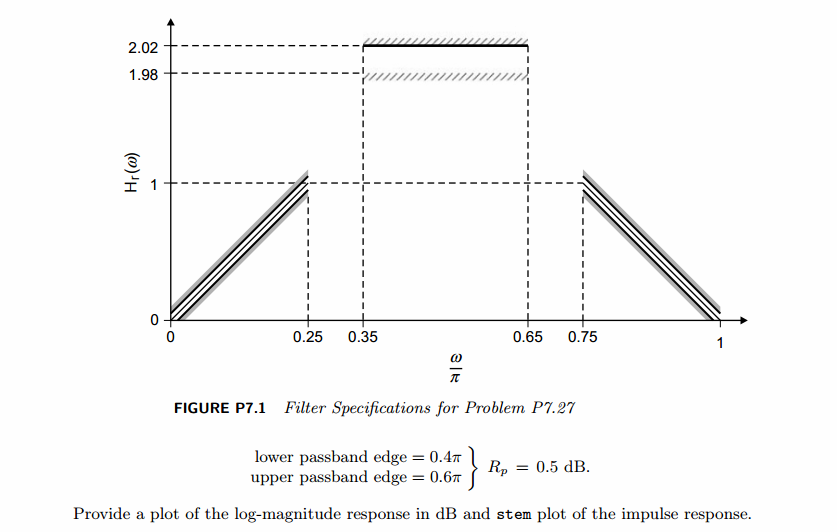
代码:
%% ++++++++++++++++++++++++++++++++++++++++++++++++++++++++++++++++++++++++++++++++

%%            Output Info about this m-file

fprintf('\n***********************************************************\n');

fprintf('        <DSP using MATLAB> Problem 7.27 \n\n');

banner();

%% ++++++++++++++++++++++++++++++++++++++++++++++++++++++++++++++++++++++++++++++++

% bandpass

ws1 = 0.25*pi; wp1 = 0.35*pi; wp2=0.65*pi; ws2 = 0.75*pi;

M=40;

delta_w = 2*pi/1000;

%% ------------------------------------

%%     fir2 Method

%% ------------------------------------

f = [0 ws1 wp1 wp2 ws2 pi]/pi;

m = [0  1  2   2    1  0 ];

h_check = fir2(M-1, f, m, hamming(M));          % if M is odd, then M+1; order

[db, mag, pha, grd, w] = freqz_m(h_check, [1]);

%[Hr,ww,P,L] = ampl_res(h_check);

[Hr, ww, b, L] = Hr_Type2(h_check);

fprintf('\n----------------------------------\n');

fprintf('\n fir2 function Method \n');

fprintf('\n----------------------------------\n');

Rp = -(min(db(floor(wp1/delta_w)+1 :1: floor(wp2/delta_w)+1)));             % Actual Passband Ripple

fprintf('\nActual Passband Ripple is %.4f dB.\n', Rp);

As = -round(max(db(1:1:floor(0.75*pi/delta_w)+1 )));                % Min Stopband attenuation

fprintf('\nMin Stopband attenuation is %.4f dB.\n', As);

[delta1, delta2] = db2delta(Rp, As)

figure('NumberTitle', 'off', 'Name', 'Problem 7.27 fir2 Method')

set(gcf,'Color','white');

subplot(2,1,1); stem([0:M-1], h_check); axis([0 M-1 -0.7 0.9]); grid on;

xlabel('n'); ylabel('h\_check(n)'); title('Actual Impulse Response');

subplot(2,1,2); plot(w/pi, db); axis([0 1 -70 10]); grid on;

set(gca,'YTickMode','manual','YTick',[-60,-21,0])

set(gca,'YTickLabelMode','manual','YTickLabel',['60';'21';' 0']);

set(gca,'XTickMode','manual','XTick',[0,0.25,0.35,0.65,0.75,1]);

xlabel('frequency in \pi units'); ylabel('Decibels'); title('Magnitude Response in dB');

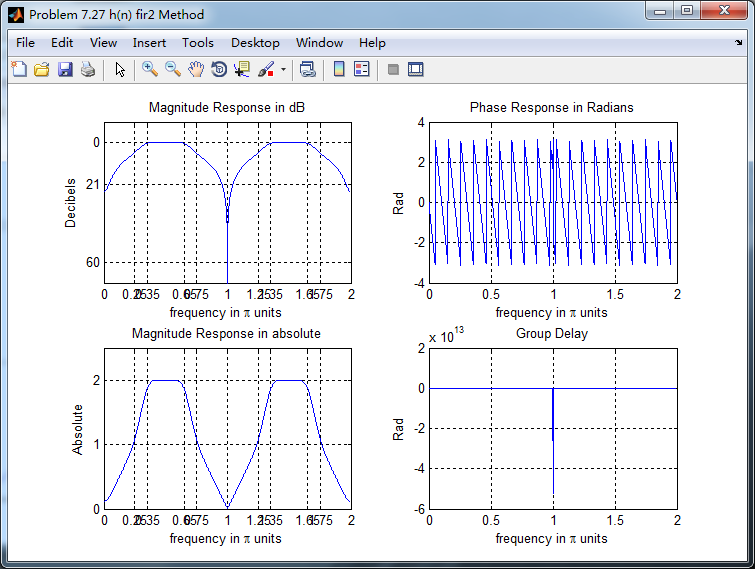
figure('NumberTitle', 'off', 'Name', 'Problem 7.27 h(n) fir2 Method')

set(gcf,'Color','white');

subplot(2,2,1); plot(w/pi, db); grid on; axis([0 2 -70 10]);

xlabel('frequency in \pi units'); ylabel('Decibels'); title('Magnitude Response in dB');

set(gca,'YTickMode','manual','YTick',[-60,-21,0]);

set(gca,'YTickLabelMode','manual','YTickLabel',['60';'21';' 0']);

set(gca,'XTickMode','manual','XTick',[0,0.25,0.35,0.65,0.75,1,1.25,1.35,1.65,1.75,2]);

subplot(2,2,3); plot(w/pi, mag); grid on; %axis([0 1 -100 10]);

xlabel('frequency in \pi units'); ylabel('Absolute'); title('Magnitude Response in absolute');

set(gca,'XTickMode','manual','XTick',[0,0.25,0.35,0.65,0.75,1,1.25,1.35,1.65,1.75,2]);

set(gca,'YTickMode','manual','YTick',[0,1.0,2.0]);

subplot(2,2,2); plot(w/pi, pha); grid on; %axis([0 1 -100 10]);

xlabel('frequency in \pi units'); ylabel('Rad'); title('Phase Response in Radians');

subplot(2,2,4); plot(w/pi, grd*pi/180);  grid on; %axis([0 1 -100 10]);

xlabel('frequency in \pi units'); ylabel('Rad'); title('Group Delay');

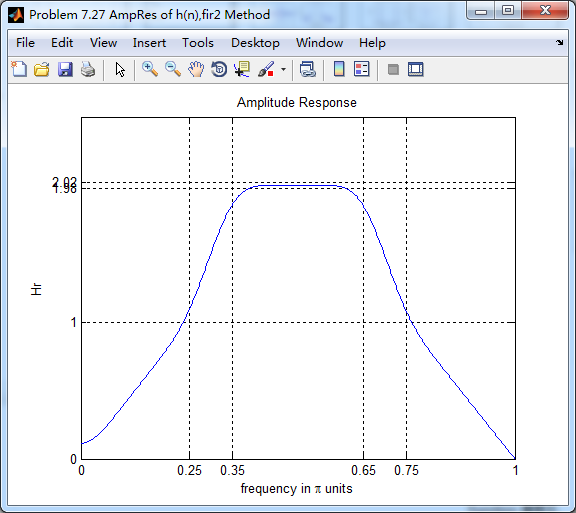
figure('NumberTitle', 'off', 'Name', 'Problem 7.27 AmpRes of h(n),fir2 Method')

set(gcf,'Color','white');

plot(ww/pi, Hr); grid on; %axis([0 1 -100 10]);

xlabel('frequency in \pi units'); ylabel('Hr'); title('Amplitude Response');

set(gca,'YTickMode','manual','YTick',[0, 1, 1.98,2.02]);

%set(gca,'YTickLabelMode','manual','YTickLabel',['90';'45';' 0']);

set(gca,'XTickMode','manual','XTick',[0,0.25,0.35,0.65,0.75,1]);
运行结果:

《DSP using MATLAB》Problem 7.27的更多相关文章
- 《DSP using MATLAB》Problem 5.27
代码: %% +++++++++++++++++++++++++++++++++++++++++++++++++++++++++++++++++++++++++++++++++++++ %% Outp ...
- 《DSP using MATLAB》Problem 8.27
7月底,又一个夏天,又一个火热的夏天,来到火炉城武汉,天天高温橙色预警,到今天已有二十多天. 先看看住的地方 下雨的时候是这样的 接着做题 代码: %% ----------------------- ...
- 《DSP using MATLAB》Problem 7.23
%% ++++++++++++++++++++++++++++++++++++++++++++++++++++++++++++++++++++++++++++++++ %% Output Info a ...
- 《DSP using MATLAB》Problem 7.16
使用一种固定窗函数法设计带通滤波器. 代码: %% ++++++++++++++++++++++++++++++++++++++++++++++++++++++++++++++++++++++++++ ...
- 《DSP using MATLAB》Problem 7.38
代码: %% ++++++++++++++++++++++++++++++++++++++++++++++++++++++++++++++++++++++++++++++++ %% Output In ...
- 《DSP using MATLAB》Problem 7.36
代码: %% ++++++++++++++++++++++++++++++++++++++++++++++++++++++++++++++++++++++++++++++++ %% Output In ...
- 《DSP using MATLAB》Problem 7.32
代码: %% ++++++++++++++++++++++++++++++++++++++++++++++++++++++++++++++++++++++++++++++++ %% Output In ...
- 《DSP using MATLAB》Problem 7.31
参照Example7.27,因为0.1π=2πf1 f1=0.05,0.9π=2πf2 f2=0.45 所以0.1π≤ω≤0.9π,0.05≤|H|≤0.45 代码: %% +++++++++ ...
- 《DSP using MATLAB》Problem 7.26
注意:高通的线性相位FIR滤波器,不能是第2类,所以其长度必须为奇数.这里取M=31,过渡带里采样值抄书上的. 代码: %% +++++++++++++++++++++++++++++++++++++ ...
随机推荐
- linux&Mysql
安装iptable yum install iptables-services --- 安装并解压相关文件到mysql /usr/local/mysql --- 配置 未完待续(由于阿里云已经安装好我 ...
- 使用Spark进行搜狗日志分析实例——map join的使用
map join相对reduce join来说,可以减少在shuff阶段的网络传输,从而提高效率,所以大表与小表关联时,尽量将小表数据先用广播变量导入内存,后面各个executor都可以直接使用 pa ...
- Thread类中start()方法喝run()方法有什么不同?
答:当调用start()方法时会启动一个新创建的线程,然后在start()内部调用run()方法.这和直接调用run()方法不同.直接调用run()方法只是在原来的线程中调用,没有创建新的线程.只有调 ...
- Excel身份证验证,身份证校验公式
=IF(LEN(Q4)=0,"空",IF(LEN(Q4)=15,"老号",IF(LEN(Q4)<>18,"位数不对",IF(CH ...
- redis的特点
一.Redis 特点 1.Redis 是一个基于内存的高性能key-value数据库, 2.Redis最大的魅力是支持保存多种数据结构,此外单个value的最大限制是1GB,不像 memcached只 ...
- Airbnb Javascript 代码规范重要点总结es6
中文原地址 1.对所有的引用使用 const 而非 var.这能确保你无法对引用重复赋值. 当需要变动引用时,使用let. const和let都是块级作用域. 2.创建对象的方式: const ite ...
- linux install ftp server
first yum install vsftpd 第二部:vi /etc/vsftpd/vsftpd.conf 添上下面一段话 anonymous_enable=YESlocal_enable=YE ...
- python并发_进程_multiprocessing
多进程基础, 主要是用了 multiprocessing模块 : 在一个python进程中开启子进程,start方法和并发效果. import time from multiprocessing im ...
- Ionic2 渐变隐藏导航栏|标题栏
废话少说 直接上代码.... //导入需要用到的命名空间 ViewChild,Content import { Component, ViewChild } from '@angular/core'; ...
- JavaScript的popup框
JavaScript中可以创建三种消息框:警告框.确认框.提示框. 1.警告框 警告框经常用于确保用户可以得到某些信息. 当警告框出现后,用户需要点击确定按钮才能继续进行操作. 语法:alert(&q ...