
一起来学Spring Cloud | 第四章:服务消费者 ( Feign )
上一章节,讲解了SpringCloud如何通过RestTemplate+Ribbon去负载均衡消费服务,本章主要讲述如何通过Feign去消费服务。
一、Feign 简介:
Feign是一个便利的rest框架,在Ribbon的基础上进行了一次改进,采用接口的方式,将需要调用的其他服务的方法定义成抽象方法,不需要自己构建http请求,简化了调用。但是最后的原理还是通过ribbon在注册服务器中找到服务实例,然后对请求进行分配。
在工作中,我们基本上都是使用Feign来进行服务调用,因为Feign使用起来就像是调用自身本地的方法一样,而感觉不到是调用远程方法,相当舒服,它主要有3个优点。
- 1. feign本身里面就包含有了ribbon,具有负载均衡的能力
- 2. fegin是一个采用基于接口的注解的编程方式,更加简便
- 3. fegin整合了Hystrix,具有熔断的能力
二、 准备工作:
1. 启动eureka-server 工程,eureka注册中心就启动了。
2. 启动springcloud-eureka-client工程,springcloud-eureka-client工程的端口为9300。
3. 将springcloud-eureka-client工程的application.properties文件中端口改成9400,然后再启动springcloud-eureka-client。
通过上面步骤,我们就启动了端口9300,9400两个一样的springcloud-eureka-client服务模块(为了测试feign的负载均衡能力)。
三、新建一个feign服务:
1. 新建一个spring-boot工程,取名为springcloud-feign-client,修改pox文件如下:
<parent>标签就是引入我们第一章节新建的父工程的pom.xml文件,具体可参考:一起来学Spring Cloud | 第一章 :如何搭建一个多模块的springcloud项目
<?xml version="1.0" encoding="UTF-8"?>

<project xmlns="http://maven.apache.org/POM/4.0.0" xmlns:xsi="http://www.w3.org/2001/XMLSchema-instance"

	xsi:schemaLocation="http://maven.apache.org/POM/4.0.0 http://maven.apache.org/xsd/maven-4.0.0.xsd">

	<modelVersion>4.0.0</modelVersion>

	<parent>

		<groupId>com.haly</groupId>

		<artifactId>springcloud</artifactId>

		<version>0.0.1-SNAPSHOT</version>

	</parent>

	<groupId>com.haly</groupId>

	<artifactId>springcloud-feign-client</artifactId>

	<version>0.0.1-SNAPSHOT</version>

	<name>springcloud-ribbon-client</name>

	<description>新建一个springcloud项目</description>

	<dependencies>

		<dependency>

            <groupId>org.springframework.cloud</groupId>

            <artifactId>spring-cloud-starter-netflix-eureka-client</artifactId>

        </dependency>

        <dependency>

            <groupId>org.springframework.boot</groupId>

            <artifactId>spring-boot-starter-web</artifactId>

        </dependency>

           <dependency>

            <groupId>org.springframework.cloud</groupId>

            <artifactId>spring-cloud-starter-openfeign</artifactId>

        </dependency>

	</dependencies>

	<build>

		<plugins>

			<plugin>

				<groupId>org.springframework.boot</groupId>

				<artifactId>spring-boot-maven-plugin</artifactId>

			</plugin>

		</plugins>

	</build>

</project>
2. 修改application.properties文件如下
server.port=9600

spring.application.name=springcloud-feign-client

eureka.client.serviceUrl.defaultZone=http://localhost:8761/eureka/
3. 模块启动类需要增加注解@EnableFeignClients,表示开启Feign的功能
package com.haly;

import org.springframework.boot.SpringApplication;

import org.springframework.boot.autoconfigure.SpringBootApplication;

import org.springframework.cloud.client.discovery.EnableDiscoveryClient;

import org.springframework.cloud.openfeign.EnableFeignClients;

@SpringBootApplication

@EnableFeignClients

@EnableDiscoveryClient

public class SpringcloudFeignClientApplication {

	public static void main(String[] args) {

		SpringApplication.run(SpringcloudFeignClientApplication.class, args);

	}

}
4. 定义一个feign接口,通过@FeignClient(“服务名”),来指定调用哪个服务。本章案例中调用了springcloud-eureka-client服务的“/hello”接口
springcloud-eureka-client模块中的hello接口,具体实现可以参考:一起来学Spring Cloud | 第二章:服务注册和发现组件 (Eureka)
ps:抽象方法的注解、方法名、参数要和服务提供方保持一致(这里是与springcloud-eureka-client模块中的 /hello方法保持一致)
package com.haly.romote;

import org.springframework.cloud.openfeign.FeignClient;

import org.springframework.web.bind.annotation.RequestMapping;

import org.springframework.web.bind.annotation.RequestMethod;

import org.springframework.web.bind.annotation.RequestParam;

@FeignClient(value = "springcloud-eureka-client")

public interface FeignRemoteService {

    @RequestMapping(value = "/hello",method = RequestMethod.GET)

    public String hello(@RequestParam(value = "name") String name);

}
5. controller层,对外暴露一个"/getHello"的API接口,给页面测试,通过上面定义的Feign客户端FeignRemoteService来消费服务。代码如下:
package com.haly.controller;

import org.springframework.beans.factory.annotation.Autowired;

import org.springframework.web.bind.annotation.GetMapping;

import org.springframework.web.bind.annotation.RequestParam;

import org.springframework.web.bind.annotation.RestController;

import com.haly.romote.FeignRemoteService;

@RestController

public class FeignController {

    @Autowired

    FeignRemoteService feignRemoteService;

    @GetMapping(value = "/getHello")

    public String getHello(@RequestParam String name) {

        return feignRemoteService.hello(name);

    }

}
6. 启动各个服务模块,服务注册结果如下
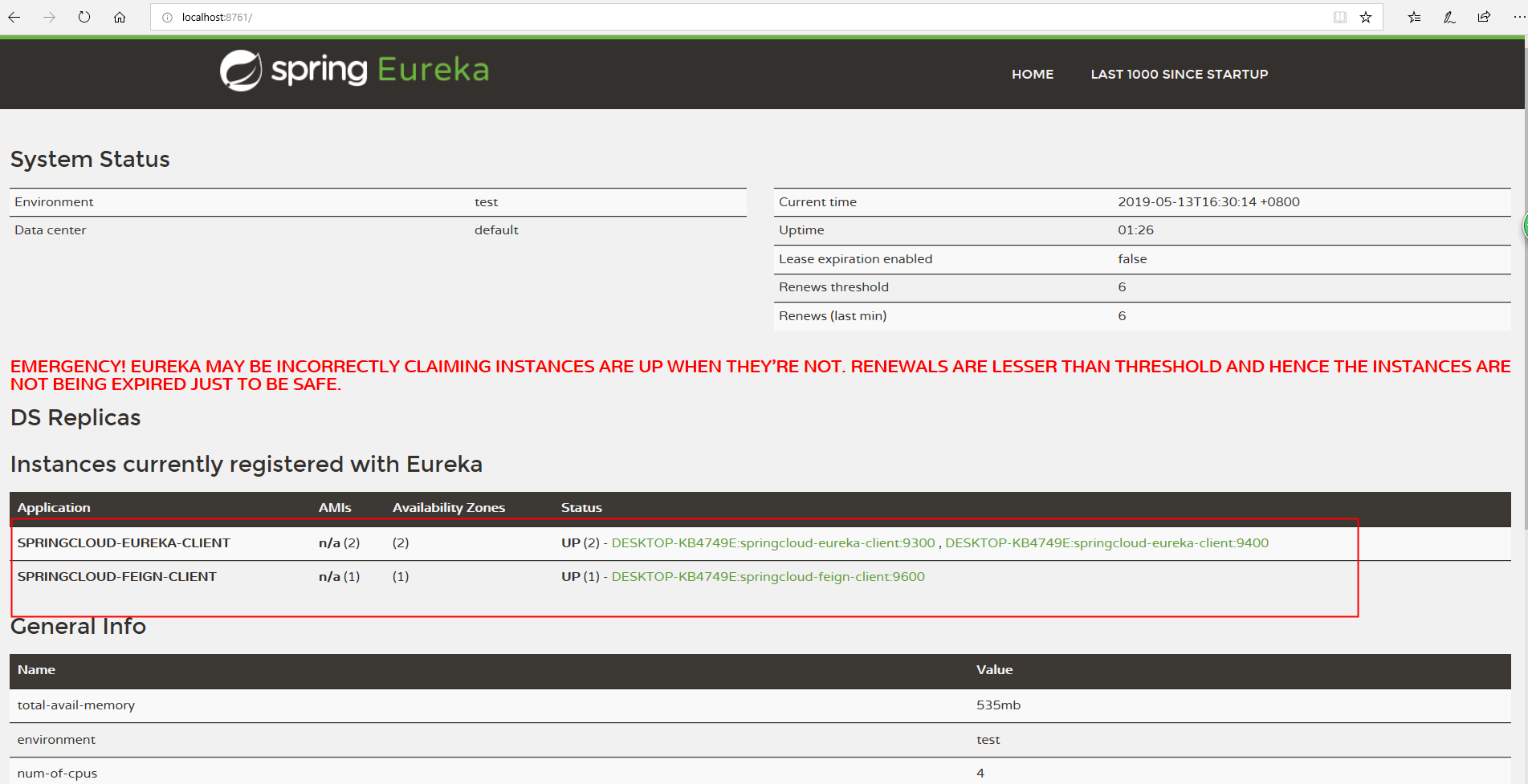
访问地址 http://localhost:9600/getHello?name=young码农 , 多次轮流访问页面,出现9300,9400服务接口返回结果,证明feign是整合了负载均衡功能


四、总结:
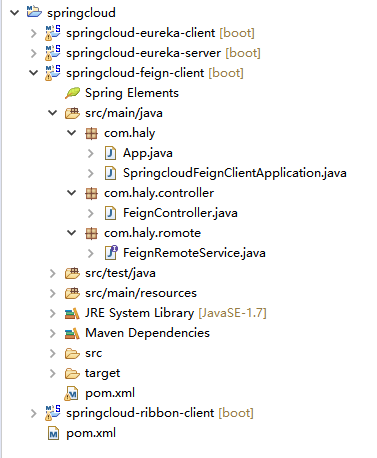
加上本章节代码后,代码目录结构:
一起来学Spring Cloud | 第四章:服务消费者 ( Feign )的更多相关文章
- spring cloud (四、服务消费者demo_consumer)
spring cloud (一.服务注册demo_eureka) spring cloud (二.服务注册安全demo_eureka) spring cloud (三.服务提供者demo_provid ...
- 一起来学Spring Cloud | 第六章:服务网关 ( Zuul)
本章节,我们讲解springcloud重要组件:微服务网关Zuul.如果有同学从第一章看到本章的,会发现我们已经讲解了大部分微服务常用的基本组件. 已经讲解过的: 一起来学Spring Cloud | ...
- 一起来学Spring Cloud | 第五章:熔断器 ( Hystrix)
在微服务项目中,一个系统可以分割成很多个不同的服务模块,不同模块之间我们通常需要进行相互调用.springcloud中可以使用RestTemplate+Ribbon和Feign来调用(工作中基本都是使 ...
- 一起来学Spring Cloud | 第七章:分布式配置中心(Spring Cloud Config)
上一章节,我们讲解了服务网关zuul,本章节我们从git和本地两种存储配置信息的方式来讲解springcloud的分布式配置中心-Spring Cloud Config. 一.Spring Cloud ...
- 一起来学Spring Cloud | 第三章:服务消费者 (负载均衡Ribbon)
一.负载均衡的简介: 负载均衡是高可用架构的一个关键组件,主要用来提高性能和可用性,通过负载均衡将流量分发到多个服务器,多服务器能够消除单个服务器的故障,减轻单个服务器的访问压力. 1.服务端负载均衡 ...
- Spring Cloud 入门教程(二): 服务消费者(rest+ribbon)
在上一篇文章,讲了服务的注册和发现.在微服务架构中,业务都会被拆分成一个独立的服务,服务与服务的通讯是基于http restful的.Spring cloud有两种服务调用方式,一种是ribbon+r ...
- Spring Cloud Netflix之Eureka服务消费者
Eureka服务消费者介绍 Eureka服务消费者用于发现服务和消费服务,发现服务通过Eureka Client完成,消费服务通过Ribbon完成,以实现负载均衡.在实际项目中,一个服务往往同时是服务 ...
- Spring Cloud Eureka 注册中心 服务消费者 服务提供者之间的关系以及高可用之间的联系
注册中心:提供服务的注册与查询(发现) 服务提供者:服务的提供方,提供服务的一方. 服务消费者:服务的消费方,使用服务的一方. 我们没有注册中心,服务提供者与服务消费者同样可以调用,通过spring中 ...
- 一起来学Spring Cloud | 第八章:消息总线(Spring Cloud Bus)
上一章节,我们讲解了分布式配置中心spring cloud config,我们把配置项存放在git或者本地,当我们修改配置时,需要重新启动服务才能生效.但是在生产上,一个服务部署了多台机器,重新启动比 ...
随机推荐
- unbuntu下安装qq
由于Wine QQ一直没更新版本导致目前版本报版本过低无法使用,暂时先上UK官网的国际版Wine QQ,虽然功能没那么新,但稳定能用: 下载: 下载地址:http://www.ubuntukylin. ...
- 【LeetCode】046. Permutations
题目: Given a collection of distinct numbers, return all possible permutations. For example,[1,2,3] ha ...
- AtCoder Regular Contest 074 E:RGB Sequence
题目传送门:https://arc074.contest.atcoder.jp/tasks/arc074_c 题目翻译 给你一行\(n\)个格子,你需要给每个格子填红绿蓝三色之一,并且同时满足\(m\ ...
- AtCoder Grand Contest 013 C:Ants on a Circle
题目传送门:https://agc013.contest.atcoder.jp/tasks/agc013_c 题目翻译 给你一个周长为\(L\)的圆,有\(N\)只蚂蚁在圆上爬,速度为一单位距离每秒. ...
- Windows WMIC命令使用详解2
Windows WMIC命令使用详解(附实例) https://blog.csdn.net/aflyeaglenku/article/details/77878525 第一次执行WMIC命令时,Win ...
- 在VMWare上安装ubuntu及VMWare&nbs…
在VMWare上安装ubuntu及VMWare Tools 一.摘要 该文主要介绍了如何在虚拟机上安装ubuntu,和安装VMWare Tools设置共享文件夹,最后对ubuntu做了简单的介绍. 二 ...
- RHEL 6 搭建ftp服务 xinetd,telnet
1.挂载光盘 设置vmware中光驱选项,载入rhel6光盘镜像 6 搭建ftp服务 xinetd,telnet" /> 2.安装rpm包 输入"#cd /media/&qu ...
- 使用MeshLab的技巧总结(自己原创总结)
1.放大点的显示,Alt+wheel,即按住Alt键后使用鼠标滑轮改变点的显示大小.
- 深度解析VC中的消息传递机制
摘要:Windows编程和Dos编程,一个很大的区别就是,Windows编程是事件驱动,消息传递的.所以,要学好Windows编程,必须 对消息机制有一个清楚的认识,本文希望能够对消息的传递做一个全面 ...
- HDU - 6156 2017CCPC网络赛 Palindrome Function(数位dp找回文串)
Palindrome Function As we all know,a palindrome number is the number which reads the same backward a ...