
原生js之canvas时钟组件
canvas一直是前端开发中不可或缺的一种用来绘制图形的标签元素,比如压缩上传的图片、比如刮刮卡、比如制作海报、图表插件等,很多人在面试的过程中也会被问到有没有接触过canvas图形绘制。
定义
canvas元素用于图形的绘制,通过脚本 (通常是JavaScript)来完成。
canvas标签只是图形容器,您必须使用脚本来绘制图形。
浏览器支持
Internet Explorer 9、Firefox、Opera、Chrome 和 Safari 支持
那么本篇文章就通过一个时钟组件来熟悉使用一下关于canvas的api。
<!DOCTYPE html>

<html>

<head>

<meta charset="UTF-8" />

<title>canvas时钟</title>

<style>

*{margin:0;padding:0;}

body{text-align:center;padding-top:100px;}

</style>

</head>

<body>

<canvas id="clock" width="200px" height="200px"></canvas>

<script>

(function(win){

	function DrawClock(options){

		this.canvas = options.el;

		this.ctx    = this.canvas.getContext('2d');//方法返回一个用于在画布上绘图的环境

		this.width  = this.ctx.canvas.width;

		this.height = this.ctx.canvas.height;

		this.r      = this.width / 2;

		this.rem    = this.width / 200;

		this.digits = [3, 4, 5, 6, 7, 8, 9, 10, 11, 12, 1, 2];

	    var self    = this;

	    self.init();

	    setInterval(function(){

	    	self.init();

	    }, 1000);

	}

	DrawClock.prototype = {

		init: function(){

			var ctx = this.ctx;

			ctx.clearRect(0, 0, this.width, this.height);    //在给定的矩形内清除指定的像素

			var now = new Date();

			var hours = now.getHours();

			var minutes = now.getMinutes();

			var seconds = now.getSeconds();

			var hour = hours >= 12 ? hours - 12 : hours;

			var minute = minutes + seconds / 60;

			this.drawBackground();

			this.drawHour(hour, minute);

			this.drawMinute(minute);

			this.drawSecond(seconds);

			this.drawDot();

			ctx.restore();

		},

		drawBackground: function(){

			var ctx = this.ctx;

			var self = this;

			ctx.save();

			ctx.translate(this.r, this.r);         //重新映射画布上的 (0,0) 位置

			ctx.beginPath();

			ctx.lineWidth = 8 * this.rem;

			ctx.arc(0, 0, this.r - ctx.lineWidth / 2, 0, 2 * Math.PI, false);    //创建弧/曲线(用于创建圆形或部分圆)

			ctx.stroke();

			ctx.font = 16  * this.rem + "px Arial";//设置或返回文本内容的当前字体属性

			ctx.textAlign = "center";              //设置或返回文本内容的当前对齐方式

			ctx.textBaseline = "middle";           //设置或返回在绘制文本时使用的当前文本基线

			this.digits.forEach(function(number, i){

				var rad = 2 * Math.PI / 12 * i;

				var x = Math.cos(rad) * (self.r - 33 * self.rem);

				var y = Math.sin(rad) * (self.r - 33 * self.rem);

				ctx.fillText(number, x, y);        //在画布上绘制"被填充的"文本

			});

			//分钟的刻度,每分钟转6deg

			for (var i = 0; i < 60; i++){

				ctx.save();                        //保存当前环境的状态

				ctx.rotate(6 * i * Math.PI / 180); //旋转当前绘图

				ctx.beginPath();                   //起始一条路径,或重置当前路径

				ctx.moveTo(0, -82 * this.rem);     //把路径移动到画布中的指定点,不创建线条

				ctx.lineTo(0, -87 * this.rem);     //添加一个新点,然后在画布中创建从该点到最后指定点的线条

				ctx.closePath();                   //创建从当前点回到起始点的路径

				ctx.strokeStyle = '#000';          //设置或返回用于笔触的颜色、渐变或模式

				ctx.lineWidth = 1 * this.rem;      //设置或返回当前的线条宽度

				ctx.stroke();                      //绘制已定义的路径

				ctx.restore();                     //返回之前保存过的路径状态和属性

			}

			//小时的刻度,每小时转30deg

			for (var i = 0; i < 12; i++){

				ctx.save();

				ctx.rotate(30 * i * Math.PI / 180);

				ctx.beginPath();

				ctx.moveTo(0, -79 * this.rem);

				ctx.lineTo(0, -87 * this.rem);

				ctx.closePath();

				ctx.strokeStyle = '#000';

				ctx.lineWidth = 2 * this.rem;

				ctx.stroke();

				ctx.restore();

			}

		},

		drawHour: function(hour, minute){

			var ctx = this.ctx;

			ctx.save();

			ctx.beginPath();

			var hRad = 2 * Math.PI / 12 * hour;

			var mRad = 2 * Math.PI / 12 / 60 * minute;

			ctx.rotate(hRad + mRad);

			ctx.lineWidth = 6 * this.rem;

			ctx.lineCap = "round";                 //设置或返回线条的结束端点样式

			ctx.moveTo(0, 10 * this.rem);

			ctx.lineTo(0, -this.r / 2);

			ctx.stroke();

			ctx.restore();

		},

		drawMinute: function(minute){

			var ctx = this.ctx;

			ctx.save();

			ctx.beginPath();

			var rad = 2 * Math.PI / 60 * minute;

			ctx.rotate(rad);

			ctx.lineWidth = 3 * this.rem;

			ctx.lineCap = "round";

			ctx.moveTo(0, 10 * this.rem);

			ctx.lineTo(0, -this.r + 26 * this.rem);

			ctx.stroke();

			ctx.restore();

		},

		drawSecond: function(second){

			var ctx = this.ctx;

			ctx.save();

			ctx.beginPath();

			ctx.fillStyle = "#c14543";

			var rad = 2 * Math.PI / 60 * second;

			ctx.rotate(rad);

			ctx.moveTo(-3 * this.rem, 20 * this.rem);

			ctx.lineTo(3 * this.rem, 20 * this.rem);

			ctx.lineTo(1, -this.r + 26 * this.rem);

			ctx.lineTo(-1, -this.r + 26 * this.rem);

			ctx.fill();    //填充当前绘图(路径)

			ctx.restore();

		},

		drawDot: function(minute){

			var ctx = this.ctx;

			ctx.beginPath();

			ctx.fillStyle = "#fff";

			ctx.arc(0, 0, 3 * this.rem, 0, 2 * Math.PI, false);

			ctx.fill();

		}

	};

       win.DrawClock = DrawClock;

})(window);

new DrawClock({el: document.getElementById("clock")});

</script>

</body>

</html>
只要心中有丘壑,就能耕出二亩田!canvas时钟用到了canvas中大部分的api,通过学习canvas时钟的代码实现,很能了解canvas的属性和方法,同时,实现时钟效果时,用到了数学中的几何模型正弦sin和余弦cos以及弧度的计算方法,又重温了一把当年学数学时的许多乐趣,可谓是一举两得。
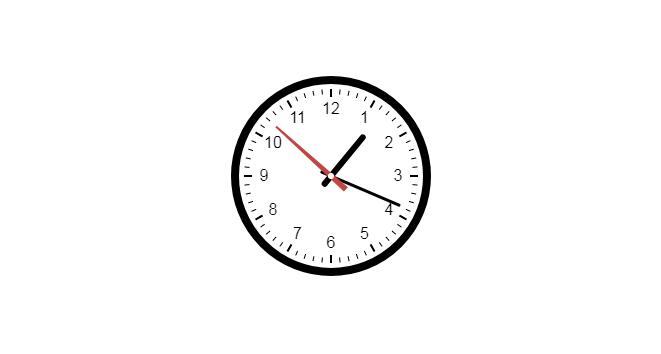
时钟效果图如下:
原生js之canvas时钟组件的更多相关文章
- 原生js实现canvas气泡冒泡效果
说明: 本文章主要分为ES5和ES6两个版本 ES5版本是早期版本,后面用ES6重写优化的,建议使用ES6版本. 1, 原生js实现canvas气泡冒泡效果的插件,api丰富,使用简单2, 只需引入J ...
- 基于原生js的返回顶部组件,兼容主流浏览器
基于原生js的返回顶部插件,兼容IE8及以上.FF.chrome等主流浏览器. js文件中封装了getScrollTop()和changeScrollTop()函数分别用于获取滚动条滚动的高度和修改滚 ...
- 原生js实现Canvas实现拖拽式绘图,支持画笔、线条、箭头、三角形和圆形等等图形绘制功能,有实例Demo
前言 需要用到图形绘制,没有找到完整的图形绘制实现,所以自己实现了一个 - - 演示地址:查看演示DEMO 新版本支持IE5+(你没看错,就是某软的IE浏览器)以上任意浏览器的Canvas绘图:htt ...
- 原生js实现中文时钟
零.寒暄 终于一个月可以更新两篇博客了,开心.昨天花了大概一天的时间玩了下github,基本的clone和push都搞定了,如果有和我一样的新手没调通的,大家可以交流. 另外,说个题外话,大家发现我的 ...
- 原生JS制作简易Tabs组件
<!DOCTYPE html> <html lang="en"> <head> <meta charset="UTF-8&quo ...
- 原生js也可以自定义组件
Web Components 是一套不同的技术,允许您创建可重用的定制元素(它们的功能封装在您的代码之外)并且在您的web应用中使用它们. 它由三项主要技术组成,它们可以一起使用来创建封装功能的定制元 ...
- 原生js 基于canvas写一个简单的前端 截图工具
先看效果 <!DOCTYPE html> <html> <head> <meta charset="utf-8"> <titl ...
- 原生JS 将canvas生成图片
核心代码: <script type="text/javascript"> // Converts image to canvas; returns new canva ...
- 原生JS实现动态时钟(优化)
<!doctype html> <html> <head> <meta charset="utf-8"> <title> ...
随机推荐
- 第二章 JavaScript核心语法
第二章 avaScript核心语法 一.变量的声明和赋值 JavaScript是一种弱类型语言,没有明确的数据类型,也就是在声明变量时不需要指定数据类型,变量的类型由赋给变量的值决定. 在Java ...
- Spring AOP AspectJ
本文讲述使用AspectJ框架实现Spring AOP. 再重复一下Spring AOP中的三个概念, Advice:向程序内部注入的代码. Pointcut:注入Advice的位置,切入点,一般为某 ...
- Extensions in UWP Community Toolkit - FrameworkElement Extensions
概述 UWP Community Toolkit Extensions 中有一个为FrameworkElement 提供的扩展 - FrameworkElement Extensions,本篇我们结合 ...
- SpringCloud的应用发布(三)vmvare+linux,xftp,xshell连接linux失败
Vmvare内的linux虚拟机已经启动,但是 xftp和xshell连接不上? 环境信息:子网 192.168.136.* linux ip:192.168.136.100 一.核对linux的ip ...
- 在GridControl表格控件中实现多层级主从表数据的展示
在一些应用场景中,我们需要实现多层级的数据表格显示,如常规的二级主从表数据展示,甚至也有多个层级展示的需求,那么我们如何通过DevExpress的GridControl控表格件实现这种业务需求呢?本篇 ...
- apache修改最大连接数报错
报错的内容: AH00180: WARNING: MaxRequestWorkers of 2500 exceeds ServerLimit value of 256 servers, decreas ...
- Java-NIO(二):缓冲区(Buffer)的数据存取
缓冲区(Buffer): 一个用于特定基本数据类行的容器.有java.nio包定义的,所有缓冲区都是抽象类Buffer的子类. Java NIO中的Buffer主要用于与NIO通道进行交互,数据是从通 ...
- 基于 MySQL 的数据库实践(准备工作)
背景 本学期在北京大学选修了<数据库概论>的实验班课程,由于 SQL 语法并不是特别理论的内容,因此课上暂时也没有特别展开.出于探索数据库领域的兴趣,使用国内普遍使用的数据库软件 MySQ ...
- 使用 WTForms 进行表单验证的例子
#使用 WTForms 进行表单验证的例子 from wtforms import Form from wtforms import BooleanField from wtforms import ...
- js面向对象之公有、私有、静态属性和方法详解
现下,javascript大行其道,对于网站开发人员来说,javascript是必需掌据的一门语言,但随着jquery等框架的流行和使用,许多人对于原生javascript缺乏深入的理解,习惯了函数式 ...