
优化实现Mobile Diffuse动态直接光照shader
项目中美术使用了Unity自带的Mobile/Diffuse这个shader制作了一部分场景素材,这个shader会依赖场景中的动态实时光源,比较耗费。
于是自己手动重写一份,简化shader的消耗,但同时保持美术已经制作场景的效果。
Shader "Mobile/Diffuse"

{

    Properties

    {

        _MainTex ("Base (RGB)", 2D) = "white" {}

    }

    SubShader

    {

        Tags { "RenderType"="Opaque" }

        LOD

        CGPROGRAM

        #pragma surface surf Lambert noforwardadd nolightmap noshadow novertexlights nodynlightmap nodirlightmap

        sampler2D _MainTex;

        struct Input

        {

            float2 uv_MainTex;

        };

        void surf (Input IN, inout SurfaceOutput o) {

            fixed4 c = tex2D(_MainTex, IN.uv_MainTex);

            o.Albedo = c.rgb;

            o.Alpha = c.a;

        }

        ENDCG

    }

    Fallback "Mobile/VertexLit"

}
我在原始shader上添加了一些编译选项用来关闭一些特性,但编译出来的shader还是有很多非必要的运算。
手动实现一份noforwardadd的(只有一个pass)版本:
Shader "James/Scene/Mesh Lighting"

{

    Properties

    {

        _MainTex ("Base (RGB)", 2D) = "white" {}

    }

    SubShader

    {

        Tags { "RenderType"="Opaque" "Queue"="Geometry" }

        LOD

        Pass

        {

            Tags { "LightMode"="ForwardBase" }

            // Lighting Off

            CGPROGRAM

            #pragma fragmentoption ARB_precision_hint_fastest

            #pragma vertex vert

            #pragma fragment frag

            #pragma multi_compile_fwdbase

            #pragma multi_compile_fog

            #include "UnityCG.cginc"

            float4 _LightColor0;

            uniform sampler2D _MainTex;

            uniform half4 _MainTex_ST;

            struct vertexIN_base

            {

                float4 vertex : POSITION;

                float3 normal : NORMAL;

                float2 texcoord : TEXCOORD0;

            };

            struct v2f_base

            {

                float4 pos : SV_POSITION;

                fixed3 vertexLight : COLOR;

                half2  uv : TEXCOORD0;

                float3 normal : TEXCOORD1;

                float3 lightDir : TEXCOORD2;

                UNITY_FOG_COORDS()

            };

            v2f_base vert(vertexIN_base v)

            {

                v2f_base o;

                o.pos = UnityObjectToClipPos(v.vertex);

                o.uv = TRANSFORM_TEX(v.texcoord, _MainTex);

                o.normal = v.normal;

                o.lightDir = ObjSpaceLightDir(v.vertex);

                half3 worldNormal = UnityObjectToWorldNormal(v.normal);

                float3 shlight = ShadeSH9(float4(worldNormal, 1.0));

                o.vertexLight = shlight;

                #ifdef VERTEXLIGHT_ON

                    o.vertexLight += Shade4PointLights (

                        unity_4LightPosX0, unity_4LightPosY0, unity_4LightPosZ0,

                        unity_LightColor[].rgb, unity_LightColor[].rgb, unity_LightColor[].rgb, unity_LightColor[].rgb,

                        unity_4LightAtten0, worldPos, worldNormal

                        );

                #endif

                UNITY_TRANSFER_FOG(o,o.pos);

                return o;

            }

            fixed4 frag(v2f_base i) : COLOR

            {

                i.lightDir = normalize(i.lightDir);

                i.normal = normalize(i.normal);

                float diffuse = max(, dot(i.normal, i.lightDir));

                fixed4 mainColor = tex2D(_MainTex, i.uv);

                fixed4 clr = mainColor * _LightColor0 * diffuse;

                clr.rgb += mainColor.rgb * i.vertexLight;

                UNITY_APPLY_FOG(i.fogCoord,clr);

                return clr;

            }

            ENDCG

        }

    }

    FallBack Off

}
上述shader和Mobile Diffuse效果基本一致(场景中光照并不复杂),并且默认的效果也是不带forward add的。
但这个shader还是依赖了场景中的实施光源数据。
于是乎,进一步,将场景中的实时光源全部移除,并将光源的颜色和方向信息直接写在shader的属性中,得到了下面的去光源版本:
Shader "James/Scene/Mesh Diffuse"

{

    Properties

    {

        _MainTex ("Base (RGB)", 2D) = "white" {}

        _MainLightColor("主光颜色", Color) = (,,,)

        _MainLightDir("主光方向", Vector) = (,,,)

        _SecondLightColor("辅光颜色", Color) = (,,,)

        _SecondLightDir("辅光方向", Vector) = (,,,)

        _SecondLightBrightness ("辅光强度", Range(, )) = 0.9

    }

    SubShader

    {

        Tags { "RenderType"="Opaque" "Queue"="Geometry" }

        LOD

        Pass

        {

            Tags { "LightMode"="ForwardBase" }

            Lighting Off

            CGPROGRAM

            #pragma fragmentoption ARB_precision_hint_fastest

            #pragma vertex vert

            #pragma fragment frag

            #pragma multi_compile_fog

            #include "UnityCG.cginc"

            float4 _MainLightColor;

            float4 _MainLightDir;

            float4 _SecondLightColor;

            float4 _SecondLightDir;

            float _SecondLightBrightness;

            uniform sampler2D _MainTex;

            uniform half4 _MainTex_ST;

            struct vertexIN_base

            {

                float4 vertex : POSITION;

                float3 normal : NORMAL;

                float2 texcoord : TEXCOORD0;

            };

            struct v2f_base

            {

                float4 pos : SV_POSITION;

                half2  uv : TEXCOORD0;

                float3 normal : TEXCOORD1;

                float3 lightDir : TEXCOORD2;

                float3 lightDir2 : TEXCOORD3;

                UNITY_FOG_COORDS()

            };

            v2f_base vert(vertexIN_base v)

            {

                v2f_base o;

                o.pos = UnityObjectToClipPos(v.vertex);

                o.uv = TRANSFORM_TEX(v.texcoord, _MainTex);

                o.normal = v.normal;

                o.lightDir = mul(unity_WorldToObject, _MainLightDir).xyz;

                o.lightDir2 = mul(unity_WorldToObject, _SecondLightDir).xyz;

                UNITY_TRANSFER_FOG(o,o.pos);

                return o;

            }

            fixed4 frag(v2f_base i) : COLOR

            {

                i.lightDir = normalize(i.lightDir);

                i.lightDir2 = normalize(i.lightDir2);

                i.normal = normalize(i.normal);

                float diffuse = max(, dot(i.normal, i.lightDir));

                float diffuse2 = max(, dot(i.normal, i.lightDir2));

                fixed4 mainColor = tex2D(_MainTex, i.uv);

                fixed4 clr = mainColor * _MainLightColor * diffuse;

                clr += _SecondLightBrightness * (mainColor * _SecondLightColor * diffuse2);

                UNITY_APPLY_FOG(i.fogCoord,clr);

                return clr;

            }

            ENDCG

        }

    }

    FallBack Off

}
这个版本支持两个光源信息,然后按照同样的Lambert光照方式来计算光照信息,其中辅光给了一个强度的调节因子。
注:这里没有完全按照默认的计算方式来计算主光以外的光照信息,是因为half3 ShadeSH9 (half4 normal)所以来的unity_SHAr unity_SHAg unity_SHAb的计算方式不明确。
    // normal should be normalized, w=1.0

    half3 SHEvalLinearL0L1 (half4 normal)

    {

        half3 x;

        // Linear (L1) + constant (L0) polynomial terms

        x.r = dot(unity_SHAr,normal);

        x.g = dot(unity_SHAg,normal);

        x.b = dot(unity_SHAb,normal);

        return x;

    }

    // normal should be normalized, w=1.0

    half3 SHEvalLinearL2 (half4 normal)

    {

        half3 x1, x2;

        // 4 of the quadratic (L2) polynomials

        half4 vB = normal.xyzz * normal.yzzx;

        x1.r = dot(unity_SHBr,vB);

        x1.g = dot(unity_SHBg,vB);

        x1.b = dot(unity_SHBb,vB);

        // Final (5th) quadratic (L2) polynomial

        half vC = normal.x*normal.x - normal.y*normal.y;

        x2 = unity_SHC.rgb * vC;

        return x1 + x2;

    }

    // normal should be normalized, w=1.0

    // output in active color space

    half3 ShadeSH9 (half4 normal)

    {

        // Linear + constant polynomial terms

        half3 res = SHEvalLinearL0L1 (normal);

        // Quadratic polynomials

        res += SHEvalLinearL2 (normal);

    #   ifdef UNITY_COLORSPACE_GAMMA

            res = LinearToGammaSpace (res);

    #   endif

        return res;

    }
Unity是怎么计算出unity_SHAr unity_SHAg unity_SHAb这几个变量的,又知道的小伙伴可以告知一下哈。
下面是基于以上三个shader的实时渲染效果,其中"James/Scene/Mesh Diffuse"不依赖场景光源。
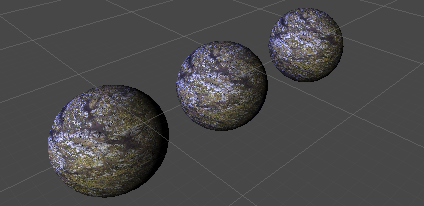
让美术直接在材质球上面手动输入light dir,其实非常的不直观,于是写了一个工具,直接把场景中的lighting对应的shader中的方向值给打印出来:
    private void WriteLightingDir()

    {

        Object obj = Selection.activeGameObject;

        if (obj is GameObject == false) return;

        Debug.Log(-(obj as GameObject).transform.forward);

    }
选中场景中的Lighting对象,然后执行上面的编辑期代码即可打印出方向值。
添加环境光:
如果只有场景光照,模型会有一些暗角,因此还需要加上自定义环境光的光照亮度。
首先通过代码设置全局的环境光,方便shader访问:
using System.Collections;

using System.Collections.Generic;

using UnityEngine;

[ExecuteInEditMode]

public class GlobalShaderSetting : MonoBehaviour

{

    public Color GlobalAmbientColor = new Color(0.5f, 0.5f, 0.5f, 1f);

    public float GlobalAmbientBrightness = ;

    public Vector4 GlobalWindDirection = new Vector4(0.5f, 0.5f, 0.5f, 1f);

    [ContextMenu("Set")]

    private void Awake()

    {

        Shader.SetGlobalColor("_GlobalAmbientColor", GlobalAmbientColor);

        Shader.SetGlobalFloat("_GlobalAmbientBrightness", GlobalAmbientBrightness);

        Shader.SetGlobalVector("_GlobalWindDirection", GlobalWindDirection);

    }

}
然后添加一个cginc的通用文件:
#ifndef JAMES_LIGHTING_H

#define JAMES_LIGHTING_H

float4 _GlobalAmbientColor;

float _GlobalAmbientBrightness;

float4 _GlobalWindDirection;

#define AMBIENT_COLOR _GlobalAmbientColor * _GlobalAmbientBrightness

#endif
在需要添加环境光的shader中添加环境光的影响即可:
clr += mainTex * AMBIENT_COLOR;
优化实现Mobile Diffuse动态直接光照shader的更多相关文章
- 【Jquery mobile】动态加载ListView 转
[Jquery mobile]动态加载ListView 分类: Jquery Mobile2011-12-01 09:04 13984人阅读 评论(1) 收藏 举报 jquerylistviewmob ...
- jquery mobile Checkbox动态添加刷新及事件绑定
jquery mobile Checkbox动态添加刷新及事件绑定 在微信项目中,涉及到一个多选功能.数据来自后台数据库,需要动态加载. 项目结构:微信api+web app.使用jquery mob ...
- 优化实现Mobile/Bumped Diffuse
在上一篇帖子的基础上增加一张法线贴图即可: Shader "James/Scene/Bumped_Diffuse" { Properties { _MainTex ("B ...
- 【Unity Shaders】Diffuse Shading——漫反射光照改善技巧
本系列主要参考<Unity Shaders and Effects Cookbook>一书(感谢原书作者),同时会加上一点个人理解或拓展. 这里是本书所有的插图.这里是本书所需的代码和资源 ...
- 【Unity Shaders】Diffuse Shading——在Surface Shader中使用properties
本系列主要参考<Unity Shaders and Effects Cookbook>一书(感谢原书作者),同时会加上一点个人理解或拓展. 这里是本书所有的插图.这里是本书所需的代码和资源 ...
- Diffuse Shading——漫反射光照改善技巧
转:http://www.narkii.com/club/thread-355113-1.html 我们会列出两种方法:使用Half Lambert lighting model(半兰伯特光照模型)和 ...
- HTTPS 传输优化详解之动态 TLS Record Size
笔者在过去分析了诸多可以减少 HTTPS 传输延迟的方法,如分布式 Session 的复用: 启用 HSTS,客户端默认开启 HTTPS 跳转:采用 HTTP/2 传输协议:使用 ChaCha20-P ...
- 【Unity Shaders】Diffuse Shading——向Surface Shader添加properties
本系列主要参考<Unity Shaders and Effects Cookbook>一书(感谢原书作者),同时会加上一点个人理解或拓展. 这里是本书所有的插图.这里是本书所需的代码和资源 ...
- [Unity优化]批处理02:动态批处理
参考链接: https://docs.unity3d.com/Manual/DrawCallBatching.html 原理: cpu每帧把可以进行动态批处理的网格进行合并,再把合并后的数据传给gpu ...
随机推荐
- 2017-9-8-WLW尝试
666 main () { int abc int def } #include<stdio.h> int main() { printf("hello world!\n&quo ...
- python基础一 ------简单队列用作历史记录
#需求:测试历史记录,一个猜字游戏,能在重新进入游戏时查看输入历史# #-*-coding:utf-8-*- from random import randint from collections i ...
- U盘安装Ubuntu 14.04 LTS
1.下载Ubuntu14.04 LTS 从Ubuntu官网下载->http://releases.ubuntu.com/14.04/ 2.将Ubuntu14.04安装到U盘 下载U盘系统安装工具 ...
- BZOJ4912 : [Sdoi2017]天才黑客
建立新图,原图中每条边在新图中是点,点权为$w_i$,边权为两个字符串的LCP. 对字典树进行DFS,将每个点周围一圈边对应的字符串按DFS序从小到大排序. 根据后缀数组利用height数组求LCP的 ...
- BZOJ4867 : [Ynoi2017]舌尖上的由乃
首先通过DFS序将原问题转化为序列上区间加.询问区间kth的问题. 考虑分块,设块大小为$K$,每块维护排序过后的$pair(值,编号)$. 对于修改,整块的部分可以直接打标记,而零碎的两块因为本来有 ...
- .net 4.0 中的特性总结(一):dynamic
在新版本的C#中,dynamic关键词是一个很重要的新特性,现在你可以创建动态对象并在运行时再决定它的类型.而且.net 4.0为CLR加入了一组为动态语言服务的运行时环境,称为DLR(Dynamic ...
- 数据库出现'\xF0\x9F\x98\xB8'
https://www.cnblogs.com/jinTaylor/p/4607505.html https://blog.csdn.net/qq_40074764/article/details/7 ...
- c c++ 函数不要返回局部变量的指针
结论:普通的变量(非new的变量)都是系统自动分配的,在栈空间(连续分配),无需程序员操作,速度快,但是...空间有限,不适合大量数据,大量的话就需要自己new new出来的变量是处于大容量的堆空间, ...
- LinkedList源码分析和实例应用
1. LinkedList介绍 LinkedList是继承于AbstractSequentialList抽象类,它也可以被当作堆栈.队列或者双端队列使用. LinkedList实现了Deque接口,即 ...
- Spring中Bean的五个作用域
当通过spring容器创建一个Bean实例时,不仅可以完成Bean实例的实例化,还可以为Bean指定特定的作用域.Spring支持如下5种作用域: singleton:单例模式,在整个Spring I ...