
UI自动化测试框架之Selenium关键字驱动 (转)
摘要
一、原理及特点
1. 关键字驱动测试是数据驱动测试的一种改进类型
2. 主要关键字包括三类:被操作对象(Item)、操作(Operation)和值(value),用面向对象形式可将其表现为Item.Operation(Value)
3. 将测试逻辑按照这些关键字进行分解,形成数据文件。
4. 用关键字的形式将测试逻辑封装在数据文件中,测试工具只要能够解释这些关键字即可对其应用自动化
二、准备
使用工具:eclipse
用到的第三方jar包:poi.jar(操作excel);selenium.jar
理解难点:java反射机制;逐步分层
三、框架构思
1、编写脚本
首先我们来写一个登陆开源中国的脚本
public class Login_Script {

            public static WebDriver driver=null;

            public static void main(String []agrs) throws InterruptedException{

//                启动火狐浏览器

                driver= new FirefoxDriver();

//                最大化

                driver.manage().window().maximize();

//                打开开源中国网址

                driver.get("http://www.oschina.net/");

//                点击登录

                driver.findElement(By.xpath("//*[@id='OSC_Userbar']/a[1]")).click();

//                输入用户名

                driver.findElement(By.xpath("//*[@id='f_email']")).sendKeys("XXXXXXB");

//                输入密码

                driver.findElement(By.xpath("//*[@id='f_pwd']")).sendKeys("XXXXXXXA");

//                点击登录按钮

//                driver.findElement(By.xpath("//*[@id='login_osc']/table/tbody/tr[7]/td/input")).click();

//                Thread.sleep(30);

//                点击退出按钮

                driver.findElement(By.xpath("//*[@id='OSC_Userbar']/a[3]")).click();

//                关闭浏览器

                driver.quit();

                }

}
2、脚本分析
这是登陆的场景
操作步骤
第一步:启动浏览器
第二步:输入网址
第四步:点击登录
第五步:输入用户名
第六步:输入密码
第七步:点击登录按钮
第八步:点击退出
第九步:关闭浏览器
3、使用excel
建立一个excel

在java中创建一个操作excel的类 ,主要实现是对excel的读和写,主要代码如下:
public class ExcelUtils {

        public static HSSFSheet ExcelSheet;

        public static HSSFWorkbook    ExcelBook;

        public static HSSFRow Row;

        public static HSSFCell    Cell;

        public static void setExcelFile(String Path,String    SheetName) throws Exception{

            FileInputStream    ExcelFile=new FileInputStream(Path);

            ExcelBook=new HSSFWorkbook(ExcelFile);

            ExcelSheet=ExcelBook.getSheet(SheetName);

        }

        public static void setCellData(String Result,  int RowNum, int ColNum,String Path) throws Exception{

              Row  = ExcelSheet.getRow(RowNum);

            Cell = Row.getCell(ColNum, Row.RETURN_BLANK_AS_NULL);

            if (Cell == null) {

                Cell = Row.createCell(ColNum);

                Cell.setCellValue(Result);

                } else {

                    Cell.setCellValue(Result);

                }

            FileOutputStream fileOut = new FileOutputStream(Path);

            ExcelBook.write(fileOut);

            fileOut.flush();

            fileOut.close();

        }

        public static String getCellDate(int RowNum,int CloNum){

            Cell=ExcelSheet.getRow(RowNum).getCell(CloNum);

            String cellData=Cell.getStringCellValue();

            return cellData;

        }

}
4、新建一个ActionKeyWords类
public class ActionKeyWords {

    public static WebDriver driver=null;

//    启动浏览器并最大化

    public static void OpenBrowser (){

        driver= new FirefoxDriver();

        driver.manage().window().maximize();

    }

//    打开开源中国网址

    public static void Navigate (){

        driver.get("http://www.oschina.net/");

    }

//    点击登录

    public static void Login_Click (){

        driver.findElement(By.xpath("//*[@id='OSC_Userbar']/a[1]")).click();

    }

//    输入用户名

    public static void Input_Name (){

        driver.findElement(By.xpath("//*[@id='f_email']")).sendKeys("XXXXXXA");

    }

//    输入密码

    public static void Input_Password (){

        driver.findElement(By.xpath("//*[@id='f_pwd']")).sendKeys("XXXXXXB");

    }

//    点击登录按钮

    public static void Login_Button (){

        driver.findElement(By.xpath("//*[@id='login_osc']/table/tbody/tr[7]/td/input")).click();

    }

    //    点击退出按钮

    public static void Logout_Click (){

        driver.findElement(By.xpath("//*[@id='OSC_Userbar']/a[3]")).click();

    }

//    关闭浏览器

    public static void CloseBrowser (){

        driver.quit();

    }

}
5、修改Login_Script脚本.
public class Login_Script {

            public static void main(String []agrs) throws Exception{

                ExcelUtils.setExcelFile("D:\\data\\TestData.xls", "steps");

                ActionKeyWords actionKeyWords= new ActionKeyWords();

                String Keywords=null;

                for(int RowNum=1;RowNum<=ExcelUtils.getLastRowNums();RowNum++){

                    Keywords=ExcelUtils.getCellDate(RowNum, 3);

                    if(Keywords.trim().equals("OpenBrowser")){

                        actionKeyWords.OpenBrowser();

                    }else if(Keywords.trim().equals("Navigate")){

                        actionKeyWords.Navigate();

                    }else if(Keywords.trim().equals("Login_Click")){

                        actionKeyWords.Login_Click();

                    }else if(Keywords.trim().equals("Input_Name")){

                        actionKeyWords.Input_Name();

                    }else if(Keywords.trim().equals("Input_Password")){

                        actionKeyWords.Input_Password();

                    }else if(Keywords.trim().equals("Login_Button")){

                        actionKeyWords.Login_Button();

                    }else if(Keywords.trim().equals("Logout_Click")){

                        actionKeyWords.Logout_Click();

                    }else if(Keywords.trim().equals("CloseBrowser")){

                        actionKeyWords.CloseBrowser();

                    }

                }

            }

}
这样代码的框架就基本已经搭建起来了,代码结构如下:

四、结构优化
1、优化Login_Script 类中的代码
注:这里用到了反射机制
 public class Login_Script {

            public static ActionKeyWords actionKeyWords;

            public static String Keywords=null;

            public static Method[] method;

            public Login_Script(){

                actionKeyWords= new ActionKeyWords();

                method=actionKeyWords.getClass().getMethods();

            }

            public static void main(String []agrs) throws Exception{

                ExcelUtils.setExcelFile("D:\\data\\TestData.xls", "steps");

                new Login_Script();

                for(int RowNum=1;RowNum<=ExcelUtils.getLastRowNums();RowNum++){

                    Keywords=ExcelUtils.getCellDate(RowNum, 3);

                    login_action();

                }

            }

            public static void login_action(){

                for(int i=0;i<method.length;i++){

//                    System.out.println(method[i].getName()+"     "+actionKeyWords+Keywords);

                    if(method[i].getName().trim().equals(Keywords)){

                        try {

                            method[i].invoke(actionKeyWords);

                        } catch (IllegalAccessException e) {

                            // TODO Auto-generated catch block

                            e.printStackTrace();

                        } catch (IllegalArgumentException e) {

                            // TODO Auto-generated catch block

                            e.printStackTrace();

                        } catch (InvocationTargetException e) {

                            // TODO Auto-generated catch block

                            e.printStackTrace();

                        }

                    }

                }

            }

}
2、将程序中的常量统一管理
例如:网页的地址,账户、密码,excel路径,这里我们在文件下面建立一个
public class Contants {

    public static  String url="http://www.oschina.net/";

    public static String excelFile="D:\\data\\";

    public static String excelName="TestData.xls";

    public static String excelSheet="steps";

    public static int excelKWCloNum=3;

    public static String userName="XXXXXXXA";

    public static String userPassword="XXXXXB";

}
3、增加对象库
下面我们看一下ActionKeyWords类中定位元素的路径 是在代码里面的,如果每次去修改的定位路径的是时候都要修改代码,为了便于维护,我们将这些元素的对象放在一个文件中,同时我们在Excel增加一列 Page Objects,这样程序根据Excel中的Page Objects,去文件中读取相应的元素,这里我们增加一个类OrpUtil,读取元素的对象
# Home Page Objects

Userbar_login=//*[@id='OSC_Userbar']/a[1]

Userbar_logout=//div[@id='OSC_Userbar']/a[3]

#Login Page Objects

Input_name=//*[@id='f_email']

Input_password=//*[@id='f_pwd']

Login_button=//*[@id='login_osc']/table/tbody/tr[7]/td/input
//OrpUtil类
public class OrpUtil {
public static String readValue(String a){
Properties pro=new Properties();
String popath=Contants.ObjectReUrl;
String value=null;
try {
InputStream in =new BufferedInputStream(new FileInputStream(popath));
pro.load(in);
value=pro.getProperty(a);
} catch (FileNotFoundException e) {
// TODO Auto-generated catch block
e.printStackTrace();
}catch (IOException e) {
// TODO Auto-generated catch block
e.printStackTrace();
}
return value;
}
}优化后的ActionKeyWords类
public class ActionKeyWords {

    public static WebDriver driver=null;

//    启动浏览器并最大化

    public static void OpenBrowser (String OR){

        System.setProperty("webdriver.chrome.driver", ".//server//chromedriver.exe");

        driver= new ChromeDriver();

        driver.manage().window().maximize();

    }

//    打开开源中国网址

    public static void Navigate (String OR){

        driver.get(Contants.url);

    }

//    点击登录

    public static void Login_Click (String OR){

        driver.findElement(By.xpath(OrpUtil.readValue(OR))).click();

    }

//    输入用户名

    public static void Input_Name (String OR){

        driver.findElement(By.xpath(OrpUtil.readValue(OR))).clear();

        driver.findElement(By.xpath(OrpUtil.readValue(OR))).sendKeys(Contants.userName);

    }

//    输入密码

    public static void Input_Password (String OR){

        driver.findElement(By.xpath(OrpUtil.readValue(OR))).click();

        driver.findElement(By.xpath(OrpUtil.readValue(OR))).sendKeys(Contants.userPassword);

    }

//    点击登录按钮

    public static void Login_Button (String OR){

        driver.findElement(By.xpath(OrpUtil.readValue(OR))).click();

    }

    //    点击退出按钮

    public static void Logout_Click (String OR){

        try {

            Thread.sleep(300);

            driver.findElement(By.xpath(OrpUtil.readValue(OR))).click();

        } catch (InterruptedException e) {

            // TODO Auto-generated catch block

            e.printStackTrace();

        }

    }

//    关闭浏览器

    public static void CloseBrowser (String OR){

        driver.quit();

    }

}
这个OR的值是从Excel中读取的
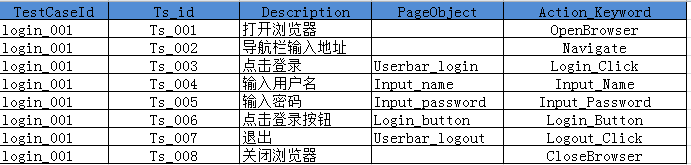
4、增加测试场景
从Excel中我们可以看到,这操作是对应的用例编写中的我们的操作步骤,在用例设计的时候还有测试场景和结果,这里
我们先增加个场景在EXCEL中增加一个名称为Suite的Sheet页

我们程序的运行逻辑是循环读取Suite页中的Runmode,当为YES时根据对应的TestSuiteID去读取对应的Steps页中的操作在步骤,进行运行
public static void main(String []agrs) throws Exception{

				ExcelUtils.setExcelFile(Contants.excelFile+Contants.excelName );

				new Login_Script();

				bResult = true;

//				循环读取suitSheet里面的值,找出运行的场景

				for(int j=1;j<=ExcelUtils.getLastRowNums(Contants.suitSheet);j++){

					String Runmode=ExcelUtils.getCellDate(j, Contants.suitRunmode,Contants.suitSheet);

					String suitTestSuiteId=ExcelUtils.getCellDate(j, Contants.suitTestSuiteId,Contants.suitSheet);

					int sRowNum;

					if(Runmode.equals("YES")){

//						根据stepTestSuiteId在caseSheet中循环查找相对应的执行步骤

						for(sRowNum=1;sRowNum<=ExcelUtils.getLastRowNums(Contants.caseSheet);sRowNum++){

							String stepTestSuiteId=ExcelUtils.getCellDate(sRowNum, Contants.stepTestSuiteId,Contants.caseSheet);

							System.out.println(ExcelUtils.getCellDate(sRowNum, Contants.excelKWCloNum,Contants.caseSheet));

							if(stepTestSuiteId.trim().equals(suitTestSuiteId)){

								Keywords=ExcelUtils.getCellDate(sRowNum, Contants.excelKWCloNum,Contants.caseSheet);

								r=ExcelUtils.getCellDate(sRowNum, Contants.excelPOCloNum,Contants.caseSheet);

								login_action(sRowNum);

								if(bResult == false){

									ExcelUtils.setCellData(Contants.fail, j, Contants.suitResult,Contants.excelFile+Contants.excelName, Contants.suitSheet);

								}

							}

						}

						if(bResult == true){

							ExcelUtils.setCellData(Contants.pass, j, Contants.suitResult,Contants.excelFile+Contants.excelName, Contants.suitSheet);

						}

					}else{

						System.out.println("没有要执行的用例");

						break;

					}

				}

			}
5、增加测试结果
在Excel中新增一列Resut
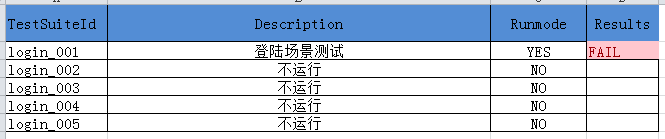
在Login_Script中定义一个boolean类型的变量bResult,默认是true在各个地方try,,cacth,当出现异常的时候在bResult赋值为false,在Excel工具类中增加一个写入excel值得方法
五、小结
这样我们的关键字驱动框架就初步搭好了,下面我们回归一下基本思路:
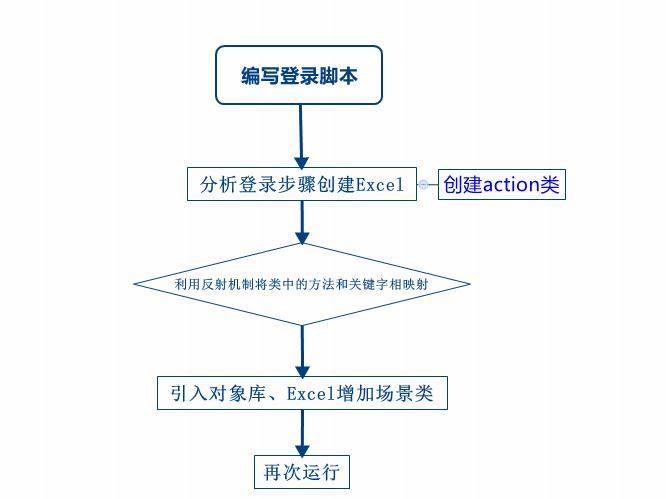
转自:http://my.oschina.net/hellotest/blog/531932
UI自动化测试框架之Selenium关键字驱动 (转)的更多相关文章
- 【转】UI自动化测试框架之Selenium关键字驱动
原网址:https://my.oschina.net/hellotest/blog/531932#comment-list 摘要: 自动化测试框架demo,用关键字的形式将测试逻辑封装在数据文件中,测 ...
- UI自动化测试框架之Selenium关键字驱动
一.原理及特点 1. 关键字驱动测试是数据驱动测试的一种改进类型 2. 主要关键字包括三类:被操作对象(Item).操作(Operation)和值(value),用面向对象形式可将其表现为Item.O ...
- 数据驱动 vs 关键字驱动:对搭建UI自动化测试框架的探索
UI自动化测试用例剖析 让我们先从分析一端自动化测试案例的代码开始我们的旅程.以下是我之前写的一个自动化测试的小Demo.这个Demo基于Selenium与Java.由于现在Selenium在自动化测 ...
- UI自动化测试框架(项目实战)python、Selenium(日志、邮件、pageobject)
其实百度UI自动化测试框架,会出来很多相关的信息,不过就没有找到纯项目的,无法拿来使用的:所以我最近就写了一个简单,不过可以拿来在真正项目中可以使用的测试框架. 项目的地址:https://githu ...
- Selenium关键字驱动测试框架Demo(Java版)
Selenium关键字驱动测试框架Demo(Java版)http://www.docin.com/p-803493675.html
- 基于selenium+Python3.7+yaml+Robot Framework的UI自动化测试框架
前端自动化测试框架 项目说明 本框架是一套基于selenium+Python3.7+yaml+Robot Framework而设计的数据驱动UI自动化测试框架,Robot Framework 作为执行 ...
- 自动化测试中级篇——LazyAndroid UI自动化测试框架使用指南
原文地址https://blog.csdn.net/iamhuanggua/article/details/53104345 简介 一直以来,安卓UI自动化测试都存在以下两个障碍,一是测试工具Mo ...
- 简单Web UI 自动化测试框架 pyse
WebUI automation testing framework based on Selenium and unittest. 基于 selenium 和 unittest 的 Web UI自动 ...
- Ui自动化测试框架
为了提高我们的UI测试效率,我们引用Ui自动化测试框架,这里简单先描述一下,后续会详细补充: 了解一个测试框架,我们就需要了解一下源码,能看懂源码即可: 1.稳定先封装wait EC,电脑性能配置较好 ...
随机推荐
- Struts2_day04--课程介绍_Struts2拦截器概述&底层原理_重要的概念
Struts2_day04 上节内容 今天内容 Struts2拦截器概述 拦截器底层原理 重要的概念 自定义拦截器 自定义登录拦截器 Struts2的标签库 Struts2表单标签(会用) Strut ...
- HttpModule,HttpContext,HttpHandler
http://www.cnblogs.com/wujy/tag/ASP.NET%E5%9F%BA%E7%A1%80/ http://www.th7.cn/Program/net/2011/12/26/ ...
- 折腾deeplin系统
1.双系统失败记录 多系统启动问题 先安装完deepin,发现再安装windows怎么都起不起来,哪怕他们已经安装在不同的盘 (体现再Windows7通过ghost位于另外一个盘,但就是没有启动项) ...
- 【BZOJ2801】[Poi2012]Minimalist Security BFS
[BZOJ2801][Poi2012]Minimalist Security Description 给出一个N个顶点.M条边的无向图,边(u,v)有权值w(u,v),顶点i也有权值p(i),并且对于 ...
- 算法分析中最常用的几种排序算法(插入排序、希尔排序、冒泡排序、选择排序、快速排序,归并排序)C 语言版
每次开始动手写算法,都是先把插入排序,冒泡排序写一遍,十次有九次是重复的,所以这次下定决心,将所有常规的排序算法写了一遍,以便日后熟悉. 以下代码总用一个main函数和一个自定义的CommonFunc ...
- uid-datepicker
$("#txtPODate").daterangepicker({singleDatePicker: true,showDropdowns: true,minDate:'01/01 ...
- 单反手动对焦M档,AV,TV,P,A,A-DEP
今天科普一下单反相机的自动对焦设置,以佳能EOS600为例,在镜头的后方会看到一个af,mf的开关.af为auto focus的缩写,自动对焦.mf为手动对焦 自动曝光模式的种类: AV:光圈优先自动 ...
- PAT 甲级 1104 sum of Number Segments
1104. Sum of Number Segments (20) 时间限制 200 ms 内存限制 65536 kB 代码长度限制 16000 B 判题程序 Standard 作者 CAO, Pen ...
- Graphite grafana
Graphite http://graphiteapp.org/ Graphite is an enterprise-ready monitoring tool that runs equally w ...
- webpack4学习笔记(一)
webpack4 1,安装webpack npm insatll webpack --save-dev //安装最新版本 npm insatll webpack@<version> --s ...