
Scala进阶之路-Spark独立模式(Standalone)集群部署
Scala进阶之路-Spark独立模式(Standalone)集群部署
作者:尹正杰
版权声明:原创作品,谢绝转载!否则将追究法律责任。
我们知道Hadoop解决了大数据的存储和计算,存储使用HDFS分布式文件系统存储,而计算采用MapReduce框架进行计算,当你在学习MapReduce的操作时,尤其是Hive的时候(因为Hive底层其实仍然调用的MapReduce)是不是觉得MapReduce运行的特别慢?因此目前很多人都转型学习Spark,今天我们就一起学习部署Spark集群吧。
一.准备环境
如果你的服务器还么没有部署Hadoop集群,可以参考我之前写的关于部署Hadoop高可用的笔记:https://www.cnblogs.com/yinzhengjie/p/9154265.html
1>.启动HDFS分布式文件系统
[yinzhengjie@s101 download]$ more `which xzk.sh`

#!/bin/bash

#@author :yinzhengjie

#blog:http://www.cnblogs.com/yinzhengjie

#EMAIL:y1053419035@qq.com

#判断用户是否传参

if [ $# -ne  ];then

    echo "无效参数,用法为: $0  {start|stop|restart|status}"

    exit

fi

#获取用户输入的命令

cmd=$

#定义函数功能

function zookeeperManger(){

    case $cmd in

    start)

        echo "启动服务"

        remoteExecution start

        ;;

    stop)

        echo "停止服务"

        remoteExecution stop

        ;;

    restart)

        echo "重启服务"

        remoteExecution restart

        ;;

    status)

        echo "查看状态"

        remoteExecution status

        ;;

    *)

        echo "无效参数,用法为: $0  {start|stop|restart|status}"

        ;;

    esac

}

#定义执行的命令

function remoteExecution(){

    for (( i= ; i<= ; i++ )) ; do

            tput setaf

            echo ========== s$i zkServer.sh  $ ================

            tput setaf

            ssh s$i  "source /etc/profile ; zkServer.sh $1"

    done

}

#调用函数

zookeeperManger

[yinzhengjie@s101 download]$
[yinzhengjie@s101 download]$ more `which xzk.sh`
[yinzhengjie@s101 download]$ more `which xcall.sh`

#!/bin/bash

#@author :yinzhengjie

#blog:http://www.cnblogs.com/yinzhengjie

#EMAIL:y1053419035@qq.com

#判断用户是否传参

if [ $# -lt  ];then

        echo "请输入参数"

        exit

fi

#获取用户输入的命令

cmd=$@

for (( i=;i<=;i++ ))

do

        #使终端变绿色

        tput setaf

        echo ============= s$i $cmd ============

        #使终端变回原来的颜色,即白灰色

        tput setaf

        #远程执行命令

        ssh s$i $cmd

        #判断命令是否执行成功

        if [ $? ==  ];then

                echo "命令执行成功"

        fi

done

[yinzhengjie@s101 download]$
[yinzhengjie@s101 download]$ more `which xcall.sh`
[yinzhengjie@s101 download]$ more `which xrsync.sh`

#!/bin/bash

#@author :yinzhengjie

#blog:http://www.cnblogs.com/yinzhengjie

#EMAIL:y1053419035@qq.com

#判断用户是否传参

if [ $# -lt  ];then

    echo "请输入参数";

    exit

fi

#获取文件路径

file=$@

#获取子路径

filename=`basename $file`

#获取父路径

dirpath=`dirname $file`

#获取完整路径

cd $dirpath

fullpath=`pwd -P`

#同步文件到DataNode

for (( i=;i<=;i++ ))

do

    #使终端变绿色

    tput setaf

    echo =========== s$i %file ===========

    #使终端变回原来的颜色,即白灰色

    tput setaf

    #远程执行命令

    rsync -lr $filename `whoami`@s$i:$fullpath

    #判断命令是否执行成功

    if [ $? ==  ];then

        echo "命令执行成功"

    fi

done

[yinzhengjie@s101 download]$
[yinzhengjie@s101 download]$ more `which xrsync.sh`
[yinzhengjie@s101 download]$ xzk.sh start

启动服务

========== s102 zkServer.sh start ================

ZooKeeper JMX enabled by default

Using config: /soft/zk/bin/../conf/zoo.cfg

Starting zookeeper ... STARTED

========== s103 zkServer.sh start ================

ZooKeeper JMX enabled by default

Using config: /soft/zk/bin/../conf/zoo.cfg

Starting zookeeper ... STARTED

========== s104 zkServer.sh start ================

ZooKeeper JMX enabled by default

Using config: /soft/zk/bin/../conf/zoo.cfg

Starting zookeeper ... STARTED

[yinzhengjie@s101 download]$

[yinzhengjie@s101 download]$ xcall.sh jps

============= s101 jps ============

 Jps

命令执行成功

============= s102 jps ============

 Jps

 QuorumPeerMain

命令执行成功

============= s103 jps ============

 QuorumPeerMain

 Jps

命令执行成功

============= s104 jps ============

 Jps

 QuorumPeerMain

命令执行成功

============= s105 jps ============

 Jps

命令执行成功

[yinzhengjie@s101 download]$
[yinzhengjie@s101 download]$ xzk.sh start
[yinzhengjie@s101 download]$ start-dfs.sh

SLF4J: Class path contains multiple SLF4J bindings.

SLF4J: Found binding in [jar:file:/soft/hadoop-2.7./share/hadoop/common/lib/slf4j-log4j12-1.7..jar!/org/slf4j/impl/StaticLoggerBinder.class]

SLF4J: Found binding in [jar:file:/soft/apache-hive-2.1.-bin/lib/log4j-slf4j-impl-2.4..jar!/org/slf4j/impl/StaticLoggerBinder.class]

SLF4J: See http://www.slf4j.org/codes.html#multiple_bindings for an explanation.

SLF4J: Actual binding is of type [org.slf4j.impl.Log4jLoggerFactory]

Starting namenodes on [s101 s105]

s101: starting namenode, logging to /soft/hadoop-2.7./logs/hadoop-yinzhengjie-namenode-s101.out

s105: starting namenode, logging to /soft/hadoop-2.7./logs/hadoop-yinzhengjie-namenode-s105.out

s103: starting datanode, logging to /soft/hadoop-2.7./logs/hadoop-yinzhengjie-datanode-s103.out

s104: starting datanode, logging to /soft/hadoop-2.7./logs/hadoop-yinzhengjie-datanode-s104.out

s102: starting datanode, logging to /soft/hadoop-2.7./logs/hadoop-yinzhengjie-datanode-s102.out

Starting journal nodes [s102 s103 s104]

s104: starting journalnode, logging to /soft/hadoop-2.7./logs/hadoop-yinzhengjie-journalnode-s104.out

s102: starting journalnode, logging to /soft/hadoop-2.7./logs/hadoop-yinzhengjie-journalnode-s102.out

s103: starting journalnode, logging to /soft/hadoop-2.7./logs/hadoop-yinzhengjie-journalnode-s103.out

SLF4J: Class path contains multiple SLF4J bindings.

SLF4J: Found binding in [jar:file:/soft/hadoop-2.7./share/hadoop/common/lib/slf4j-log4j12-1.7..jar!/org/slf4j/impl/StaticLoggerBinder.class]

SLF4J: Found binding in [jar:file:/soft/apache-hive-2.1.-bin/lib/log4j-slf4j-impl-2.4..jar!/org/slf4j/impl/StaticLoggerBinder.class]

SLF4J: See http://www.slf4j.org/codes.html#multiple_bindings for an explanation.

SLF4J: Actual binding is of type [org.slf4j.impl.Log4jLoggerFactory]

Starting ZK Failover Controllers on NN hosts [s101 s105]

s101: starting zkfc, logging to /soft/hadoop-2.7./logs/hadoop-yinzhengjie-zkfc-s101.out

s105: starting zkfc, logging to /soft/hadoop-2.7./logs/hadoop-yinzhengjie-zkfc-s105.out

[yinzhengjie@s101 download]$

[yinzhengjie@s101 download]$ xcall.sh jps

============= s101 jps ============

 Jps

 NameNode

 DFSZKFailoverController

命令执行成功

============= s102 jps ============

 QuorumPeerMain

 JournalNode

 Jps

 DataNode

命令执行成功

============= s103 jps ============

 JournalNode

 QuorumPeerMain

 Jps

 DataNode

命令执行成功

============= s104 jps ============

 QuorumPeerMain

 Jps

 DataNode

 JournalNode

命令执行成功

============= s105 jps ============

 DFSZKFailoverController

 NameNode

 Jps

命令执行成功

[yinzhengjie@s101 download]$
[yinzhengjie@s101 download]$ start-dfs.sh
2>.上传测试数据到HDFS集群中
[yinzhengjie@s101 download]$ cat temp

++023450FM-+000599999V0202701N015919999999N0000001N9-+99999102001ADDGF108991999999999999999999

++023450FM-+000599999V0202901N008219999999N0000001N9++99999102001ADDGF104991999999999999999999

++023450FM-+000599999V0209991C000019999999N0000001N9-+99999102001ADDGF108991999999999999999999

++023450FM-+000599999V0201801N008219999999N0000001N9-+99999101831ADDGF108991999999999999999999

++023450FM-+000599999V0201801N009819999999N0000001N9-+99999101761ADDGF108991999999999999999999

++023450FM-+000599999V0201801N009819999999N0000001N9++99999101751ADDGF108991999999999999999999

++023450FM-+000599999V0202001N009819999999N0000001N9-+99999101701ADDGF106991999999999999999999

++023450FM-+000599999V0202701N015919999999N0000001N9-+99999102001ADDGF108991999999999999999999

++023450FM-+000599999V0202901N008219999999N0000001N9-+99999102001ADDGF104991999999999999999999

++023450FM-+000599999V0209991C000019999999N0000001N9++99999102001ADDGF108991999999999999999999

++023450FM-+000599999V0201801N008219999999N0000001N9-+99999101831ADDGF108991999999999999999999

++023450FM-+000599999V0201801N009819999999N0000001N9++99999101761ADDGF108991999999999999999999

++023450FM-+000599999V0201801N009819999999N0000001N9++99999101751ADDGF108991999999999999999999

++023450FM-+000599999V0202001N009819999999N0000001N9++99999101701ADDGF1069919999999999999999990029029070999991901010106004++023450FM-+000599999V0202701N015919999999N0000001N9-+99999102001ADDGF108991999999999999999999

++023450FM-+000599999V0202901N008219999999N0000001N9-+99999102001ADDGF104991999999999999999999

++023450FM-+000599999V0209991C000019999999N0000001N9++99999102001ADDGF108991999999999999999999

++023450FM-+000599999V0201801N008219999999N0000001N9++99999101831ADDGF108991999999999999999999

++023450FM-+000599999V0201801N009819999999N0000001N9++99999101761ADDGF108991999999999999999999

++023450FM-+000599999V0201801N009819999999N0000001N9-+99999101751ADDGF108991999999999999999999

++023450FM-+000599999V0202001N009819999999N0000001N9++99999101701ADDGF1069919999999999999999990029029070999991901010106004++023450FM-+000599999V0202701N015919999999N0000001N9-+99999102001ADDGF108991999999999999999999

++023450FM-+000599999V0202701N015919999999N0000001N9-+99999102001ADDGF108991999999999999999999

++023450FM-+000599999V0202901N008219999999N0000001N9++99999102001ADDGF104991999999999999999999

++023450FM-+000599999V0209991C000019999999N0000001N9-+99999102001ADDGF108991999999999999999999

++023450FM-+000599999V0201801N008219999999N0000001N9++99999101831ADDGF108991999999999999999999

++023450FM-+000599999V0201801N009819999999N0000001N9++99999101761ADDGF108991999999999999999999

++023450FM-+000599999V0201801N009819999999N0000001N9++99999101751ADDGF108991999999999999999999

++023450FM-+000599999V0202001N009819999999N0000001N9-+99999101701ADDGF106991999999999999999999

++023450FM-+000599999V0202701N015919999999N0000001N9++99999102001ADDGF108991999999999999999999

++023450FM-+000599999V0202901N008219999999N0000001N9-+99999102001ADDGF104991999999999999999999

++023450FM-+000599999V0209991C000019999999N0000001N9++99999102001ADDGF108991999999999999999999

++023450FM-+000599999V0201801N008219999999N0000001N9++99999101831ADDGF108991999999999999999999

++023450FM-+000599999V0201801N009819999999N0000001N9-+99999101761ADDGF108991999999999999999999

++023450FM-+000599999V0201801N009819999999N0000001N9++99999101751ADDGF108991999999999999999999

++023450FM-+000599999V0202001N009819999999N0000001N9++99999101701ADDGF1069919999999999999999990029029070999991901010106004++023450FM-+000599999V0202701N015919999999N0000001N9-+99999102001ADDGF108991999999999999999999

++023450FM-+000599999V0202901N008219999999N0000001N9++99999102001ADDGF104991999999999999999999

++023450FM-+000599999V0209991C000019999999N0000001N9-+99999102001ADDGF108991999999999999999999

++023450FM-+000599999V0201801N008219999999N0000001N9++99999101831ADDGF108991999999999999999999

++023450FM-+000599999V0201801N009819999999N0000001N9-+99999101761ADDGF108991999999999999999999

++023450FM-+000599999V0201801N009819999999N0000001N9++99999101751ADDGF108991999999999999999999

++023450FM-+000599999V0202001N009819999999N0000001N9++99999101701ADDGF1069919999999999999999990029029070999991901010106004++023450FM-+000599999V0202701N015919999999N0000001N9-+99999102001ADDGF108991999999999999999999

[yinzhengjie@s101 download]$
[yinzhengjie@s101 download]$ cat temp
[yinzhengjie@s101 download]$ hdfs dfs -mkdir -p  /home/yinzhengjie/data

SLF4J: Class path contains multiple SLF4J bindings.

SLF4J: Found binding in [jar:file:/soft/hadoop-2.7./share/hadoop/common/lib/slf4j-log4j12-1.7..jar!/org/slf4j/impl/StaticLoggerBinder.class]

SLF4J: Found binding in [jar:file:/soft/apache-hive-2.1.-bin/lib/log4j-slf4j-impl-2.4..jar!/org/slf4j/impl/StaticLoggerBinder.class]

SLF4J: See http://www.slf4j.org/codes.html#multiple_bindings for an explanation.

SLF4J: Actual binding is of type [org.slf4j.impl.Log4jLoggerFactory]

[yinzhengjie@s101 download]$

[yinzhengjie@s101 download]$ hdfs dfs -ls -R /

SLF4J: Class path contains multiple SLF4J bindings.

SLF4J: Found binding in [jar:file:/soft/hadoop-2.7./share/hadoop/common/lib/slf4j-log4j12-1.7..jar!/org/slf4j/impl/StaticLoggerBinder.class]

SLF4J: Found binding in [jar:file:/soft/apache-hive-2.1.-bin/lib/log4j-slf4j-impl-2.4..jar!/org/slf4j/impl/StaticLoggerBinder.class]

SLF4J: See http://www.slf4j.org/codes.html#multiple_bindings for an explanation.

SLF4J: Actual binding is of type [org.slf4j.impl.Log4jLoggerFactory]

drwxr-xr-x   - yinzhengjie supergroup           -- : /home

drwxr-xr-x   - yinzhengjie supergroup           -- : /home/yinzhengjie

drwxr-xr-x   - yinzhengjie supergroup           -- : /home/yinzhengjie/data

[yinzhengjie@s101 download]$
[yinzhengjie@s101 download]$ hdfs dfs -mkdir -p /home/yinzhengjie/data
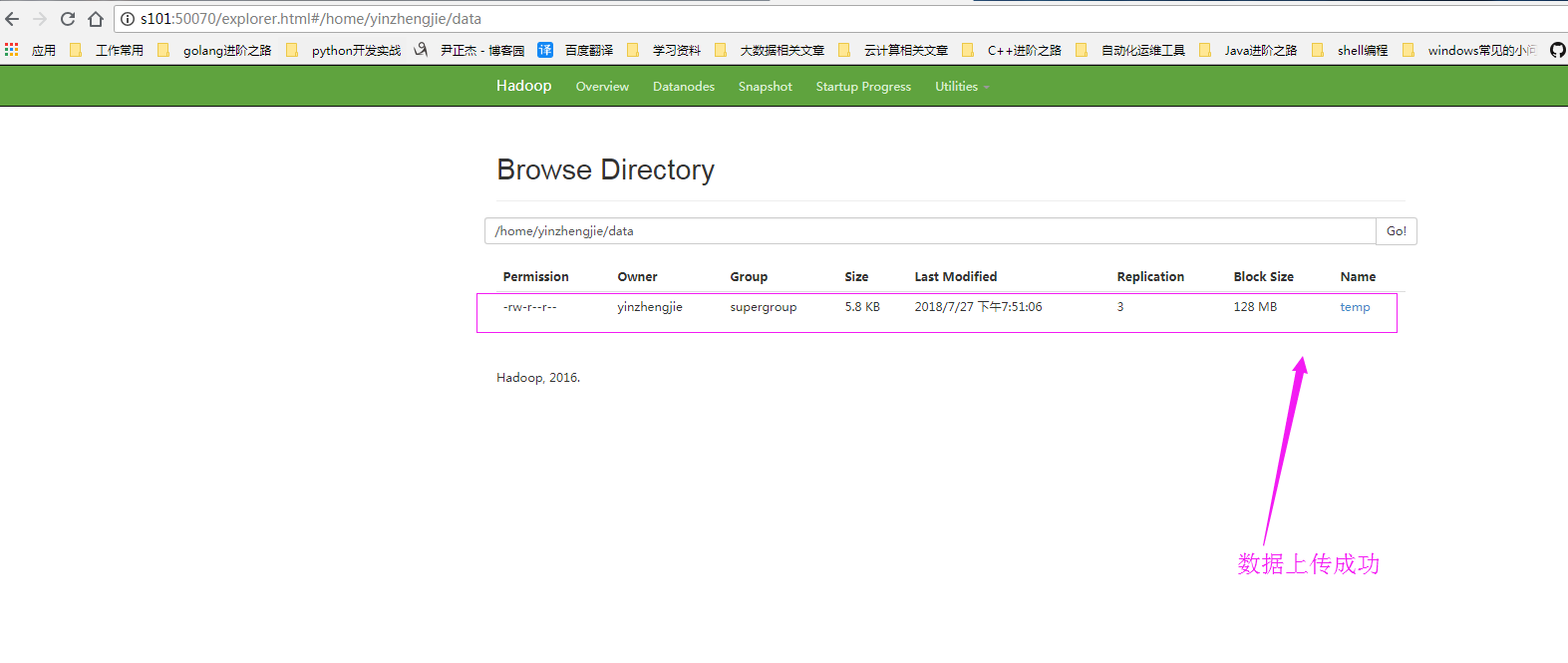
[yinzhengjie@s101 download]$ hdfs dfs -put temp /home/yinzhengjie/data

SLF4J: Class path contains multiple SLF4J bindings.

SLF4J: Found binding in [jar:file:/soft/hadoop-2.7./share/hadoop/common/lib/slf4j-log4j12-1.7..jar!/org/slf4j/impl/StaticLoggerBinder.class]

SLF4J: Found binding in [jar:file:/soft/apache-hive-2.1.-bin/lib/log4j-slf4j-impl-2.4..jar!/org/slf4j/impl/StaticLoggerBinder.class]

SLF4J: See http://www.slf4j.org/codes.html#multiple_bindings for an explanation.

SLF4J: Actual binding is of type [org.slf4j.impl.Log4jLoggerFactory]

[yinzhengjie@s101 download]$

[yinzhengjie@s101 download]$

[yinzhengjie@s101 download]$  hdfs dfs -ls -R /

SLF4J: Class path contains multiple SLF4J bindings.

SLF4J: Found binding in [jar:file:/soft/hadoop-2.7./share/hadoop/common/lib/slf4j-log4j12-1.7..jar!/org/slf4j/impl/StaticLoggerBinder.class]

SLF4J: Found binding in [jar:file:/soft/apache-hive-2.1.-bin/lib/log4j-slf4j-impl-2.4..jar!/org/slf4j/impl/StaticLoggerBinder.class]

SLF4J: See http://www.slf4j.org/codes.html#multiple_bindings for an explanation.

SLF4J: Actual binding is of type [org.slf4j.impl.Log4jLoggerFactory]

drwxr-xr-x   - yinzhengjie supergroup           -- : /home

drwxr-xr-x   - yinzhengjie supergroup           -- : /home/yinzhengjie

drwxr-xr-x   - yinzhengjie supergroup           -- : /home/yinzhengjie/data

-rw-r--r--    yinzhengjie supergroup        -- : /home/yinzhengjie/data/temp

[yinzhengjie@s101 download]$
[yinzhengjie@s101 download]$ hdfs dfs -put temp /home/yinzhengjie/data
二.部署Spark集群
1>.创建slaves文件
[yinzhengjie@s101 ~]$ cp /soft/spark/conf/slaves.template /soft/spark/conf/slaves

[yinzhengjie@s101 ~]$ more /soft/spark/conf/slaves | grep -v ^# | grep -v ^$

s102

s103

s104

[yinzhengjie@s101 ~]$
2>.修改spark-env.sh配置文件
[yinzhengjie@s101 ~]$ cp /soft/spark/conf/spark-env.sh.template /soft/spark/conf/spark-env.sh

[yinzhengjie@s101 ~]$

[yinzhengjie@s101 ~]$ echo export JAVA_HOME=/soft/jdk >> /soft/spark/conf/spark-env.sh

[yinzhengjie@s101 ~]$ echo SPARK_MASTER_HOST=s101 >> /soft/spark/conf/spark-env.sh

[yinzhengjie@s101 ~]$ echo SPARK_MASTER_PORT= >> /soft/spark/conf/spark-env.sh

[yinzhengjie@s101 ~]$

[yinzhengjie@s101 ~]$ grep -v ^# /soft/spark/conf/spark-env.sh | grep -v ^$

export JAVA_HOME=/soft/jdk

SPARK_MASTER_HOST=s101

SPARK_MASTER_PORT=

[yinzhengjie@s101 ~]$
3>.将s101机器上的spark环境进行分发
[yinzhengjie@s101 ~]$ xrsync.sh /soft/spark

spark/                     spark-2.1.-bin-hadoop2./

[yinzhengjie@s101 ~]$ xrsync.sh /soft/spark

spark/                     spark-2.1.-bin-hadoop2./

[yinzhengjie@s101 ~]$ xrsync.sh /soft/spark/

=========== s102 %file ===========

命令执行成功

=========== s103 %file ===========

命令执行成功

=========== s104 %file ===========

命令执行成功

=========== s105 %file ===========

命令执行成功

[yinzhengjie@s101 ~]$ xrsync.sh /soft/spark-2.1.-bin-hadoop2./

=========== s102 %file ===========

命令执行成功

=========== s103 %file ===========

命令执行成功

=========== s104 %file ===========

命令执行成功

=========== s105 %file ===========

命令执行成功

[yinzhengjie@s101 ~]$

[yinzhengjie@s101 ~]$ su root

Password:

[root@s101 yinzhengjie]#

[root@s101 yinzhengjie]# xrsync.sh /etc/profile

=========== s102 %file ===========

命令执行成功

=========== s103 %file ===========

命令执行成功

=========== s104 %file ===========

命令执行成功

=========== s105 %file ===========

命令执行成功

[root@s101 yinzhengjie]#

[root@s101 yinzhengjie]# exit

exit

[yinzhengjie@s101 ~]$
4>.在所有的spark节点的conf/目录创建core-site.xml和hdfs-site.xml软连接文件
[yinzhengjie@s101 ~]$ xcall.sh "ln -s /soft/hadoop/etc/hadoop/core-site.xml /soft/spark/conf/core-site.xml"

============= s101 ln -s /soft/hadoop/etc/hadoop/core-site.xml /soft/spark/conf/core-site.xml ============

命令执行成功

============= s102 ln -s /soft/hadoop/etc/hadoop/core-site.xml /soft/spark/conf/core-site.xml ============

命令执行成功

============= s103 ln -s /soft/hadoop/etc/hadoop/core-site.xml /soft/spark/conf/core-site.xml ============

命令执行成功

============= s104 ln -s /soft/hadoop/etc/hadoop/core-site.xml /soft/spark/conf/core-site.xml ============

命令执行成功

============= s105 ln -s /soft/hadoop/etc/hadoop/core-site.xml /soft/spark/conf/core-site.xml ============

命令执行成功

[yinzhengjie@s101 ~]$ xcall.sh "ln -s /soft/hadoop/etc/hadoop/hdfs-site.xml /soft/spark/conf/hdfs-site.xml"

============= s101 ln -s /soft/hadoop/etc/hadoop/hdfs-site.xml /soft/spark/conf/hdfs-site.xml ============

命令执行成功

============= s102 ln -s /soft/hadoop/etc/hadoop/hdfs-site.xml /soft/spark/conf/hdfs-site.xml ============

命令执行成功

============= s103 ln -s /soft/hadoop/etc/hadoop/hdfs-site.xml /soft/spark/conf/hdfs-site.xml ============

命令执行成功

============= s104 ln -s /soft/hadoop/etc/hadoop/hdfs-site.xml /soft/spark/conf/hdfs-site.xml ============

命令执行成功

============= s105 ln -s /soft/hadoop/etc/hadoop/hdfs-site.xml /soft/spark/conf/hdfs-site.xml ============

命令执行成功

[yinzhengjie@s101 ~]$
5>.启动Spark集群
[yinzhengjie@s101 ~]$ /soft/spark/sbin/start-all.sh

starting org.apache.spark.deploy.master.Master, logging to /soft/spark/logs/spark-yinzhengjie-org.apache.spark.deploy.master.Master--s101.out

s102: starting org.apache.spark.deploy.worker.Worker, logging to /soft/spark/logs/spark-yinzhengjie-org.apache.spark.deploy.worker.Worker--s102.out

s104: starting org.apache.spark.deploy.worker.Worker, logging to /soft/spark/logs/spark-yinzhengjie-org.apache.spark.deploy.worker.Worker--s104.out

s103: starting org.apache.spark.deploy.worker.Worker, logging to /soft/spark/logs/spark-yinzhengjie-org.apache.spark.deploy.worker.Worker--s103.out

[yinzhengjie@s101 ~]$

[yinzhengjie@s101 ~]$ xcall.sh jps

============= s101 jps ============

 NameNode

 DFSZKFailoverController

 Master

 Jps

命令执行成功

============= s102 jps ============

 DataNode

 QuorumPeerMain

 Worker

 JournalNode

 Jps

命令执行成功

============= s103 jps ============

 Worker

 Jps

 JournalNode

 QuorumPeerMain

 DataNode

命令执行成功

============= s104 jps ============

 Worker

 Jps

 JournalNode

 DataNode

 QuorumPeerMain

命令执行成功

============= s105 jps ============

 DFSZKFailoverController

 Jps

 NameNode

命令执行成功

[yinzhengjie@s101 ~]$
6>.启动spark-shell连接到spark集群
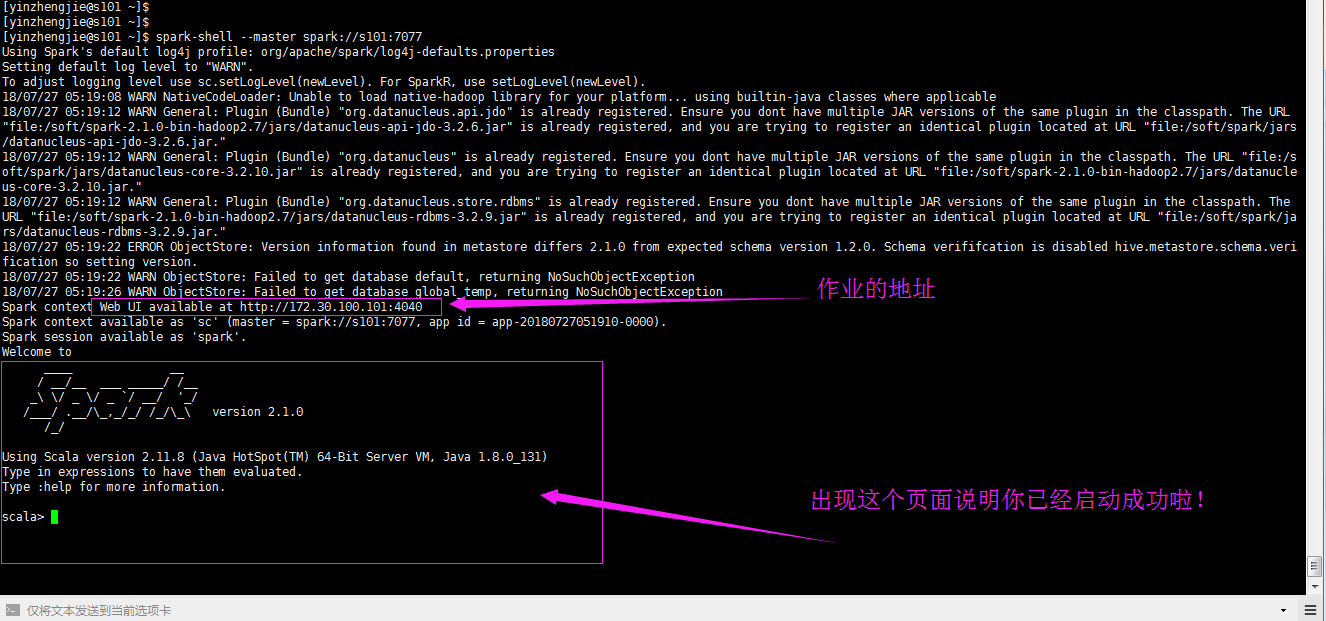
[yinzhengjie@s101 ~]$ spark-shell --master spark://s101:7077

Using Spark's default log4j profile: org/apache/spark/log4j-defaults.properties

Setting default log level to "WARN".

To adjust logging level use sc.setLogLevel(newLevel). For SparkR, use setLogLevel(newLevel).

// :: WARN NativeCodeLoader: Unable to load native-hadoop library for your platform... using builtin-java classes where applicable

// :: WARN General: Plugin (Bundle) "org.datanucleus.api.jdo" is already registered. Ensure you dont have multiple JAR versions of the same plugin in the classpath. The URL "file:/soft/spark-2.1.0-bin-hadoop2.7/jars/datanucleus-api-jdo-3.2.6.jar" is already registered, and you are trying to register an identical plugin located at URL "file:/soft/spark/jars/datanucleus-api-jdo-3.2.6.jar."

// :: WARN General: Plugin (Bundle) "org.datanucleus" is already registered. Ensure you dont have multiple JAR versions of the same plugin in the classpath. The URL "file:/soft/spark/jars/datanucleus-core-3.2.10.jar" is already registered, and you are trying to register an identical plugin located at URL "file:/soft/spark-2.1.0-bin-hadoop2.7/jars/datanucleus-core-3.2.10.jar."

// :: WARN General: Plugin (Bundle) "org.datanucleus.store.rdbms" is already registered. Ensure you dont have multiple JAR versions of the same plugin in the classpath. The URL "file:/soft/spark-2.1.0-bin-hadoop2.7/jars/datanucleus-rdbms-3.2.9.jar" is already registered, and you are trying to register an identical plugin located at URL "file:/soft/spark/jars/datanucleus-rdbms-3.2.9.jar."

// :: ERROR ObjectStore: Version information found in metastore differs 2.1. from expected schema version 1.2.. Schema verififcation is disabled hive.metastore.schema.verification so setting version.

// :: WARN ObjectStore: Failed to get database default, returning NoSuchObjectException

// :: WARN ObjectStore: Failed to get database global_temp, returning NoSuchObjectException

Spark context Web UI available at http://172.30.100.101:4040

Spark context available as 'sc' (master = spark://s101:7077, app id = app-20180727051910-0000).

Spark session available as 'spark'.

Welcome to

      ____              __

     / __/__  ___ _____/ /__

    _\ \/ _ \/ _ `/ __/  '_/

   /___/ .__/\_,_/_/ /_/\_\   version 2.1.

      /_/

Using Scala version 2.11. (Java HotSpot(TM) -Bit Server VM, Java 1.8.0_131)

Type in expressions to have them evaluated.

Type :help for more information.

scala>
[yinzhengjie@s101 ~]$ spark-shell --master spark://s101:7077 (默认的端口是7077,这个端口可以修改哟!)
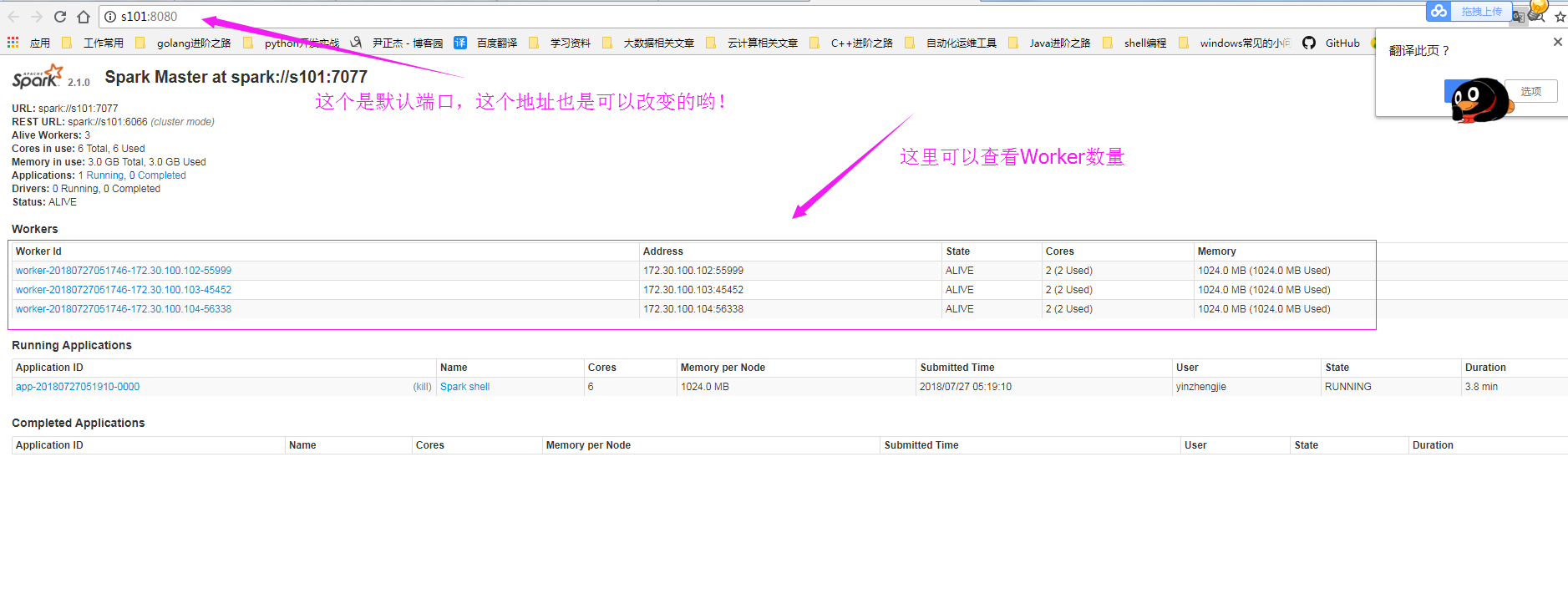
7>.查看WebUI界面
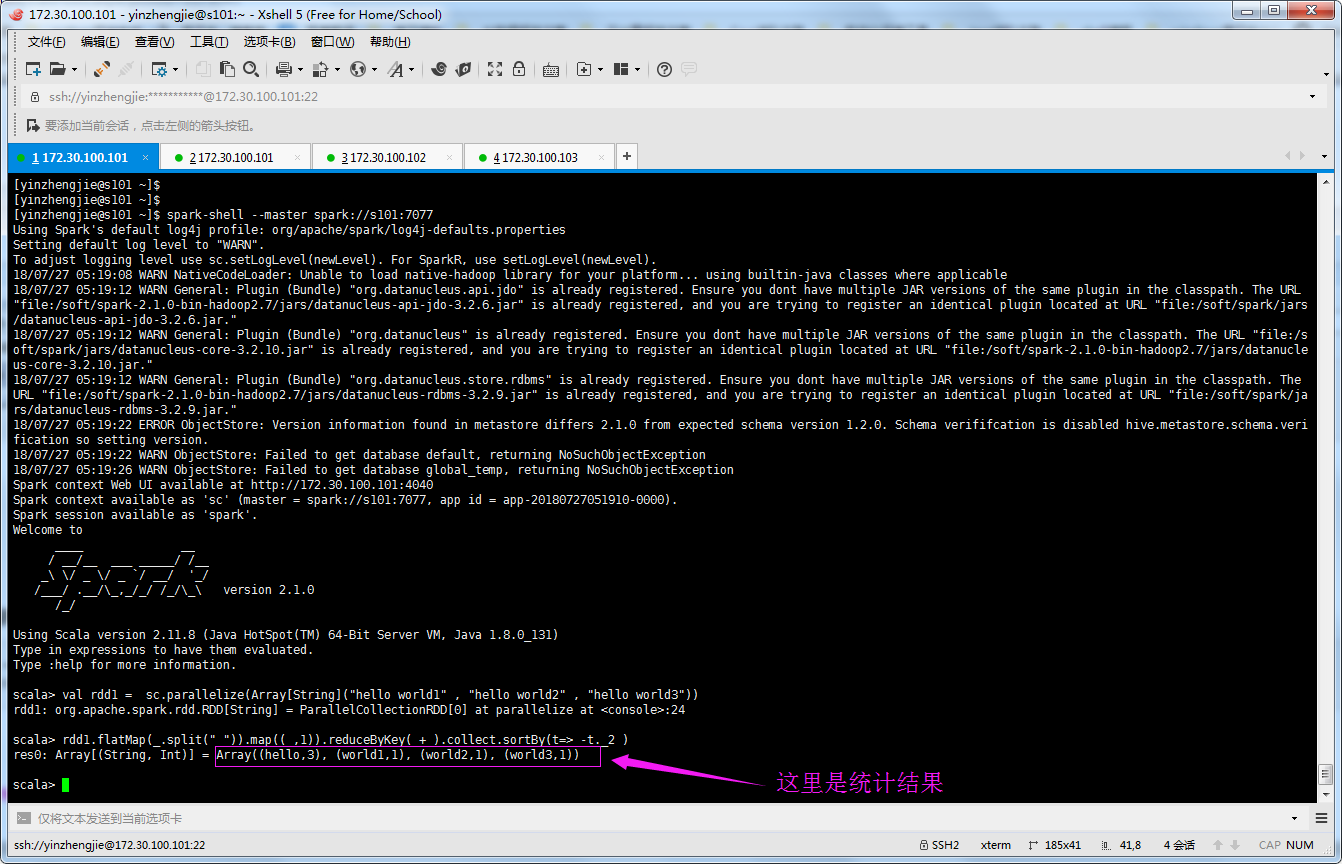
8>.编写程序在Spark集群上实现WordCount
val rdd1 =  sc.parallelize(Array[String]("hello world1" , "hello world2" , "hello world3"))

rdd1.flatMap(_.split(" ")).map((_,)).reduceByKey(_+_).collect.sortBy(t=> -t._2 )
三.在Spark集群中执行代码
1>.Create JAR from Moudles
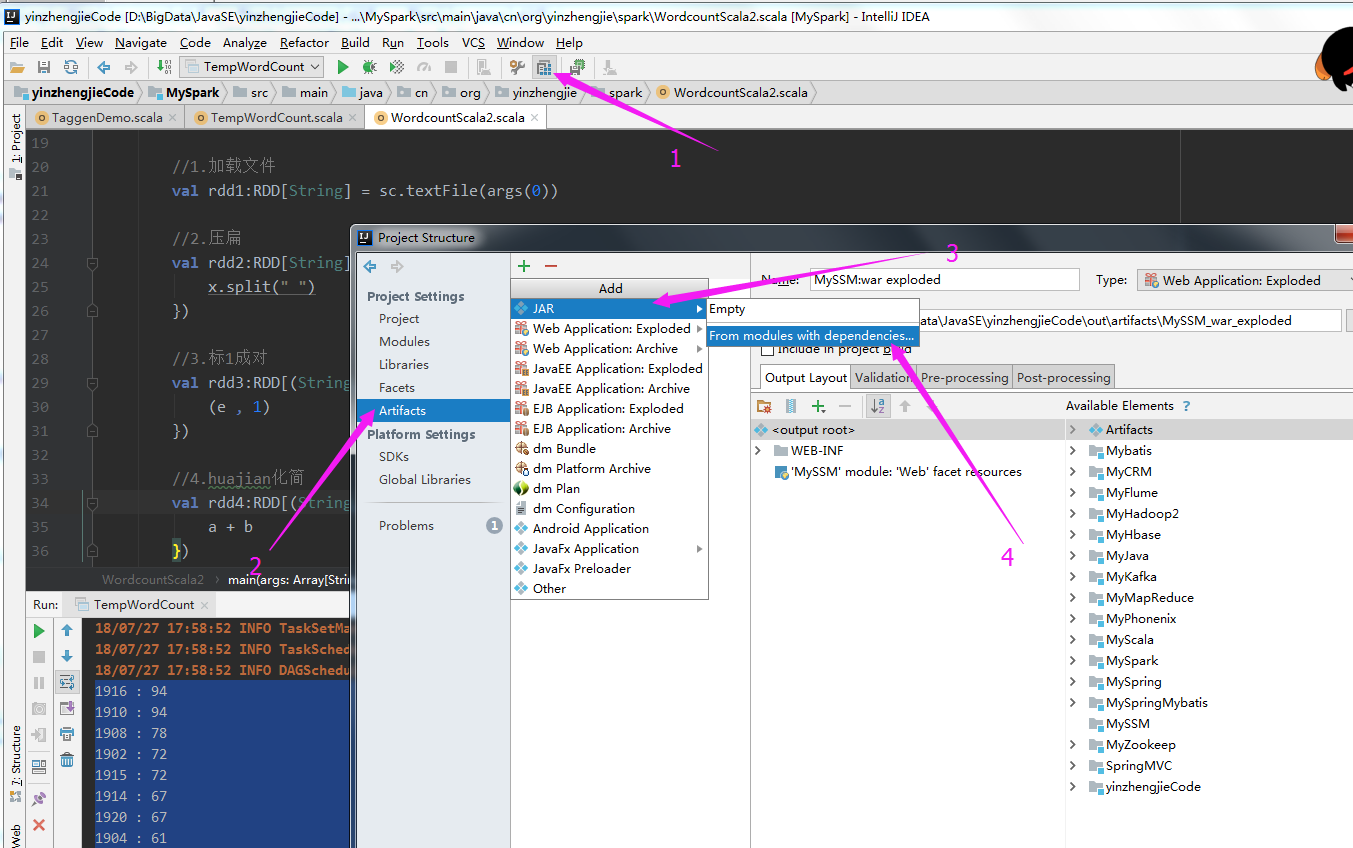
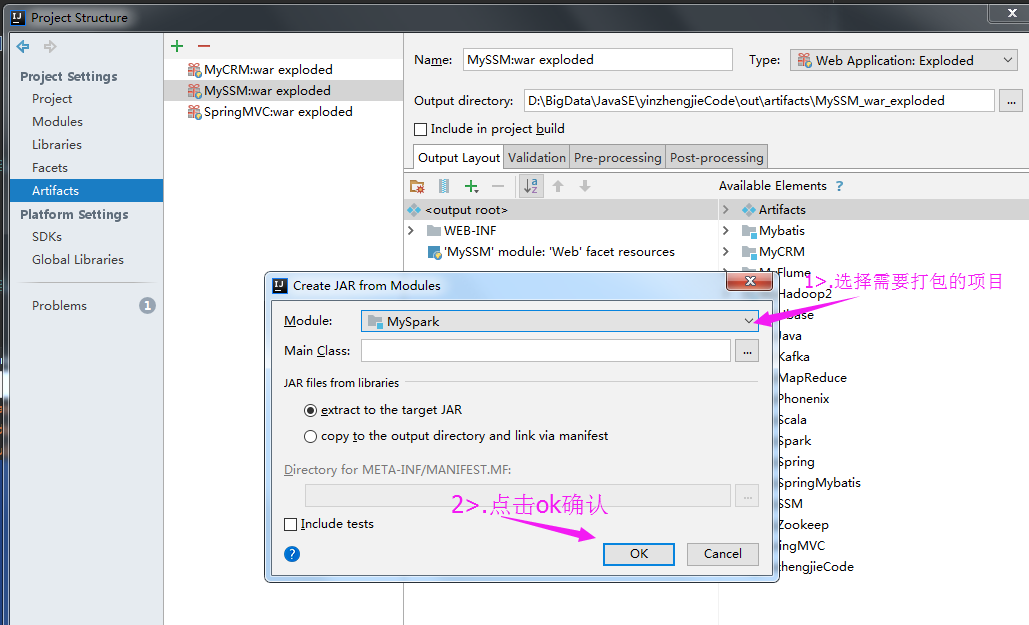
2>.选择需要打包的项目
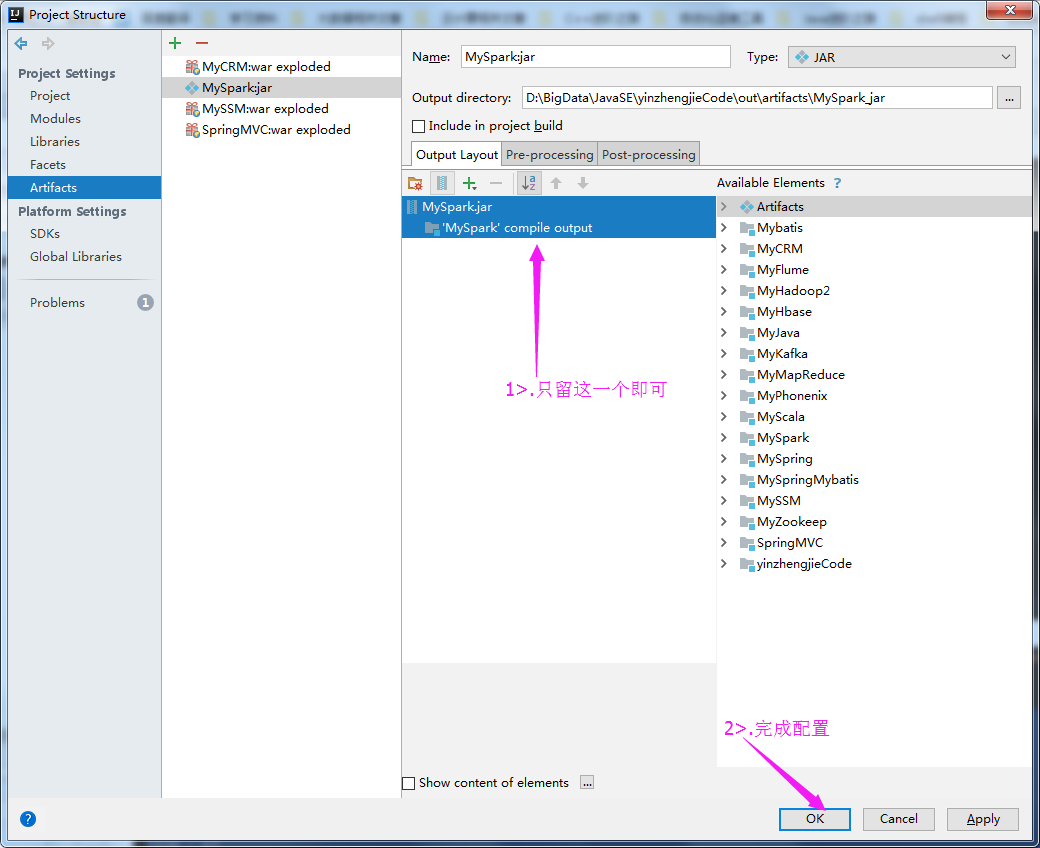
3>.删除第三方类库
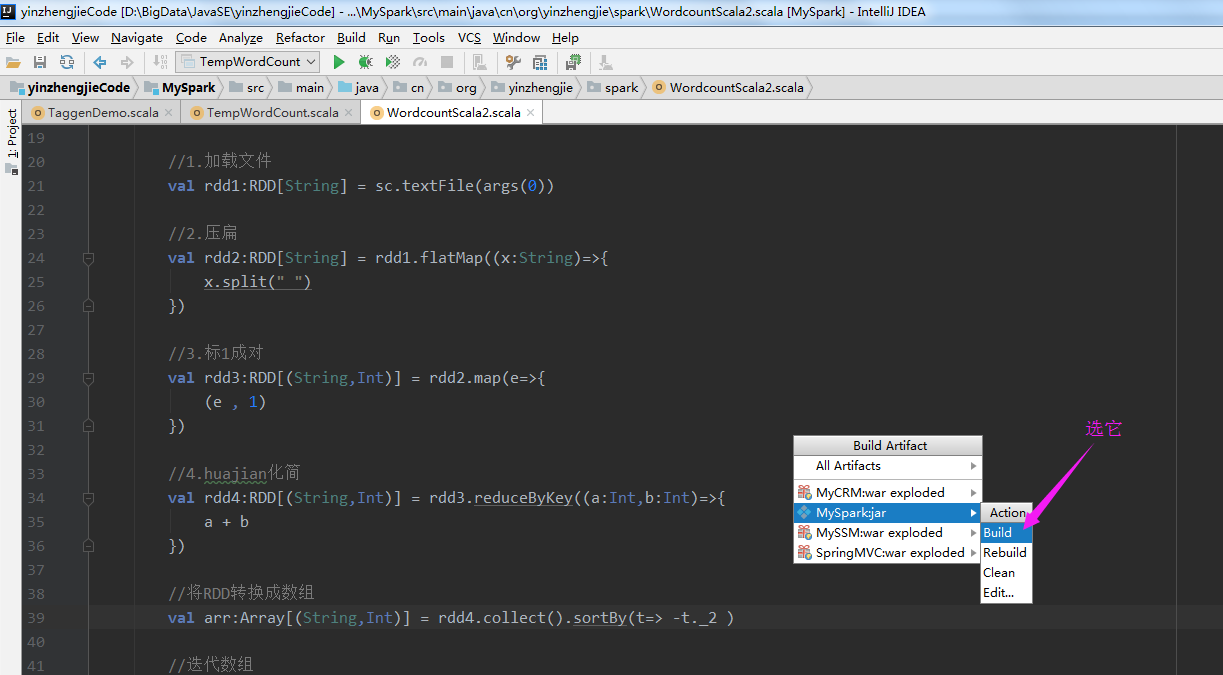
4>.点击Build Artifacts....
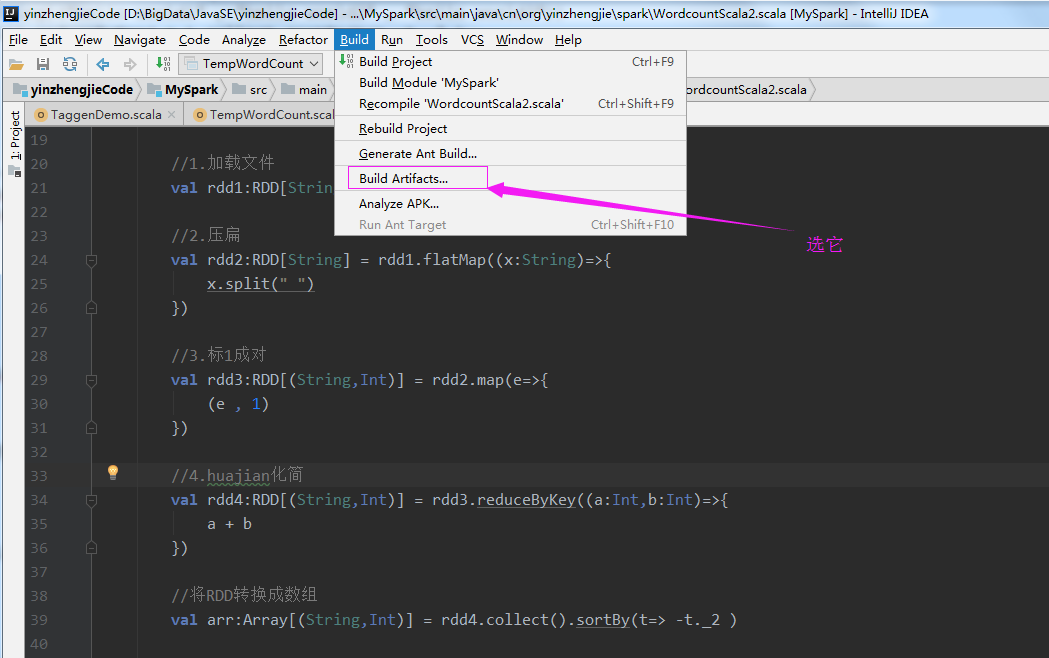
5>.选择build
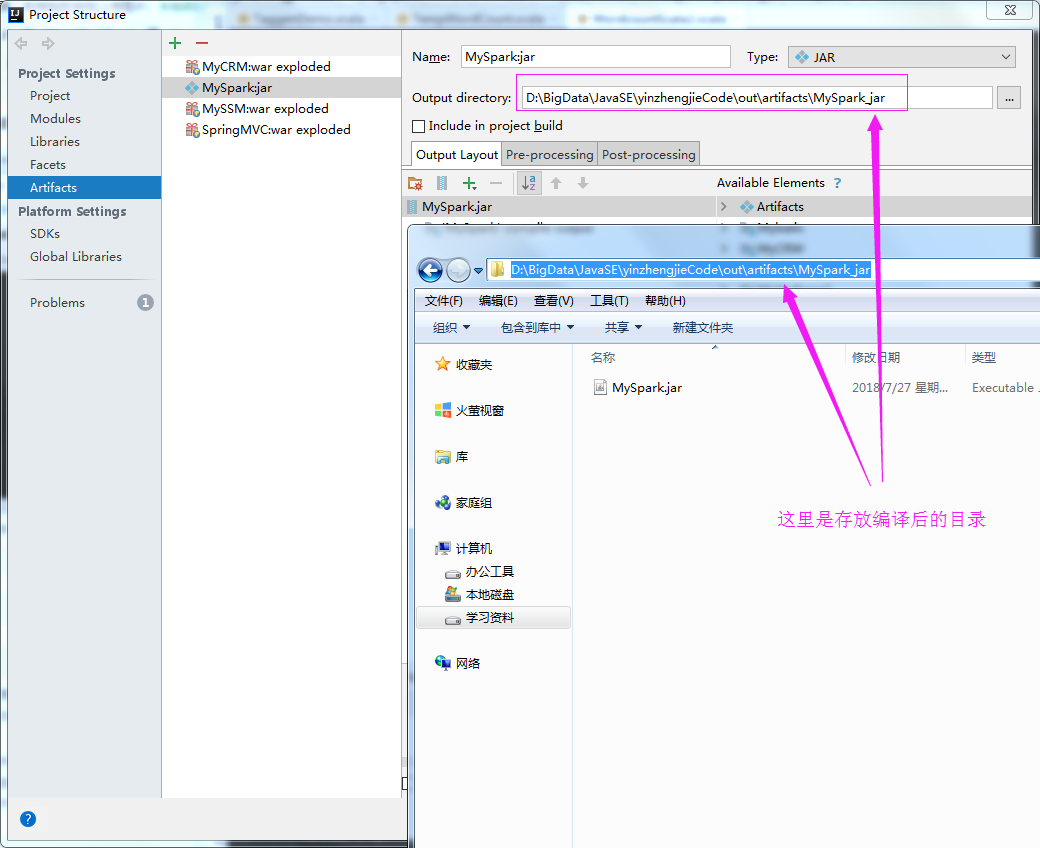
6>.查看编译后的文件
7>.将编译后的文件上传到服务器上
8>.
Scala进阶之路-Spark独立模式(Standalone)集群部署的更多相关文章
- Scala进阶之路-Spark本地模式搭建
Scala进阶之路-Spark本地模式搭建 作者:尹正杰 版权声明:原创作品,谢绝转载!否则将追究法律责任. 一.Spark简介 1>.Spark的产生背景 传统式的Hadoop缺点主要有以下两 ...
- Scala进阶之路-Spark底层通信小案例
Scala进阶之路-Spark底层通信小案例 作者:尹正杰 版权声明:原创作品,谢绝转载!否则将追究法律责任. 一.Spark Master和worker通信过程简介 1>.Worker会向ma ...
- spark standalone集群部署 实践记录
本文记录了一次搭建spark-standalone模式集群的过程,我准备了3个虚拟机服务器,三个centos系统的虚拟机. 环境准备: -每台上安装java1.8 -以及scala2.11.x (x代 ...
- Standalone 集群部署
Spark中调度其实是分为两个层级的,即集群层级的资源分配和任务调度,以及任务层级的任务管理.其中集群层级调度是可配置的,Spark目前提供了Local,Standalone,YARN,Mesos.任 ...
- linux平台使用spark-submit以cluster模式提交spark应用到standalone集群
shell脚本如下 sparkHome=/home/spark/spark-2.2.0-bin-hadoop2.7 $sparkHome/bin/spark-submit \ --class stre ...
- Flink 集群搭建,Standalone,集群部署,HA高可用部署
基础环境 准备3台虚拟机 配置无密码登录 配置方法:https://ipooli.com/2020/04/linux_host/ 并且做好主机映射. 下载Flink https://www.apach ...
- 在spark中启动standalone集群模式cluster问题
spark-submit --master spark://master:7077 --deploy-mode cluster --driver-cores 2 --driver-memory 100 ...
- windows平台使用spark-submit以client方式提交spark应用到standalone集群
1.spark应用打包,我喜欢打带依赖的,这样省事. 2.使用spark-submit.bat 提交应用,代码如下: for /f "tokens=1,2 delims==" %% ...
- Spark概述及集群部署
Spark概述 什么是Spark (官网:http://spark.apache.org) Spark是一种快速.通用.可扩展的大数据分析引擎,2009年诞生于加州大学伯克利分校AMPLab,2010 ...
随机推荐
- 实训十二(stick的设定)
上篇我们介绍到人物主角的设定,其实人物是有工具使的,那就是——stick小棍. 信息的获取.起始位置.长度的加载.边界的判断.位置.长度重置是需要我们主要考虑的问题 信息获取上考虑的使什么时候加载st ...
- pandas(DataFrame)
DataFrame是二维数据结构,即数据以行和列的表格方式排列!特点:潜在的列是不同的类型,大小可变,标记行和列,可以对列和行执行算数运算. 其中Name,Age即为对应的Columns,序号0,1, ...
- 8-Python3从入门到实战—基础之数据类型(集合-Sets)
Python从入门到实战系列--目录 集合的定义 集合(set)和字典类似,也是一组key的集合,但不存储value:由于key不能重复,所以,在set中,没有重复的key. 创建一个set,需要提供 ...
- PAT 1011 A+B和C
https://pintia.cn/problem-sets/994805260223102976/problems/994805312417021952 给定区间[-2^31^, 2^31^]内的3 ...
- Notepad++ 大小写转换
code_field_text 普通文本 code_field_user_id 用户ID code_field_customer_id 客户ID code_field_dict 数据字典 code_f ...
- bat脚本的写法
当你每次都要输入相同的命令时,可以把这么多命令存为一个批处理,从此以后,只要运行这个批处理,就相当于打了几行.几十行命令.下面以Nginx服务的停止脚本为例写一个bat批处理文件: 1.新建nginx ...
- hive存储、数据模型、内部表
创建内部表 加一列元素 删除表
- Linux基础学习(6)--Linux软件安装
第六章——Linux软件安装 一.软件包管理简介 1.软件包分类: (1)源码包:脚本安装包 (2)二进制包(RPM包.系统默认包) 2.源码包: (1)源码包的优点:开源,如果有足够的能力,可以修改 ...
- Spring的各个jar包的作用介绍
spring4中各个jar包的介绍: Spring AOP:Spring的面向切面编程,提供AOP(面向切面编程)的实现 Spring Aspects:Spring提供的对AspectJ框架的整合Sp ...
- golang的interface剖析
背景: golang的interface是一种satisfied式的.A类只要实现了IA interface定义的方法,A就satisfied了接口IA.更抽象一层,如果某些设计上需要一些更抽象的 ...