
Beautiful Soup模块
Beautiful Soup 是一个可以从HTML或XML文件中提取数据的Python库,它能够通过你喜欢的转换器实现惯用的文档导航,查找,修改文档的方式.Beautiful Soup会帮你节省数小时甚至数天的工作时间.
快速开始,以如下html作为例子.
html_doc = """

<html><head><title>The Dormouse's story</title></head>

<body>

<p class="title"><b>The Dormouse's story</b></p>

<p class="story">Once upon a time there were three little sisters; and their names were

<a href="http://example.com/elsie" class="sister" id="link1">Elsie</a>,

<a href="http://example.com/lacie" class="sister" id="link2">Lacie</a> and

<a href="http://example.com/tillie" class="sister" id="link3">Tillie</a>;

and they lived at the bottom of a well.</p>

<p class="story">...</p>

"""
使用BeautifulSoup解析这段代码,能够得到一个 BeautifulSoup 的对象,并能按照标准的缩进格式的结构输出:
from bs4 import BeautifulSoup

soup = BeautifulSoup(html_doc,'html.parser')

print(soup.prettify())

<html>

 <head>

  <title>

   The Dormouse's story

  </title>

 </head>

 <body>

  <p class="title">

   <b>

    The Dormouse's story

   </b>

  </p>

  <p class="story">

   Once upon a time there were three little sisters; and their names were

   <a class="sister" href="http://example.com/elsie" id="link1">

    Elsie

   </a>

   ,

   <a class="sister" href="http://example.com/lacie" id="link2">

    Lacie

   </a>

   and

   <a class="sister" href="http://example.com/tillie" id="link3">

    Tillie

   </a>

   ;

and they lived at the bottom of a well.

  </p>

  <p class="story">

   ...

  </p>

 </body>

</html>
几个简单的浏览结构化数据的方法:
#打印出title标签的信息
soup.title

<title>The Dormouse's story</title>

#打印出title标签的标签名称

soup.title.name

'title'

#打印出title标签的内容

soup.title.string

"The Dormouse's story"

#打印出title标签的内存地址

soup.title.strings

<generator object _all_strings at 0x0000025B5572A780>

#打印出title标签的父标签

soup.title.parent.name

'head'

#打印出第一个p标签的信息

soup.p

<p class="title"><b>The Dormouse's story</b></p>

#取出p标签的值

soup.p['class'] 或者soup.p.get('class')

['title']

#打印出第一个a标签的信息

soup.a

<a class="sister" href="http://example.com/elsie" id="link1">Elsie</a>

#获取所有的a标签,返回一个列表.

soup.find_all('a')

[<a class="sister" href="http://example.com/elsie" id="link1">Elsie</a>, <a class="sister" href="http://example.com/lacie" id="link2">Lacie</a>, <a class="sister" href="http://example.com/tillie" id="link3">Tillie</a>]

#返回id=link3的的标签内容

soup.find(id='link3')

<a class="sister" href="http://example.com/tillie" id="link3">Tillie</a>
从文档中找到所有<a>标签的链接:
for link in soup.find_all('a'):

    print(link.get('href'))

http://example.com/elsie

http://example.com/lacie

http://example.com/tillie
从文档中获取所有文字内容:
print(soup.get_text())

The Dormouse's story

The Dormouse's story

Once upon a time there were three little sisters; and their names were

Elsie,

Lacie and

Tillie;

and they lived at the bottom of a well.
获取标签属性
soup.a.attrs

{'id': 'link1', 'class': ['sister'], 'href': 'http://example.com/elsie'}
使用BeautifulSoup库的 find()、findAll()和find_all()函数
在构造好BeautifulSoup对象后,借助find()和findAll()这两个函数,可以通过标签的不同属性轻松地把繁多的html内容过滤为你所想要的。
这两个函数的使用很灵活,可以: 通过tag的id属性搜索标签、通过tag的class属性搜索标签、通过字典的形式搜索标签内容返回的为一个列表、通过正则表达式匹配搜索等等
基本使用格式:
通过tag的id属性搜索标签
t = soup.find(attrs={"id":"aa"})
搜索a标签中class属性是sister的所有标签内容
t= soup.findAll('a',{'class':'sister'})
find_all() 方法搜索当前tag的所有tag子节点,并判断是否符合过滤器的条件.
soup.find_all("title")

# [<title>The Dormouse's story</title>]

soup.find_all("p", "title")

# [<p class="title"><b>The Dormouse's story</b></p>]

soup.find_all("a")

# [<a class="sister" href="http://example.com/elsie" id="link1">Elsie</a>,

#  <a class="sister" href="http://example.com/lacie" id="link2">Lacie</a>,

#  <a class="sister" href="http://example.com/tillie" id="link3">Tillie</a>]

soup.find_all(id="link2")

# [<a class="sister" href="http://example.com/lacie" id="link2">Lacie</a>]
BeautifulSoup的使用
在用requests库从网页上得到了网页数据后,就要开始使用BeautifulSoup了。
一个示例:
#!/usr/bin/python

#coding:utf-

import requests

from bs4 import BeautifulSoup

url = requests.get("http://www.douban.com/tag/%E5%B0%8F%E8%AF%B4/?focus=book")

#获取页面代码

#print(url.text)

#创建BeautifulSoup对象

soup = BeautifulSoup(url.text,"html.parser")

#print(soup.prettify())

#book_div 查找出div标签中id属性是book的内容

book_div = soup.find('div',{'id':'book'})

#print(book_div)

#book_div的另一种写法,获取结果一样

# book_div = soup.find(attrs={"id":"book"})

# print('book_div的内容',book_div)

#通过class="title"获取所有的book  a标签

book_a = book_div.findAll(attrs={"class":"title"})

print(book_a)

#

# for循环是遍历book_a所有的a标签,book.string是输出a标签中的内容.

for book in book_a:

    print(book.string)
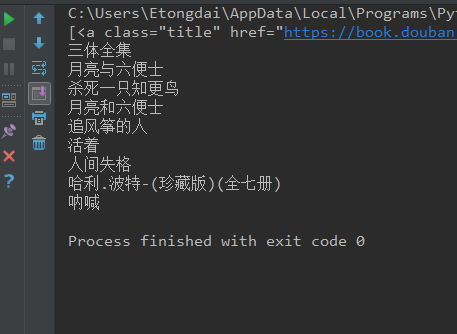
执行结果:
参考文档: https://www.cnblogs.com/sunnywss/p/6644542.html
https://www.cnblogs.com/dan-baishucaizi/p/8494913.html
http://www.cnblogs.com/hearzeus/p/5151449.html
https://beautifulsoup.readthedocs.io/zh_CN/v4.4.0/
Beautiful Soup模块的更多相关文章
- 爬虫-Beautiful Soup模块
阅读目录 一 介绍 二 基本使用 三 遍历文档树 四 搜索文档树 五 修改文档树 六 总结 一 介绍 Beautiful Soup 是一个可以从HTML或XML文件中提取数据的Python库.它能够通 ...
- Python Beautiful Soup模块的安装
以安装Beautifulsoup4为例: 1.到网站上下载:http://www.crummy.com/software/BeautifulSoup/bs4/download/ 2.解压文件到C:\P ...
- 吴裕雄--天生自然python学习笔记:Beautiful Soup 4.2.0模块
Beautiful Soup 是一个可以从HTML或XML文件中提取数据的Python库.它能够通过你喜欢的转换器实现惯用的文档导航,查找,修改文档的方式.Beautiful Soup会帮你节省数小时 ...
- Python Beautiful Soup学习之HTML标签补全功能
Beautiful Soup是一个非常流行的Python模块.该模块可以解析网页,并提供定位内容的便捷接口. 使用下面两个命令安装: pip install beautifulsoup4 或者 sud ...
- 转:Beautiful Soup
Beautiful Soup 是一个可以从HTML或XML文件中提取数据的Python库.它能够通过你喜欢的转换器实现惯用的文档导航,查找,修改文档的方式.Beautiful Soup会帮你节省数小时 ...
- python标准库Beautiful Soup与MongoDb爬喜马拉雅电台的总结
Beautiful Soup标准库是一个可以从HTML/XML文件中提取数据的Python库,它能够通过你喜欢的转换器实现惯用的文档导航,查找,修改文档的方式,Beautiful Soup将会节省数小 ...
- Beautiful Soup库基础用法(爬虫)
初识Beautiful Soup 官方文档:https://www.crummy.com/software/BeautifulSoup/bs4/doc/# 中文文档:https://www.crumm ...
- etree和Beautiful Soup的使用
1.lxml 是一种使用 Python 编写的库,可以迅速.灵活地处理 XML ,支持 XPath (XML Path Language),使用 lxml 的 etree 库来进行爬取网站信息 2.B ...
- 【爬虫】beautiful soup笔记(待填坑)
Beautiful Soup是一个第三方的网页解析的模块.其遵循的接口为Document Tree,将网页解析成为一个树形结构. 其使用步骤如下: 1.创建对象:根据网页的文档字符串 2.搜索节点:名 ...
随机推荐
- [AHOI2009]维护序列
OJ题号:洛谷2023.BZOJ1798 思路: 参见[洛谷3373][模板]线段树 2 #include<cstdio> #include<cctype> #include& ...
- vue父页面给子页面传递数据
父页面: <template> <div>{{msg}} <Son title='向子文件传递数据' :data='data' :lifemsg ='lifemsg' : ...
- 关于git的使用记录总结
1.解决Windows下git换行符报警问题 git config --global core.autocrlf false 2.撤销add的文件退出暂存区 git reset --mixed 3.g ...
- 生命短暂,意识到开始使用python的重要性,python3.5.3安装和使用篇
原创文章,未经允许不得转载! 之前都是使用C++和R语言做事情.一直觉得c++挺好,好是好,就是有挺多车轱辘得自己造.细想下C++可以调用python,python也可以调用c++.那何不学学pyth ...
- hdu1003 Max Sum(最大子串)
https://vjudge.net/problem/HDU-1003 注意考虑如果全为负的情况,特判. 还有输出格式,最后一个输出不用再空行. #include<iostream> #i ...
- JIRA、Confluence中文官方技术博客
JIRA.Confluence中文官方技术博客 http://blog.csdn.net/atlassian2013
- DBS-Function:f_GetPy
ylbtech-SQL Server-Function:f_GetPy A, 返回顶部 1.f_GetPy )) ) as begin ) ) collate Chinese_PRC_CI_AS, ...
- Tensorflow之Slim使用
一些参考文档: 官方文档: TensorFlow-Slim image classification model library TensorFlow-Slim使用说明 TensorFlow-Slim ...
- mybatis 批量添加
<insert id="addTrackBatch" parameterType="java.util.List"> INSERT INTO t_t ...
- [Python设计模式] 第14章 老板来了——观察者模式
github地址:https://github.com/cheesezh/python_design_patterns 题目 用程序模拟以下情景,在一个办公室里,当老板进门的时候,前台秘书就偷偷通知办 ...