
python开发_stat
当我们使用os.stat(path)获取一个文件(夹)信息的时候,
os.stat(path)本身返回的是一个元组如:
nt.stat_result(st_mode=33206, st_ino=203224933185146561, st_dev=0,
st_nlink=1, st_uid=0, st_gid=0, st_size=21090, st_atime=1376373336,
st_mtime=1376534141, st_ctime=1376373336)
在这个元组中,包含了10个属性:
st_mode -- protection bits(模式)
st_ino -- inode number(索引号)
st_dev -- device(设备)
st_nlink -- number of hard links(硬链接号)
st_uid -- user id of owner(用户id)
st_gid -- group id of owner (组id)
st_size -- size of file,in bytes (大小)
st_atime -- time of most recent access expressed in seconds (访问时间)
st_mtime -- time of most recent content modificatin expressed in seconds (修改时间)
st_ctime -- platform dependent;time of most recent metadata change on Unix,
or the teime of creation on Windows,expressed in senconds (根据不同操作系统而定)
#############################################################
而stat在这里起到什么作用呢?
类似于java中定义的一些常量:
如:
os.stat(path).st_size
os.stat(path)[stat.ST_SIZE]
这两种表示方法是一样的。
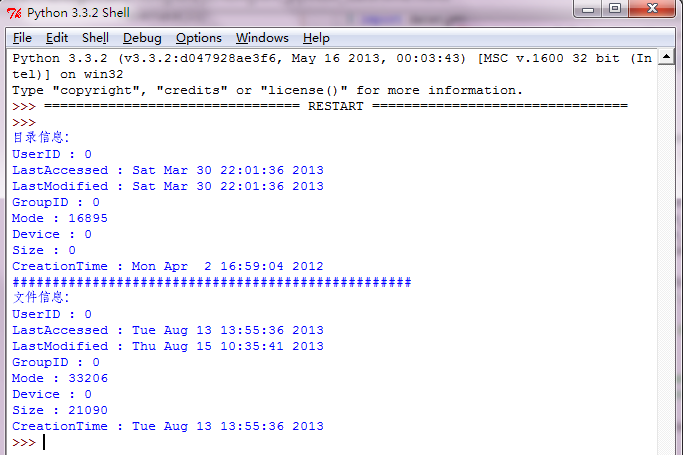
下面是我做的demo:
运行效果:
==============================================
代码部分:
==============================================
 #python stat

 '''

     当我们使用os.stat(path)获取一个文件(夹)信息的时候,

     os.stat(path)本身返回的是一个元组如:

     nt.stat_result(st_mode=33206, st_ino=203224933185146561, st_dev=0,

     st_nlink=1, st_uid=0, st_gid=0, st_size=21090, st_atime=1376373336,

     st_mtime=1376534141, st_ctime=1376373336)

     在这个元组中,包含了10个属性:

     st_mode    -- protection bits(模式)

     st_ino     -- inode number(索引号)

     st_dev     -- device(设备)

     st_nlink   -- number of hard links(硬链接号)

     st_uid     -- user id of owner(用户id)

     st_gid     -- group id of owner (组id)

     st_size    -- size of file,in bytes (大小)

     st_atime   -- time of most recent access expressed in seconds (访问时间)

     st_mtime   -- time of most recent content modificatin expressed in seconds (修改时间)

     st_ctime   -- platform dependent;time of most recent metadata change on Unix,

                   or the teime of creation on Windows,expressed in senconds (根据不同操作系统而定)

     #############################################################

     而stat在这里起到什么作用呢?

     类似于java中定义的一些常量:

     如:

         os.stat(path).st_size

         os.stat(path)[stat.ST_SIZE]

         这两种表示方法是一样的。

 '''

 import os

 import time

 import stat

 def get_file_stat(path):

     '''获取一个文件(夹)信息,该信息将以一个元组的形式返回'''

     if os.path.exists(path):

         return os.stat(path)

     else:

         print('the path [{}] is not exist!'.format(path))

 def print_info(file_stat):

     '''打印信息'''

     if file_stat != None:

         file_info = {

             'Size' : file_stat [ stat.ST_SIZE ],                         #获取文件大小

             'LastModified' : time.ctime( file_stat [ stat.ST_MTIME ] ),  #获取文件最后修改时间

             'LastAccessed' : time.ctime( file_stat [ stat.ST_ATIME ] ),  #获取文件最后访问时间

             'CreationTime' : time.ctime( file_stat [ stat.ST_CTIME ] ),  #获取文件创建时间

             'Mode' : file_stat [ stat.ST_MODE ],                         #获取文件的模式

             'Device' : file_stat [stat.ST_DEV],                          #设备

             'UserID' : file_stat [stat.ST_UID],

             'GroupID' : file_stat [stat.ST_GID]

             }

         for key in file_info:

             print('{} : {}'.format(key, file_info[key]))

     else:

         print('the stat is None!')

 def main():

     path_dir = 'c:\\Download'

     path_file = 'c:\\test.html'

     print('目录信息:')

     file_stat = get_file_stat(path_dir)

     print_info(file_stat)

     print('#' * 50)

     print('文件信息:')

     file_stat = get_file_stat(path_file)

     print_info(file_stat)

 if __name__ == '__main__':

     main()
python开发_stat的更多相关文章
- python开发环境搭建
虽然网上有很多python开发环境搭建的文章,不过重复造轮子还是要的,记录一下过程,方便自己以后配置,也方便正在学习中的同事配置他们的环境. 1.准备好安装包 1)上python官网下载python运 ...
- 【Machine Learning】Python开发工具:Anaconda+Sublime
Python开发工具:Anaconda+Sublime 作者:白宁超 2016年12月23日21:24:51 摘要:随着机器学习和深度学习的热潮,各种图书层出不穷.然而多数是基础理论知识介绍,缺乏实现 ...
- Python开发工具PyCharm个性化设置(图解)
Python开发工具PyCharm个性化设置,包括设置默认PyCharm解析器.设置缩进符为制表符.设置IDE皮肤主题等,大家参考使用吧. JetBrains PyCharm Pro 4.5.3 中文 ...
- Python黑帽编程1.2 基于VS Code构建Python开发环境
Python黑帽编程1.2 基于VS Code构建Python开发环境 0.1 本系列教程说明 本系列教程,采用的大纲母本为<Understanding Network Hacks Atta ...
- Eclipse中Python开发环境搭建
Eclipse中Python开发环境搭建 目 录 1.背景介绍 2.Python安装 3.插件PyDev安装 4.测试Demo演示 一.背景介绍 Eclipse是一款基于Java的可扩展开发平台. ...
- Python开发:环境搭建(python3、PyCharm)
Python开发:环境搭建(python3.PyCharm) python3版本安装 PyCharm使用(完全图解(最新经典))
- Python 开发轻量级爬虫08
Python 开发轻量级爬虫 (imooc总结08--爬虫实例--分析目标) 怎么开发一个爬虫?开发一个爬虫包含哪些步骤呢? 1.确定要抓取得目标,即抓取哪些网站的哪些网页的哪部分数据. 本实例确定抓 ...
- Python 开发轻量级爬虫07
Python 开发轻量级爬虫 (imooc总结07--网页解析器BeautifulSoup) BeautifulSoup下载和安装 使用pip install 安装:在命令行cmd之后输入,pip i ...
- Python 开发轻量级爬虫06
Python 开发轻量级爬虫 (imooc总结06--网页解析器) 介绍网页解析器 将互联网的网页获取到本地以后,我们需要对它们进行解析才能够提取出我们需要的内容. 也就是说网页解析器是从网页中提取有 ...
随机推荐
- Django基础必备三神装(HttpResponse、render,、redirect)
在使用三神装的时候,首先当然是得要导入它们: from django.shortcuts import HttpResponse, render, redirect 1.HttpResponse 它是 ...
- javascript之for循环的几种写法
背景 javascript中的for循环选择多种多样,可你知道其中的差别在哪里吗?什么时候又该用哪种循环才是最佳策略?以上这些是本文想讨论的,欢迎交流. 说明 1.20年前的for循环 //20年前的 ...
- jQuery基础(Ajax,load(),getJSON(),getScript(),post(),ajax(),同步/异步请求数据)
1.使用load()方法异步请求数据 使用load()方法通过Ajax请求加载服务器中的数据,并把返回的数据放置到指定的元素中,它的调用格式为: load(url,[data],[callba ...
- 遇到的一个渲染的bug
id=center1 的元素,如果js代码需要设置其宽高,则属性必须设置为display. 否则html会先计算该元素的高宽,子元素会根据该元素进行响应的渲染,后续js代码就算更改了center1的高 ...
- 合理选择css3动画实现方式
使用css3实现动画,比js控制DOM属性的方式要高效很多.流畅很多,主要分transition和animation两大方式. transition适用于一次性变换 animation适用于循环动画和 ...
- oracle 导入导出 dmp 的三种方式
1.命令行参数 比如:exp scott/tiger@orcl tables=emp file=D:\test.dmp 2.交互提示符 比如:C:\Users\Administrator>exp ...
- jquery刷新页面的实现代码(局部及全页面刷新)
局部刷新: 这个方法就多了去了,常见的有以下几种: $.get方法,$.post方法,$.getJson方法,$.ajax方法如下 前两种使用方法基本上一样 下面介绍全页面刷新方法:有时候可能会用到 ...
- 离线安装SharePoint2016
离线安装SharePoint2016的过程中,遇到了不少问题,该文章将安装过程尽量详细描述,供自己后续参考,请不要嫌文章啰嗦哈. 本人使用的是Windows Server 2012 R2 Standa ...
- 转 Ubuntu Linux 环境变量PATH设置
Ubuntu Linux系统环境变量配置文件: /etc/profile : 在登录时,操作系统定制用户环境时使用的第一个文件 ,此文件为系统的每个用户设置环境信息,当用户第一次登录时,该文件被执行. ...
- npm私有仓库搭建
背景 Node.js开发本地项目,有时不同项目之间存在依赖,如果不想把项目发布到npm社区的仓库,则需要有自己本地的仓库. 有些公司采用的是内网开发,很多npm资源无法从内网去下载. sinopia( ...