
python开发_stat
当我们使用os.stat(path)获取一个文件(夹)信息的时候,
os.stat(path)本身返回的是一个元组如:
nt.stat_result(st_mode=33206, st_ino=203224933185146561, st_dev=0,
st_nlink=1, st_uid=0, st_gid=0, st_size=21090, st_atime=1376373336,
st_mtime=1376534141, st_ctime=1376373336)
在这个元组中,包含了10个属性:
st_mode -- protection bits(模式)
st_ino -- inode number(索引号)
st_dev -- device(设备)
st_nlink -- number of hard links(硬链接号)
st_uid -- user id of owner(用户id)
st_gid -- group id of owner (组id)
st_size -- size of file,in bytes (大小)
st_atime -- time of most recent access expressed in seconds (访问时间)
st_mtime -- time of most recent content modificatin expressed in seconds (修改时间)
st_ctime -- platform dependent;time of most recent metadata change on Unix,
or the teime of creation on Windows,expressed in senconds (根据不同操作系统而定)
#############################################################
而stat在这里起到什么作用呢?
类似于java中定义的一些常量:
如:
os.stat(path).st_size
os.stat(path)[stat.ST_SIZE]
这两种表示方法是一样的。
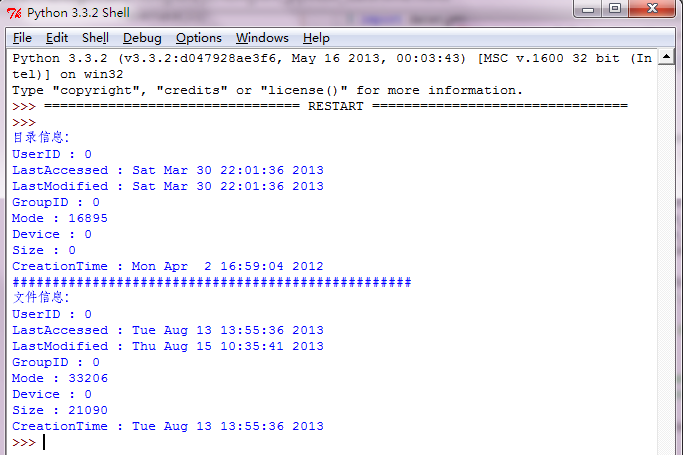
下面是我做的demo:
运行效果:
==============================================
代码部分:
==============================================
 #python stat

 '''

     当我们使用os.stat(path)获取一个文件(夹)信息的时候,

     os.stat(path)本身返回的是一个元组如:

     nt.stat_result(st_mode=33206, st_ino=203224933185146561, st_dev=0,

     st_nlink=1, st_uid=0, st_gid=0, st_size=21090, st_atime=1376373336,

     st_mtime=1376534141, st_ctime=1376373336)

     在这个元组中,包含了10个属性:

     st_mode    -- protection bits(模式)

     st_ino     -- inode number(索引号)

     st_dev     -- device(设备)

     st_nlink   -- number of hard links(硬链接号)

     st_uid     -- user id of owner(用户id)

     st_gid     -- group id of owner (组id)

     st_size    -- size of file,in bytes (大小)

     st_atime   -- time of most recent access expressed in seconds (访问时间)

     st_mtime   -- time of most recent content modificatin expressed in seconds (修改时间)

     st_ctime   -- platform dependent;time of most recent metadata change on Unix,

                   or the teime of creation on Windows,expressed in senconds (根据不同操作系统而定)

     #############################################################

     而stat在这里起到什么作用呢?

     类似于java中定义的一些常量:

     如:

         os.stat(path).st_size

         os.stat(path)[stat.ST_SIZE]

         这两种表示方法是一样的。

 '''

 import os

 import time

 import stat

 def get_file_stat(path):

     '''获取一个文件(夹)信息,该信息将以一个元组的形式返回'''

     if os.path.exists(path):

         return os.stat(path)

     else:

         print('the path [{}] is not exist!'.format(path))

 def print_info(file_stat):

     '''打印信息'''

     if file_stat != None:

         file_info = {

             'Size' : file_stat [ stat.ST_SIZE ],                         #获取文件大小

             'LastModified' : time.ctime( file_stat [ stat.ST_MTIME ] ),  #获取文件最后修改时间

             'LastAccessed' : time.ctime( file_stat [ stat.ST_ATIME ] ),  #获取文件最后访问时间

             'CreationTime' : time.ctime( file_stat [ stat.ST_CTIME ] ),  #获取文件创建时间

             'Mode' : file_stat [ stat.ST_MODE ],                         #获取文件的模式

             'Device' : file_stat [stat.ST_DEV],                          #设备

             'UserID' : file_stat [stat.ST_UID],

             'GroupID' : file_stat [stat.ST_GID]

             }

         for key in file_info:

             print('{} : {}'.format(key, file_info[key]))

     else:

         print('the stat is None!')

 def main():

     path_dir = 'c:\\Download'

     path_file = 'c:\\test.html'

     print('目录信息:')

     file_stat = get_file_stat(path_dir)

     print_info(file_stat)

     print('#' * 50)

     print('文件信息:')

     file_stat = get_file_stat(path_file)

     print_info(file_stat)

 if __name__ == '__main__':

     main()
python开发_stat的更多相关文章
- python开发环境搭建
虽然网上有很多python开发环境搭建的文章,不过重复造轮子还是要的,记录一下过程,方便自己以后配置,也方便正在学习中的同事配置他们的环境. 1.准备好安装包 1)上python官网下载python运 ...
- 【Machine Learning】Python开发工具:Anaconda+Sublime
Python开发工具:Anaconda+Sublime 作者:白宁超 2016年12月23日21:24:51 摘要:随着机器学习和深度学习的热潮,各种图书层出不穷.然而多数是基础理论知识介绍,缺乏实现 ...
- Python开发工具PyCharm个性化设置(图解)
Python开发工具PyCharm个性化设置,包括设置默认PyCharm解析器.设置缩进符为制表符.设置IDE皮肤主题等,大家参考使用吧. JetBrains PyCharm Pro 4.5.3 中文 ...
- Python黑帽编程1.2 基于VS Code构建Python开发环境
Python黑帽编程1.2 基于VS Code构建Python开发环境 0.1 本系列教程说明 本系列教程,采用的大纲母本为<Understanding Network Hacks Atta ...
- Eclipse中Python开发环境搭建
Eclipse中Python开发环境搭建 目 录 1.背景介绍 2.Python安装 3.插件PyDev安装 4.测试Demo演示 一.背景介绍 Eclipse是一款基于Java的可扩展开发平台. ...
- Python开发:环境搭建(python3、PyCharm)
Python开发:环境搭建(python3.PyCharm) python3版本安装 PyCharm使用(完全图解(最新经典))
- Python 开发轻量级爬虫08
Python 开发轻量级爬虫 (imooc总结08--爬虫实例--分析目标) 怎么开发一个爬虫?开发一个爬虫包含哪些步骤呢? 1.确定要抓取得目标,即抓取哪些网站的哪些网页的哪部分数据. 本实例确定抓 ...
- Python 开发轻量级爬虫07
Python 开发轻量级爬虫 (imooc总结07--网页解析器BeautifulSoup) BeautifulSoup下载和安装 使用pip install 安装:在命令行cmd之后输入,pip i ...
- Python 开发轻量级爬虫06
Python 开发轻量级爬虫 (imooc总结06--网页解析器) 介绍网页解析器 将互联网的网页获取到本地以后,我们需要对它们进行解析才能够提取出我们需要的内容. 也就是说网页解析器是从网页中提取有 ...
随机推荐
- Ubuntu双系统环境下隐藏掉其他开机启动项
系统环境:ubuntu16.04需求:PC装的双系统(ubuntu+win10),为了应对某些需求,需要将win10系统给从电脑上消失,让你看不见也进不去它.做法:当然不可能真的删除掉win10系统, ...
- 转:xdebug在linux下的安装教程
原文:xdebug在linux下的安装教程 [注意,本人是PHP7.1.7 Nginx ,第7步没有做,但是xdebug.so就已经在PHP的扩展文件夹里面了.目录是phpinfo的extension ...
- angular2 如何使用websocket
1.npm下载: npm install angular2-websocket 2.需要在哪个组件使用就在那里引入: import {$WebSocket} from 'angular2-websoc ...
- 使用 Leaflet 显示 ArcGIS 生成西安80坐标的地图缓存
Leaflet 是一个非常小巧灵活的 Geo js 库,esri 本身也在 Github 上有 leaflet 的相关项目.但是 leaflet 本身支持 Web Mercator Auxiliary ...
- js map()处理数组和对象数据
之前的文章梳理了JS数组与对象属性的遍历方法,本文介绍专门用以遍历并处理数据的map()方法. 一.原生map() map()是数组的一个方法,它创建一个新数组,其结果是该数组中的每个元素都调用一个提 ...
- linux 文件搜索命令find、-name、-iname、通配符*?、-size、-user、-group、-amin、-cmin、-mmin、-a、-o、-exec/-ok、-inum
尽可能规划好目录结构,少用文件搜索操作,因为它会占用大量的系统资源 find /bin/find find [搜索范围] [匹配条件] find /etc -name initfind /etc -n ...
- java基础(七) java四种访问权限
引言 Java中的访问权限理解起来不难,但完全掌握却不容易,特别是4种访问权限并不是任何时候都可以使用.下面整理一下,在什么情况下,有哪些访问权限可以允许选择. 一.访问权限简介 访问权限控制: ...
- USTCCourseCommunity 项目介绍
我们的项目名为USTCCourseCommunity,科大课程社区,主要提供课表管理.课程资源管理.课程信息管理.智能排课.轻松评课等方面的服务,旨在为科大师生提供便捷. 科大现有课程服务形式存在的问 ...
- leetCode Detect Capital
1.问题描述 Given a word, you need to judge whether the usage of capitals in it is right or not. We defin ...
- swift版的CircleView
swift版的CircleView 效果图 源码 // // CircleView.swift // CircleView // // Created by YouXianMing on 15/10/ ...