
UITableView中cell点击的绚丽动画效果
UITableView中cell点击的绚丽动画效果
本人视频教程系类 iOS中CALayer的使用
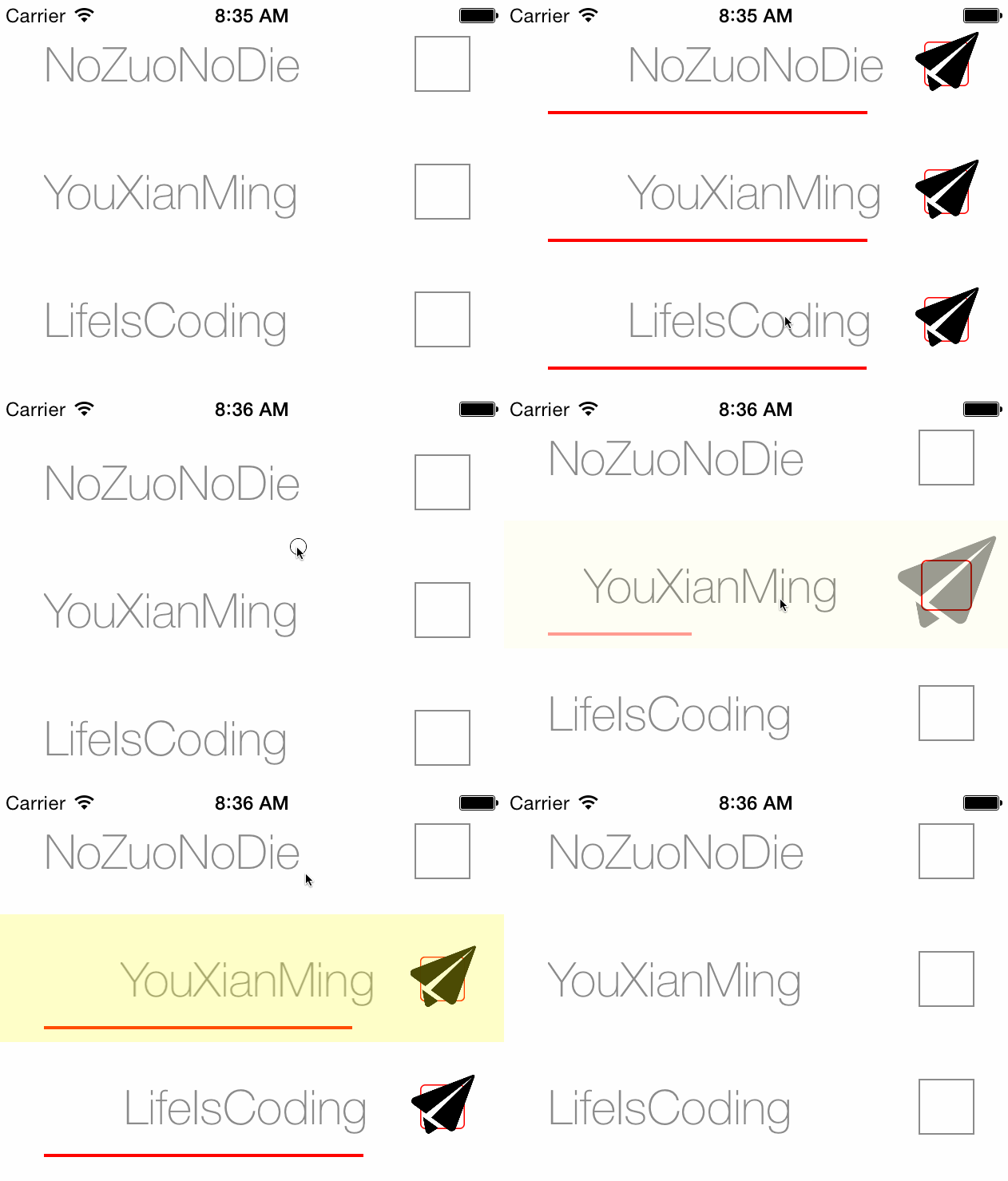
效果图:
源码:
YouXianMingCell.h 与 YouXianMingCell.m
//

//  YouXianMingCell.h

//  CellAnimation

//

//  Created by YouXianMing on 14/12/27.

//  Copyright (c) 2014年 YouXianMing. All rights reserved.

//

#import <UIKit/UIKit.h>

@interface YouXianMingCell : UITableViewCell

@property (nonatomic, strong) UILabel *name;

- (void)showIconAnimated:(BOOL)animated;

- (void)hideIconAnimated:(BOOL)animated;

- (void)showSelectedAnimation;

@end
//

//  YouXianMingCell.m

//  CellAnimation

//

//  Created by YouXianMing on 14/12/27.

//  Copyright (c) 2014年 YouXianMing. All rights reserved.

//

#import "YouXianMingCell.h"

@interface YouXianMingCell ()

@property (nonatomic, strong) UIImageView *iconView;

@property (nonatomic, strong) UIView      *lineView;

@property (nonatomic, strong) UIView      *rectView;

@end

@implementation YouXianMingCell

- (instancetype)initWithStyle:(UITableViewCellStyle)style reuseIdentifier:(NSString *)reuseIdentifier {

    self = [super initWithStyle:style reuseIdentifier:reuseIdentifier];

    if (self) {

        _rectView                   = [[UIView alloc] initWithFrame:CGRectMake(, , , )];

        _rectView.layer.borderWidth = .f;

        _rectView.layer.borderColor = [UIColor grayColor].CGColor;

        [self addSubview:_rectView];

        // 图标

        _iconView       = [[UIImageView alloc] initWithFrame:CGRectMake(, , , )];

        _iconView.image = [UIImage imageNamed:@"icon"];

        _iconView.alpha = .f;

        [self addSubview:_iconView];

        // 文字

        _name           = [[UILabel alloc] initWithFrame:CGRectMake(, , , )];

        _name.font      = [UIFont fontWithName:@"HelveticaNeue-Thin" size:];

        _name.textColor = [UIColor grayColor];

        [self addSubview:_name];

        _lineView                 = [[UIView alloc] initWithFrame:CGRectMake(, , , )];

        _lineView.alpha           = .f;

        _lineView.backgroundColor = [UIColor redColor];

        [self addSubview:_lineView];

    }

    return self;

}

- (void)showIconAnimated:(BOOL)animated {

    if (animated) {

        _iconView.transform = CGAffineTransformMake(, , , , , );

        [UIView animateWithDuration:0.5

                              delay:

             usingSpringWithDamping:

              initialSpringVelocity:

                            options:UIViewAnimationOptionCurveEaseInOut

                         animations:^{

                             _iconView.alpha     = .f;

                             _iconView.transform = CGAffineTransformMake(, , , , , );

                             _lineView.alpha     = .f;

                             _lineView.frame     = CGRectMake(, , , );

                             _name.frame         = CGRectMake( + , , , );

                             _rectView.layer.borderColor  = [UIColor redColor].CGColor;

                             _rectView.transform          = CGAffineTransformMake(0.8, , , 0.8, , );

                             _rectView.layer.cornerRadius = .f;

                         }

                         completion:^(BOOL finished) {

                         }];

    } else {

        _iconView.transform = CGAffineTransformMake(, , , , , );

        _iconView.alpha     = .f;

        _lineView.alpha     = .f;

        _lineView.frame     = CGRectMake(, , , );

        _name.frame         = CGRectMake( + , , , );

        _rectView.layer.borderColor  = [UIColor redColor].CGColor;

        _rectView.transform          = CGAffineTransformMake(0.8, , , 0.8, , );

        _rectView.layer.cornerRadius = .f;

    }

}

- (void)hideIconAnimated:(BOOL)animated {

    if (animated) {

        [UIView animateWithDuration:0.5

                              delay:

             usingSpringWithDamping:

              initialSpringVelocity:

                            options:UIViewAnimationOptionCurveEaseInOut

                         animations:^{

                             _iconView.alpha     = .f;

                             _iconView.transform = CGAffineTransformMake(0.5, , , 0.5, , );

                             _lineView.alpha     = .f;

                             _lineView.frame     = CGRectMake(, , , );

                             _name.frame         = CGRectMake(, , , );

                             _rectView.layer.borderColor  = [UIColor grayColor].CGColor;

                             _rectView.transform          = CGAffineTransformMake(, , , , , );

                             _rectView.layer.cornerRadius = ;

                         }

                         completion:^(BOOL finished) {

                         }];

    } else {

        _iconView.alpha     = .f;

        _lineView.alpha     = .f;

        _lineView.frame     = CGRectMake(, , , );

        _name.frame         = CGRectMake(, , , );

        _rectView.layer.borderColor  = [UIColor grayColor].CGColor;

        _rectView.transform          = CGAffineTransformMake(, , , , , );

        _rectView.layer.cornerRadius = ;

    }

}

- (void)showSelectedAnimation {

    UIView *tmpView         = [[UIView alloc] initWithFrame:CGRectMake(, , , )];

    tmpView.backgroundColor = [[UIColor yellowColor] colorWithAlphaComponent:0.30];

    tmpView.alpha           = .f;

    [self addSubview:tmpView];

    [UIView animateWithDuration:0.20 delay: options:UIViewAnimationOptionCurveEaseIn animations:^{

        tmpView.alpha = 0.8f;

    } completion:^(BOOL finished) {

        [UIView animateWithDuration:0.20 delay:0.1 options:UIViewAnimationOptionCurveEaseOut animations:^{

            tmpView.alpha = .f;

        } completion:^(BOOL finished) {

            [tmpView removeFromSuperview];

        }];

    }];

}

@end
控制器源码:
//

//  ViewController.m

//  CellAnimation

//

//  Created by YouXianMing on 14/12/27.

//  Copyright (c) 2014年 YouXianMing. All rights reserved.

//

#import "ViewController.h"

#import "YouXianMingCell.h"

static NSString *YouXianMingCellFlag = @"YouXianMingCell";

@interface ViewController ()<UITableViewDelegate, UITableViewDataSource>

@property (nonatomic, strong) UITableView    *tableView;

@property (nonatomic, strong) NSMutableArray *dataArray;

@property (nonatomic, strong) NSMutableArray *chooseArray;

@end

@implementation ViewController

- (void)viewDidLoad {

    [super viewDidLoad];

    // 初始化数据源

    _dataArray   = [NSMutableArray array];

    _chooseArray = [NSMutableArray array];

    [_dataArray addObject:@"NoZuoNoDie"];

    [_dataArray addObject:@"YouXianMing"];

    [_dataArray addObject:@"LifeIsCoding"];

    [_chooseArray addObject:@(NO)];

    [_chooseArray addObject:@(NO)];

    [_chooseArray addObject:@(NO)];

    // 初始化tableView

    self.tableView                = [[UITableView alloc] initWithFrame:self.view.bounds style:UITableViewStylePlain];

    self.tableView.delegate       = self;

    self.tableView.dataSource     = self;

    self.tableView.separatorStyle = UITableViewCellSeparatorStyleNone;

    [self.tableView registerClass:[YouXianMingCell class] forCellReuseIdentifier:YouXianMingCellFlag];

    [self.view addSubview:self.tableView];

}

#pragma mark - TableView相关方法

- (NSInteger)tableView:(UITableView *)tableView numberOfRowsInSection:(NSInteger)section {

    return _dataArray.count;

}

- (UITableViewCell *)tableView:(UITableView *)tableView cellForRowAtIndexPath:(NSIndexPath *)indexPath {

    YouXianMingCell *cell = [tableView dequeueReusableCellWithIdentifier:YouXianMingCellFlag];

    cell.selectionStyle   = UITableViewCellSelectionStyleNone;

    cell.name.text = _dataArray[indexPath.row];

    if ([_chooseArray[indexPath.row] boolValue] == NO) {

        [cell hideIconAnimated:NO];

    } else {

        [cell showIconAnimated:NO];

    }

    return cell;

}

- (void)tableView:(UITableView *)tableView didSelectRowAtIndexPath:(NSIndexPath *)indexPath {

    YouXianMingCell *cell = (YouXianMingCell *)[tableView cellForRowAtIndexPath:indexPath];

    [cell showSelectedAnimation];

    if ([_chooseArray[indexPath.row] boolValue] == NO) {

        [_chooseArray replaceObjectAtIndex:indexPath.row withObject:@(YES)];

        [cell showIconAnimated:YES];

    } else {

        [_chooseArray replaceObjectAtIndex:indexPath.row withObject:@(NO)];

        [cell hideIconAnimated:YES];

    }

    [tableView deselectRowAtIndexPath:indexPath animated:YES];

}

- (CGFloat)tableView:(UITableView *)tableView heightForRowAtIndexPath:(NSIndexPath *)indexPath {

    return .f;

}

@end
测试图片:

核心地方:


UITableView中cell点击的绚丽动画效果的更多相关文章
- iOS中UITableView的cell点击事件不触发didSelectRowAtIndexPath(汇总)
iOS中UITableView的cell点击事件不触发didSelectRowAtIndexPath 首先分析有几种原因,以及相应的解决方法 1.UITableViewCell的userInterac ...
- UITableView中cell里的UITextField不被弹出键盘挡住
UITableView中cell里的UITextField不被弹出键盘挡住 本人视频教程系类 iOS中CALayer的使用 效果如下: 源码: EditCell.h 与 EditCell.m // ...
- 如何获取UITableView中cell的frame值
如何获取UITableView中cell的frame值 这个可以用来处理UITableView弹出键盘的问题 本人视频教程系类 iOS中CALayer的使用 效果: 源码: // // ViewC ...
- 用适配器模式处理复杂的UITableView中cell的业务逻辑
用适配器模式处理复杂的UITableView中cell的业务逻辑 适配器是用来隔离数据源对cell布局影响而使用的,cell只接受适配器的数据,而不会与外部数据源进行交互. 源码: ModelCell ...
- 神奇的canvas——点与线绘制的绚丽动画效果
代码地址如下:http://www.demodashi.com/demo/11636.html 前言 之前在某网站上看到了一个canvas绘制的动画效果,虽然组成的元素很简单,只有点和线,但是视觉效果 ...
- 在 jQuery 中使用滑入滑出动画效果,实现二级下拉导航菜单的显示与隐藏效果
查看本章节 查看作业目录 需求说明: 在 jQuery 中使用滑入滑出动画效果,实现二级下拉导航菜单的显示与隐藏效果 用户将光标移动到"最新动态页"或"帮助查询" ...
- 解决UITableView中Cell重用机制导致内容出错的方法总结
UITableView继承自UIScrollview,是苹果为我们封装好的一个基于scroll的控件.上面主要是一个个的 UITableViewCell,可以让UITableViewCell响应一些点 ...
- ios UITableView中Cell重用机制导致内容重复解决方法
UITableView继承自UIScrollview,是苹果为我们封装好的一个基于scroll的控件.上面主要是一个个的 UITableViewCell,可以让UITableViewCell响应一些点 ...
- iOS - UITableView中Cell重用机制导致Cell内容出错的解决办法
"UITableView" iOS开发中重量级的控件之一;在日常开发中我们大多数会选择自定Cell来满足自己开发中的需求, 但是有些时候Cell也是可以不自定义的(比如某一个简单的 ...
随机推荐
- Pyltp使用
1.先使用pip安装pyltp-0.2.1-cp36-cp36m-win_amd64.whl 2.再参考API文档进行具体的使用:http://pyltp.readthedocs.io/zh_CN/d ...
- redis实战笔记(7)-第7章 基于搜索的应用程序
本章主要内容 使用Redis进行搜索 对搜索结果进行排序 实现广告定向 实现职位搜索
- Druid连接池(四)
十七.Druid加密 运维和DBA都不希望把密码明文直接写在配置文件中,Druid提供了数据库密码加密的功能. ConfigFilter的作用包括: 从配置文件中读取配置 从远程http文件中读取配置 ...
- I/O模式总结
进程读取数据时要经过两个阶段: 1.等待内核准备数据: 2.将内核缓冲区中的数据复制到进程缓冲区中. 一.阻塞IO 进程会阻塞在等待内核准备数据和数据从内核空间复制到用户空间这两个阶段. 二.非阻塞I ...
- [转]MVC中几种常用ActionResult
本文转自:http://www.cnblogs.com/xielong/p/5940535.html 一.定义 MVC中ActionResult是Action的返回结果.ActionResult 有多 ...
- 导出为shape文件
private void barButtonItem2_ItemClick(object sender, DevExpress.XtraBars.ItemClickEventArgs e)//导出为s ...
- C#中深拷贝和浅拷贝
一:概念 内存:用来存储程序信息的介质. 指针:指向一块内存区域,通过它可以访问该内存区域中储存的程序信息.(C#也是有指针的) 值类型:struct(整形.浮点型.decimal的内部实现都是str ...
- Servlet的数据库访问
创建数据库: import java.sql.*; public class SqlUtil { static { try { Class.forName("com.mysql.jdbc ...
- Linux下socket通信和epoll
上一篇博客用多线程实现服务端和多个客户端的通信,但是在实际应用中如果服务端有高并发的需求,多线程并不是一个好选择. 实现高并发的一种方法是IO多路复用,也就是select,poll,epoll等等. ...
- hdu 1226
超级密码 Time Limit: 20000/10000 MS (Java/Others) Memory Limit: 65536/32768 K (Java/Others)Total Subm ...