
springboot集成swagger2
介绍:
Swagger是全球最大的OpenAPI规范(OAS)API开发工具框架,支持从设计和文档到测试和部署的整个API生命周期的开发。(摘自Swagger官网)Swagger说白了就是帮助开发者省去了维护接口文档的时间,用来调试接口非常方便。
一、创建项目
在上一篇博客中介绍了怎么创建springboot项目,在这篇博客中就不过多讲,在博客的最后我会上传项目的源码,爱学习的小伙伴们可以下载交流,有问题的小伙伴可以在博客下方留言,博主看到后第一时间会给你回复。
二、引入swagger2依赖
    <!--swagger2-->

        <dependency>

            <groupId>io.springfox</groupId>

            <artifactId>springfox-swagger2</artifactId>

            <version>2.6.1</version>

        </dependency>

        <dependency>

            <groupId>io.springfox</groupId>

            <artifactId>springfox-swagger-ui</artifactId>

            <version>2.6.1</version>

        </dependency>
三、创建Swagger2配置类
package com.chaoqi.springboot_swagger.dao.utils;

import org.springframework.context.annotation.Bean;

import org.springframework.context.annotation.Configuration;

import springfox.documentation.builders.ApiInfoBuilder;

import springfox.documentation.builders.PathSelectors;

import springfox.documentation.builders.RequestHandlerSelectors;

import springfox.documentation.service.ApiInfo;

import springfox.documentation.spi.DocumentationType;

import springfox.documentation.spring.web.plugins.Docket;

import springfox.documentation.swagger2.annotations.EnableSwagger2;

//让Spring来加载该类配置

@Configuration

//开启Swagger2

@EnableSwagger2

public class Swagger2 {

    @Bean

    public Docket createRestApi() {

        return new Docket(DocumentationType.SWAGGER_2)

                .groupName("HelloWorld")

                .apiInfo(apiInfo())

                .select()

                // 扫描的包所在位置

                .apis(RequestHandlerSelectors.basePackage("com.chaoqi.springboot_swagger.web"))

                // 扫描的 URL 规则

                .paths(PathSelectors.any())

                .build();

    }

    private ApiInfo apiInfo() {

        // 联系信息

        return new ApiInfoBuilder()

                // 大标题

                .title("")

                // 描述

                .description("")

                // 服务条款 URL

                .termsOfServiceUrl("")

                // 版本

                .version("")

                .build();

    }

}
创建controller
Swagger2注解说明:
@Api:用在请求的类上,表示对类的说明

    tags="说明该类的作用,可以在UI界面上看到的注解"

    value="该参数没什么意义,在UI界面上也看到,所以不需要配置"

@ApiOperation:用在请求的方法上,说明方法的用途、作用

    value="说明方法的用途、作用"

    notes="方法的备注说明"

@ApiImplicitParams:用在请求的方法上,表示一组参数说明

    @ApiImplicitParam:用在@ApiImplicitParams注解中,指定一个请求参数的各个方面

        name:参数名

        value:参数的汉字说明、解释

        required:参数是否必须传

        paramType:参数放在哪个地方

            · header --> 请求参数的获取:@RequestHeader

            · query --> 请求参数的获取:@RequestParam

            · path(用于restful接口)--> 请求参数的获取:@PathVariable

            · body(不常用)

            · form(不常用)

        dataType:参数类型,默认String,其它值dataType="Integer"

        defaultValue:参数的默认值

@ApiResponses:用在请求的方法上,表示一组响应

    @ApiResponse:用在@ApiResponses中,一般用于表达一个错误的响应信息

        code:数字,例如400

        message:信息,例如"请求参数没填好"

        response:抛出异常的类

@ApiModel:用于响应类上,表示一个返回响应数据的信息

            (这种一般用在post创建的时候,使用@RequestBody这样的场景,

            请求参数无法使用@ApiImplicitParam注解进行描述的时候)

    @ApiModelProperty:用在属性上,描述响应类的属性
package com.chaoqi.springboot_swagger.web;

import com.chaoqi.springboot_swagger.dao.domain.MusicInfo;

import com.chaoqi.springboot_swagger.service.MusicInfoService;

import io.swagger.annotations.Api;

import io.swagger.annotations.ApiImplicitParam;

import io.swagger.annotations.ApiImplicitParams;

import io.swagger.annotations.ApiOperation;

import org.springframework.beans.factory.annotation.Autowired;

import org.springframework.web.bind.annotation.*;

import java.util.List;

@RestController

@RequestMapping(value = "/music")

@Api(tags = "音乐信息")

public class MusicInfoController {

    @Autowired

    private MusicInfoService musicInfoService;

    @ApiOperation(value = "根据Id获取歌手信息")

    @ApiImplicitParams({

            @ApiImplicitParam(name = "id", value = "用户ID", required = true, paramType = "query", dataType = "Long"),

    })

    @RequestMapping(value = "/showMusic", method = RequestMethod.GET)

    public List<MusicInfo> getMusicInfo(@RequestParam(name = "id", required = false) Long id) {

        List<MusicInfo> musicInfo1 = musicInfoService.getMusicInfo(id);

        return musicInfo1;

    }

    @ApiOperation(value="根据Id删除歌手信息")

    @ApiImplicitParam(name = "id", value = "用户ID", required = true, paramType = "query", dataType = "Long")

    @RequestMapping(value="/deleteMusic", method=RequestMethod.DELETE)

    public Long deleteUser(@RequestParam(name = "id", required = false) Long id) {

        Long sum = musicInfoService.getDeleteId(id);

        return sum;

    }

}
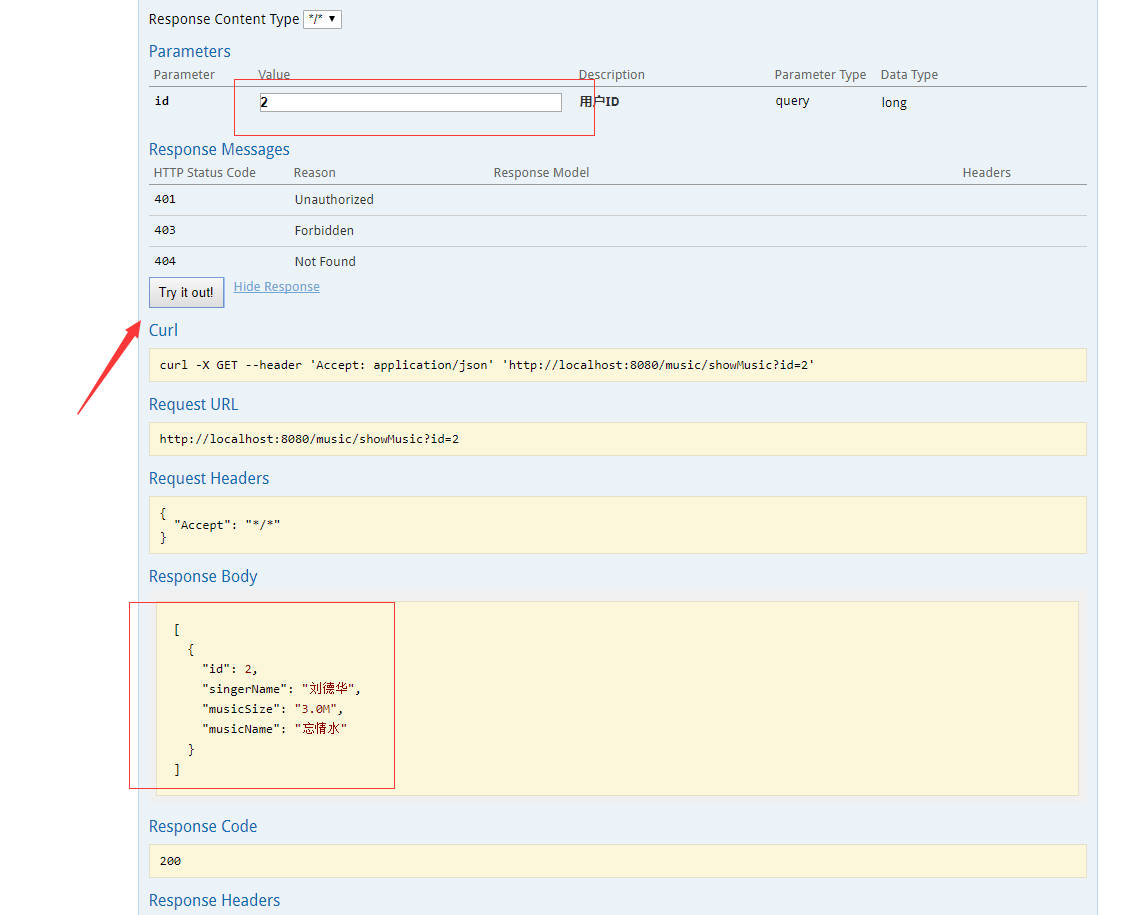
启动项目运行http://localhost:8080/swagger-ui.html

整合成功,源码下载地址:https://github.com/caicahoqi/ChaoqiIsPrivateLibrary
springboot集成swagger2的更多相关文章
- SpringBoot集成Swagger2实现Restful(类型转换错误解决办法)
1.pom.xml增加依赖包 <dependency> <groupId>io.springfox</groupId> <artifactId>spri ...
- springboot集成swagger2构建RESTful API文档
在开发过程中,有时候我们需要不停的测试接口,自测,或者交由测试测试接口,我们需要构建一个文档,都是单独写,太麻烦了,现在使用springboot集成swagger2来构建RESTful API文档,可 ...
- SpringBoot集成Swagger2在线文档
目录 SpringBoot集成Swagger2在线文档 前言 集成SpringBoot 登录接口文档示例 代码 效果 注解说明 总结 SpringBoot集成Swagger2在线文档 前言 不得不说, ...
- springboot 集成swagger2.x 后静态资源报404
package com.bgs360.configuration; import org.springframework.context.EnvironmentAware; import org.sp ...
- SpringBoot集成Swagger2并配置多个包路径扫描
1. 简介 随着现在主流的前后端分离模式开发越来越成熟,接口文档的编写和规范是一件非常重要的事.简单的项目来说,对应的controller在一个包路径下,因此在Swagger配置参数时只需要配置一 ...
- springboot集成swagger2报Illegal DefaultValue null for parameter type integer
springboot集成swagger2,实体类中有int类型,会报" Illegal DefaultValue null for parameter type integer"的 ...
- SpringBoot集成Swagger2 以及汉化 快速教程
(一) Swagger介绍 Swagger 是一款RESTFUL接口的文档在线自动生成+功能测试功能软件 (二)为什么使用Swagger 在现在的开发过程中还有很大一部分公司都是以口口相传的方式来进行 ...
- Springboot集成swagger2生成接口文档
[转载请注明]: 原文出处:https://www.cnblogs.com/jstarseven/p/11509884.html 作者:jstarseven 码字挺辛苦的..... 一 ...
- springboot 集成swagger2
使用Swagger 可以动态生成Api接口文档,在项目开发过程中可以帮助前端开发同事减少和后端同事的沟通成本,而是直接参照生成的API接口文档进行开发,提高了开发效率.这里以springboot(版本 ...
- [转] spring-boot集成swagger2
经测,spring-boot版本使用1.5.2+时需使用springfox-swagger2版本2.5+(spring-boot 1.2 + springfox-swagger2 2.2 在未扫描ja ...
随机推荐
- 高性能网络 SR-IOV机制--VF与PF的通信
PF 驱动是一个专门管理SR-IOV设备全局功能驱动,而且还要配置相关共享资源.PF 驱动 随着Hypervisor 的不同而不同,一般需要具有比普通虚拟机更高的权限才能对其进行操作.PF驱动包含了所 ...
- linux内核升级(ubuntu12.04从3.13.0升级到3.4.0 )
花了一天的时间,终于把ubuntu12.04 的linux内核版本从3.13.0升级到3.4.0 升级后,系统更加稳定.具体步骤:# wget http://www.kernel.org/pub/li ...
- C# GUID介绍和的使用
GUID(全局统一标识符)是指在一台机器上生成的数字,它保证对在同一时空中的所有机器都是唯一的.通常平台会提供生成GUID的API.生成算法很有意思,用到了以太网卡地址.纳秒级时间.芯片ID码和许多可 ...
- 双刃剑MongoDB的学习和避坑
双刃剑MongoDB的学习和避坑 MongoDB 是一把双刃剑,它对数据结构的要求并不高.数据通过key-value的形式存储,而value的值可以是字符串,也可以是文档.所以我们在使用的过程中非常方 ...
- 存储过程 100w提交
create or replace procedure largedata_insert(ip_table_name in varchar2, --目标表 ip_table_column in v ...
- 前端测试框架对比(js单元测试框架对比)
前端测试框架对比(js单元测试框架对比) 本文主要目的在于横评业界主流的几款前端框架,顺带说下相关的一些内容. 测试分类 通常应用会有 单元测试(Unit tests) 和 功能测试(Function ...
- 第二个scala程序
计算昨日收益,读取hdfs文件,使用临时表sqlcontext进行计算,结果保存于mysql中. 之前考虑过将结果存储于Hbase中,由于各种原因及问题,在加上数据量真的很小很小,就改成mysql了. ...
- Html行内元素和块级元素
1.关于行内元素和块状元素的说明 根据CSS规范的规定,每一个网页元素都有一个display属性,用于确定该元素的类型,每一个元素都有默认的display属性值,比如div元素,它的默认display ...
- 四大组件之BroadcastReceiver基础
1. 系统广播 1.1 动态注册 (1)创建自定义接收器类继承自BroadcaseReceiver,实现onReceive()方法,对接收到的广播的逻辑处理就是写在这个函数中的. (2)实例化 ...
- 【POI2001】【HDU1814】和平委员会
题面 Description 根据宪法,Byteland民主共和国的公众和平委员会应该在国会中通过立法程序来创立. 不幸的是,由于某些党派代表之间的不和睦而使得这件事存在障碍. 此委员会必须满足下列条 ...